

Description
WordPress Book Gallery is a powerful Book Showcase plugin for WordPress that lets you create beautiful book galleries, catalogs, and digital libraries in minutes.
WordPress Book Gallery lets you easily display books with cover images, author details, descriptions, ratings, affiliate links, and SEO-friendly Book Schema — no coding required.
🔧 Who Should Use This Plugin?
- Authors & Publishers – showcase your books professionally
- Book Bloggers & Reviewers – attract readers and improve SEO
- Libraries & Bookstores – organize collections online
- Affiliate Marketers – monetize book recommendations easily
✨ Why WP Books Gallery?
-
Display books in grid, slider, or list layouts
-
Showcase author, ISBN, publisher, and rating info
-
Add affiliate or buy links for monetization
-
Automatically include Book Schema for SEO rich results
-
Fully compatible with Page Builder
-
Perfect for book review sites, libraries, bookstores, and affiliate marketers
✅ Online Digital Library
With this WordPress Digital Library Plugin you can create your own online book store to showcase your books. Visitors can download books for free or buy them from a third party site.
✅ Perfect for Book Review & Affiliate Websites
Create beautiful book lists like:
✔ Best programming books
✔ Top self-help books
✔ Must-read business books
✔ Book review websites
Add Amazon or affiliate links to each book and monetize your content.
✅ Sell Books Directly
You are an author or publisher and you have books to sell. Sell it directly from your site. Easy and Quick setup with WooCommerce.
✅ WordPress Book Showcase Plugin
✔ Display book covers
✔ Show book details
✔ Add buy links
✔ Create book lists
How It Works!
Read more about WordPress Books Gallery.
🌟 Key Features:
👉 Book Galleries & Showcases – beautiful grid, slider, and list layouts
👉 Book Metadata – author, publisher, ISBN, language, and more
👉 Ratings & Reviews – star ratings to engage visitors
👉 Affiliate Links & Buy Buttons – monetize your book lists
👉 Search & Filters – fully customizable search panel
👉 Sale Books Directly – using WooCommerce
👉 SEO-Ready Book Schema – get rich results in Google search
👉 Customizable Layouts – responsive and mobile-friendly
👉 Import Books – import books using csv or API from Google Books using ISBN
➡️ Usage of Shortcode:⬅️
Show Books Gallery
[wp_books_gallery]
Showing Books from a category
[wp_books_gallery category="Noble"]
🌟 Pro Features – Basic
- Display Unlimited Books With Paginaton
- Display Book Price (Regular and Discounted) with 115 Currencies
- Two Separate Buttons: Download and Buy Now
- Extra Shortcoded Options Like: Show-Hide Total Books, Seach Panel, Authors, Language etc.
- Book Format and Series
- Order By – Title, Date, Author etc.
🌟 Pro Features – Professional
- Extra Metadata: ISBN-13, Reading Age, Grade Level, Item Weight, Co-Publisher, ASIN, Edition, Illustrator etc.
- Display Review & Rating
- Display Featured, Latest, Categorized Books With Slider
- Display Multiple Authors
- Display Subtitle in Details Page
- Up to 15 buttons to sell on different platforms
- External Book Cover Image Url
- Latest Books Slider Widget
- Allow Only Logged-in Users to Download Books
- Import Books with CSV Format – Addon Available
- Import Books from Open Library
- Display Book details in popup modal
- Option for Affiliate Code tag in url
- Related Books Slider in Single page
- Author Books slider in Single page
- Display Author Bio at Book Details Page
- Display a single book by book-id
- Books by Category Panel
- Author List Panel
- Individual Author Panel with Book Listing
- More Styling Options
➡️ Upgrade to Pro
Consider upgrading to Books Gallery Pro to unlock advanced features and support ongoing development.
📋 Translation Ready:
- POT file included (/languages/)
- Spanish (Spain)
- Spanish (Ecuador)
- Spanish (Venezuela)
- Spanish (Mexico)
- Swedish (Sweden)
- Romanian
- French (France)
- Farsi (Iran)
- Arabic
- German
🔥 Other Plugins from HM Plugin
👉 WordPress Job Board and Recruitment Plugin Create a modern job board and career page on WordPress
👉 WordPress Donation Plugin Accept payments on WordPress with Stripe
👉 WordPress News Plugin Display internal and external news in various layouts
👉 WordPress Notification Bar Plugin Dsiplay message and a button at the top or bottom of your webpage
👉 WordPress Author Bio Box Plugin Displays an author box / author info / auhor bio to your website
👉 WordPress Logo Showcase Plugin Easiest client, brand logo showcase plugin to display logos on your website
👉 WordPress Resume Manager Plugin Display and manage personal resume or CV at your WordPress webpage
👉 WordPress Restaurant Menu Plugin Simplest plugin that displays food items, menus in your webpage
👉 WordPress Product Showcase Plugin Display products with various informations on your website
👉 WordPress Testimonial Plugin Displays client’s testimonial, review or quote in multiple ways
👉 WordPress FAQ Plugin WordPress FAQ Plugin which will display various FAQs in your website
Screenshots
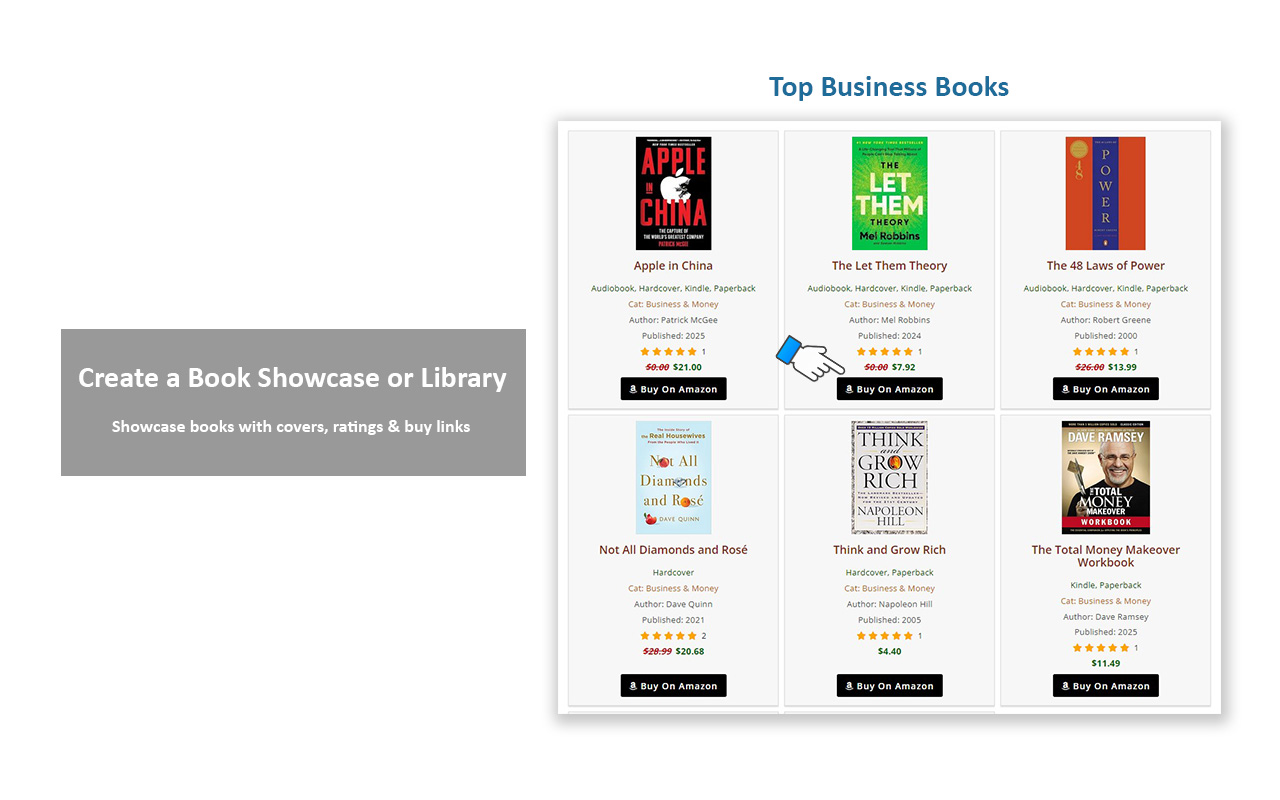
Book showcase grid layout 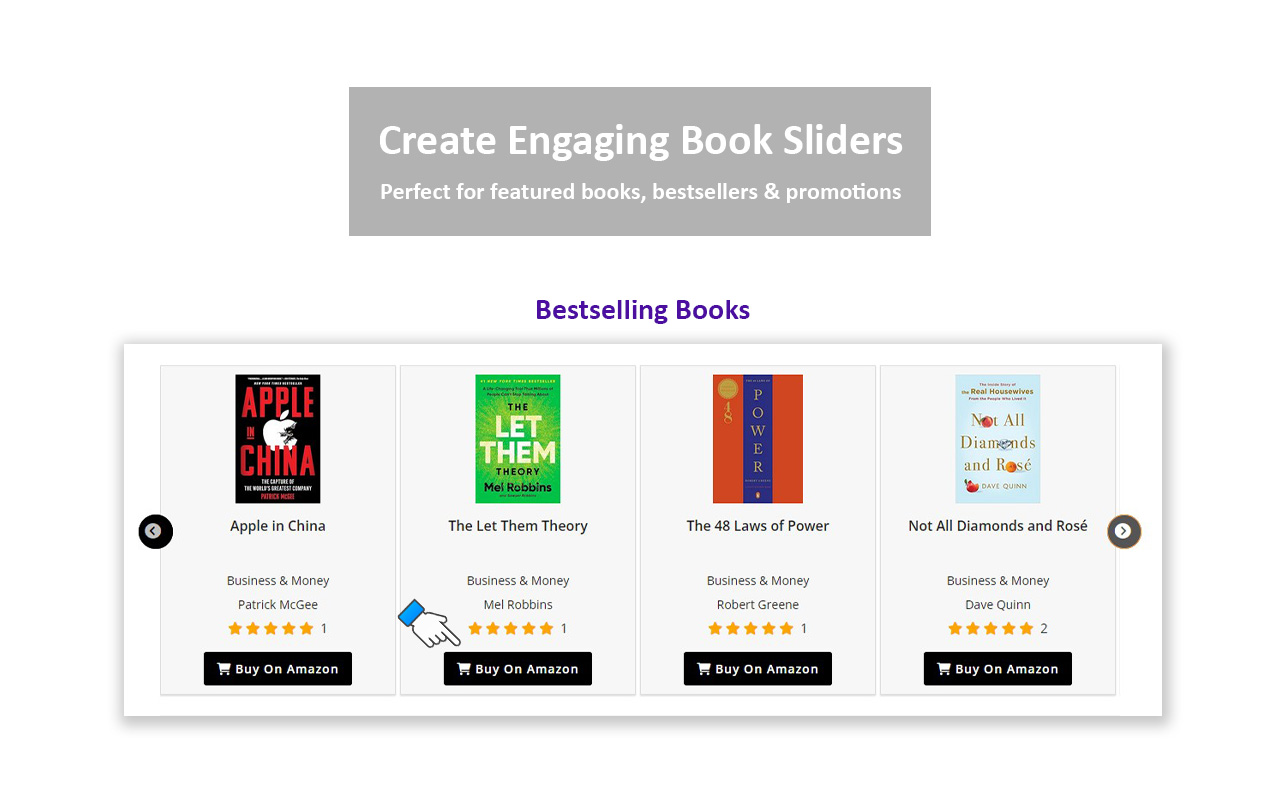
Interactive Book Slider (Pro) 
Add Affiliate Buy Links 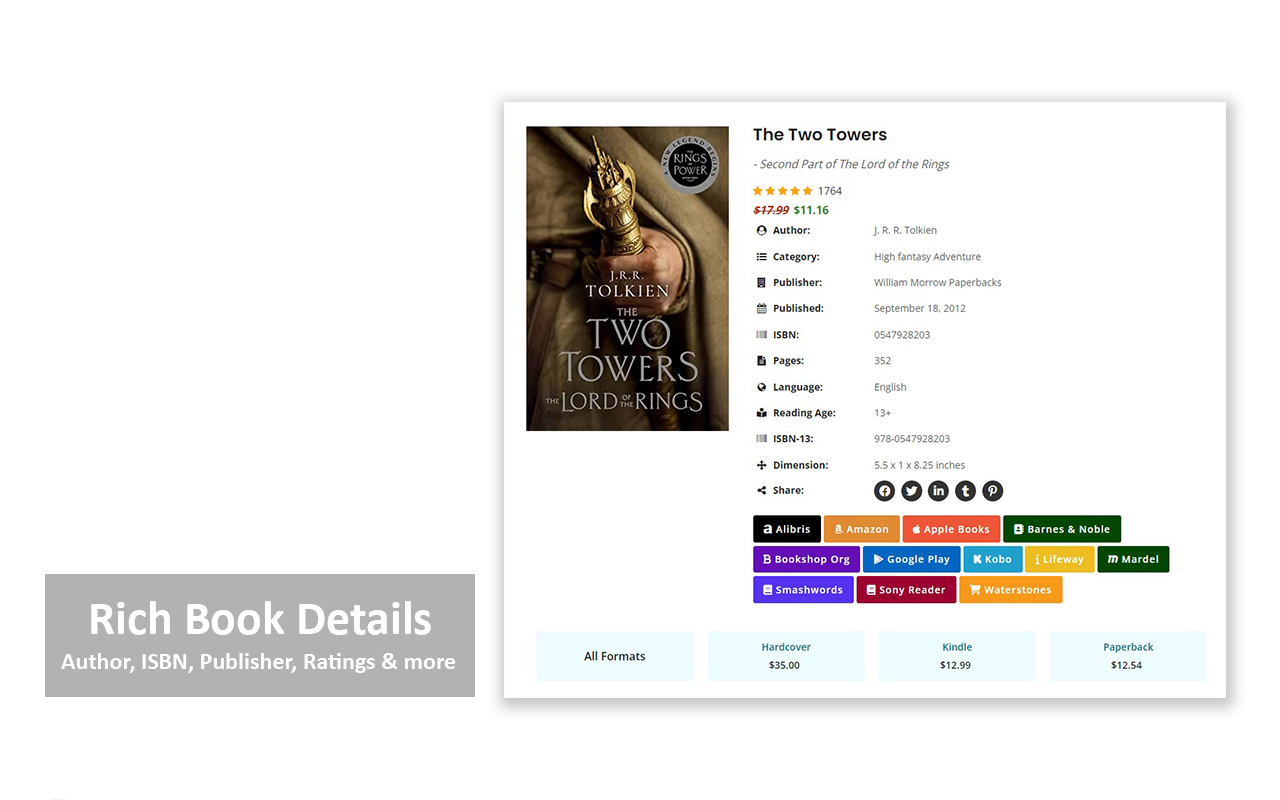
Author, ISBN, Ratings & more 
Organize Books by Category
Installation
Install WordPress Books Gallery as a regular WordPress plugin. Here are different ways to install plugin:
Install by search plugin:
- In your Admin, go to menu Plugins > Add New
- Search WordPress Books Gallery
- Click to install
- Activate the plugin
- Setup the proper settings in WGB Books menu
Install by upload plugin:
- Download the latest version of WordPress Book Gallery (.zip file)
- In your Admin, go to menu Plugins > Add New
- Select “Upload Plugin”
- Click on “Choose File”
- Select downloaded wp-books-gallery.zip and click on “Install Now” button
- Activate the plugin
FAQ
-
How Can I Display Books?
-
After activating the plugin, you will see “WGB Books” in WordPress Admin Dashboard.
Go to “Add New Book” and add your Books as many as you want.
Now you need to insert the shortcode [wp_books_gallery] at any page through TinyMCE editor.
-
I have applied the shortocode but front page is not like as your demo!
-
Please dont use only “books” as your page url slug. Try to use something else or add extra word like “our-books”, “library” etc.
-
Only 20 books are showing, although there are much more books. How Can I increase them?
-
You need to upgrade to the Pro vesion to display molre than 20 books with pagination. If you’re interested to get the Pro, Please go to Upgrade to Pro! Page.
-
How To Display Pagination In Books Gallery?
-
You need to upgrade to the Pro vesion to display molre than 20 books with pagination. If you’re interested to get the Pro, Please go to Upgrade to Pro! Page.
-
Book details page showing 404!
-
Please go to Settings -> Permalinks. Just Save Changes and refresh the page.
-
Is the Plugin fully responsive?
-
Yes, Book Gallery plugin is fully responsive. You can control to show the number of books columns on different devices (Desktop, mobile etc.).
-
Do I need coding skills to showcase Books?
-
Not at all! This Book Gallery plugin is very easy to use. No more pain writing any shortcode attributes to display Books on your website. With just a few clicks, you can amazingly showcase your Books using the Shortcode [wp_books_gallery].
-
Will it automatically use my existing Books when Upgrade to Pro?
-
Yes. If you already have Books in the free version, you will automatically get the Books to use in the Pro version.
-
Should I purchase the Pro version?
-
Pro version includes tons of amazing and useful features. If you’re interested to get the Pro, Please go to Upgrade to Pro! Page.
-
Can I have a Free Trial of that Pro version?
-
Yes you can! Please go to Upgrade to Pro! Page.
-
Is it translation ready?
-
Yes, this plugin is fully Translation ready, supporting .pot language files! You can easily translate into your language with loco translator.
Reviews


Contributors & Developers
“WP Books Gallery – Build Stunning Book Showcases & Libraries in Minutes” is open source software. The following people have contributed to this plugin.
Contributors


“WP Books Gallery – Build Stunning Book Showcases & Libraries in Minutes” has been translated into 8 locales. Thank you to the translators for their contributions.
Interested in development?
Browse the code, check out the SVN repository, or subscribe to the development log by RSS.
Changelog
4.7.9
- Improved compatibility with the latest WordPress version
- Sidebar added to the archive and tag pages
- Gallery with only image template introduced
- Gallery columns shortcode option added
- Cover size shortcode option added
- Fixed reported bug
- Improved usability
- Freemius SDK updated to 2.13.1
4.7.8
- Added book gallery slug option in permalink settings
- Improved CSS for cleaner layouts
- Added option to include books in the post category
- Fixed minor bugs
4.7.7
- Freemius SDK updated to 2.13.0
- Slick css min applied
4.7.6
- Author display issue in the details page fixed
- Book details open in the same tab issue fixed
- Search dropdown option font size issue fixed
4.7.5
- Freemius SDK updated to 2.12.2
- CSS fixed
- Refresh button center issue fixed
- Code optimized
4.7.4
- Gallery image thumbnail issue fixed
- Freemius SDK updated to 2.12.1
4.7.3
- Search button font size option added
- Search button font weight option added
- Search container margin top option added
- Search container margin bottom option added
4.7.2
- Freemius SDK updated to 2.12.0
- Gallery style admin page layout improved
4.7.1
- Textdomain changed from define to real textdomain
- Translation notification fixed
4.7.0
- Hide load more button option added
4.6.9
- More details button added to book details page
- Shortcode option to filter by multiple category
- Format count bug fixed in core
- Combined search issue fixed
- Css fixed
- Code optimized
- Updated Freemius SDK to the latest version
4.6.8
- Price hide option added to gallery page
- Price hide option added to details page
- Publish date format option added to gallery page
- Code optimized
- Max number increased for regular and sale price
- Price format option added
4.6.7
- Freemius SDK updated to 2.9.0
- Paragraph applied to the gallery description
- Book details container background color option added
- Css fixed
- Code optimized
4.6.6
- Freemius SDK updated to 2.8.1
- Reset button font size option added
- Reset button hover bg color option added
- Reset button hover font color option added
- Reset button hover border color option added
- Small bug fixed
4.6.5
- Refresh button icon option added
- Show-hide refresh button option added
- Refresh button use text instead of icon option added
- Refresh button width option added
- Freemius SDK updated to 2.7.4
4.6.4
- Freemius SDK update to 2.7.2
- Minor CSS fixed
4.6.3
- Book saving conflict with formats issue fixed
- Minor code optimized
4.6.2
- Author url issue fixed
- RTL support for book single page
4.6.1
- Freemius SDK update to 2.6.2
- Add download file media button added
- Go to direct checkout page for WooCommerce
- Return to shop url changed to home page
4.5.9
- Download button icon option added
- Freemius SDK update to 2.6.1
- Admin book informations file code optimized
4.5.8
- Book details mobile layout issue fixed
- Css fixed
4.5.7
- Gallery page default image issue fixed
- Hide book cover applied to list layout
- Author and category link applied in list layout
- Freemius sdk upgraded
- Small bug fixed
- Button added to single modal
- Detail page layout improved
- Link applied to details page slider category and author
4.5.6
- Details page publisher link to search page added
- Author label changed to Primary Author
- Reading age icon fixed
- Details page show hide tag option added
- Details page tag label option added
- Download button redirects to login if login permission enabled
- Order by meta key issue fixed
4.5.5
- Small bug fixed
- CSS fixed
- Gallery author link added
4.5.4
- Code optimized
- Freemius SDK update to 2.5.10
- Default image bug fixed in details page
- WordPress general date format applied to details publish date
- Backslash appearing before apostrophes issue fixed in search title
4.5.3
- Book category and tag archive page fixed
- Code optimized
- Url bug fixed
- Freemius sdk version upgraded
4.5.2
- Book category template fixed
- Category link added to Gallery books category
- Open button Url in the same window option added
- Orderby rand issue fixed
- Orderby Rand option added to Gallery Page settings
- Freemius sdk upgraded
4.5.1
- Freemius version upgraded
- Css fixed
4.5.0
- Search design issue improved
- Freemius version upgraded
- Hide other books slider from details page if there is no book
- Show-hide back button option added
- Back button label text option added
- Detail page layout issue fixed
- Book details page made enabled by default
4.4.9
- Price amount range increased
- Resolution warning fixed
- Grid classic template added
- Search and Reset button alignment issue fixed
- Security fixing in admin settings page
- Search panel issue fixed when there is no books
- Default message option added when there is no book
4.4.8
- Gallery list view template added
- Gallery template selection option added
- Gallery container black bg color issue fixed
- Pagination anchor styling issue fixed
- Default cover image url option added
4.4.7
- Images different sizes option added
- Formates changed to Formats
- Books Gallery Sidebar Introduced
- Css fixed
4.4.6
* Freemius sdk updated
* Donation admin link removed
4.4.5
- Bug fixed
- Css fixed
4.4.4
- Books per page option open
- Changed selectize assets from CDN to local
- Slick script minified
- Gallery button bg color, font color option added
- Gallery main container padding, border radius option added
- Gallery container background color
4.4.3
- Freemius version updated
4.4.2
- Security fix
- Details tag space fixed
4.4.1
- Gallery mobile, tablet width issue fixed
- All books admin table width issue fixed
4.4
- Sidebar display issue fixed
- Without sidebar width issue fixed
- Refresh button styling improved
- Font Awesome Free 6.1.1 integrated
- Gallery container border color option added
- Gallery container width option added
- Gallery container margin top/bottom option added
- Css fixed
4.3
- Allow post author in admin add/edit books panel
- Books archive page turned into gallery page
- Support for post author
4.2
- Book detail page SEO improved
- Book detail page code reorganized
- Book detail page title line height fixed
- Gallery page column updated to 5
- Adminajax url issue fixed
- Display cover in admin all books list
4.1
- JS issue fixed
- CSS issue fixed
4.0
- Selectize sorting and conflicting issue fixed
- Search button hover bg and font color option added
3.9
- Action before/after added in front single page
- Search reset button background, border, font color option added
3.8
- Searchable dropdown for search panel added
3.7
- Spelling issue fixed
3.6
- Security fix
3.5
- Minor issue fixed
3.4
- United Arab Emirates currency added
3.3
- General Setings Page Added
- Gallery Page Url Slug Option added
- Gallery Page Slug Applied to Back Button
- Search Filter on Author and Category Link in Details Page
3.2
- Admin Tab Styling Overlap Issue Fixed
- Admin Sidebar Link Updated
- Icon Added to Details Page Book Info
3.1
- Minor bug fixing
- Code optimized
- Search button border issue fixed
- Css fixed
3.0
- Search Panel Button Styling Issue fixed
- Code Reorganized
- Font-awesome integrated
- Search Refresh Icon Changed
2.9
- Minor fixing
- Max width applied to details page
- Notice error fixed in details page
2.8
- Usage & Tutorial Page Added
- Download button Url open in new tab
- Minor fixing
2.7
- Show all books fixed
- Code optimized/organized
- CSS improved
- Freenius integrated
2.6
- Bug/Notice error fixed for front image
- Bug/Notice error fixed for single image
- Show-Hide sidebar in single page
- Code optimized
2.5
- Book category hyerarchy added in search panel
- Single book sidebar responsive issue fixed
- Book cover image size changed – loop and single
- 5 Translation file included – Spain, Ecuador, Venezuela, Mexico and Sweden
- Book item border color option added
- Book item background color option added
- Book image hover effect added – Rotation 360
- CSS issue fixed
2.4
- Sidebar added to single book template
- Empty link removed if not available from book cover
- Search icon issue fixed
- Removed pages word from single page
- Back button issue fixed
- Gallary column number added – 1
- Max Title Word Length set to 50
- Max Description Word Length set to 100
2.3
- Search issue solved in home page
- Search form reset button added
- CSS issue fixed
- Notice error fixed
2.2
- Hide search via shortcode (search=false)
- Show/Hide total books option added
- Book title color option added
- Book title hover color option added
- Book title font-size option added
- Book description color option added
- Book description font-size option added
- Styling updated
- Bug fixed in filter list in admin panel for books and posts
2.1
- Book status field changed dropdown to radio button
- Applied readonly to published on field to avoid date issue
- Change Month/Year option in datepicker for published on field
- NULL value skipped from Year dropdown in search panel
- Dot appearance between pagination fixed
- Total books count showing on top
- Download button background color option added
- Download button font color option added
- Default Option for search items
- Some styling fixed
2.0
- Search problem to other page fixed
- Books display order ASC/DESC option added
- Books cover/image width full/default option added
- Enable/Disable book details page option added
- Showing the book’s tags in details page
- Pages word included in translation in details page
- Search By ISBN option added
- Search By Language option added
- Year wise search option added
- Show/Hide Year Search Option Added
- ASC/DESC Year Order in Search Panel Option added
- Show/Hide ISBN seacrh Option Added
- Some styling fixed
1.9
- Search Books Button Text Option Added
- Search Books Button BG Color Option Added
- Search Books Button Border Color Option Added
- Search Books Button Font Color Option Added
- Category Order ASC/DESC in Search Panel
- Author Order ASC/DESC in Search Panel
- Publisher Order ASC/DESC in Search Panel
- Bug Fixes Regarding Text Domain
- Translation Ready: POT file included (/languages/)
1.8
- Option For Gallary Columns In Mobile Added
- Author not showing in details page solved
- Multiple category showing issue solved
- Bug fixed
1.7
- Search Panel Settings Included In Admin Menu
- Show/Hide Search Panel Option Added
- Show/Hide Search By Book Name Option Added
- Show/Hide Search By Category Option Added
- Show/Hide Search By Author Option Added
- Show/Hide Search By Publisher Option Added
- Display Author By Category In Search Selection
- Hide The Download Button If No External Link Available
- Translate Enable Search Panel Text
- Support For Post Tags
- Description Word Length Option Added
- Published Date Format (Full/Year) Option Added
- Minor bug fixes
1.6
- Various search option added
- Sorting by Name, Author, Date etc.
- No image preview added if image not found
1.5
- Flush Rewrite applied upon plugin activation
- Gallery and Book Detail Settings menu included in admin area
- Grid layout implemented in Gallery page
- Display Gallery columns option added
- Book title word legth option added
- Open book details page when click on image added
- Open book details on same tab or a new tab option added
- Category Label Text option added
- Author Label Text option added
- Option to display category in Gallery page
- Option to display author in Gallery page
- Option to display description in Gallery page
- Option to display Buy now / Download button in Gallery page
- Buy now / Download button text option added
- Option to display Author and Author Label text in details page
- Option to display Category and Category Label text in details page
- Option to display Publisher and Publisher Label text in details page
- Option to display Publish Date and Publish Date Label text in details page
- Option to display ISBN and ISBN Label text in details page
- Option to display Pages and Pages Label text in details page
- Option to display Country and Country Label text in details page
- Option to display Language and Language Label text in details page
- Option to display Dimension and Dimension Label text in details page
- Option to display File Size and File Size Label text in details page
- Option to display BuyNow / Download button in details page
- Option to display Description and Description Label text in details page
1.4
- Bug fixes
- Layout improved
1.3
- Shortcode included: Display Option, Pagination Option, Category Option
- Active/Inactive option added
1.2
- Book detail page layout modified
- Description section comes to bottom
1.1
- Details page added
1.0
- Initial release