

Description
Become the Brand AI Recommends.
GEO Plugin by Squirrly SEO helps your WordPress site become easier for AI answer engines to understand, trust, cite, and recommend — across ChatGPT, Perplexity, Claude, Gemini, and Google AI Overviews.
The GEO Plugin by Squirrly SEO optimizes your WordPress site for the three layers of modern search at once: classic SEO so you rank on Google, AEO (Answer Engine Optimization) so AI engines pull your content as the direct answer, and GEO (Generative Engine Optimization) so ChatGPT, Perplexity, Gemini, Claude and Google AI Overviews cite your pages by name. One plugin to get you found by both search engines and AI.
Why GEO and AEO matter now
Search is splitting in two. People still type into Google, but more and more they just ask an AI. Google AI Overviews now appear on a large share of results and reduce clicks to the classic blue links, while ChatGPT, Perplexity and Gemini answer hundreds of millions of questions every week, usually by quoting a few trusted sources. Traditional SEO gets your page indexed. AEO and GEO get your page chosen as the answer and cited. The GEO Plugin by Squirrly SEO does all three, so you do not have to choose.
AEO and GEO features
- GEO/AEO Audit – scores how ready each page is to be cited by AI: a direct-answer block near the top, question-style headings, lists and tables, content depth, freshness, and FAQ / HowTo / Article schema.
- AI crawler control – decide how GPTBot, ClaudeBot, PerplexityBot, Google-Extended and other AI bots can access your content, straight from your robots rules.
- llms.txt and llms-full.txt – generate, upload and serve the emerging llms.txt standard so generative engines understand your best content.
- LLM Indexing – push new and updated URLs to the IndexNow API and the Google Indexing API so search and AI engines discover them fast.
- Answer-ready Schema / structured data – FAQ, HowTo, Article, Q&A, Organization and more: the machine-readable formats AI engines lift word for word.
- Inner Links and Link Opportunities – build topical authority by linking the right pages for the right keywords.
SEO features
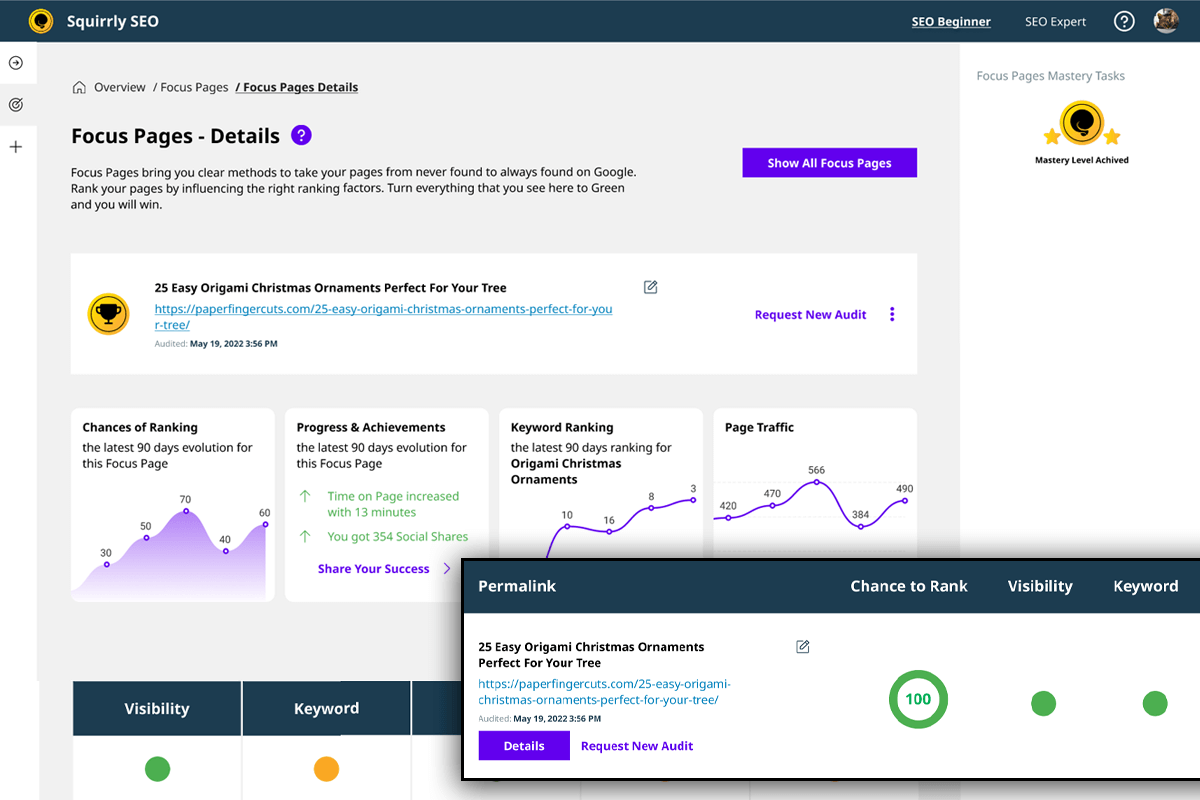
- Focus Pages – see exactly why a page is not ranking and what to fix, page by page.
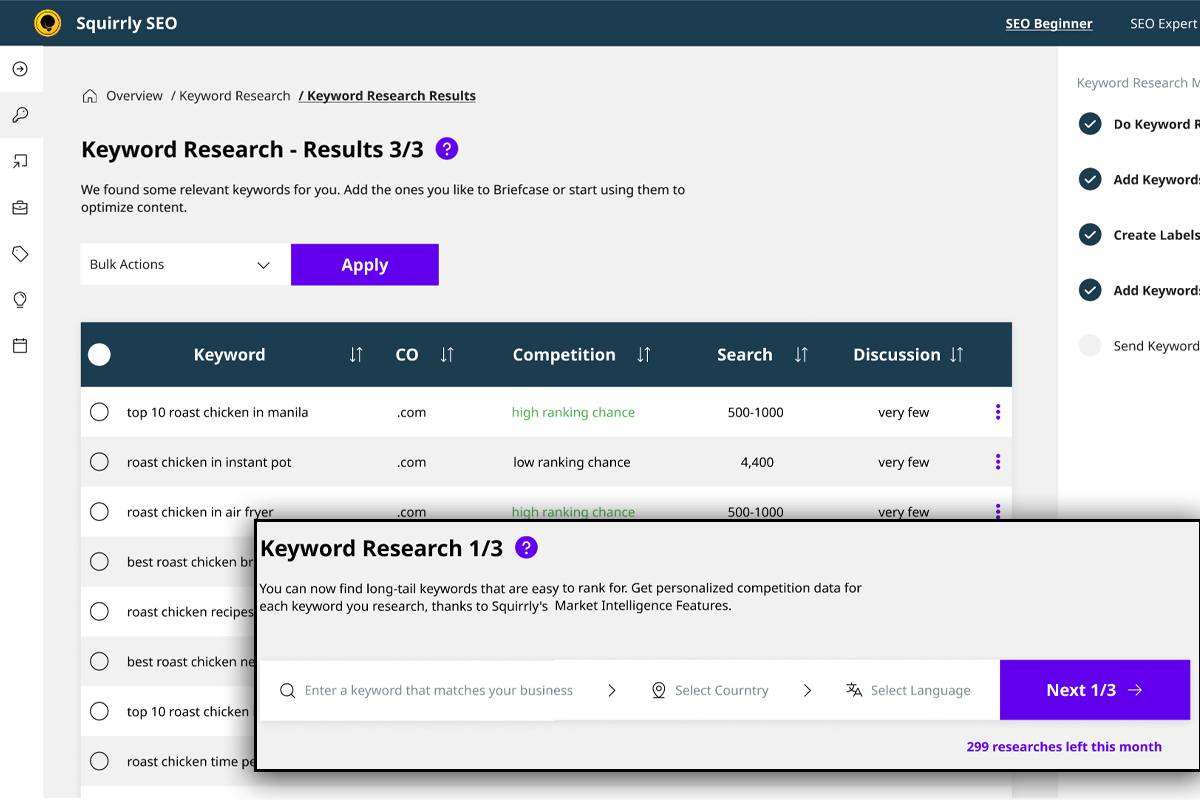
- AI Keyword Research – find keywords you can actually rank for, with real competition and search-intent analysis.
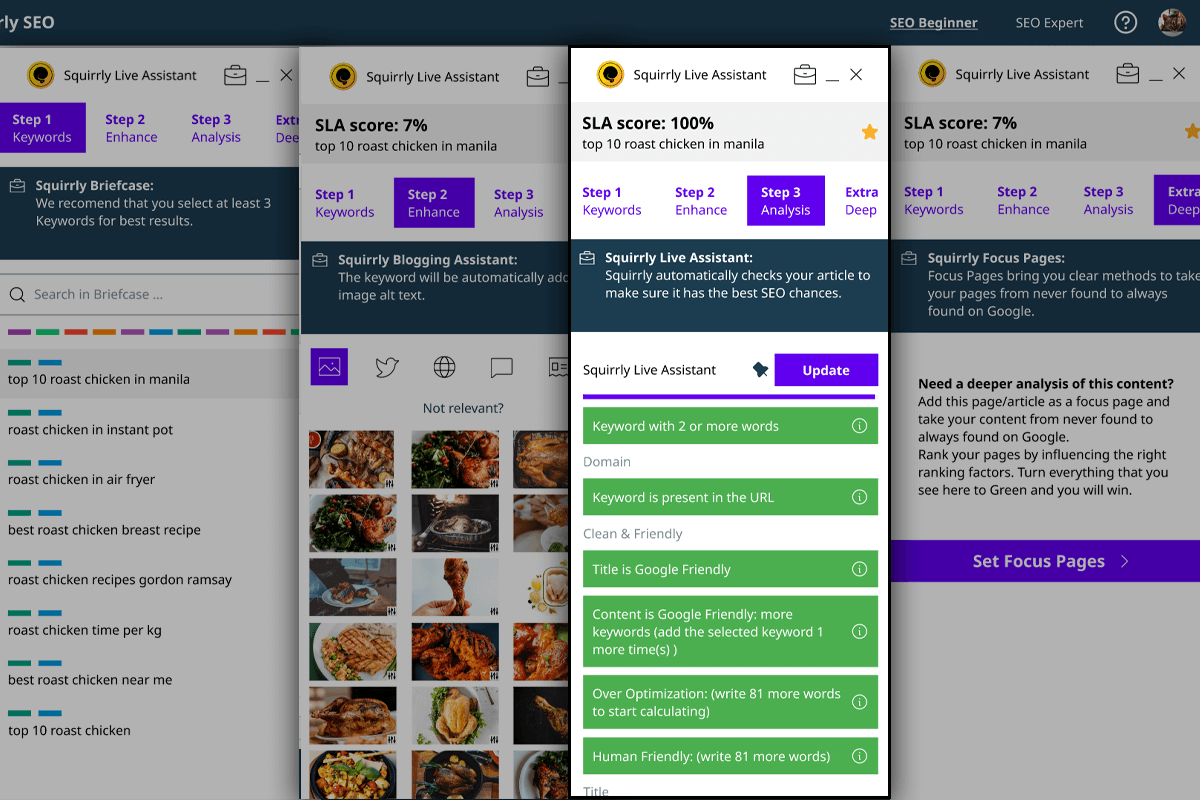
- Live Assistant – real-time, on-page optimization guidance as you write in Gutenberg, Elementor, Divi and other builders.
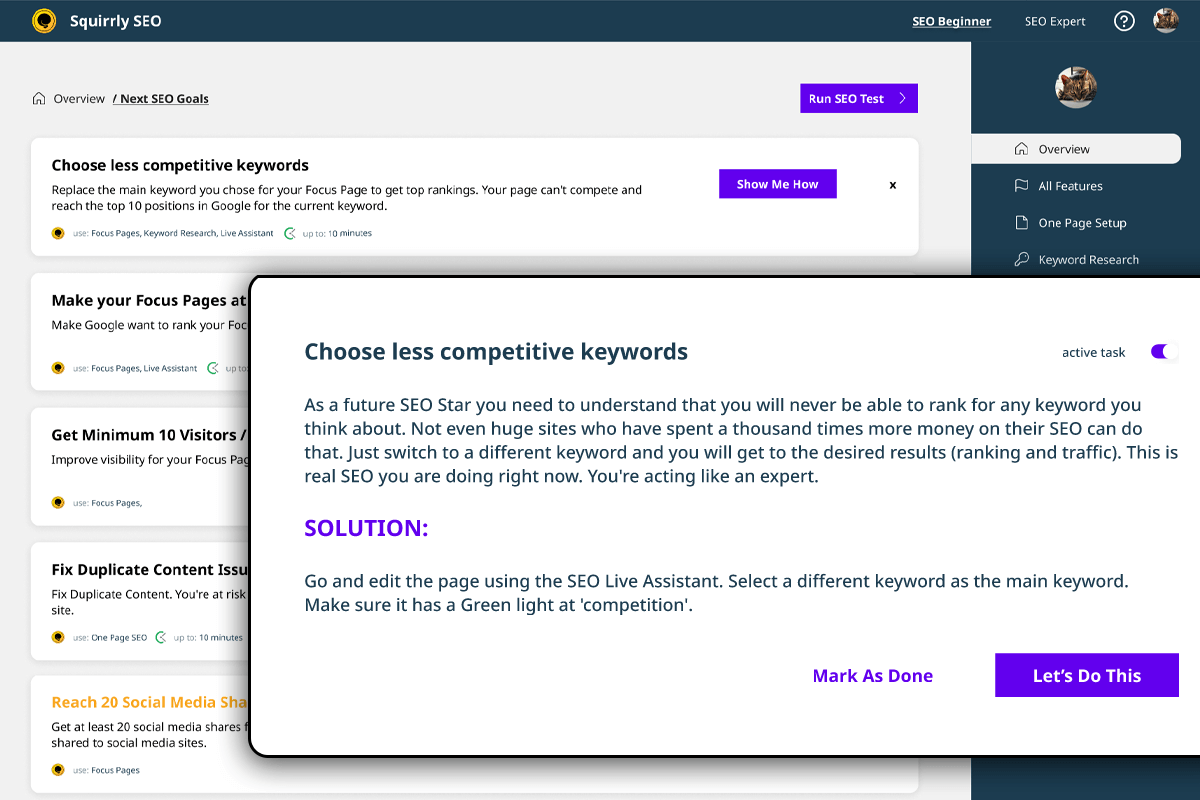
- SEO Goals – a guided, prioritized plan of what to do next.
- Technical SEO on autopilot – XML sitemaps, canonical links, meta robots, Open Graph and Twitter / X cards, redirects and favicons.
- Audits and tracking – SERP and rank tracking, traffic, authority and backlink audits, plus competitor analysis.
Built for how AI reads the web
AEO and GEO reward content that is easy for a machine to extract: a clear answer up front, headings phrased as the questions people ask, lists and tables instead of walls of text, accurate schema, and a fresh last-updated date. Squirrly checks every one of these for you and tells you exactly what to fix, so the same work that helps you rank on Google also helps you get quoted by AI.
Getting started in 3 steps
- Install and activate the plugin, then connect your free Squirrly account to unlock the cloud tools (audits, keyword research, rank tracking).
- Add your important pages to the GEO/AEO Audit. Squirrly scores each page for SEO and answer-readiness and gives you a prioritized “fix these first” list.
- Turn on the AEO/GEO essentials: generate your llms.txt, allow the AI crawlers you want, and switch on LLM Indexing so new and updated URLs are pushed to search and AI engines automatically.
Works with your stack
Gutenberg, Elementor, Divi, WooCommerce, WordPress Multisite, WPML, and PHP 7.0 to 8.x.
Migrate safely
Import your existing SEO data from Rank Math, Yoast, All in One SEO, SEO Framework, SEO Press, SEO Pressor, Add Meta Tags, Greg’s High Performance SEO, HeadSpace2, Platinum SEO Pack, SEO Title Tags and SEO Ultimate.
Trusted worldwide
Built by Squirrly Limited (United Kingdom) since 2012, used in 150+ countries, and a multiple-time award-winning SEO tool. Powered by Squirrly’s own AI from AISQ.com: Ranking Vision AI, Keyword Research AI and Ask AI.
BENEFITS / CUSTOMER SUCCESS / ALL FEATURES / LIVE DEMO
What’s Next
If you like our WordPress SEO plugin, then consider checking out our other projects:
- Squirrly Social – One Year of Social Media Posts in a Flash.
- Starbox PRO – Your Authors Will Shine Like Stars.
- Squirrly SPY – Your Competitor’s SEO Growth. In Your Hands..
- Education Cloud PLUS – It’s like Netflix for Marketing Education.
- RankJumps – Managed SEO. Done-for-you by Experts from Squirrly.
- Learning Solutions by Squirrly – Teach Online. Starting Tomorrow.
- Hide My WP Ghost – WordPress Security Layer and Security Enhancements.
- WordPress Developers Page – Innovations and Partnerships.
- Plugins – Other Plugins created by Squirrly.
Credits
- Florin Muresan – CEO at Squirrly
- Calin Vingan – CTO at Squirrly
- Sorel Nagy – Developer
- Andreea Leau – VP Marketing
- Cristina Leau – Squirrly mascot designer
- Alexandra Nicola – COO at Squirrly
- Teodora Vingan – SEO Analyser
- Irina Pogor – Content Writer
- Ana Darstaru – Chief of Customer Service
- Lucian Nertan – VP of Agency
- Rares Papita – CHO
Investors
- Ibrahim Evsan, serial entrepreneur, one of the best known bloggers in Germany
- Philipp Kandal, co-Founder and CTO of Skobbler (recently acquired for $24M by Telenav)
Many Thanks.
License
Squirrly is Free to use. The version from the WP directory will install the Free Version.
You’ll be able to use this seo software once you install the plugin and use your email to connect to Squirrly.co
For higher content marketing and SEO needs, you can check our Official Site and see what the PRO Plan offers.
Screenshots
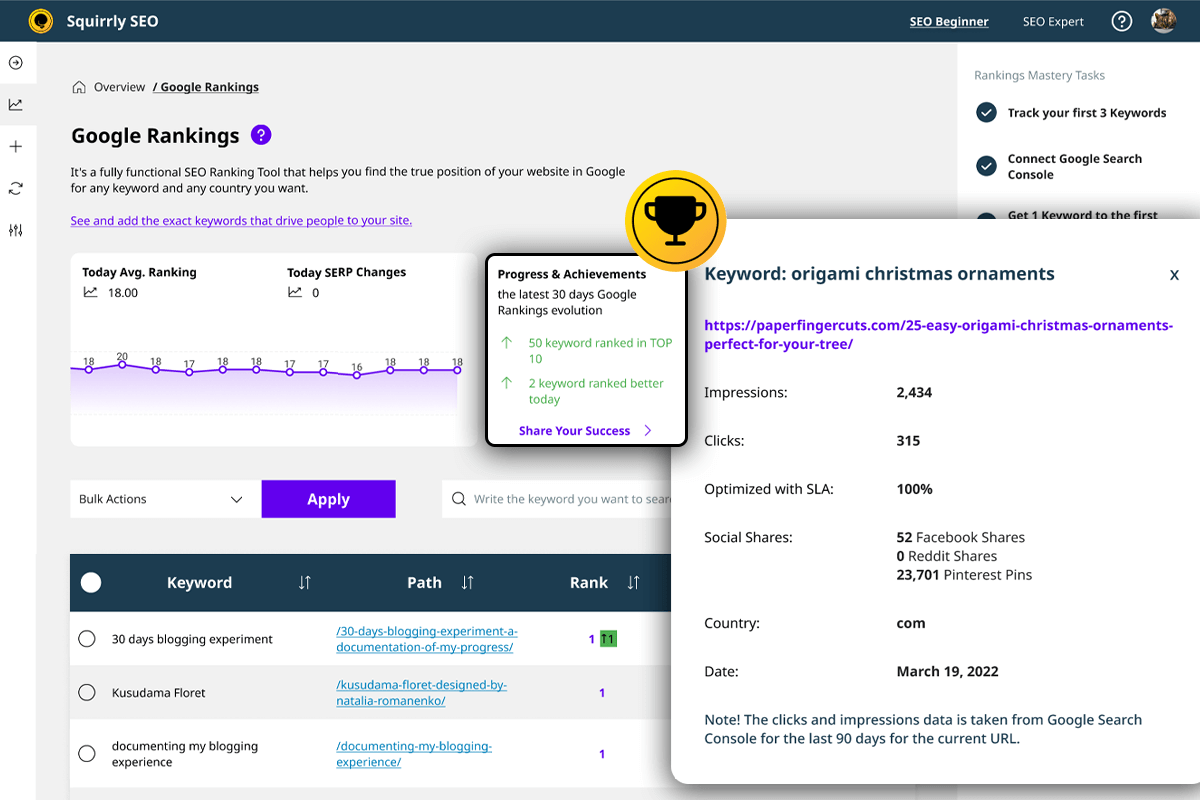


Installation
MANUALLY
Check the visual presentation of the Installation Process step by step.
- Download the plugin from this Page (here on the WordPress Directory) or from our site.
- Login to your Admin account in your WordPress Site.
- Click on “Plugins” in the left side menu.
- Now Click on “Add new”
- In this tab, click on the “Upload plugin” button on the top.
- Upload the “squirrly-seo.zip” file by clicking the “Choose File” button.
- Click on the “Install Now” Button.
- After the upload is finished, click Activate Plugin.
- Now enter your email and click “Sign Up”10.Done! Start getting Excellent SEO on WordPress11. You’ll start receiving email lessons to help you become a great content marketer. All for free.
=FROM YOUR WORDPRESS DASHBOARD=
- Click on the “Plugins” tab in the menu displayed on the left.
- Now click on the “Add New” button.
- In the right corner type “Squirrly SEO” and hit enter to search.
- Click on the “Install Now” button next to the plugin.
- After the Installation is done click “Activate”. 6.Now enter your email and click “Sign Up”.
- Done! Start getting Excellent SEO on WordPress.
- You’ll start receiving email lessons to help you become a great content marketer. All for free. Type a keyword to the right of the screen and start using Squirrly Seo. Enjoy!
FAQ
-
What is GEO and AEO, and how does this plugin help?
-
GEO (Generative Engine Optimization) is about getting your content cited by AI engines like ChatGPT, Perplexity, Gemini, Claude and Google AI Overviews. AEO (Answer Engine Optimization) is about structuring your content so those engines can lift it as the direct answer. The GEO Plugin by Squirrly SEO audits every page for the signals AI engines rely on – a direct answer near the top, question-style headings, lists and tables, content depth, freshness and the right schema – and tells you exactly what to fix.
-
Will this get my site cited by ChatGPT, Perplexity and Google AI Overviews?
-
No tool can guarantee a citation, but the plugin sets up everything that makes a citation possible: answer-ready content structure, FAQ / HowTo / Article schema, control over AI crawlers (GPTBot, ClaudeBot, PerplexityBot, Google-Extended), an llms.txt file, and fast indexing through the IndexNow and Google Indexing APIs. These are the same signals AI engines use to decide what to quote.
-
What is llms.txt and does this plugin create it?
-
llms.txt is an emerging standard, similar to robots.txt or a sitemap, that tells AI and language models which content on your site matters and how to use it. The GEO Plugin by Squirrly SEO lets you generate, edit or upload both llms.txt and llms-full.txt through the WordPress media library and serves them at your site root.
-
Does GEO replace SEO?
-
No. Classic SEO still gets your pages indexed and ranked on Google, which is also where many AI engines source their answers. GEO and AEO build on top of SEO so the same content can rank on search engines and be cited by AI. This plugin covers all three so you optimize once.
-
Can I use Squirrly together with Rank Math? Could I replace Rank Math altogether with Squirrly?
-
Yes, you can use Squirrly SEO alongside Rank Math if you want to, as Squirrly enables you to deactivate certain settings or modules so that Squirrly SEO and Rank Math can work in compatibility mode.
If Squirrly stops handling source code changes, then it works with Rank Math, SEOpress, All In One SEO SEO, Yoast, and others. Regarding whether you could replace Rank Math altogether with Squirrly SEO, this graphic linked below shows you a side-by-side comparison of Squirrly SEO vs. Rank Math.
There are around 650 features in Squirrly SEO, most of which can’t be found in Rank Math, given that Rank Math does not offer a duality between plugin and cloud services.
https://howto12.squirrly.co/wordpress-seo/use-squirrly-in-compatibility-mode-with-other-seo-plugins/
https://plugin.squirrly.co/compare/#vsrankmath
-
Can we import data from Rank Math into Squirrly SEO?
-
Yes, you can easily import all settings and all page optimizations made with Rank Math, using our import features. This provides step-by-step documentation on how to migrate your data from Rank Math so that you don’t lose your previous SEO optimization.
https://howto12.squirrly.co/wordpress-seo/how-to-switch-from-rank-math-to-squirrly-seo/
-
Are Focus Pages similar to Pillar Content in Rank Math?
-
You can search for “focus pages” on this page:
https://www.squirrly.co/wordpress/plugins/second-seo-features-page/
You will see there all that it offers. It is incredibly valuable for SEO and does everything required for SEO, unlike the pillar feature in Rank Math. It offers more than even Moz or Ahrefs does in terms of content analysis.
Side by side comparison: Squirrly SEO versus Rank Math
https://plugin.squirrly.co/compare/#vsrankmath
Powered by advanced cloud servers owned by the Squirrly Company, the MarketIntelligence big data analysis we do, and data sources like: Moz, Majestic, Alexa, Semrush, Google Analytics, ContentLook, crawlers owned by Squirrly: we are in a unique position that allows us to do in-depth content analysis and see each page the same way that Google’s algorithms see it.
-
We have been around since 2012 and we’ve validated over 17 products already with money paid by customers. There are few startups that could show the same results.
Get a more detailed response here.
https://howto12.squirrly.co/faq/how-does-squirrly-marketing-and-marketshare-wise-compete/
-
Yes, you can use Squirrly SEO alongside other SEO plugins like Yoast, Rank Math, SEO Press, Premium SEO Pack, All in One SEO, or SEO Framework in compatibility mode.
You can learn more about how to use Squirrly SEO in compatibility mode here.
https://howto12.squirrly.co/wordpress-seo/use-squirrly-in-compatibility-mode-with-other-seo-plugins/
If Squirrly stops handling source code changes, then it works with Rank Math, SEOpress, SEO Pressor, All in One SEO, Yoast, SEO Framework, and others.
Basically, you can use Squirrly SEO to power up WP on top of everything that is already handled by the other WordPress SEO plugin you’re using. Of course, you can also decide to switch to Squirrly, as it offers the complete SEO funnel.
Check out these graphics
https://plugin.squirrly.co/compare/
to see how Squirrly compares to other SEO plugins such as Yoast, Rank Math, SEOPress, SEO Framework, and All in One SEO.
-
How does Squirrly compare with plugins like SEO Framework, SEO Press, Rank Math, All in one SEO, or Yoast in terms of site speed and pagespeed?
-
Most of the processing, data storage, and other things that only Squirrly SEO can do, are actually things that happen on our Cloud Servers. The duality between plugin and Cloud Services (APIs, crawlers, big data, A.I., MarketIntelligence services) allows us to load the plugin’s code very fast.
The duality between SEO plugin and Cloud Services gives us an advantage over other WordPress SEO plugins like SEO Framework, SEO Press, Rank Math, All in One SEO, Rank Math, and Yoast.
More about this here.
https://howto12.squirrly.co/faq/how-does-squirrly-compare-site-speed/
-
Does Squirrly SEO Have a Redirection feature?
-
Yes, Squirrly does provide redirection functionality. Squirrly SEO has a 301 Redirect option. The 301 Redirection Option can now be found in All Snippets in the Visibility section of Squirrly SEO.
Snippets in All Snippet – Bulk SEO
Snippet when Editing Page
Snippet on the Front-EndIt’s a new way of doing re-directs and complements our automatic redirection feature.
https://howto12.squirrly.co/kb/seo-links/
-
Is there a Way to Remove the no-index Pages from the XML Sitemap?
-
Yes, you can use Squirrly SEO to remove the no-index pages from the XML sitemap.
You can do this by post type using the SEO Settings > Automation functionality. Simply select the post type and switch off: “Include In XML Sitemap”.
More details about how to remove no-index pages from the XML sitemap can be seen here.
https://howto12.squirrly.co/kb/seo-automation/#send_to_sitemap
Or you can remove the no-index pages from the xml sitemap at an URL level by editing the SEO Snippet and then selecting “Visibility”.
More details about this xml sitemap option can be seen here.
https://howto12.squirrly.co/kb/bulk-seo/#bulk_seo_visibility
-
Does WordPress SEO Plugin by Squirrly Have an Option for submitting new URLs to Google Search Console to be Indexed?
-
Yes, Squirrly has an option that helps with submitting new URLs to Google Search Console, namely the: Ping New Posts to Search Engine option.
More details about this here.
https://howto12.squirrly.co/kb/sitemap-xml-settings/
-
What Special Features Does SEO Plugin by Squirrly Offer for Local SEO?
-
Squirrly provides Schema for Local Business. Coordinates, hours, menus, etc. are available. You can learn more about this here.
https://howto12.squirrly.co/kb/json-ld-structured-data/
Meta Data for GEO and Location – Especially helpful for Local SEO and Knowledge Graph
Add Coordinates for Local SEO and add the address of your main location.
This will be used for your Organization and for Publisher details within your WordPress site.Schema for Local SEO can now be built directly from WordPress – Squirrly – SEO Settings – JSON-LD.
For multiple locations, you can build the Schema using the Editor we give access to and the Custom Code option for Schema.
We’ve even added KML files recently so you can easily add your local business to Google Earth and our integration actually works.
-
What Dedicated Features Does Squirrly Offer for News Websites?
-
- Build XML Sitemap for Google News (you can learn more about this here)
- XML Sitemap Settings: Blogging Frequency. You have the option to select Every Day as your blogging frequency or even Every Hour.
- Ping New Posts to Search Engines. Pinging is a process by which Squirrly SEO can notify search engines that your xml sitemap has been updated.
- Open Graph Type for Google News – NewsArticle
- Schema for Google News
https://howto12.squirrly.co/kb/sitemap-xml-settings/#news_sitemap
-
Yes, you can customize the Open Graph and Twitter Card image for every page and post using Bulk SEO or the Squirrly SEO Snippet.
You can learn more about these features here.
https://howto12.squirrly.co/kb/bulk-seo/
-
How is Squirrly Addressing the Core Web Vitals SEO Scoring Method?
-
Squirrly is addressing them with Focus Pages.
Page experience has been one of the main reasons we’ve created Focus Pages and it goes a little beyond just pagespeed and coding propriety.
Time on page, bounce rates, number of pages visited are also very important and we’re getting clear signals that their importance is shifting.
We already address pagespeed and https and give resources to our users, so they are prepared for the update.
https://howto12.squirrly.co/kb/focus-pages-page-audits/
-
What is the advantage of using Squirrly’s keyword research tool instead of using an external tool for this?
-
Squirrly’s built-in keyword research tool allows you to perform keyword research without leaving WordPress.
Furthermore, Squirrly also provides access to features like Briefcase, which means you can not only find keywords but also organize them into tighter groups for a better strategy. Furthermore, our keyword research data is fresh, since we don’t use caching (cached databases).
Maximum caching time is about 48 hours, not a whole year or two years like you find in other tools.
As we use Google API for search volume, Social Media for discussions, the data should be fresh every time and this is why it is different from others – and also why the data we show is different from what you may find in other keyword research tools who use caching for their data. (caching time can be extremely high for some of those tools).
https://howto12.squirrly.co/kb/keyword-research-and-seo-strategy/
-
Can you guarantee SEO results?
-
If you follow what we outline here, then yes. We will guarantee (please read the following resource):
https://plugin.squirrly.co/squirrly-seo-pro-results-guarantee/
-
Why is Squirrly Keyword Research better than Google Keyword Planner for SEO strategies?
-
Because our tool focuses on the information your need to better rank on Google not to get your Ads in front of more people. Google Keyword Planner is a great research tool if you are creating Adwords campaigns. For SEO our keyword generator tool is better.
-
I can’t log into the WordPress with my user. Get the message ‘An error occured.’ What can I do?
-
I see that your host server is not letting you access our remote API.
Please tell your webmaster to add the IPs 176.9.121.162 and 176.9.112.210 in the white-list for remote access and it should work. -
100% green in Squirrly Live Assistant but I’m not getting traffic yet
-
Sometimes we receive emails with this question and I want to help everybody have the correct image of Squirrly Live Assistance. The article bellow answers in detail this question.
https://howto12.squirrly.co/wordpress-seo/100-green-in-squirrly-live-assistant-but-im-not-getting-traffic/
Reviews


Contributors & Developers
“GEO Plugin by Squirrly SEO” is open source software. The following people have contributed to this plugin.
Contributors


“GEO Plugin by Squirrly SEO” has been translated into 5 locales. Thank you to the translators for their contributions.
Translate “GEO Plugin by Squirrly SEO” into your language.
Interested in development?
Browse the code, check out the SVN repository, or subscribe to the development log by RSS.
Changelog
14.0.1
- Fix: Smoother Live Assistant loading inside the Elementor editor.
- Fix: Tidied up navigation to the AI Visibility page.
14.0.0
- New: Rebranded to the GEO Plugin by Squirrly SEO – SEO, AEO and GEO in one plugin.
- New: GEO/AEO Audit that scores each page for answer-readiness (direct-answer block, question-style headings, lists and tables, content depth, freshness) and AI crawler access, llms.txt and answer-ready schema.
- New: LLM Indexing (formerly Auto-Indexing) – submit URLs to the IndexNow API and the Google Indexing API.
- New: llms.txt and llms-full.txt – generate, edit or upload and serve them at your site root. Large content is stored outside the main options row for performance.
- New: AI crawler control for GPTBot, ClaudeBot, PerplexityBot, Google-Extended and more.
- New: Link Opportunities for Inner Links – find published posts that mention a keyword and link them to a target page in a few clicks.
- Improvement: Modernized Audit UX and Inner Links.
- Fix: Bulk actions on audited pages, compare-audits warning for older audits, and timezone display on the LLM Indexing log.
12.4.18
- Fix – Restore the secure HMAC-signed API connection that could fail with “invalid_signature” after the 12.4.17 update
- Fix – Automatically reconnect to the Squirrly API with the per-site key, without needing to disconnect and reconnect the website
- Fix – Keep the website connected during Squirrly Cloud maintenance or downtime instead of dropping the connection
- Fix – Show a clear “reconnect this site” message when a website is cloned, staged or moved, instead of a generic “can’t load data” error
- Update – Add a one-click reconnect for cloned, staged or moved websites
12.4.17
- Security – Stop exposing master API tokens in the Live Assistant frontend config
- Security – sla_customcall restricted to a fixed allowlist of research endpoints
- Security – savePost whitelists post meta keys and validates JSON-LD data as JSON
- Security – JSON-LD output always re-encoded from validated JSON to block stored XSS
- Security – Settings backup and restore exclude per-site auth credentials
- Update – HMAC-signed API requests with a per-site key
- Update – Signed cloud callbacks via /wp-json/squirrly/v1/identity for clone detection
- Update – Detect cloned installs and require a fresh handshake on duplicates
- Update – Replace sqQuery JS global with sqAdmin; use the default WordPress ajaxurl
- Update – Redact tokens and signatures from local debug output
12.4.16
- Update – default LLMS to reflect the AI crawlers requirements
- Fix – Correct the automation patterns for publish time
- Fix – Focus Pages to identify the keyword in image files for the German language
- Fix – Add Nofollow on external links including subdomains if not added on exceptions list
- Fix – Prevent clearing the third party cache by default when the plugin settings are updated
- Fix – Showing the correct subscription plan when the server connection is lost
- Fix – JSON-LD author link to use the native author archive URL with correct special character handling instead of a broken relative URL
12.4.15
- Update – Google Ranking filters and stats
- Update – LLMS & Robots to avoid translation PHP warning
- Update – Add the option to manually clear the sitemap cache
- Update – Compatibility with WPML
- Fix – Javascript error on automation patterns
- Fix – Tag, category and author pages details to show the correct language
12.4.14
- Update – Add the Llms.txt feature to configure rules for AI crawlers
- Fix – Sitemap cache directory creation issue on multilingual sites
- Fix – Daily progress and optimization in Rankings
- Fix – Compatibility with Divi pagination to show the correct canonical meta
12.4.12
- Update – Added the option to recheck a ranking keyword in Rankings
- Update – Compatibility issue when $post->id is false
- Update – Compatibility with TranslatePress URLs on Sitemap URLs
- Update – Canonical link identification in Focus Pages
- Update – Add language path support for sitemap cache directory
- Fix – Issue when adding suggested inner links
- Fix -Remove suggested inner links after added
- Fix – Warning in API calls on line 278 for grabbing post content
- Fix – WooCommerce error on Snippet product URL
- Fix – Popup layout and style in Squirrly > Overview
12.4.11
- Update – The option to recheck the ranking keyword
- Update – Compatibility issue with other SEO plugins when $post->id is false
- Update – TranslatePress on Sitemap URLs
- Fix – WooCommerce error when calling get_sample_permalink in Squirrly Snippet
- Fix – Function _load_textdomain_just_in_time was called incorrectly error.
12.4.10
- Update – Compatibility with WP 6.8
- Fixed – Main Keyword change in SLA
- Fixed – Briefcase rows and pagination when searching for a keyword
- Fix – Google Analytics 4 connection
12.4.09
- Update – Correct the issue when multiple pages are selected in Innerlinks
- Update – The nonce referrer on search forms
- Fix – The strict parameter on rankings
- Fix – Add the Squirrly FontAwesome class in Audit and Focus Pages
- Fix – Pagination in Briefcase and Rankings
12.4.08
- Update – Plugin security on api and searches
12.4.07
- Update – Update the Bulk SEO Page to load only from Optimize > Bulk SEO
- Update – Add the Item ID in Review Schema to identify the reviewed item
- Fix – Keyword Research competition info on Briefcase
- Fix – Small layout bugs
12.4.06
- Update – Squirrly Live Assistant to prevent too many ajax triggers on Gutenberg saving process
- Update – Compatibility with Polylang plugin
- Update – Security updates on search parameter in Focus Pages, Audits, Bulk SEO
12.4.04
- Fix – Sitemap path validation when multilingual plugins are activated
- Fix – Robots TXT files customization issue
- Fix – Sanitization warning on different type of search input
- Fix – Rest Api calls warnings when no keywords found in a post
- Fix – Javascript error on SEO Links when open in external tab
12.4.03
- Update – Add the option to add noindex with dofollow in metas for search engines to follow all the links on the page
- Update – Display publish date and modify date on translation language
- Fix – Focus Pages notification on limit reached per website and per entire account.
- Fix – Invalidate Sitemap cache on Automation settings update
- Fix – Hide post type sitemap when the post type is set as noindex in Automation
- Fix – Robots.txt customization issue
- Fix – Sitemap load issue on websites with paths
- Fix – Bulk SEO title and description fields sanitization error
12.4.02
- Update – Add sanitization on Focus Page search params to increase security
- Update – Show the date and month in local language
- Fix – Correct Next Goals notification counter
- Fix – Fontawesome on Post Editor and Squirrly Live Assistant
- Fix – On keywords import from postmeta, avoid error when stored as array and not string
12.4.01
- Update – Ensured compatibility with WordPress 6.7.
- Update – Improved plugin layout and improves plugin security.
- Update – Reorganized the menu for a more streamlined and user-friendly navigation experience.
- Update – Grouped related sections like Automation and Bulk SEO under a new Optimize section for better organization.
- Update – Renamed IndexNow to Auto-Indexing to clarify its functionality.
- Update – Added a Visibility column to the Posts and Categories tables, highlighting all noindex and nofollow URLs.
- Fix – Addressed minor bugs for smoother performance.
12.3.24
- Update – Add Squirrly permalink hook sq_permalink for dev use
- Update – Add the options to select the IndexNow Endpoints
12.3.23
- Update – Compatible with WP 6.6.2
- Update – Add the option to remove Posts from Sitemap News in Google News
- Update – Add the option to set SEO Automation for each language with WPML plugin
- Fix – Clear the optimized keyword when deleted from SLA
12.3.22
- Update – Sitemap Compatibility with WPML
- Update – Update plugin security on SEO Snippet
- Update – Add the option to remove Posts from Sitemap News in Google News
- Update – Add the option to set SEO Automation for each language with WPML plugin
12.3.21
- Update – Compatibility with EWWW Image Optimizer
- Update – Compatible with WP 6.6.1
- Fix – Prevent loading the same optimized keyword on cloned posts/pages
12.3.20
- Update – Compatible with WP 6.6
- Fix – API security on innerlinks check and keywords check
- Fix – Sitemap compatibility with WordPress sitemap wp-sitemap.xml path
- Fix – Live Assistant to reload resources when network connection is low
- Fix – Sitemap to add only videos with thumbnails for google validation
12.3.19
- Update – Compatible with WP 6.5.3
- Update – SLA compatibility for Chinese chars
- Update – SLA compatibility with last version of Elementor
- Update – Compatibility with WPML when post type is not translatable.
- Fix – Focus Page > Platform Health tasks to not create confusion about the current URL
- Fix – Location coordinates kml in sitemap
- Fix – Prevent loading the sitemap.xml on subcategories
- Fix – Adjust settings layout on scale resolution
- Fix – Sitemap to use the /wp-content/cache as the default directory
- Fix – Favicon size in config to load on all mobile devices
12.3.18
- Update – Compatible with PHP 8.3 & WP 6.5
- Update – Search by URL in Focus Pages and Audit
- Update – Search term by URL in Focus Pages and Audit
- Update – Added more compatibility with WooCommerce variation products
- Update – Add specific notification in Ranking Sync page when GSC token expires
- Update – Language in Dublin Core for more compatibility with WeGlot plugin
- Update – Compatibility with SEO Generator plugin from AppSumo
- Update – Keyword load in SLA when added in wp_postmeta with meta_key sq_keywords
- Update – Advanced SEO Pack to work better with Polylang for WooCommerce when No Category path is activated
12.3.17
- Compatible with WP 6.4.3
- Update – Sitemap compatibility for JetEngine
- Update – SLA compatibility with Avada, add support for Fusion Builder
- Update – Notification message in Focus Pages and Audits when a crawling error is received
- Update – Added the option to select multiple pages as inner link source
- Update – Inner linking order to show the recent added links
- Update – Show all WP hidden patterns in the list when “sq_show_hidden_patterns” is active
- Update – Innerlinks API query in posts to find relevant links
- Fix – Sitemap Custom Posts loading issue
- Fix – IndexNow submit from Bulk SEO
- Fix – Inner link add button in popup when accessing multiple pages
- Fix – Keywords import in Briefcase
12.3.16
- Compatible with WP 6.4.2
- Update – Add the option to select the label for the Keyword Research
- Update – Add the option to select the label for the Research > History
- Update – Add the option to select the label for the Research > Suggestion
- Update – GA properties to show only the domain mathing domains
- Update – SLA for Divi not to take the header and footer in LP optimization
- Fix – SLA loading issue for Oxygen Builder
- Fix – Stop loading any resource from Squirrly when Page builder in preview
- Fix – Keyword Sync on Rankings
- Fix – Bulk keyword deletion in Briefcase
- Fix – Bulk label deletion in Briefcase
12.3.15
- Compatible with WP 6.4.1
- Update – Integrated the SEO Automation with Polylang and WPML for each Post Type
- Fix – Canonical link on Polylang and WPML for the Home Page
- Fix – Post Title in Focus Pages and Audits when the Feature Image is set
12.3.14
- Compatible with WP 6.4 & PHP 8.3
- Update – Language support on WPML when website language different from user language
- Fix – Local posts/custom posts search on Inner Links
- Fix – Compatibility with Frontend Builders when used in Third Party plugins/themes
- Fix – Bulk action on Briefcase when adding labels to keywords
- Fix – Bulk action on Briefcase when sending keywords to rankings
- Fix – Patterns warning when postmeta value is not string
- Fix – Compatibility with WPML when adding Rich Snippets for {search_term_string} param on WebPage Schema
12.3.13
- Fix – Local posts/custom posts search and pagination in Squirrly Live Assistant
- Fix – Silent installation of Advanced SEO Pack on websites with WPML
- Fix – Show original posts title when searching in Focus Pages and Audits Pages
- Fix – Language option in keyword research to find keywords in a specific language for a specific country
12.3.12
- Update – Added the language option in keyword research to find keywords in a specific language for a specific country
- Update – Added the option to add custom post meta title, description and keywords _sq_title, _sq_description, _sq_keywords
- Update – Search on SLA for extra posts
- Update – Jsonld compatibility with woocommerce products with variables
- Update – Added the custom fields pattern in Squirrly for sanitized fields in postmeta like {{customfield(field_name)}} & {{customfields(array_key|array_value)}}
- Update – Added the caching option in Sitemap XML for faster loading and saving server resources
- Update – Show keywords from other SEO plugins in SLA and Post List if there are none set in Squirrly SEO
- Fix – Set NoWrap on table columns with numbers
12.3.11
- Fix – Show the custom JsonLd code if already set in Squirrly SEO Snippet
- Update – Add Patterns support for customfield data like {{customfield(field_name)}}
- Update – Automation to load the reusable schema from Advanced SEO Pack
- Update – Show connect tool on Connect Tools as it needs Google Auth
- Update – Add Company URL in Rich Snippets
- Update – Better URL detection on Archives, Custom Post Type taxonomy
- Fix – Hide the Squirrly SEO Snippet close button on categories and tags to avoid folding the snippet
- Fix – Plugin typos
- Fix – Customer support phone details in Rich Snippets
- Fix – Loading dependency with jQuery on resources
- Fix – Change the twitter icon with X twitter
- Fix – Pagination links on table pages for the first page and previous page
12.3.10
- Fix – Security and Vulnerability issue on pagination in Focus Pages > Inner Links.
- Fix – Squirrly SEO Snippet visibility error when post type was not added in Automation
- Fix – Remove db table alter on plugin load
- Fix – View layout and typos
- Fix – Don’t show image width and height on Advanced Rich Snippets when can’t load them
- Fix – Multiple URLs submit issue on IndexNow feature
- Update – The option to load add image width and height in Advanced Rich Snippets
12.3.05
- Update – Metas, Open Graph, Twitter Card, Rich Snippets, layout in SEO Snippet section
- Update – Inner Links suggestions to load when suggestions are found on server
- Update – Added support for sq_question and sq_answer classes to automatically add them in FAQ Rich Snippet
- Fix – Increased the loading speed on Briefcase, Suggestions, History, Labels, Rankings
- Fix – Switch on/off SEO on Automation to work better
- Fix – Compatibility with Schema & Structured Data for WP & AMP showing query error
12.3.04
- Update – Add related questions to Research > Suggestions with the option to write focus page related articles
- Update – Add the option to add Inner Link directly from Research > Suggestions for the optimized articles
- Update – Add the suggested keywords found by the Cloud in Inner Links section
- Update – Security on Inner Links section
- Fix – Bugs and Types
12.3.03
- Update – More bugs fixed and competibility with Squirrly SEO – Advanced Pack
12.3.02
- New – Inner Links feature available in Squirrly SEO > Focus Pages
- New – Redirects feature available in Squirrly SEO – Advanced Pack
- New – 404 Monitoring feature available in Squirrly SEO – Advanced Pack
- New – Custom Schemas feature available in Squirrly SEO – Advanced Pack
- New – Advanced Rich Snippets feature available in Squirrly SEO – Advanced Pack
- Update – Added the option to insert custom inner links based on keywords
- Update – Added the option Inner Links for custom nofollow & open in new tab
- Update – Added the option to create DevKit packages in Squirrly Cloud for DevKit accounts
- Update – Compatibility with Divi theme when header templates are created
- Update – Added the option to install Squirrly SEO – Advanced Pack plugin for Redirects, 404 Monitoring, Custom JsonLD Schemas, Rich Snippets
- Fix – Small Bugs
12.3.01 – 08/14/2023
- Update – Compatibility with WP 6.3
- Update – Added API calls for Innerlinks and Contextual Keywords with links
- Fix – Reset the SLA box position when is outside the window. Firefox compatibility.
12.2.04 – 08/07/2023
- Update – Remove twitter support from SLA for the moment
- Update – Automation types based on Ecommerce website
- Update – Frontend snippet for tags, categories and taxes
- Update – The onboarding video
- Update – Compatibility with Polylang and the tags
- Fix – Set the home URL when the URL is missing from post
- Fix – Loading of Squirrly SEO Live Assistant based of dependencies
- Fix – Api call on inner links to avoid long DB queries
- Fix – Handle the styles and scripts differently for more compatibility with other plugins
- Fix – Sitemap URL validation to not allow cloud URLs
- Fix – Woocommerce offer expire date in Schema
12.2.03 – 05/22/2023
- Update – Compatibility with WP 6.2.2
- Fix – Frontend SLA for Divi & Zion Builder
12.2.02 – 05/17/2023
- Update – Compatibility with WP 6.2.1
- Update – New Snippet layout using hooks for each section
- Update – Loading CSS and JS function to load js dependencies in frontend
- Update – Compatibility with Beaver Builder
- Update – JsonLD schema autodetects video schema on post/page
- Update – Added more countries and languages on Google Ranking section
- Fix – z-index style of Media Library for Frontend editor
- Fix – Show notifications in Squirrly SEO when limits are reached
- Fix – Country ranking check issue for countries with Google prefix “com.” & “co.”
12.2.01 – 04/24/2023
- Update – Compatibility with Polylang & TranslatePress plugins
- Update – Frontend SLA to work better with Media Library and detect the Title in Elementor when a text is changed in H1
- Update – Search post query in Squirrly SEO Focus Pages, Bulk SEO and SEO Audits to work with the Theme Incubator
- Fix – Sitemap to load the archive on post type when the category archive is not added in the sitemap
- Fix – Sitemap to not include data:image from post contents
- Fix – Feedback & Cloud Disconnect option on uninstall
- Fix – Frontend SLA for Thrive plugin javascript warning
- Fix – Add language slug on home url for TranslatePress plugin
- Fix – Prevent showing the white space at the beginning of the sitemap
- Fix – Show Rich Snippets Profile info on Dublin Core and OG when it’s selected as global showing in settings
- Fix – Crawler server to load the website faster
- Fix – UI small bugs
divi seo
thrive seo
oxygen seo
elementor seo
zion seo
bricks seo
yoast alternative
yoast seo alternative
all in one seo alternative
seo pressor alternative
wordpress seo alternative
wordpress seo
seo optimization
seo content
nofollow external links
nofollow links plugin
structured data plugin
google structured data
yandex seo optimization
yandex seo metas
google seo metas
- Changelog Archive: https://plugin.squirrly.co/squirrly-seo-changelog/