
Description
Order Tracker for WooCommerce gives your customers a self-service way to check the status of their orders without contacting support. Customers enter their order number and the phone number used at checkout, and the plugin returns the current order status, a visual progress bar, and key order details — all without a page reload.
Key features
- Self-service order lookup by order number and billing/shipping phone number.
- Ajax-powered results — no page reload required.
- Visual progress bar with stages: Pending, On Hold, Processing, Shipped, Completed.
- Built-in support for cancelled, refunded, and failed orders.
- Adds a custom “Shipped” order status to WooCommerce, including a quick action button in the admin orders list.
- Use as a page template or via the
[cbwct-order-tracker]shortcode anywhere on your site. - Developer-friendly: filter hooks for customizing labels, messages, and progress percentages.
- Fully translation-ready (text domain:
wc-order-tracker).
For more information, visit the plugin homepage. Contributions are welcome on GitHub.
Filter hooks
The following filters let developers customize the tracker output:
cbwct_order_tracking_heading— Heading shown above the tracking form.cbwct_field_text_order_number— Label for the order number field.cbwct_field_text_phone_number— Label for the phone number field.cbwct_submit_button_text— Submit button text.cbwct_order_number_phone_number_required— Message shown when either field is empty.cbwct_order_is_not_found— Message shown when the entered order number doesn’t exist.cbwct_phone_mismatch— Message shown when the phone number doesn’t match the order.cbwct_product_title_trim_words— Number of words shown in product titles on the result table (default: 8).cbwct_pending_progress_percent— Progress bar percentage for Pending orders (default: 23).cbwct_on_hold_progress_percent— Progress bar percentage for On hold orders (default: 42).cbwct_processing_progress_percent— Progress bar percentage for Processing orders (default: 61).cbwct_shipped_progress_percent— Progress bar percentage for Shipped orders (default: 80).cbwct_completed_progress_percent— Progress bar percentage for Completed orders (default: 100).
The legacy misspelled filter names (cbwct_*_prograss_percent) from earlier versions are still supported for backward compatibility, but new code should use the names listed above.
Demo videos
Support
For questions, support, or feature requests, contact the team at support@bplugins.com or visit bPlugins.com.
Screenshots
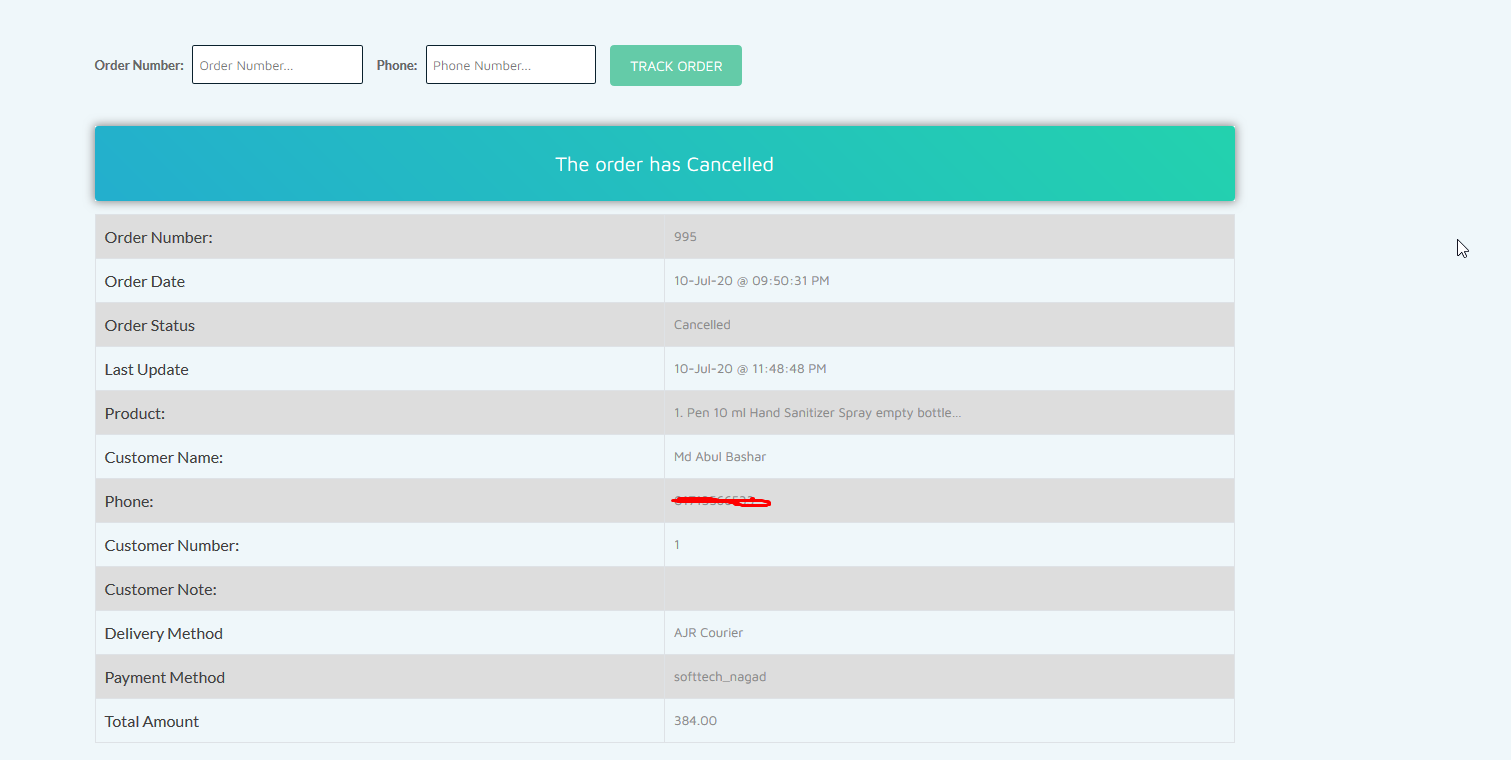
Cancelled order view. 
Shipped order with progress bar. 
Order in processing status. 
Order on hold.
Installation
- Upload the plugin folder to the
/wp-content/plugins/directory, or install it through the WordPress Plugins screen. - Activate the plugin through the Plugins screen in WordPress.
- Display the order tracking form using one of these options:
- Shortcode: Add
[cbwct-order-tracker]to any post or page. - Page template: Create a new page and select the Order Tracker for WooCommerce template from the Page Attributes panel.
- Shortcode: Add
FAQ
-
How do I add the order tracking form to my site?
-
You can either insert the
[cbwct-order-tracker]shortcode into any post or page, or create a dedicated page and assign the Order Tracker for WooCommerce page template under Page Attributes. -
My customer’s order and phone number are correct, but the result shows “not found.” What should I do?
-
Make sure the phone number entered for tracking matches the format used at checkout exactly. For example, if the customer placed the order with the country code (
+88123456789), they must enter the same format when tracking. Likewise, an order placed without a country code (123456789) must be tracked using the same format. -
Does the plugin support developer hooks?
-
Yes. Several filter hooks are available to customize the form labels, messages, and progress bar percentages — see the Filter hooks section below.
-
Is the plugin translation-ready?
-
Yes. The plugin uses the
wc-order-trackertext domain and is fully compatible with WordPress.org’s translation platform.
Reviews


Contributors & Developers
“Order Tracker for WooCommerce – Track Customer Order” is open source software. The following people have contributed to this plugin.
Contributors


“Order Tracker for WooCommerce – Track Customer Order” has been translated into 1 locale. Thank you to the translators for their contributions.
Translate “Order Tracker for WooCommerce – Track Customer Order” into your language.
Interested in development?
Browse the code, check out the SVN repository, or subscribe to the development log by RSS.
Changelog
1.2.8
- Declared GPLv2 license in the plugin header.
- Aligned the text domain with the plugin slug (
wc-order-tracker) across all gettext calls and replaced inline-variable strings withsprintf()placeholders plus translator comments. - Hardened nonce verification and input sanitization (
isset+wp_unslash+sanitize_text_field) on all$_POSTreads. - Improved output escaping across all templates (
esc_attr,esc_url,wp_kses_post,intval); refactored helper methods to return values so call-site escaping is effective. - Prefixed template and process variables with
cbwct_to satisfy WordPress Coding Standards. - Introduced a version constant and passed it to all
wp_enqueue_style/wp_enqueue_scriptcalls for proper cache busting. - Removed the discouraged
load_plugin_textdomain()call (WordPress now loads translations automatically for hosted plugins). - Renamed progress-bar filters from
cbwct_*_prograss_percenttocbwct_*_progress_percent(correct spelling). The legacy names continue to work as backward-compatible aliases.
1.2.7
- Fixed text domain issues.
1.2.5
- Improved translation support.
1.2.4
- Fixed translation issues.
1.2.3
- Fixed order number search issue.
1.2.2
- Added text domain and security updates.
1.1
- Fixed broken search form.
- Added “Shipped” order status.
- Fixed shortcode error.
- General improvements.
1.0
- Initial release.