

Description
Advanced Accounts – Customize My Account Page / OTP Login & Registration for WooCommerce is an all-in-one solution to enhance your WooCommerce customer account area. It combines a versatile My Account page customizer with secure passwordless login features and a flexible membership system to control content, products, and user access.
The My Account page is one of the most frequently visited sections of any e-commerce site. This plugin allows you to tailor the account dashboard, simplify login and registration with OTP verification, and introduce membership-based access control to deliver personalized experiences for different user groups.
You can create membership levels, restrict content or products to members, and even offer exclusive discounts based on membership roles.
Premium version | Documentation | Support | Demo
Key Features and Benefits
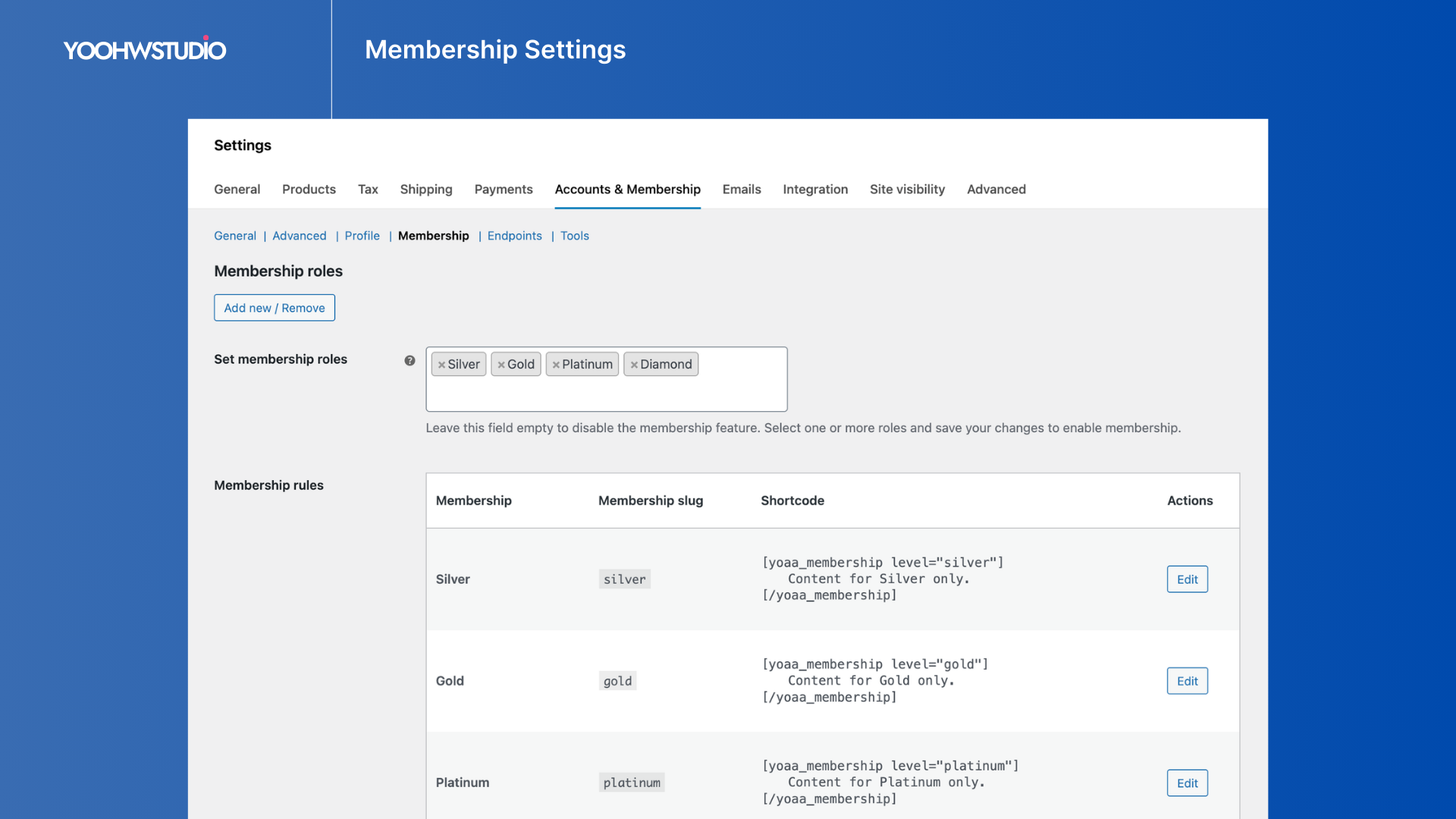
- Membership Roles System: Create membership tiers using WordPress roles and manage them directly inside the plugin settings.
- Membership Content Visibility: Use the
[yoaa_membership]shortcode to control which users can view specific content based on membership levels. - Flexible Access Conditions: Display content only for specific membership levels, logged-in users, or guests.
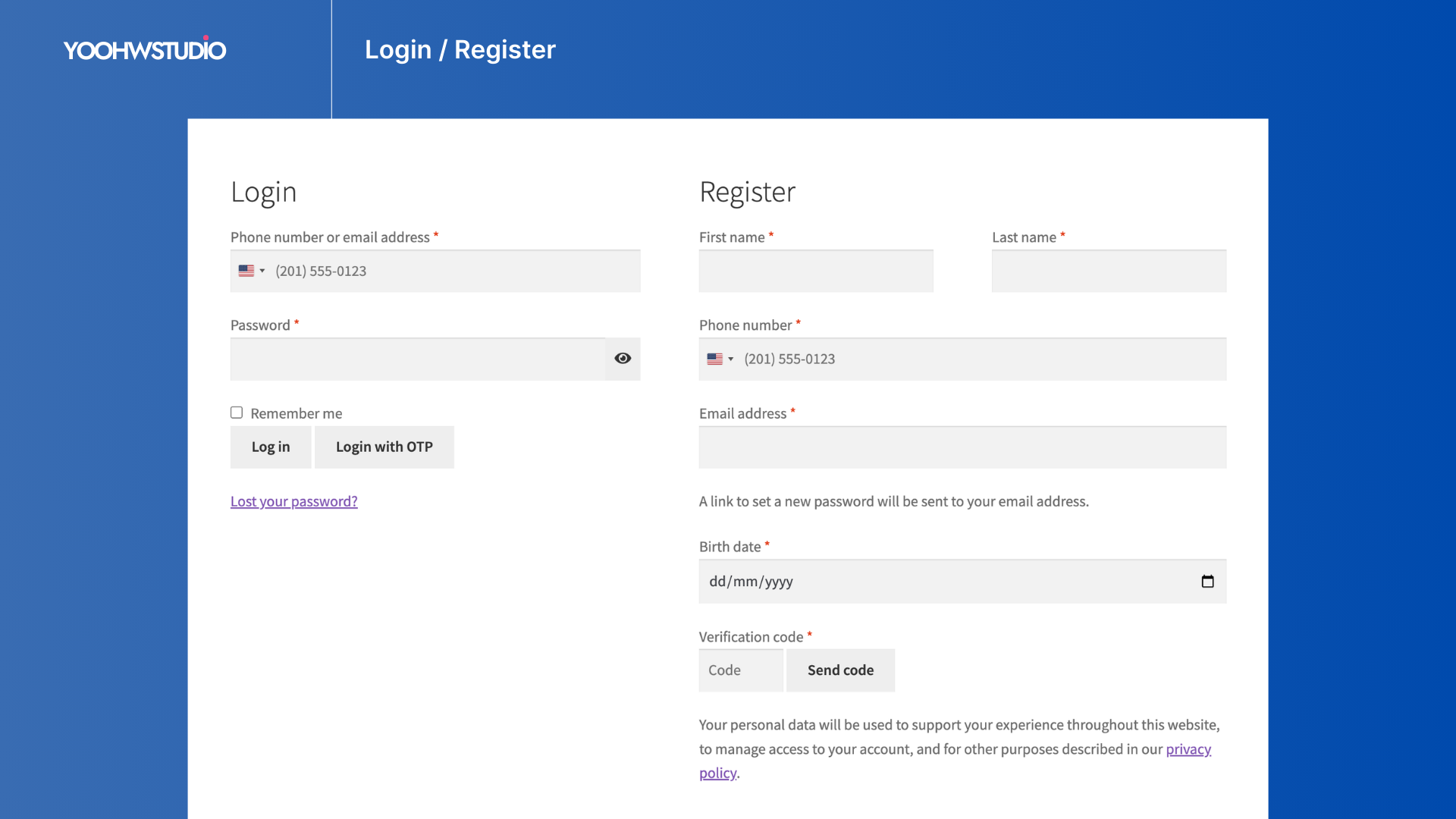
- OTP Login & Registration (SMS/Email): Improve login security and convenience by letting users log in with a one-time password (OTP) sent to their phone or email.
- Phone & Email Verification: Ensure genuine users with verified contact details before accounts are fully activated.
- Password Reset via OTP: Users can securely reset passwords using verification codes sent to their phone or email.
- WooCommerce Login Page Integration: Automatically redirect WordPress login pages to the WooCommerce My Account login interface.
- Mobile-Friendly & Responsive: Designed for smooth login and account management on mobile devices.
- Extensibility and Compatibility: Built with WordPress standards and compatible with WooCommerce themes and multilingual plugins.
Membership Features (Free Version)
- Membership Roles: Define membership levels using WordPress user roles.
- Membership Role Management: Manage and configure membership roles directly inside the plugin settings.
- Content Control Shortcode: Use the
[yoaa_membership]shortcode to restrict or show content based on membership levels. - Flexible Visibility Conditions: Shortcodes support conditions for specific membership roles, logged-in users, or guests.
Premium Membership Features
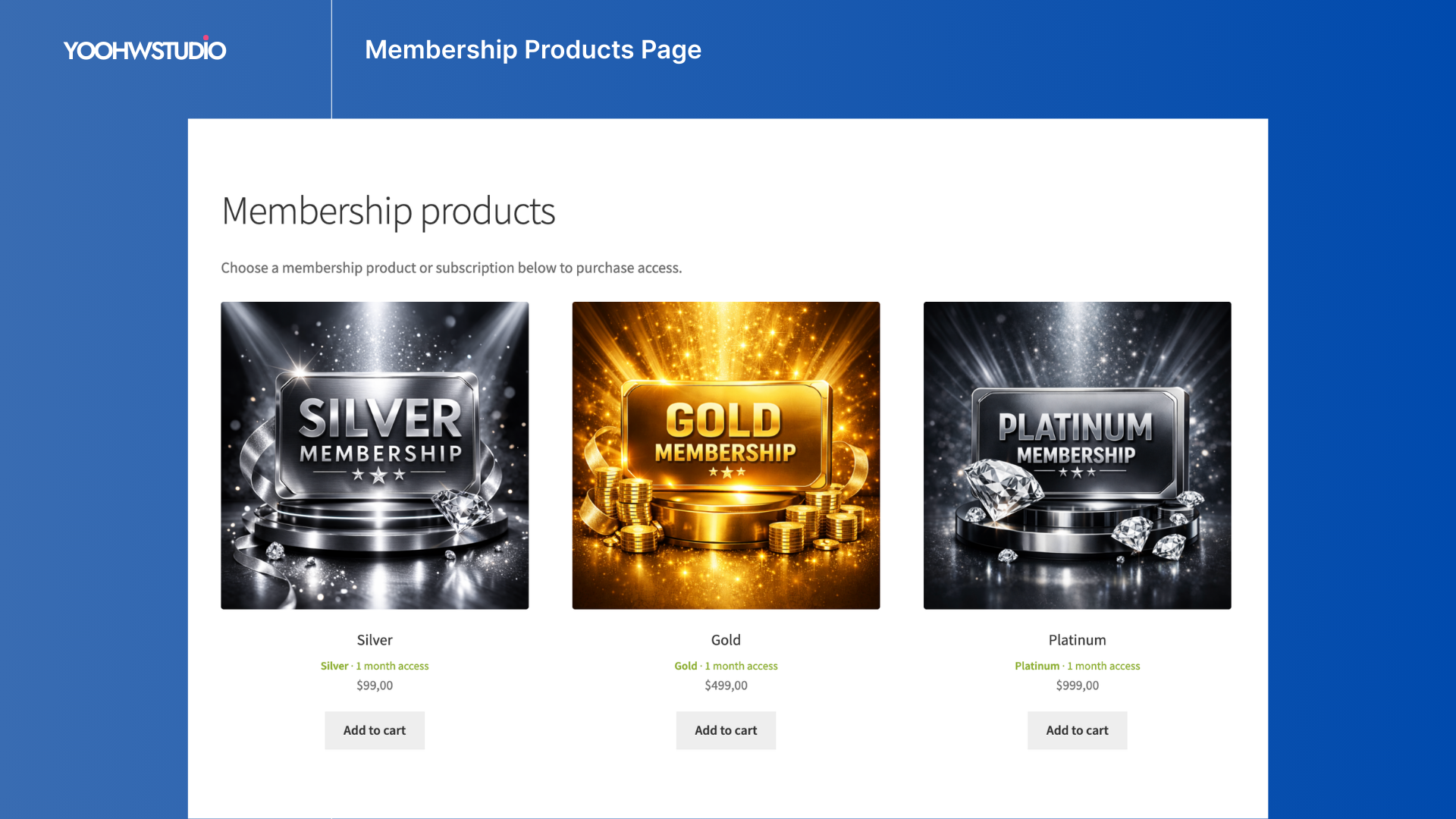
- Membership Products Page: Automatically generate a dedicated page that lists available membership plans, allowing customers to easily view, purchase, and upgrade membership tiers.
- Multiple Membership Roles: Allow users to have multiple membership roles simultaneously.
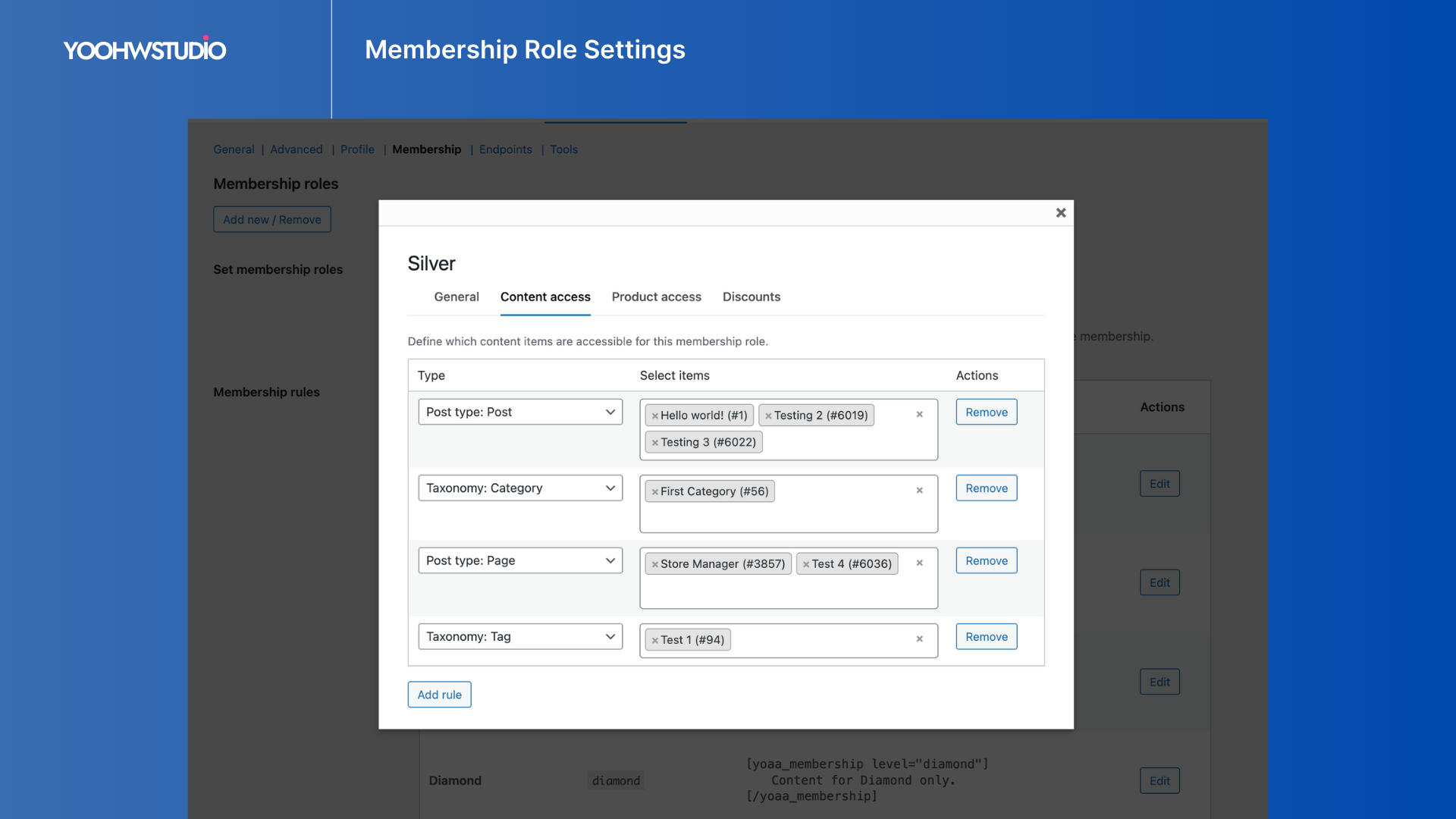
- Content Access Control: Restrict posts and pages by membership roles.
- Custom Access Notices: Unauthorized users will see a customizable notice message instead of restricted content.
- Optional Login Button: Guests can be prompted with a login button when trying to access restricted content.
- Product Access Control: Restrict WooCommerce products by membership roles.
- Product Access Messages: Restricted products can be hidden or replaced with a custom message for unauthorized users.
- Membership-Based Discounts: Offer exclusive pricing or discounts for specific membership levels.
- Flexible Shortcodes: Shortcodes support multiple membership levels and custom fallback messages.
Premium Tools
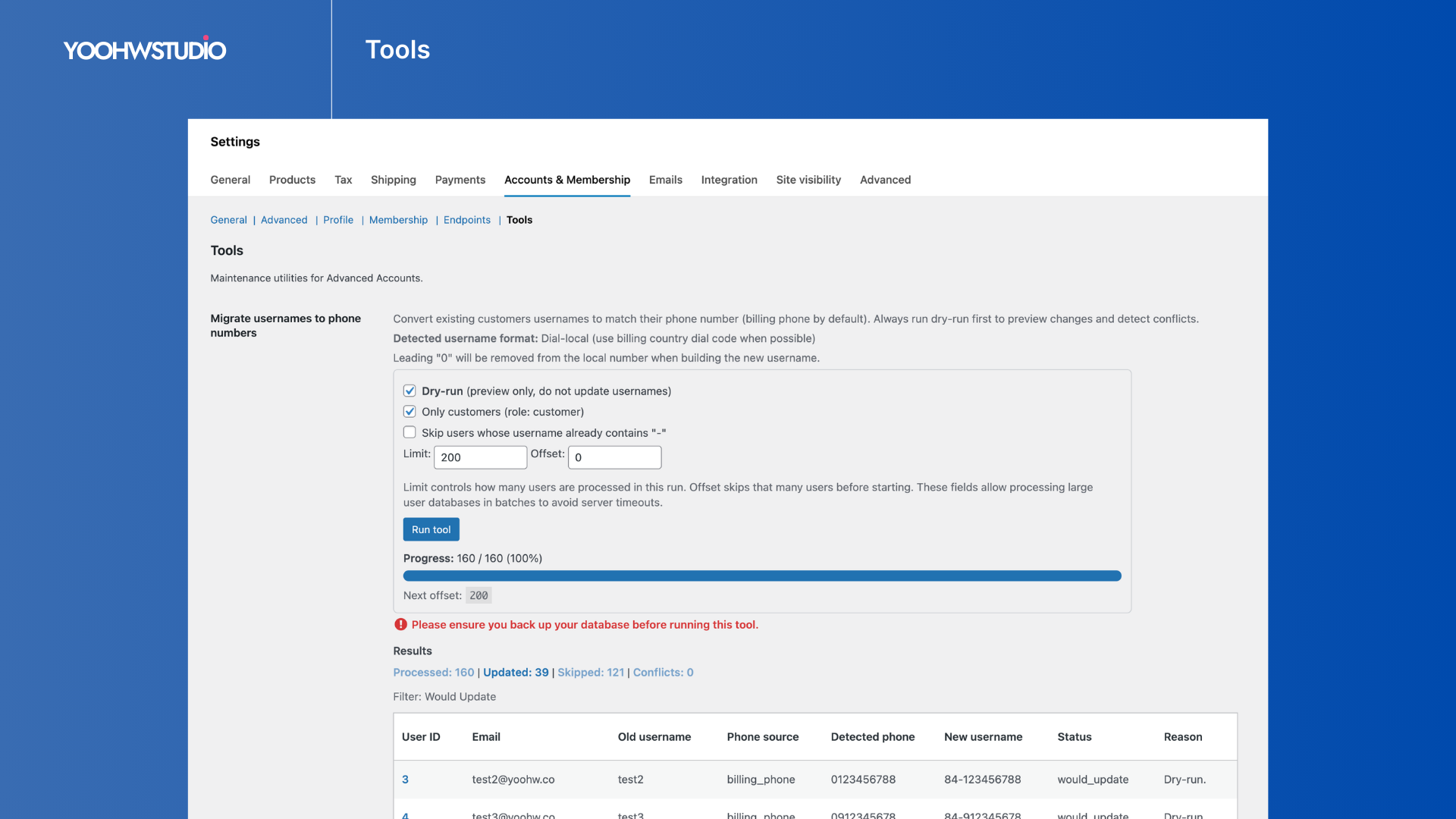
- Username Migration Tool: Convert existing usernames into phone-based usernames with a dry-run preview and batch processing tool.
Other Premium Features
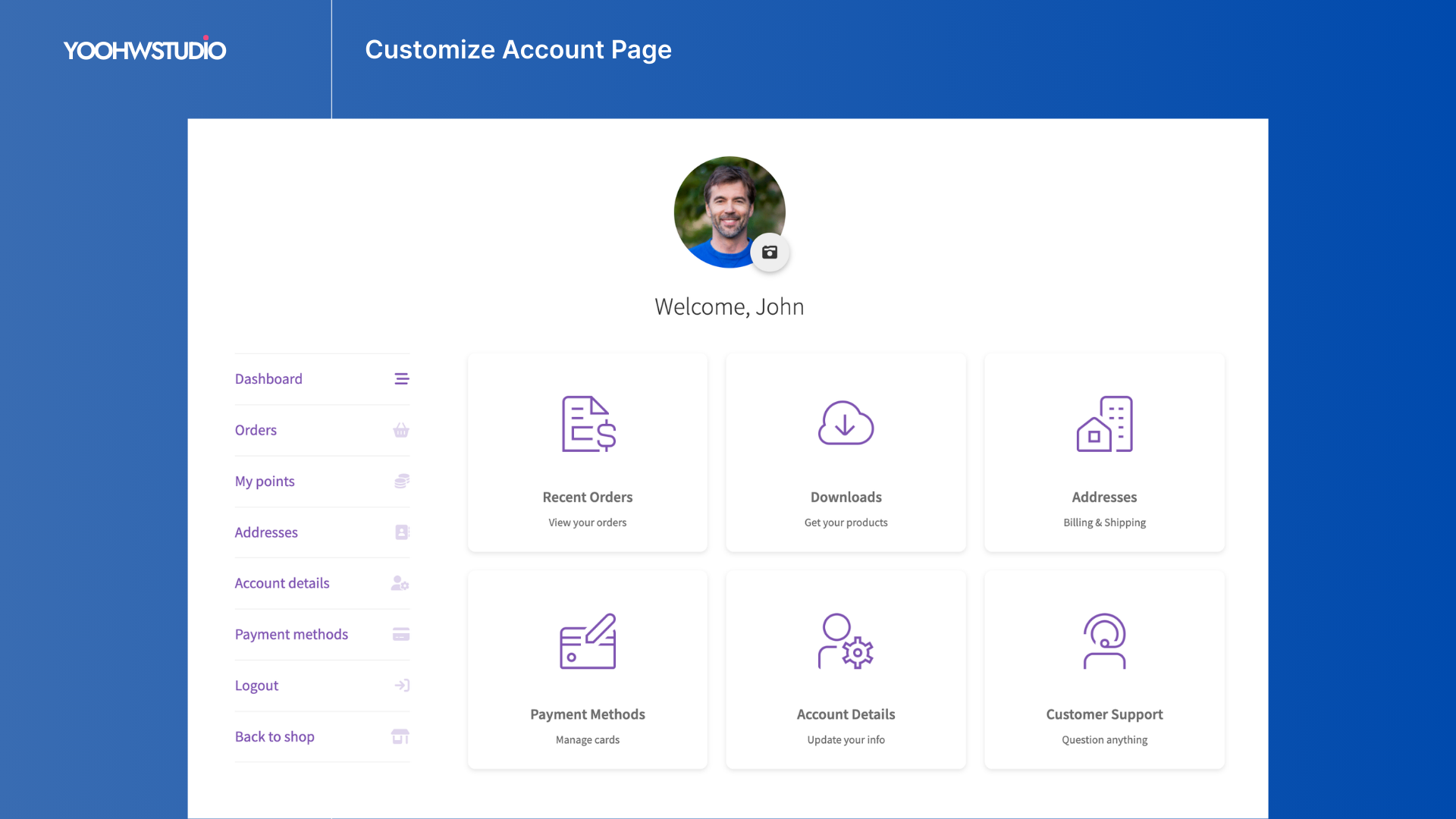
- Add Unlimited Custom Endpoints: Create new tabs in the My Account page to display custom content or shortcodes.
- Customize Existing Endpoint Content: Override or inject content into default WooCommerce account tabs.
- Custom Icons for Account Menu: Assign built-in or uploaded icons to each account endpoint.
- Role-Based / Members-Only Sections: Restrict account endpoints to specific roles or membership levels.
- User Avatars and Profile Photos: Allow customers to upload profile images directly from their account page.
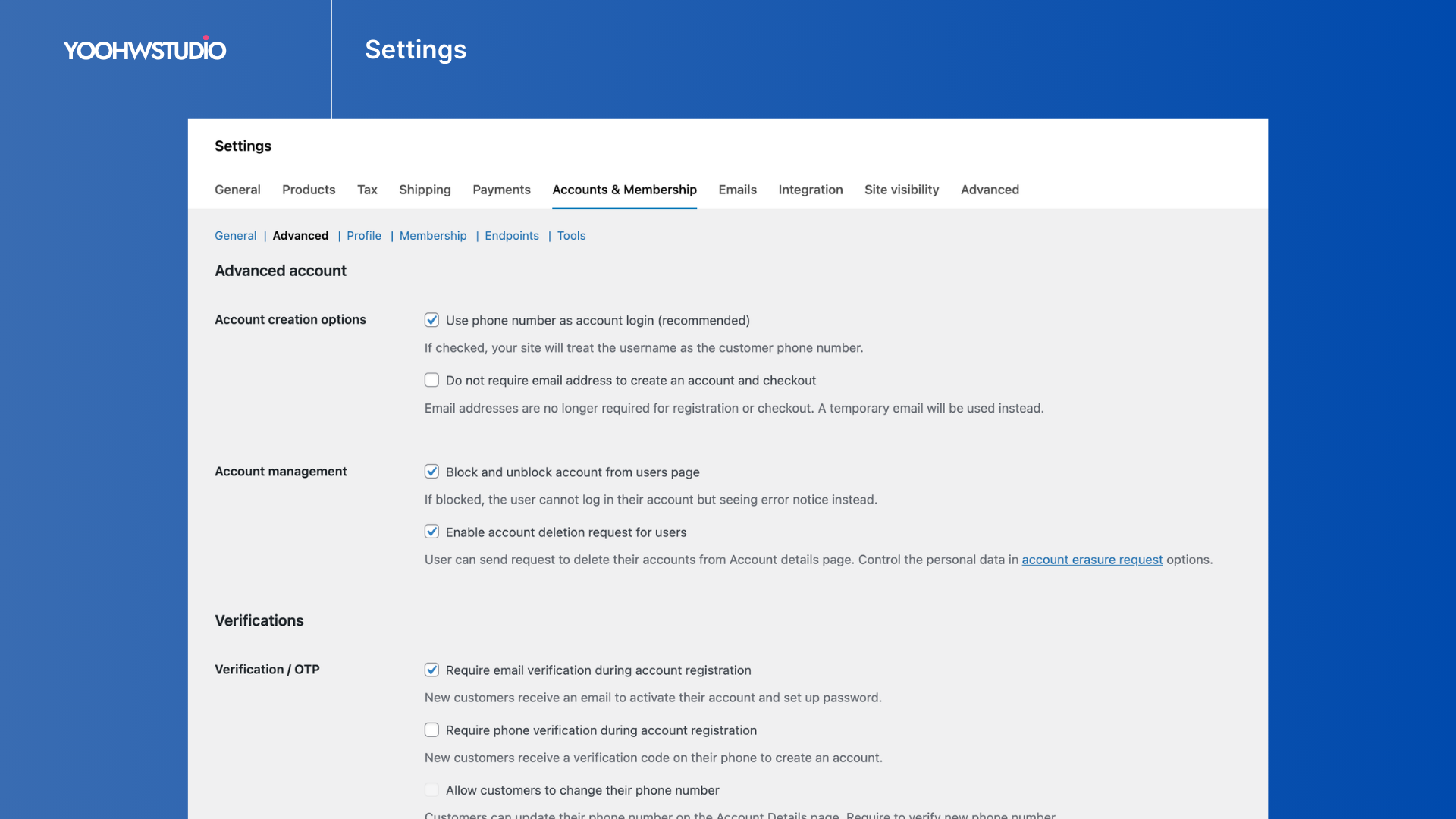
- Block / Unblock Users: Suspend or reinstate user accounts without deleting data.
- Account Erasure Requests: Provide users with GDPR-compliant data deletion requests.
- Phone Number Updates with Verification: Allow users to securely update their phone number with SMS verification.
- Extra Registration Fields: Add fields such as first name, last name, and birthday to the registration form.
- Third-Party SMS Services: Integrate with Twilio and Textmagic for SMS verification.
Explore the Premium version here
In summary, WooCommerce Advanced Accounts empowers you to take full control of your customers’ account experience. Customize the My Account dashboard, enable secure OTP login and registration, and introduce membership-based access to content, products, and exclusive pricing. Deliver personalized experiences for different user groups while enhancing security through verification. All these capabilities come in one lightweight plugin – eliminating the need to install multiple plugins for account customization, OTP authentication, and membership management.
Plugin Integrations
Blacklist Manager
Integrates with Blacklist Manager. Once a customer’s phone number or email is verified through this plugin, Blacklist Manager can recognize it as verified during checkout when verification rules are enabled.
WooCommerce Loyalty – Points and Rewards (Premium)
Fully compatible with WooCommerce Loyalty – Points and Rewards. Membership roles can work together with loyalty rewards, allowing store owners to offer points, rewards, and exclusive benefits to specific membership levels.
WooCommerce Subscriptions
Compatible with WooCommerce Subscriptions. Sell membership plans as subscription products to enable recurring payments and automatic membership renewals.
External Services
This plugin connects to third-party and external services to deliver One-Time Passwords (OTPs), verify phone numbers, and provide licensing and notification features. These services are required for specific functionality and only transmit data when the related feature is used.
- Yo Credits: Used to send OTPs for phone verification, login, checkout, and password reset.
- Twilio: Third-party SMS provider used when enabled or as a fallback.
- Textmagic: Alternative SMS gateway for OTP delivery.
IP-API (IP Geolocation): Used to detect country information for phone number formatting.
YoOhw API Services: Used for licensing, subscriptions, site registration, updates, and plugin news.
All external services are configurable, and no data is sent unless the related feature is enabled or triggered by user action.
Screenshots
Installation
- Upload Plugin: Upload the
wc-advanced-accountsfolder to the/wp-content/plugins/directory. - Activate Plugin: Activate the plugin through the ‘Plugins’ menu in WordPress.
- Prerequisites: Ensure that WooCommerce is installed and activated.
FAQ
-
Q: What does this plugin do?
-
A: Advanced Accounts enhances the WooCommerce My Account area with customizable endpoints, secure OTP login and registration via SMS or email, and a flexible membership system that allows you to control access to content, products, and discounts.
-
Q: How does the membership system work?
-
A: The plugin allows you to create membership levels using WordPress user roles. These roles can then be used to control visibility of content, restrict WooCommerce products, or provide membership-based discounts (Premium feature).
-
Q: Can users have multiple membership levels?
-
A: Yes. In the Premium version, users can hold multiple membership roles at the same time, allowing more flexible membership structures.
-
Q: How can I restrict content to members only?
-
A: You can use the
[yoaa_membership]shortcode to show or hide content based on membership roles. The shortcode also supports conditions for logged-in users or guests. -
Q: Can I restrict WooCommerce products to specific members?
-
A: Yes. The Premium version allows store owners to restrict products so that only specific membership levels can purchase or view them.
-
Q: What happens when a user tries to access restricted content?
-
A: Unauthorized users will see a custom notice message instead of the restricted content. Optionally, guests can also see a login button prompting them to sign in.
-
Q: Can I offer special pricing for members?
-
A: Yes. The Premium version supports membership-based discounts, allowing you to provide exclusive pricing for specific membership levels.
-
Q: How does phone number registration work?
-
A: Users can register using their phone number instead of an email address. The plugin validates and verifies the phone number through OTP before completing registration.
-
Q: Can users still register with an email address?
-
A: Yes. You can configure the plugin to allow registration using either a phone number or an email address.
-
Q: What is OTP login, and how does it improve security?
-
A: OTP (One-Time Password) login sends a temporary verification code to the user’s verified phone number or email address. The user enters the code to log in, eliminating the need for traditional passwords.
-
Q: Can I change the content of default WooCommerce account endpoints?
-
A: Yes. You can customize the content of default account tabs such as Dashboard, Orders, or Downloads directly from the plugin settings without editing templates.
-
Q: Can I collect additional information during registration?
-
A: Yes. The plugin allows you to add additional fields such as first name, last name, or birth date to the registration form.
-
Q: Does the plugin work with any WooCommerce theme?
-
A: Yes. The plugin extends WooCommerce’s native account system and works with most WooCommerce-compatible themes.
Reviews

Contributors & Developers
“Advanced Accounts for WooCommerce – Membership / Customize My Account Page / OTP” is open source software. The following people have contributed to this plugin.
Contributors
Interested in development?
Browse the code, check out the SVN repository, or subscribe to the development log by RSS.
Changelog
1.4 (Mar 13, 2026)
- New: Membership Roles – Added a Membership Roles system to define membership levels using WordPress roles.
- New: Membership Roles – Added a membership roles management interface inside plugin settings.
- New: Shortcodes – Added [yoaa_membership] shortcode to control content visibility based on membership roles.
- New: Shortcodes – Supports conditions for specific membership level (single), logged-in users, or guests.
- Improve: WooCommerce 10.6 compatibility.
1.3.8 (Feb 15, 2026)
- Improve: WooCommerce 10.5 compatibility.
- Improve: Minor improvements.
1.3.7 (Jan 5, 2026)
- Update: Optimized and cleaned the code.
- Improve: WooCommerce 10.4 compatibility.
1.3.6 (Dec 4, 2025)
- Fix: Font Awesome icons url issue at the endpoints settings.
- Improve: Reused the self-hosted Font Awesome icons, and already optimized for better performance.
1.3.5 (Nov 13, 2025)
- Improve: Replace self-hosted font awesome by their CDN endpoints instead.
- Improve: Optimized and removed some unnecessary code.
- Improve: WooCommerce 10.3 compatibility.
1.3.4 (July 27, 2025)
- Update: Do not force to logged out if the user already verified after checkout.
- Improve: Allow the login by OTP functions affect to sitewide.
- Improve: Make sure
WC()->sessionis not either empty or the customer‐session cookie never back to the browser.
1.3.3 (July 17, 2025)
- Fix: Corrected the billing phone number format in the order data.
- Improve: WooCommerce compatibility.
1.3.2 (Jun 12, 2025)
- Update: Excluded administrators from verifivation requirement.
- Fix: Correct the JavaScript files to run on the right places.
- Improve: Set all endpoints settings are ‘Show’ for the first time installer.
1.3.1 (Jun 4, 2025)
- Fix: Login form template overrided on the checkout page.
1.3 (May 28, 2025)
- New: Added Customize my account page – Can change labels, slugs; adding icons; reorder positions; and show/hide endpoints.
- New: Integrated the WooCommerce Loyalty Program plugin.
- Update: Blacklist Manager integration – Also verified user when
create accountduring verified checkout. - Fix: Error if registering when the disabled email requirement option is enabled.
- Fix: Invalid username when creating an account on the checkout page.
- Fix: Verified the account by phone number during create an account via checkout.
- Improve: The plugin can now work with the custom endpoints.
- Improve: If a phone number is not verified, then avoid to log in and display error notice.
- Improve: Log in form displaying on the order received and checkout pages.
- Improve: Display the correct error message in case empty phone number with a dial code.
1.2.4 (May 8, 2025)
- Fix: Blacklist Manager integration logic.
- Improve: Picked up by the field
namerather than ID to support the form display multiple places on one page.
1.2.3 (May 3, 2025)
- Update: Get the visitor IP instead of the hosting IP for the default dial code.
- Fix: The login field and the register field won’t clobber each other.
- Fix: Missing save button on the reset password page.
- Fix: Error notice display when the phone number field is empty or incorrect.
- Improve: Disabled the buttons after clicking on the my account page.
1.2.2 (Apr 21, 2025)
- New: Added the verified column to the users page.
- New: Added option to redirect wp-login to my account page.
- Fix: Mismatched JavaScript version.
1.2.1 (Mar 24, 2025)
- Update: Add the phone dial code to verification list on WCBM integration.
- Improve: Auto adding billing phone as username if it is numeric.
- Improve: Remove unnecessary code.
1.2.0 (Mar 9, 2025)
- New: Brand new country dropdown selection, faster, smoother, and better.
- New: Phone number format for each country.
- Update: Added country dropdown for the shipping phone.
- Update: Hide the country dropdown if an email is typed in the username field.
- Fix: Conflict the country dropdown of username and billing phone fields on the checkout page.
- Fix: Did not hide the default field and button of the reset password form.
- Improve: Disable reset password by code if use phone number as account login option is disabled.
- Improve: Failed notice for failure to generate a new key.
1.1.2 (Feb 22, 2025)
- Fix: JavaScript error of login with OTP.
- Fix: Display the country code dropdown on the site selling to single country.
- Improve: Allow to users receive an email to set up their password.
1.1.1 (Feb 20, 2025)
- New: Added the country code dropdown for shipping phone on the checkout page.
- New: Added the country code dropdown for the reset password page.
- Improve: Upgrade the IP Geo function.
- Improve: Separated the code for the country that has multiple codes.
1.1.0 (Feb 10, 2025)
- New: Fully supported the site selling to multiple countries.
- Fix: Email address verification error.
- Fix: Reset password button does not display.
- Improve: Added the resend the verification email action.
- Improve: Verified the account via log-in by OTP.
- Improve: Auto log out after the customer creates an account during checkout.
- Improve: Auto-fill the phone number on the checkout page for the newly registered user.
- Improve: Added country code selection on the checkout page.
- Improve: Auto-register after verifying successfully.
- Improve: A bunch of other improvements.
1.0.3 (Jan 25, 2025)
- Fix: Cannot Generate a SMS key.
- Improve: Force the account creation options are disabled if the phone options are enabled.
1.0.2 (Dec 21, 2024)
- Fix: Conflict with our other plugin.
- Fix: Login form did not work if added multiple areas (ex: popups etc)
- Improve: Avoid to send register code if the phone is already registered.
1.0.1 (Dec 14, 2024)
- New: Reset password using OTP for both phone and email.
- New: Login with OTP for email address.
- Fix: Phone country code trigger for site is selling in a single country.
- Improve: The notices will only display for administrators.
1.0.0 (Dec 11, 2024)
- First released.