Description
Text to Speech plugin for WordPress with natural AI voices, accessibility features, and SEO / AEO benefits. Includes 10,000 free welcome credits.
Add Text to Speech to WordPress in Seconds
Text to Speech (TTS) turns your written content into natural, human-like audio. It makes your website accessible to everyone. Listeners, people with visual impairments, and those with learning differences all benefit.
The plugin uses ElevenLabs to generate lifelike speech that sounds human, warm and clear. No setup, API key, or coding is needed. Install it and start converting your WordPress posts into audio right away.
Text to speech keeps visitors on your page longer and raises engagement. Both of these factors can improve your SEO. The plugin follows WCAG 2.1, WCAG 2.2, and ADA accessibility standards.
PRO and Agency adds Speech-to-Text (STT) features. These are useful for transcription, captions, or converting podcasts and video into readable text.
Key Benefits
- Instant setup with no API keys or external accounts needed. Install and start converting text to speech
- Natural voices powered by ElevenLabs that produce clear, professional narration
- Automatic, mobile-friendly audio player that fits any screen size
- Accessibility ready with ARIA labels and keyboard support for screen readers and assistive devices
- Better engagement and SEO signals as visitors spend more time on your pages
- 10,000 free text-to-speech characters on activation so you can try it at no cost
- Lightweight and built for performance with no impact on page speed or Core Web Vitals
- Speech-to-Text transcription (PRO) to create written transcripts from your audio content
How It Works
- Install and activate the plugin from your WordPress dashboard
- Publish or update a post or page. Audio is generated from your content automatically
- A text-to-speech audio player appears on the page with no extra configuration
- Visitors can play, pause, adjust speed, or download the audio file
Video Walkthrough
Full walkthrough, features, and pricing:
https://mementor.no/en/wordpress-plugins/text-to-speech/
Why Choose This Text to Speech Plugin
Simple and Fast
- No API keys, or coding needed. Install, activate, and your audio player is ready in seconds
- Works with default settings so you can start converting text to speech right away
Natural Voices
- Natural male, female, and multilingual voices that sound clear and professional
- Pick from a wide range of tones and styles to match your brand and audience
Accessibility and Compliance
- Fully compatible with WCAG 2.1 AA and ADA guidelines for web accessibility
- Helps your website meet legal requirements by offering audio versions of written content
Theme and Page Builder Compatibility
- Works with any theme or page builder, including Elementor, Gutenberg, Divi, Visual Composer, and all standard WordPress themes
- No conflicts with popular plugins. Designed to fit smoothly into your existing setup
SEO Optimized
Audio players raise dwell time and send positive accessibility signals. Text to Speech PRO includes AudioObject schema for better search visibility.
Features
Free Features
- 10,000 free characters to convert text to audio. Enough to get started without paying
- Natural male and female voices in multiple languages for a professional listening experience
- Automatic player for posts, pages, and WooCommerce products with no manual setup needed
- Flexible player placement – before title, after title, after content, before excerpt, or after excerpt
- Zero-click install. Activate the plugin and your audio player is ready
- Mobile-first player with speed control and download so visitors can listen anywhere
- Accessibility ready with ARIA labels and keyboard control for screen readers and assistive devices
- Audio auto-updates when post content changes. No need to regenerate manually
- Audio Library to browse, search, filter, and manage all generated audio files in one place
- Statistics dashboard to track how many visitors listen to your content
- Shortcode and block support for custom player placement anywhere on your site
- Content filtering with CSS selectors or no-audio class to exclude specific sections from narration
- Built for caching and performance plugins like WP Rocket, LiteSpeed Cache, and W3 Total Cache
- Multisite support for managing text-to-speech across multiple WordPress sites from one network
PRO & Agency Features
- 600+ voices across 70+ languages to match your audience worldwide
- Premium 44.1 kHz (192 kbps) audio quality for studio-grade narration
- ElevenLabs v2 and Eleven v3 models for the latest and most natural-sounding voice technology
- Speech-to-Text transcription to create written transcripts from audio
- Bulk audio generation to convert multiple posts or pages at once
- WooCommerce product narration. Let customers listen to product descriptions
- Voice cloning with ElevenLabs Voice ID to create a custom brand voice
- Word replacement and pronunciation correction for names, abbreviations, and technical terms
- SSML support for fine-tuned control over speech output
- Custom pauses to add natural breaks between sections, headings, or paragraphs
- AudioObject schema for SEO. Structured data that helps search engines index your audio content
- Custom intro and outro to add branding or disclaimers to every audio file
- WPML and Weglot multi-language voice mapping to assign different voices per language
- Amazon S3 media offload to reduce server load and speed up audio delivery
- Advanced analytics with detailed listening data per post, device, and location
- White-label mode (Agency plan) to remove plugin branding from the backend and the text-to-speech player
- Resell or share our Text-to-Speech plugin (Agency plan) under your own brand and pricing. Offer text-to-speech as a service to your clients and create a recurring revenue stream
- Credit Allocation per Site (Agency plan). Distribute credits across client sites from one account. Control usage per site to manage costs and ensure fair allocation
- Priority support with faster response times from the development team
Supported Languages
Compatible with WPML, Polylang, TranslatePress, Weglot, and other translation plugins.
Text to Speech works in 70+ languages. Here are some of the most popular:
- English (US, UK, AU): Text to Speech
- Norwegian: Tekst til tale
- Spanish: Texto a voz
- French: Synthèse vocale
- German: Text-to-Speech
- Italian: Sintesi vocale
- Portuguese: Texto para fala
- Dutch: Tekst naar spraak
- Polish: Zamiana tekstu na mowę
- Turkish: Metinden sese
- Russian: Преобразование текста в речь
- Arabic: تحويل النص إلى كلام
- Hindi: पाठ से वाक्
- Bengali: টেক্সট টু স্পিচ
- Chinese: 文字转语音
- Japanese: テキスト読み上げ
- Korean: 텍스트 음성 변환
- Thai: แปลงข้อความเป็นเสียง
- Vietnamese: Chuyển văn bản thành giọng nói
- Indonesian: Teks ke suara
Accessibility and SEO Advantages
- Meet WCAG 2.1 AA and ADA requirements by offering an audio version of written content
- Raise average session time as visitors stay longer when they can listen instead of read
- Help users with dyslexia, ADHD, or visual impairments with a hands-free listening option
- Improve SEO with rich media and structured data that search engines can index and display
- Create inclusive multilingual content that reaches audiences in their preferred language
Use Cases
- Accessibility and inclusion. Make your website usable for people with reading difficulties or disabilities
- Blogs and news. Let readers listen to articles while on the go
- E-commerce product descriptions. Give shoppers the option to hear product details before buying
- Education. Help students absorb course material through audio learning
- Long-form content. Turn guides, reports, and documentation into easy-to-consume audio
- Multitaskers. Serve visitors who prefer listening while commuting, exercising, or working
- Content creators. Repurpose written content into audio format without extra recording effort
More Tools by Mementor
- Text to Speech – TTSWP: TTSWP.com
- BestPris.no: Best Pris
- SEO-Analyse.no: SEO Analyse
Standard Installation
- Go to Plugins Add New in your WordPress admin
- Search for “Text to Speech – TTSWP”
- Click Install Now and then Activate
- Click “Connect Site” on the Overview page to link your site to TTSWP
- You receive 10,000 free welcome credits instantly
- Optional: connect your ElevenLabs API key for 10,000 extra free monthly credits
- Optional: upgrade to Pro or Agency for more credits and features
Quick Start Guide
- Overview – see your plan, credits, and setup checklist at a glance
- Voices – pick a default voice and language for your audio
- Player – customize colors, size, position, and player label
- Content – choose which post types generate audio and set content rules
- Audio Library – browse, search, and manage all generated audio files
- Statistics – track play counts and listener engagement
- Shortcode Generator – create custom player embeds for any content
- Bulk Generation (Pro) – convert all existing posts to audio at once
External Services
ElevenLabs API
Purpose: Converts your text into natural-sounding speech
Data sent: Post text, voice ID, API key (if used)
When: On manual or automatic audio generation
Storage: MP3 files saved locally or on S3
Limits: Free plan includes 10,000 one-time welcome credits. PRO plans start at 50,000 credits per month.
Terms: https://elevenlabs.io/terms-of-use
Privacy: https://elevenlabs.io/privacy-policy
Mementor Software Licensing
Handles checkout and license validation for PRO
Terms: https://mementor.no/en/terms-and-conditions/
Privacy: https://mementor.no/en/privacy/
Privacy
Data Collection
This plugin collects usage statistics only if you opt in through the consent dialog in Settings. You can opt out anytime in Settings Advanced.
If you opt in, we collect:
- Feature usage counts (generations, characters)
- Plugin, PHP, and WordPress versions
- Your site domain
We never collect:
- Personal information or user data
- Content of your posts or pages
- API keys or passwords
Other Privacy Information
- Content text sent for speech synthesis goes to ElevenLabs
- API keys are stored encrypted in your database
- Audio files remain on your server or configured S3 storage
- Full data removal runs on uninstall if enabled in Advanced settings
Credits
Natural voice synthesis by ElevenLabs
Developed by Mementor Webdesign & Digitalt Markedsføringsbyrå AS
This plugin includes an affiliate link to ElevenLabs. If you purchase through this link, Mementor may earn a small commission at no extra cost to you.
Screenshots
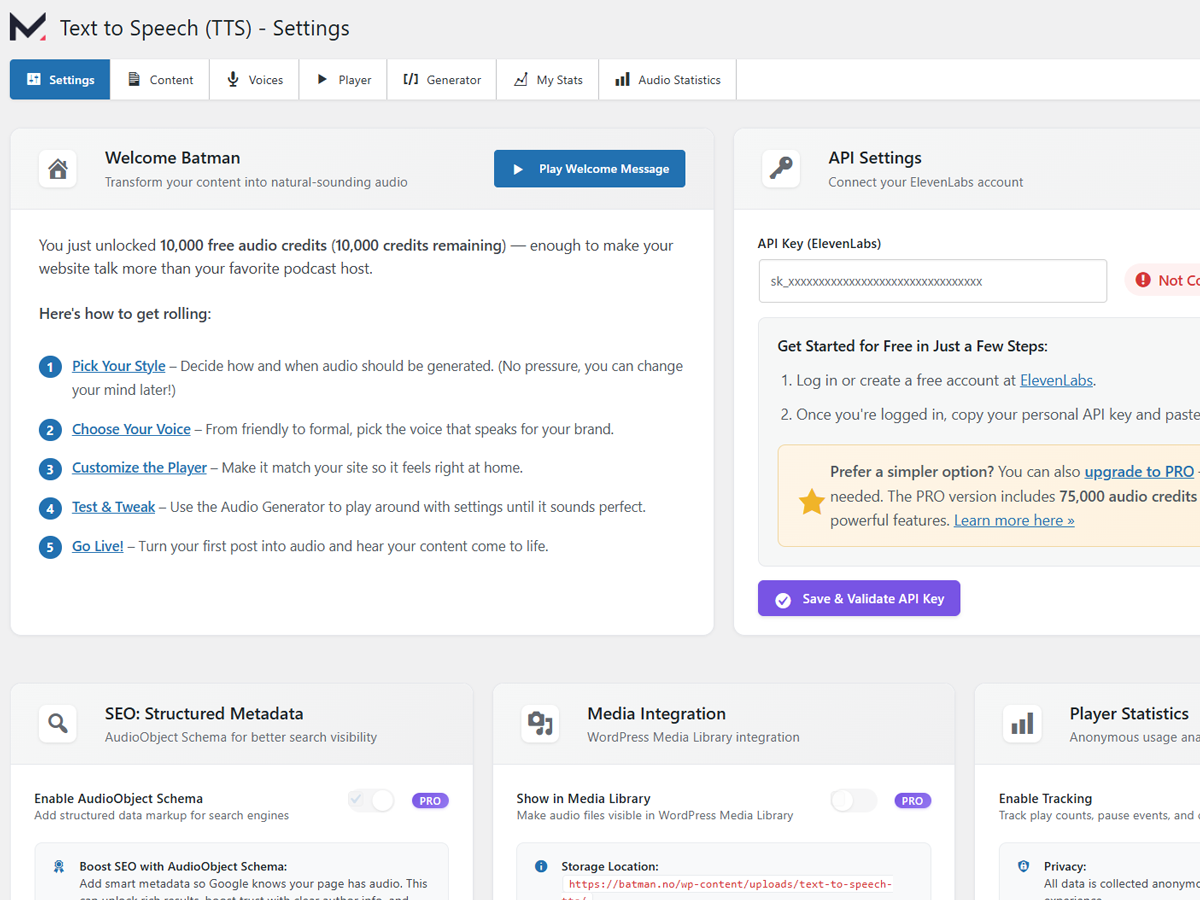
Dashboard with an overview of your text-to-speech settings, ready to generate audio with one click 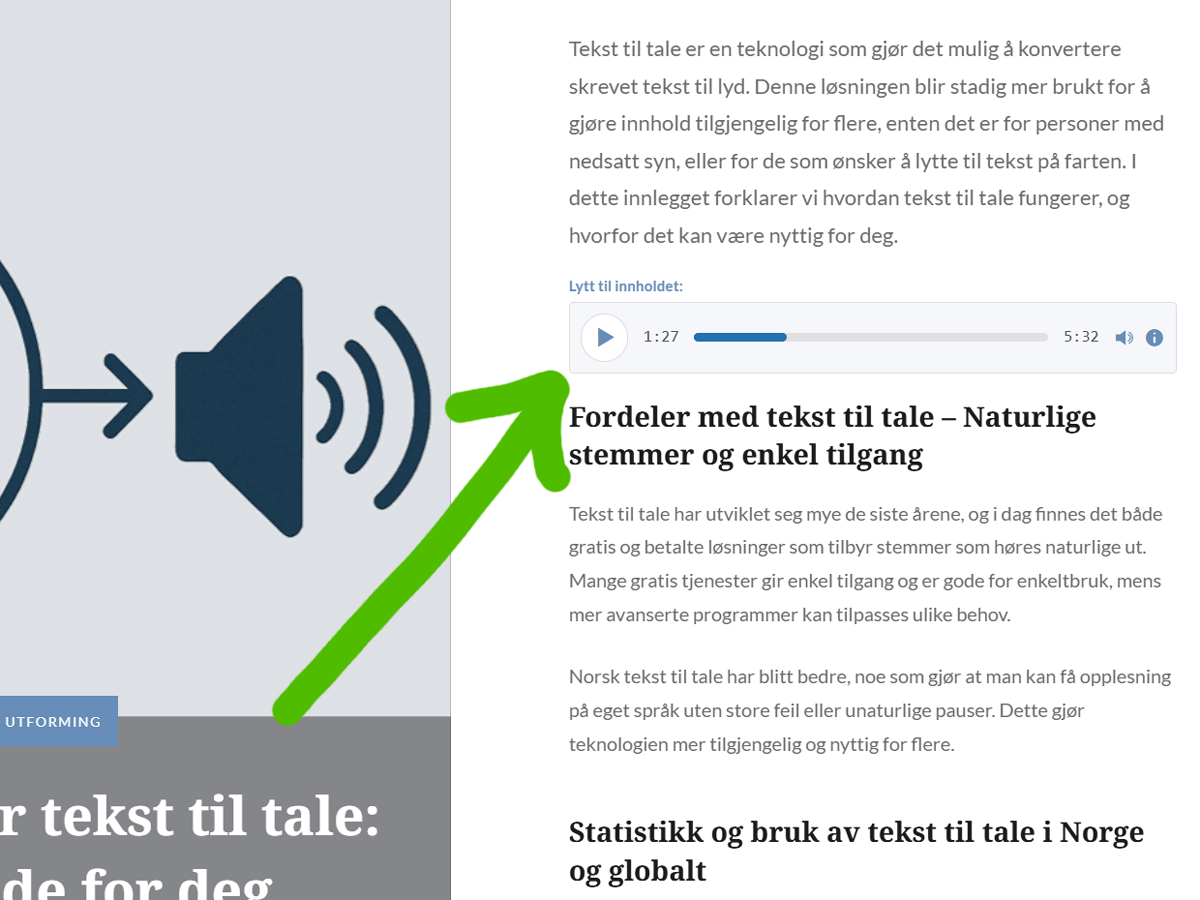
Voice and language selector. Choose from natural male and female voices in multiple languages 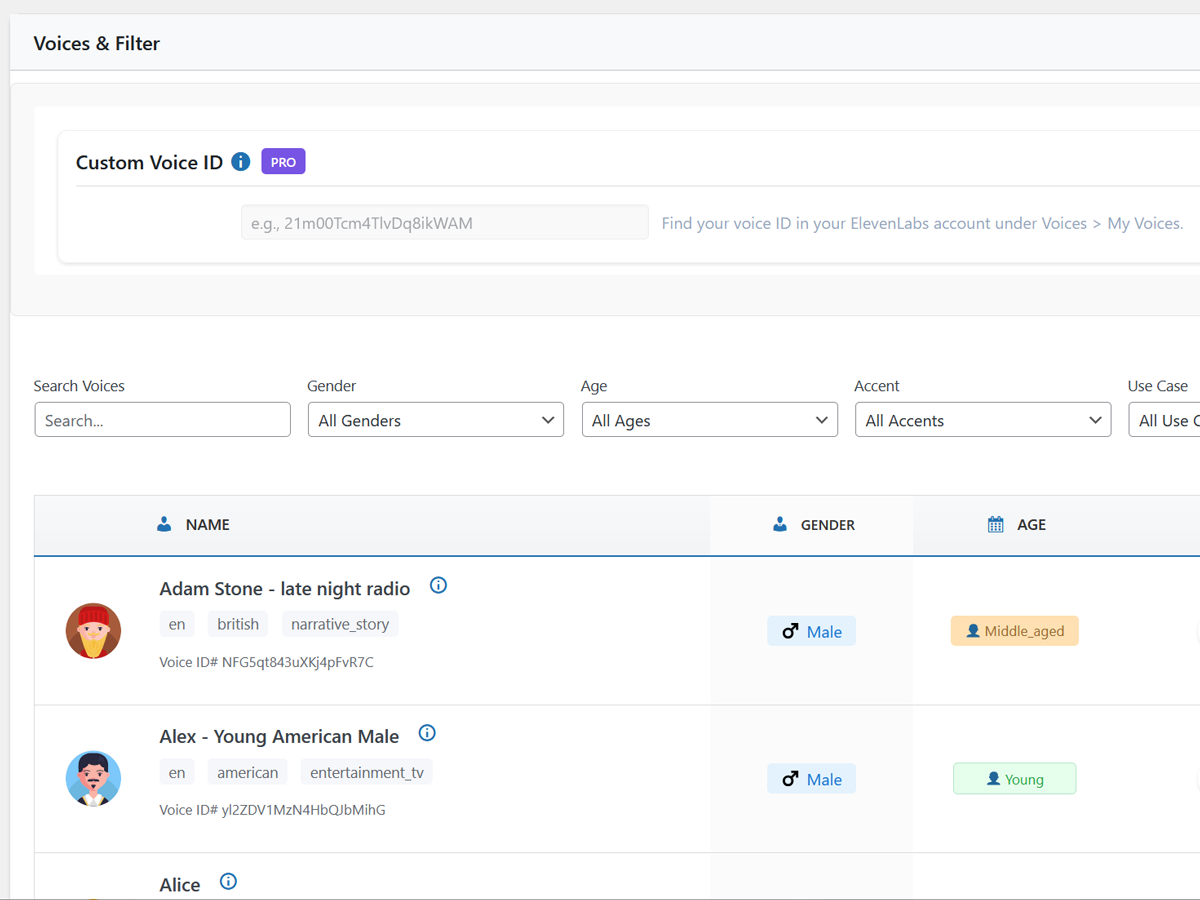
Audio player added to posts automatically with no manual placement needed 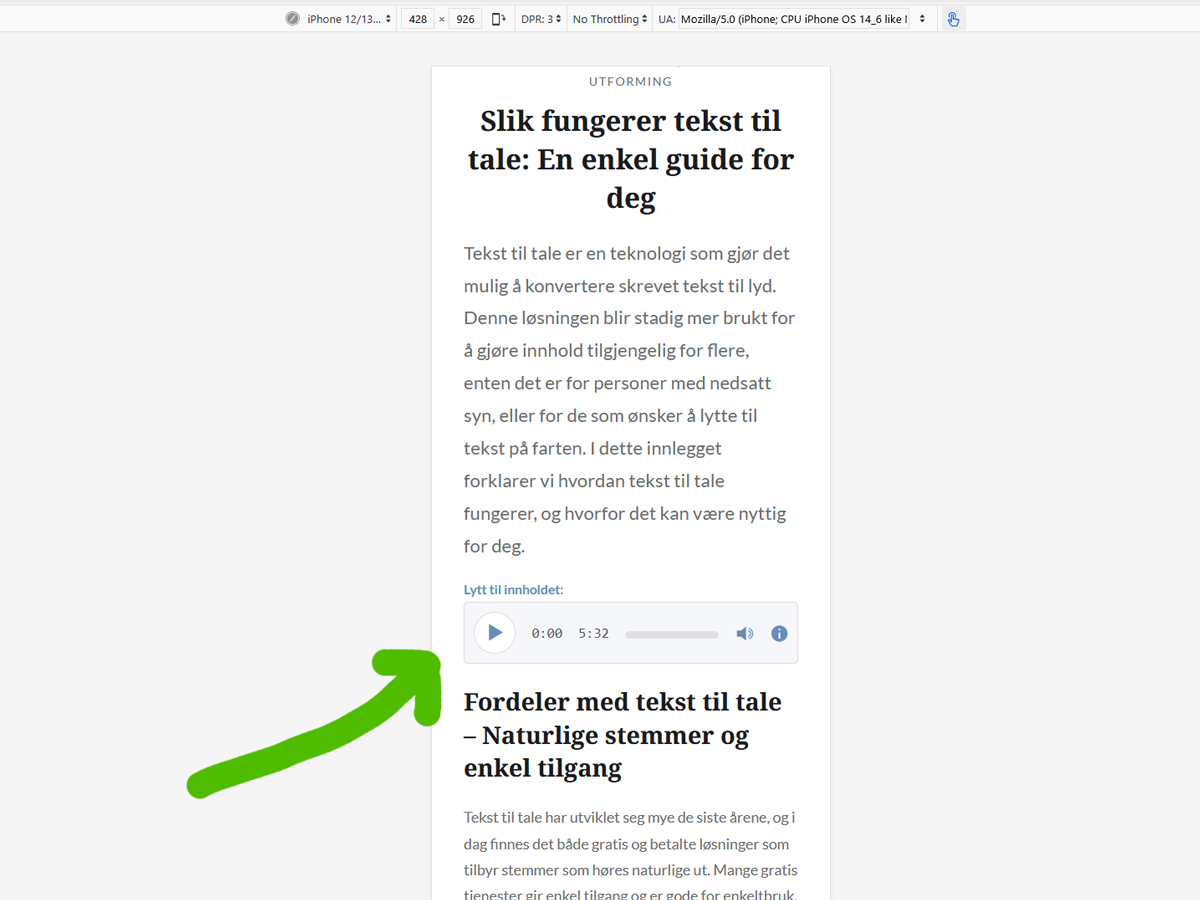
Word Replacement & Pronunciation Controls 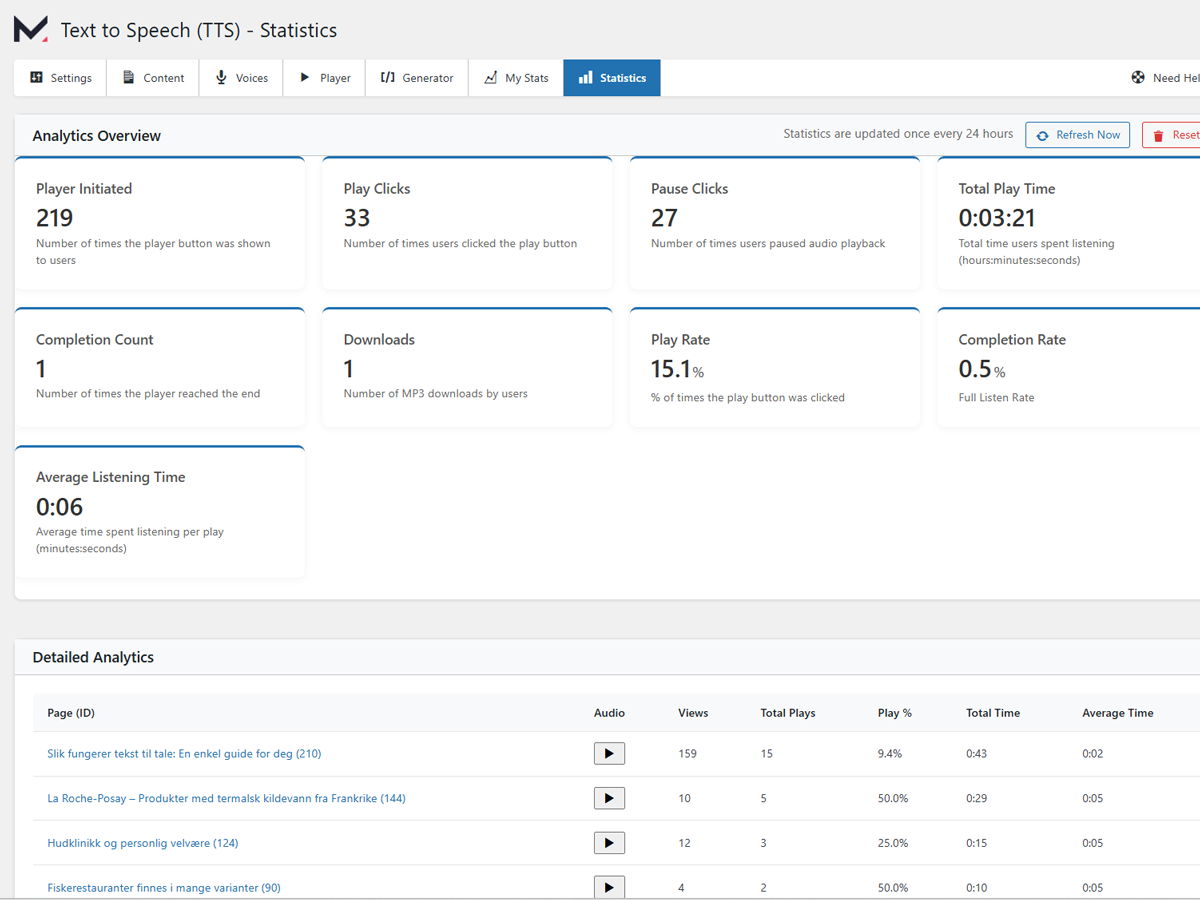
Engagement analytics. Track how many visitors listen to your audio content 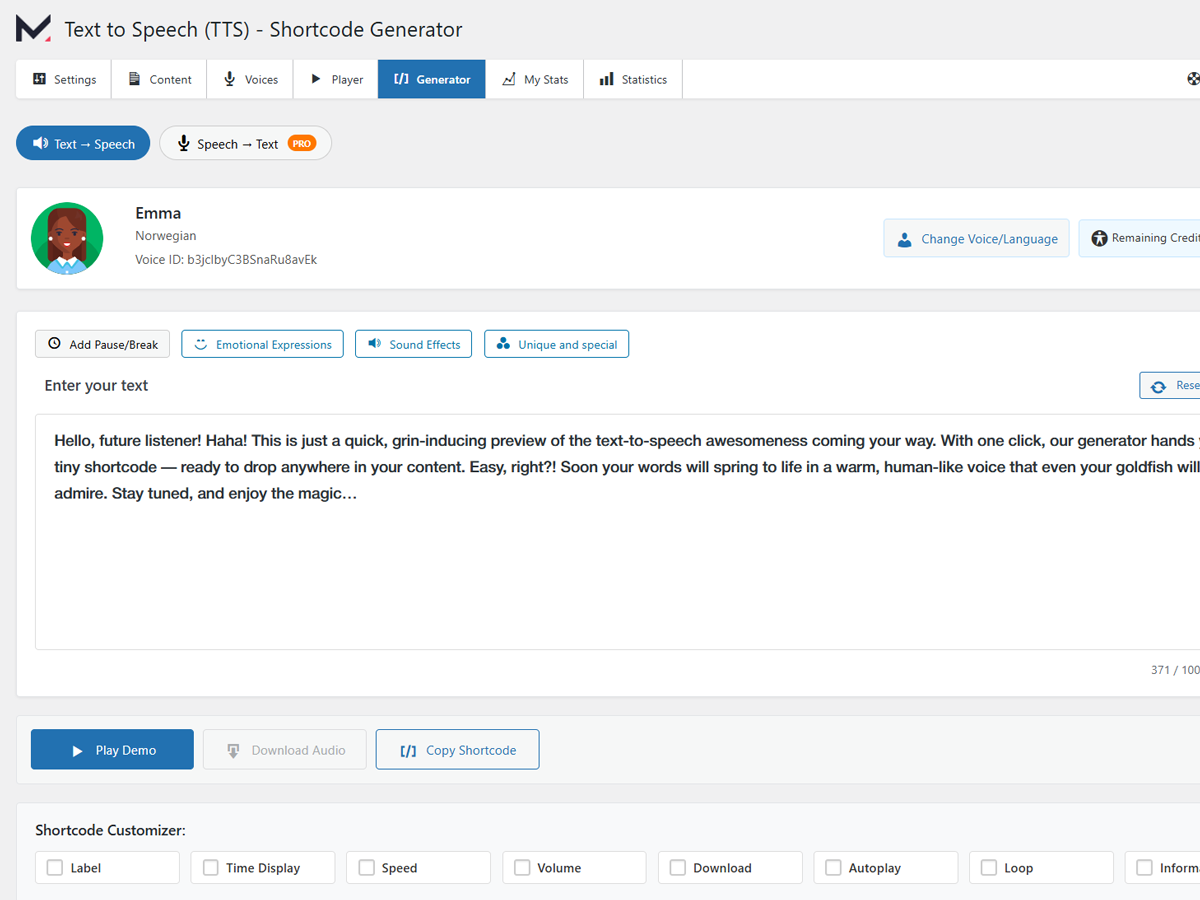
Shortcode and block generator. Place the audio player anywhere on your site 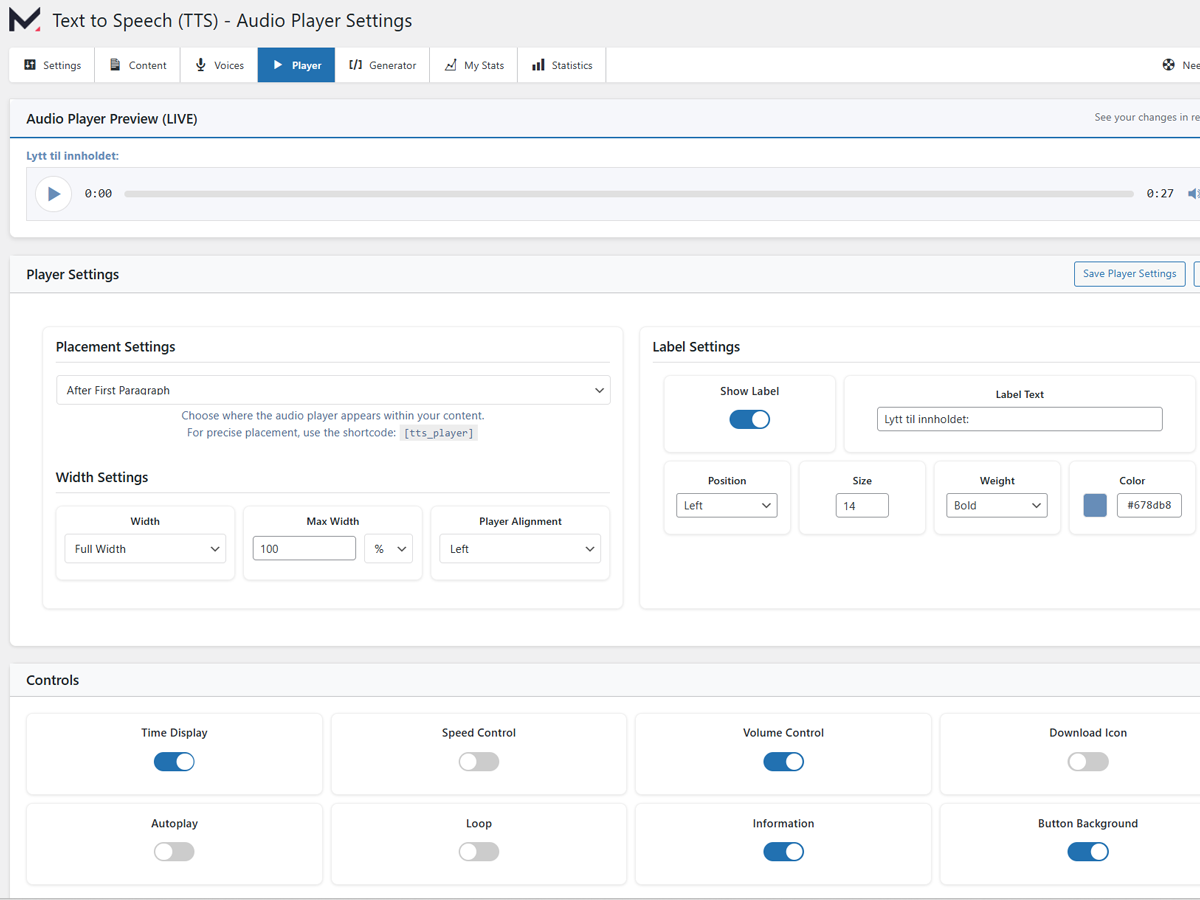
Audio settings panel. Configure playback options, voice selection, and content filters 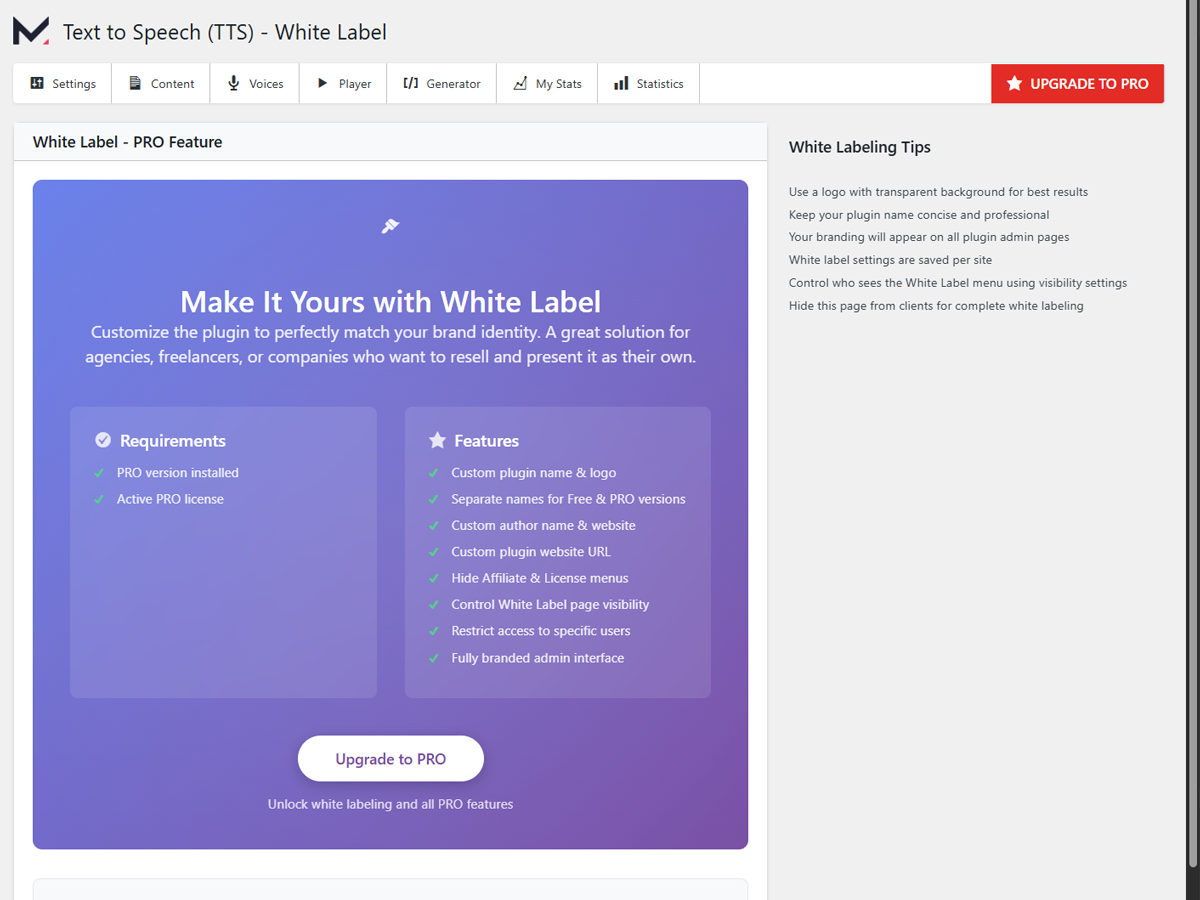
White-label branding options. Remove plugin branding from the backend and the player 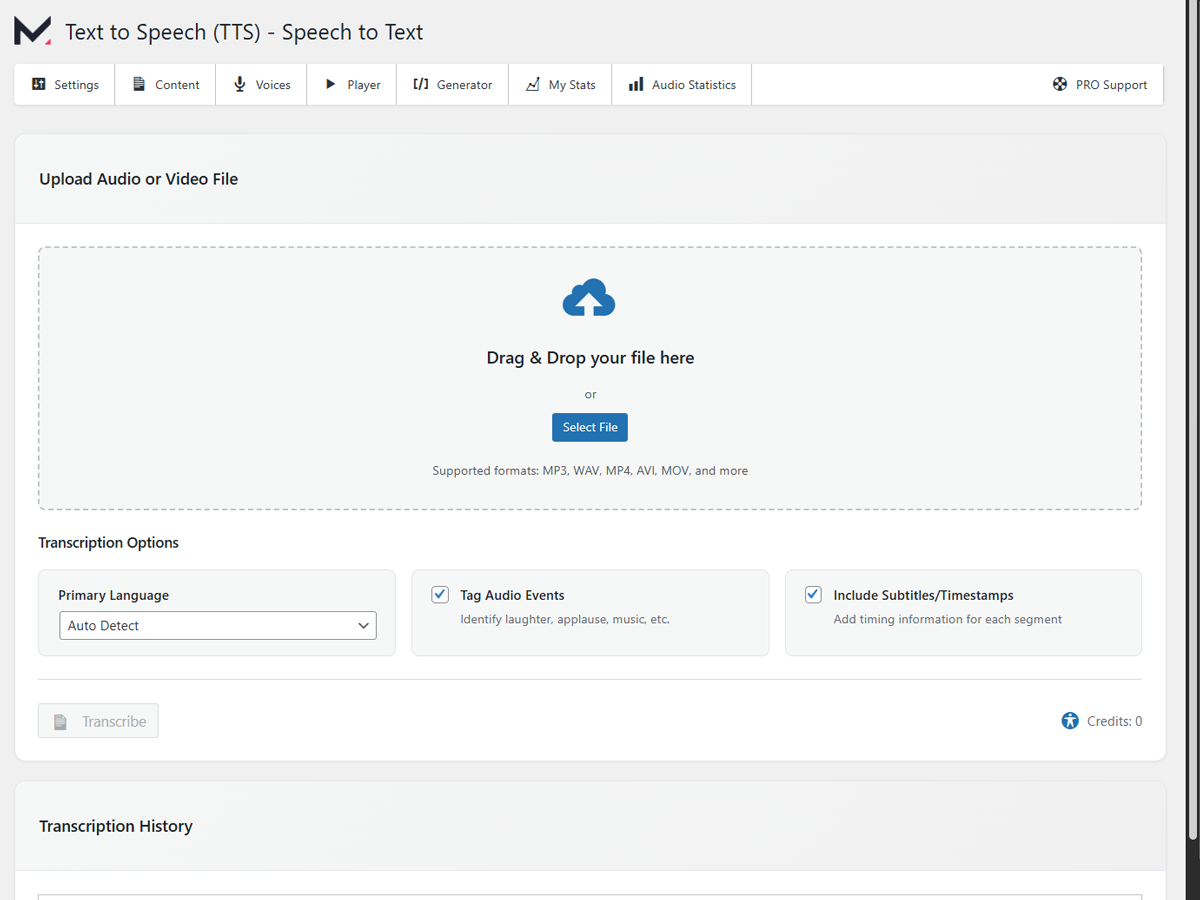
Speech-to-Text transcription interface. Create written transcripts from your audio files
FAQ
-
Do I need an API key or an ElevenLabs account?
-
No. You get 10,000 free welcome credits when you connect your site. No ElevenLabs account is needed. If you want an extra 10,000 free monthly credits, you can optionally connect your own ElevenLabs API key as a fallback.
-
What is TTSWP Dashboard?
-
It is the TTSWP cloud dashboard where you manage your plan, credits, connected sites, and billing. Connect your WordPress site from the plugin’s Overview page with one click.
-
What is the difference between Free, Pro and Agency?
-
Free includes 10,000 welcome credits and standard voices. Pro adds monthly credits, all voices, Amazon S3 storage, multilingual support, and advanced features. Agency adds unlimited sites, white-label branding, credit allocation per site, and dedicated support.
-
Is the text to speech player WCAG compliant?
-
Yes. All audio controls include ARIA labels, keyboard navigation, and color-contrast support.
-
Which languages does text to speech support?
-
All plans support 70+ languages. Pro and Agency unlock 600+ premium voices.
-
Does text to speech work with Elementor, Divi, or Gutenberg?
-
Yes. It works with all popular page builders and standard WordPress themes.
-
Does it work with WooCommerce?
-
Yes. You can generate audio for product descriptions, including title, price, stock status, and category. Pro feature.
-
Can I bulk-convert existing posts to audio?
-
Yes. Upgrade to Pro and use the Bulk Generate tool.
-
Will text to speech slow down my site?
-
No. The player is lazy-loaded and works with caching plugins like WP Rocket, LiteSpeed Cache, and W3 Total Cache.
-
Can I use my own voice?
-
Yes. Pro users can enter their custom ElevenLabs Voice ID for voice cloning.
-
What happens when I run out of credits?
-
Existing audio stays playable. New audio will not generate until you top up credits, your monthly credits renew, or your ElevenLabs API key fallback kicks in.
-
Can I manage multiple sites from one account?
-
Yes. Connect multiple WordPress sites to your TTSWP account. Agency plans include unlimited sites with per-site credit allocation.
Reviews


Contributors & Developers
“Text to Speech – TTSWP” is open source software. The following people have contributed to this plugin.
Contributors
“Text to Speech – TTSWP” has been translated into 3 locales. Thank you to the translators for their contributions.
Translate “Text to Speech – TTSWP” into your language.
Interested in development?
Browse the code, check out the SVN repository, or subscribe to the development log by RSS.
Changelog
3.1.7 – 2026-04-01
- New: Locale-aware number normalization — numbers, percentages, and years are now spoken in the correct language (Dutch, German, French, and 25+ languages)
- Fixed: European number formats (e.g. 8,52% and 5.083.173) were mispronounced or read in English
- Fixed: WPML admin language was overriding the plugin’s TTS language setting in the Shortcode Generator
3.1.6 – 2026-03-31
- New: Numbers, currency, and percentages are now converted to spoken words before synthesis (e.g. $22,200 “twenty-two thousand two hundred dollars”, 2% “two percent”)
- Fixed: Shortcode audio generator was missing number normalization, causing TTS to mispronounce amounts
- Fixed: ElevenLabs Playground was sending raw text without any preprocessing
3.1.5 – 2026-03-31
- Fixed: Audio was being auto-generated on every page visit for paid plan users, regardless of settings
- Fixed: Auto-generation on page visit now correctly respects the “Auto-generate on publish” setting
- Fixed: Credit usage from auto-generation was not logged in the “Credit Usage by Post” table
- Fixed: Failed auto-generation attempts no longer retry on every page load (6-hour cooldown)
3.1.4 – 2026-03-31
- Removed: Remote telemetry collection and usage tracking to external servers
- Fixed: License page no longer blocked for free plan users
- Fixed: Some posts causing a server error when auto-generation is enabled
- Fixed: Browser console warning about unreachable code in player script
3.1.3 – 2026-03-31
- New: Full translation support for 20 languages
- Improved: Sidebar menu now matches the redesigned in-app navigation
- Updated: Fresh translation template (.pot) with all current strings
3.1.2 – 2026-03-30
- Improved: “Site not connected” error now shows a helpful modal with a link to Settings instead of a plain message
- Removed: Telemetry consent modal and remote telemetry collection
3.1.1 – 2026-03-29
- New: Welcome page with onboarding flow, demo audio player, and step-by-step guide for new users
- Improved: Setup checklist items now link directly to the relevant page
- Improved: Setup checklist correctly detects first audio generated across all languages
- Fixed: Proxy download Content-Type validation and tightened SSRF allowlist
- Fixed: File upload validation in Speech-to-Text restricted to audio formats only
- Fixed: Settings export no longer includes sensitive keys (S3, integrity secret)
- Security: Multiple hardening fixes across AJAX handlers and admin pages
3.1.0 – 2026-03-29
TTSWP Cloud Platform
- New: TTSWP cloud dashboard for managing plans, credits, and connected sites
- New: One-click site connection from the plugin Overview page
- New: Pro and Agency plans with per-site billing and monthly/yearly toggle
- New: Credit top-ups that never expire
- New: ElevenLabs BYOK – connect your personal API key as automatic fallback when plan credits run out, with 10,000 free monthly credits from ElevenLabs
- New: Step-by-step ElevenLabs API key setup guide
Upgrade Plan Page
- New: Redesigned Upgrade page showing current plan, Pro, and Agency side by side
- New: Current plan banner with credits remaining and quick links to Manage Plan and Top Up
- New: Feature showcase (Premium Audio, Automation, Integrations) below the plan cards
Improvements
- New: Review nudge card on the Overview page after 10+ audio files or 7 days of use
- Improved: Setup checklist now detects ElevenLabs API key from both TTSWP cloud and local plugin settings
3.0.2 – 2026-03-25
- Fixed: Save settings button not working on all admin pages (White Label, Advanced, Player, Voices, Content, PRO Support)
- Fixed: No confirmation message shown after saving settings on pages with custom form handlers
- Improved: Audio Library now shows a toast notification when audio is successfully regenerated
3.0.1 – 2026-03-25
- Improved: Generated audio files now use the post title in the filename (e.g.
the-headline-14-en.mp3instead ofmementor-14-en.mp3). Existing audio is not affected - Improved: Comprehensive security hardening – added nonce verification, output escaping, input sanitization, and prepared statements across all admin pages and AJAX handlers
- Improved: Settings import now validates option names against a whitelist to prevent unauthorized writes
- Improved: Complete plugin cleanup on uninstall – all database tables, options, transients, and cron jobs are now properly removed
- Improved: Deactivation now clears all scheduled cron events to prevent orphaned tasks
- Improved: Cron scheduling moved out of class constructors to reduce overhead on frontend page loads
- Improved: Infrequently used options (DB versions, timestamps) no longer autoload on every request
- Improved: All PHP files now include direct access protection
- Improved: Removed duplicate AJAX handler registrations and dead code
- Fixed: Wrong text domain in several translation strings preventing proper localization
- Fixed: Audio player showing a “Generate Audio” button on posts that already have audio
- Fixed: Shortcode player rendering on the frontend even when no audio file exists
- Fixed: Auto-inserted player rendering with a pending state instead of being hidden when no audio is available
- New: Bulk rename in Audio Library – rename old-format filenames (
mementor-ID-lang.mp3) to use the current post title - New: Bulk download in Audio Library now creates a single zip file when multiple files are selected
- Fixed: Frontend audio player now uses post meta as the authoritative source for audio URLs, preventing stale references after file renames
- Fixed: Duplicate AudioObject schema markup when multiple player instances exist on a page
- Fixed: Audio Library play counts now include today’s events instead of only showing aggregated historical data
- Fixed: Regenerating audio with Media Library enabled deleted the newly saved file due to attachment cleanup race condition
- Fixed: Deleting audio from the post list now properly removes the Media Library attachment and physical file
- Fixed: Post list audio detection and deletion now uses post meta URLs instead of hardcoded filename patterns
- Fixed: Speech builder caching DELETE query results which could mask errors
- Fixed: N+1 database query in statistics page running SHOW TABLES inside a loop
- Fixed: Audio file saving now always uses WP_Filesystem API instead of falling back to raw PHP functions
3.0.0 – 2026-03-25
Redesigned Admin Interface
- New: Sidebar navigation replaces horizontal tab navigation for faster access to all plugin pages
- New: Universal card-based design system with consistent styling across every admin page
- New: Design tokens (CSS custom properties) for colors, spacing, typography, and component styles
- New: SVG speaker icon in the WordPress admin menu and plugin sidebar
- New: Global input styling with improved contrast, visible borders, and purple focus states
New Pages
- New: Audio Library page – browse, search, filter, sort, and manage all generated audio files with inline playback and bulk actions (select, delete, download)
- New: Add More Credits page – view available credit tiers with a dedicated sidebar CTA button
- New: Documentation page under System & Help
Redesigned Pages
- Redesigned: Voices page – card-based voice list with filters, compact audio settings grid, and copy Voice ID on hover
- Redesigned: Player page – sticky live preview, two-panel controls and colors layout, organized sizing and spacing
- Redesigned: License page – sales page with feature cards and Stripe checkout for free users, streamlined license management for PRO and Agency users
- Redesigned: PRO Support page – support form with info sidebar in a two-column layout
- Redesigned: Statistics, My Stats & Voices, Advanced, Affiliate, and White Label pages – all converted to the new design system
Other Improvements
- New: PRO plugin update notification in the sidebar when a new version is available
- New: Review tracking – footer updates after clicking the review link
- New: White Label enhancements – SVG logo upload support and the ability to hide Documentation, Add More Credits, and PRO Support menu items
- Improved: Checkbox styling with purple checkmark on white background
- Improved: Footer with review link and “Built with” branding
Previous Versions
Version 2.x and earlier included: WooCommerce product audio, WPML multi-language support, Media Library integration, S3 storage, Weglot support, Elementor compatibility, content extraction improvements, and many bug fixes.