

Description
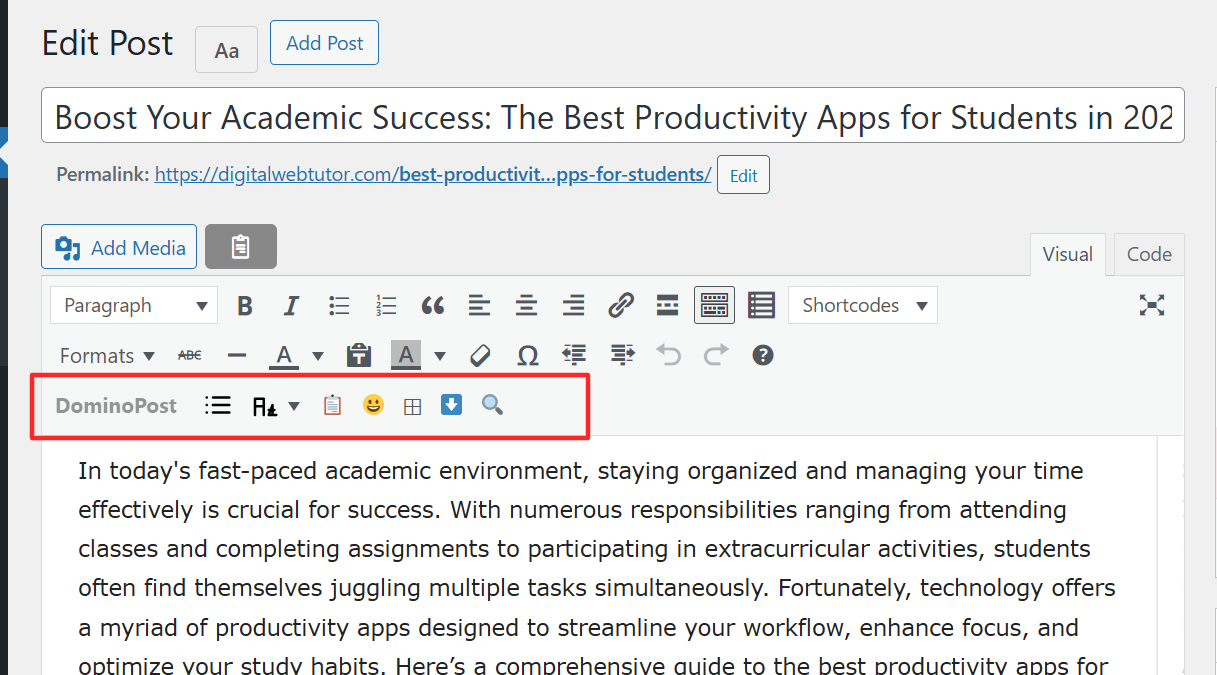
DominoPost is the industry-leading AI-driven productivity suite for professional bloggers, SEO agencies, and content creators. It transforms the WordPress Classic Editor (TinyMCE) into a high-octane content machine, eliminating the need for multiple heavy plugins.
Built by DominoPress, this toolkit provides a seamless, distraction-free environment where AI does the heavy lifting—from generating full SEO-optimized articles to advanced semantic internal linking. Stop switching between tabs; bring the power of GPT-4 directly to your editor.
💎 DominoPost PRO: The AI Evolution
Upgrade your content game with the DominoPost PRO Addon, featuring our most advanced automation engines:
- ⚡ AI Smart Internal Interlinker: Automatically scans your site and inserts high-relevance internal links with perfect anchor text. Double your page views and boost SEO in seconds.
- 🌐 Smart AI External Link Placement: Paste any external URL and let the AI find the perfect context-aware spot to insert it naturally.
- ✨ AI Smart Rewrite (Magic Wand): Select any text and instantly paraphrase it with 4 professional tones (Friendly, Creative, Professional, Concise).
- ❓ AI FAQ Schema Generator: Generate beautiful FAQ blocks with automated JSON-LD Schema to dominate Google’s “People Also Ask” sections.
- 🔧 1-Click AI Grammar Fixer: Instantly audit and fix spelling, grammar, and sentence structure (PRO selection tool).
- 📦 Premium AI Interface: Experience the “Scroll & Review” bar to verify AI links before publishing, plus our signature tech-inspired scanning animations.
🚀 DominoPost FREE: Essential Productivity Suite
Get started with our lightweight, high-performance toolkit for every writer:
- ⚡ Pro Table of Contents (TOC): 4 stunning styles (Bullets, Numbers, Minimal, Boxed) with smooth-scrolling and live preview. Superior SEO and UX out of the box.
- 🕵️♂️ Site-Wide Broken Link Checker: Identify and fix 404 errors across your entire site from one central dashboard.
- ✍️ AI Content Writer (Standard): Generate SEO-optimized lists, headings, and outlines from simple keywords. Support for 50+ languages.
- 🖼️ AI Image Generator: Generate context-aware images (DALL-E/Flux) and auto-attach them as Featured Images.
- 📎 CTA & Copy Code Buttons: Professional one-click buttons for code snippets and call-to-action blocks to boost conversions.
- 📊 SEO Post Analysis: Real-time stats, word count, reading time, and keyword density tracking in your sidebar.
- 📝 Case Converter: Instantly fix capitalization (Title Case, Sentence Case, UPPERCASE) in one click.
Why Choose DominoPress?
- Lightweight & Fast: Optimized code with Zero Bloat. Doesn’t slow down your site or dashboard.
- SEO-First Design: Every feature is built to help you rank higher on Google Search.
- Seamless Integration: Built natively for the WordPress Classic Editor for the fastest writing experience possible.
Credits
Developed by DominoPress – Making WordPress Content Creation Smarter, Faster, and more Human.
Visit us: https://dominopress.com
Screenshots
DominoPost AI Writer – Generate full articles from keywords. 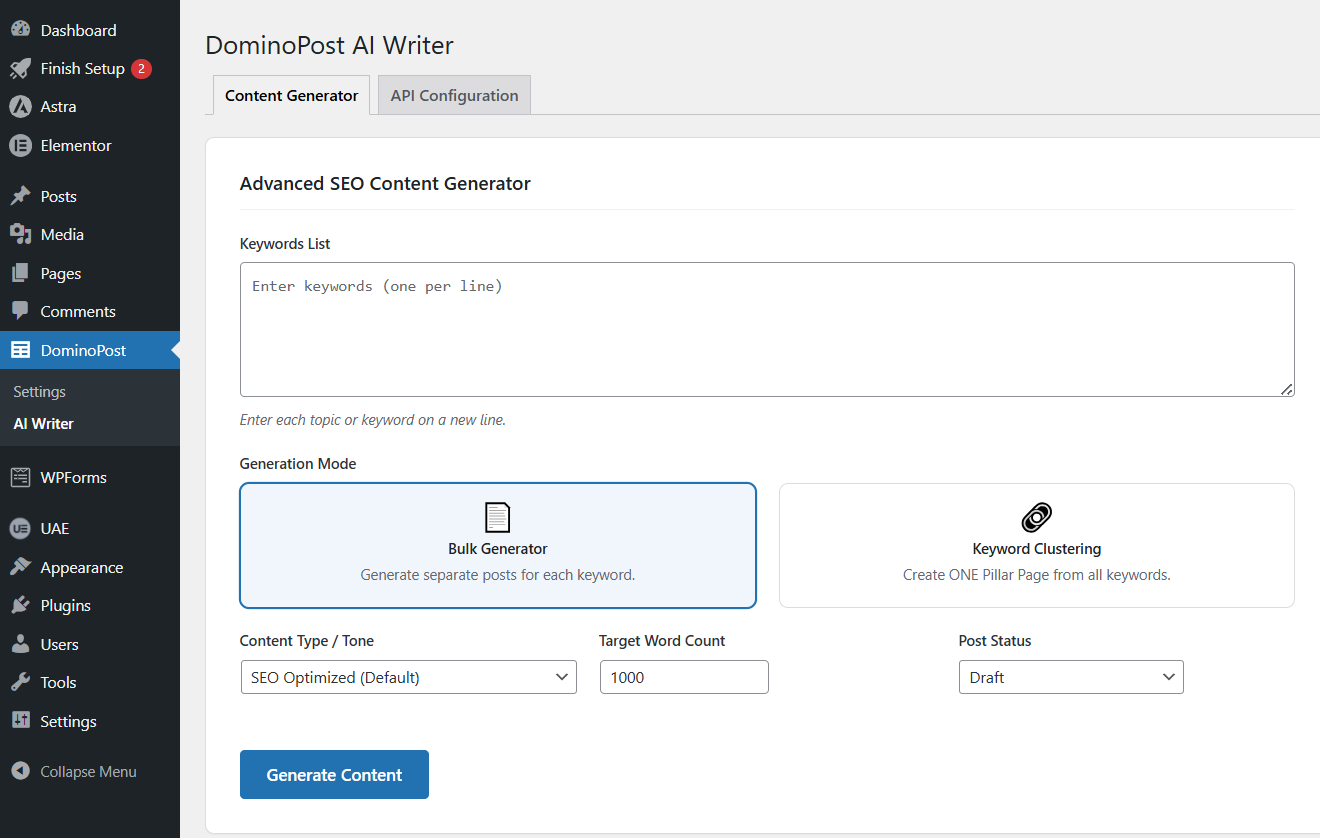
DominoPost toolbar with all features. 
Modern Table of Contents with 4 style variations. 
Title Case Fixer dropdown menu. 
Related Posts simple numbered list display. 
The Frontend of Related Posts Suggestion. 
Related Posts meta box for manual selection. 
Update Reminder meta box in post editor. 
Content Analysis sidebar showing stats. 
In-article Find & Replace in Few Click. 
Settings page with all configuration options. 
Emoji Library for Bloggers. 
Insert Modern Download Button as Gif. 
Download Button Preview. 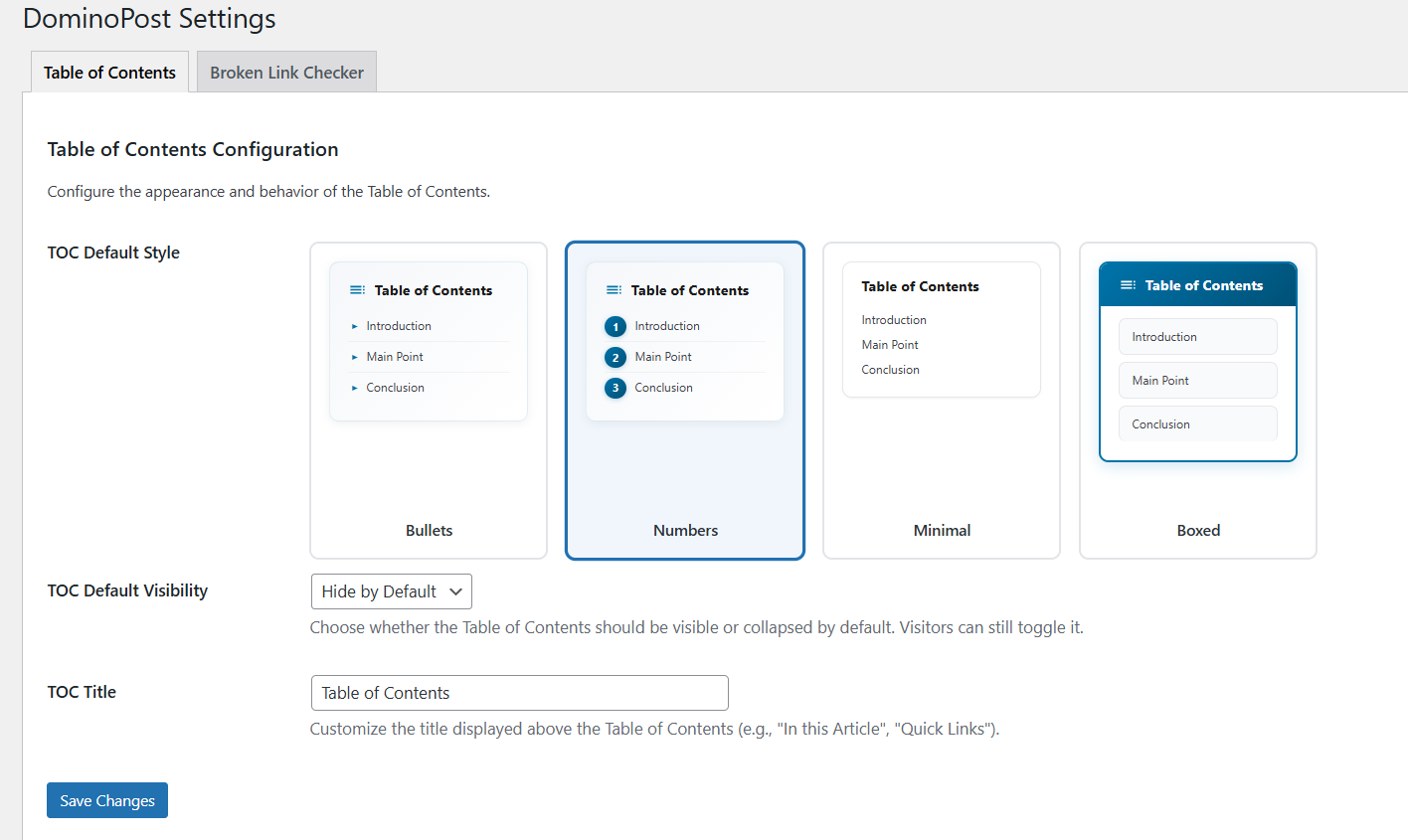
Broken Link Checker.
Installation
- Upload the
dominopost-advanced-post-editorfolder to your/wp-content/plugins/directory. - Activate the plugin through the ‘Plugins’ menu in WordPress.
- (Optional) Install the DominoPost PRO Addon to unlock the advanced AI automation suite.
- Visit DominoPost Settings to configure your API key and default styles.
- Start creating world-class content!
FAQ
-
Does it support OpenAI and LongCat AI?
-
Yes! We support any OpenAI-compatible API key. Simply enter your key in the settings.
-
Is the Table of Contents SEO friendly?
-
Absolutely. Our TOC follows semantic HTML structures and uses clean IDs for perfect Google crawling.
-
Does the PRO Addon require the Free version?
-
Yes, the PRO Addon is a lightweight enhancement that plugs into the robust DominoPost core. Use them together for the ultimate experience.

Contributors & Developers
“DominoPost – The Ultimate AI-Powered SEO & Writing Toolkit” is open source software. The following people have contributed to this plugin.
Contributors
Translate “DominoPost – The Ultimate AI-Powered SEO & Writing Toolkit” into your language.
Interested in development?
Browse the code, check out the SVN repository, or subscribe to the development log by RSS.
Changelog
2.6.0
- NEW: Official Launch of the DominoPost PRO Addon Architecture.
- NEW: Premium AI Smart Rewrite (Magic Wand) with 4 custom tones.
- NEW: AI FAQ Schema Generator with automated JSON-LD output.
- NEW: Permanent Toolbar Visibility for all premium tools with “PRO Preview” interactive modals.
- Updated: Official DominoPress rebranding and new support URLs.
- Improved: Major CSS overhaul for all editor popups and modals for premium pixel-perfect finish.
- Fixed: Duplication issues when PRO and Core are active simultaneously.
2.5.0
- NEW: AI-Powered Auto Internal Linking (PRO).
- NEW: Smart AI External Link placement with context analysis (PRO).
- NEW: “Scroll & Review” Bar for premium link verification.
- Improved: Enhanced AI loading overlay with high-tech animations.
2.4.0
- Fixed: Editor and Author roles can now properly access DominoPost tools.
- Fixed: Resolved issue where the TinyMCE visual editor would sometimes crash into the “Text” tab for non-admin users.
2.3.2
- Fixed: Stop AI from incorrectly altering valid proper nouns and foreign language spellings.
- Improved: AI Writer prompt logic for ‘Keyword Clustering’ mode to build strong pillar pages.
- Improved: Better SEO tuning for Bulk Mode.
2.3.1
- Fixed: Improved API response handling and implemented a smart retry mechanism.
- Improved: AI Writer configuration UI and added a direct setting link in the plugins list.
2.3.0
- New: Added support for AI Provider selection (LongCat vs OpenAI).
- New: Added optional “Custom Instructions” field for AI generation.
- Improved: AI now automatically detects and fixes spelling mistakes in keywords.
- Improved: Better error handling and timeout prevention for long articles.
2.2.2
- FIX: Fixed AI Writer timeouts on slower servers (increased execution limit).
- FIX: Fixed “Empty Response” error for Bengali/non-English languages.
- FIX: Fixed Word Count accuracy for Unicode/Bengali scripts.
- IMPROVEMENT: Enhanced AI prompts for more natural, human-like language generation.
- IMPROVEMENT: Clarified API configuration instructions.
2.2.1
- FIX: Fixed readme.txt tags and description length compliance warnings.
- FIX: Fixed Table of Contents including “More Articles” header.
2.2.0
- NEW: AI Writer – Powerful SEO content generator with Bulk and Clustering modes.
- NEW: Settings Menu – Renamed specific submenu to “Settings” for clarity.
- IMPROVEMENT: Refined UI and prompts for better human-like writing.
2.1.0
- NEW: Related Posts – Simple numbered list of related content.
- NEW: Update Reminders – Dashboard notifications with action buttons.
- NEW: Manual Related Posts selection via meta box.
- NEW: “Notified” and “Remind 2 days later” buttons for reminders.
- NEW: “Last Updated” display option.
- NEW: Download button “Open in new tab” option.
- IMPROVED: Emoji Picker – Curated 75 most-used emojis for bloggers.
- IMPROVED: Download buttons – Auto-add https:// to URLs.
- IMPROVED: TOC smooth scrolling.
- IMPROVED: Title Case Fixer positioning and visibility.
- IMPROVED: Related Posts design – clean numbered list.
- IMPROVED: Overall UI/UX enhancements.
- REMOVED: Email notifications (replaced with dashboard notifications).
- SECURITY: Added ABSPATH checks to all class files.
- Version bump to 2.0.0 for major feature additions.
1.2.1 – 2024-11-26
- Fixed TOC emoji encoding issue.
- Added modern TOC styling with 4 variations.
- Improved settings page organization.
- Bug fixes and performance improvements.
1.2.0 – 2024-11-25
- Added Table of Contents feature.
- Added Content Analyzer.
- Added Find & Replace.
- Added settings page.
- Improved toolbar organization.
1.1.0 – 2024-11-20
- Added Title Case Fixer.
- Added Copy Code blocks.
- Added Emoji Picker.
- Added Table Generator.
- Added Download Buttons.
1.0.0 – 2024-11-15
- Initial release.
- Classic Editor integration.
- Basic toolbar features.