

Description
Video Tutorial
Smart Cycle Discounts is a campaign-first promotion operations plugin for WooCommerce designed for stores that need reliable, scheduled, and high-performing discount campaigns.
It combines the capabilities of a WooCommerce discount plugin and dynamic pricing engine within a single structured workflow.
Instead of managing scattered sale prices and disconnected discount rules, you run organized promotion campaigns that help you plan, launch, monitor, and optimize promotions with tighter control over timing, conflicts, and performance.
Many stores still run scheduled sales and automated promotions through manual edits and isolated rules. This often leads to overlapping discounts, margin leakage, late launches, early endings, and constant troubleshooting.
Smart Cycle Discounts replaces that fragmented process with four connected systems designed to bring visibility, operational discipline, and safer promotion execution to WooCommerce stores.
Key Features
Smart Cycle Discounts helps WooCommerce stores run reliable, automated promotions with operational control.
- Automated WooCommerce discount campaigns
- Percentage and fixed discounts
- BOGO (Buy One Get One) promotions
- Scheduled and recurring sales campaigns
- Campaign-first promotion workflow (plan schedule launch monitor)
- Priority-based overlap and conflict handling
- Campaign Health checks before launch
- Campaign Intelligence guidance for “what to do right now”
- Campaign lifecycle management (draft scheduled active expired)
- Campaign-level performance tracking (Pro analytics depth)
Perfect For WooCommerce Stores That
- Run seasonal, flash, or recurring sales campaigns
- Need to schedule WooCommerce discounts automatically
- Manage multiple promotions and want safer overlap control
- Want promotion risk checks before launching campaigns
- Need campaign-based decision support instead of simple discount rules
WooCommerce Discount Types and Dynamic Pricing Features
Free version includes:
- Percentage discounts
- Fixed amount discounts
- BOGO (Buy One Get One) deals
- Free shipping toggle inside campaign setup
- User role targeting (include/exclude roles)
- Location targeting by billing or shipping country
- Recurring campaign scheduling (continuous or instances)
Pro version adds:
- Tiered quantity discounts (volume pricing)
- Spend threshold discounts (cart-based conditions)
- Bundle deals (percentage, fixed, flat bundle pricing)
- Advanced discount-rule controls for deeper eligibility and margin protection
- Advanced subscription discount controls (when WooCommerce Subscriptions is active)
- Full analytics dashboard and advanced exports
Advanced WooCommerce Promotion Engine
Smart Cycle Discounts is built as a campaign system, not a one-off rule editor.
- Campaign lifecycle management (draft scheduled active expired)
- Smart product targeting (all products, specific products, random products, categories, advanced filters)
- Timezone-aware scheduling automation
- Priority resolution when campaigns overlap
- Optimized caching and operations for larger WooCommerce catalogs
WooCommerce Promotion Conflict Detection
Before launch, Campaign Health and Campaign Intelligence evaluate operational risks including:
- Promotion conflicts and overlapping discounts
- Priority ties across concurrent campaigns
- Stock exposure and product readiness
- Schedule and timing consistency
- Discount integrity and risk indicators
This shifts teams from reactive troubleshooting to proactive promotion control.
WooCommerce Campaign Analytics and Intelligence
Smart Cycle Discounts includes campaign-level operational insight so you can evaluate:
- Which campaigns are driving meaningful revenue
- Which discounted products perform best
- Which promotions should be scaled, paused, or redesigned
The analytics dashboard helps stores optimize promotions instead of guessing which discounts work best.
Advanced analytics depth and exports are available in Pro, while base Campaign Intelligence guidance is included in the free version.
Popular WooCommerce Promotion Use Cases (BOGO, Bulk Discounts, Bundle Discounts, Sale Scheduler)
Smart Cycle Discounts can be used to run:
- WooCommerce BOGO campaigns
- WooCommerce bulk discount and tiered pricing campaigns
- WooCommerce scheduled sales and recurring promotions
- WooCommerce bundle discount campaigns and product packages
- WooCommerce flash sales and seasonal campaigns
- WooCommerce customer-segment discounts (roles and locations)
- WooCommerce promotion cycles with planned campaign scheduling
Why This WooCommerce Discount Plugin Is Different
Most WooCommerce discount plugins are rule engines.
Smart Cycle Discounts is a promotion operations system for WooCommerce: plan campaigns, launch promotions on schedule, detect risks before revenue loss, and run promotions with controlled execution.
Useful Links
- Product page: Smart Cycle Discounts
- Free plugin listing: WordPress.org Plugin Page
- Documentation hub: Smart Cycle Discounts Docs
- Changelog: Version History
- Use cases: Campaign Use Cases
- Discount calculator: WooCommerce Discount Calculator
- Blog: WooCommerce Tips & Tutorials
- Support: Support Center
- Contact: Contact Webstepper
- Privacy policy: Privacy Policy
- Terms: Terms of Service
Get Started
Install Smart Cycle Discounts, launch your first campaign in minutes, and move from manual discount edits to repeatable, automated WooCommerce promotions.
Need Help?
Screenshots
Campaign wizard Step 1 – Basic information with campaign name, description, and contextual help 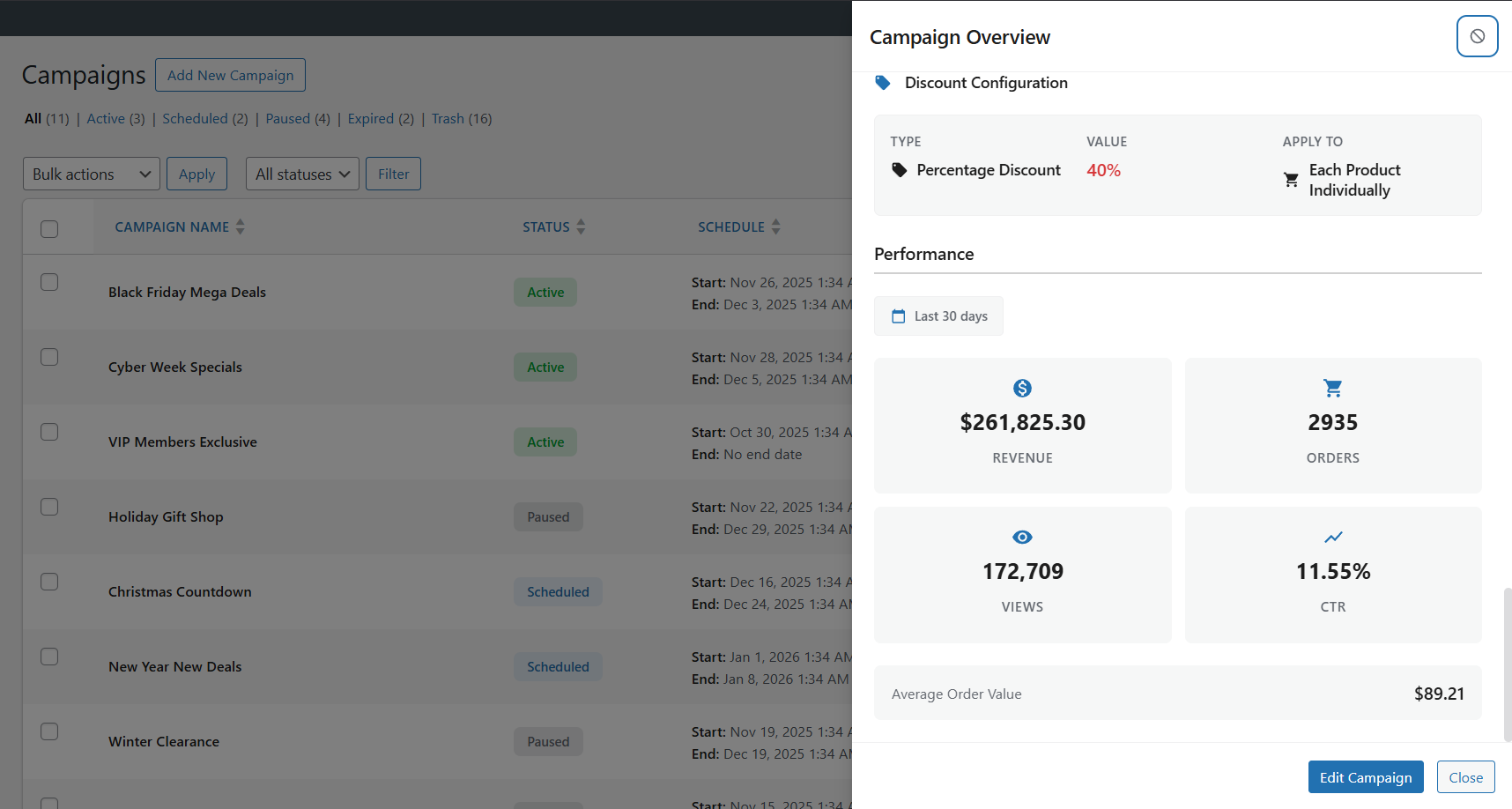
Campaign wizard Step 2 – Product selection with category tree and filtering options 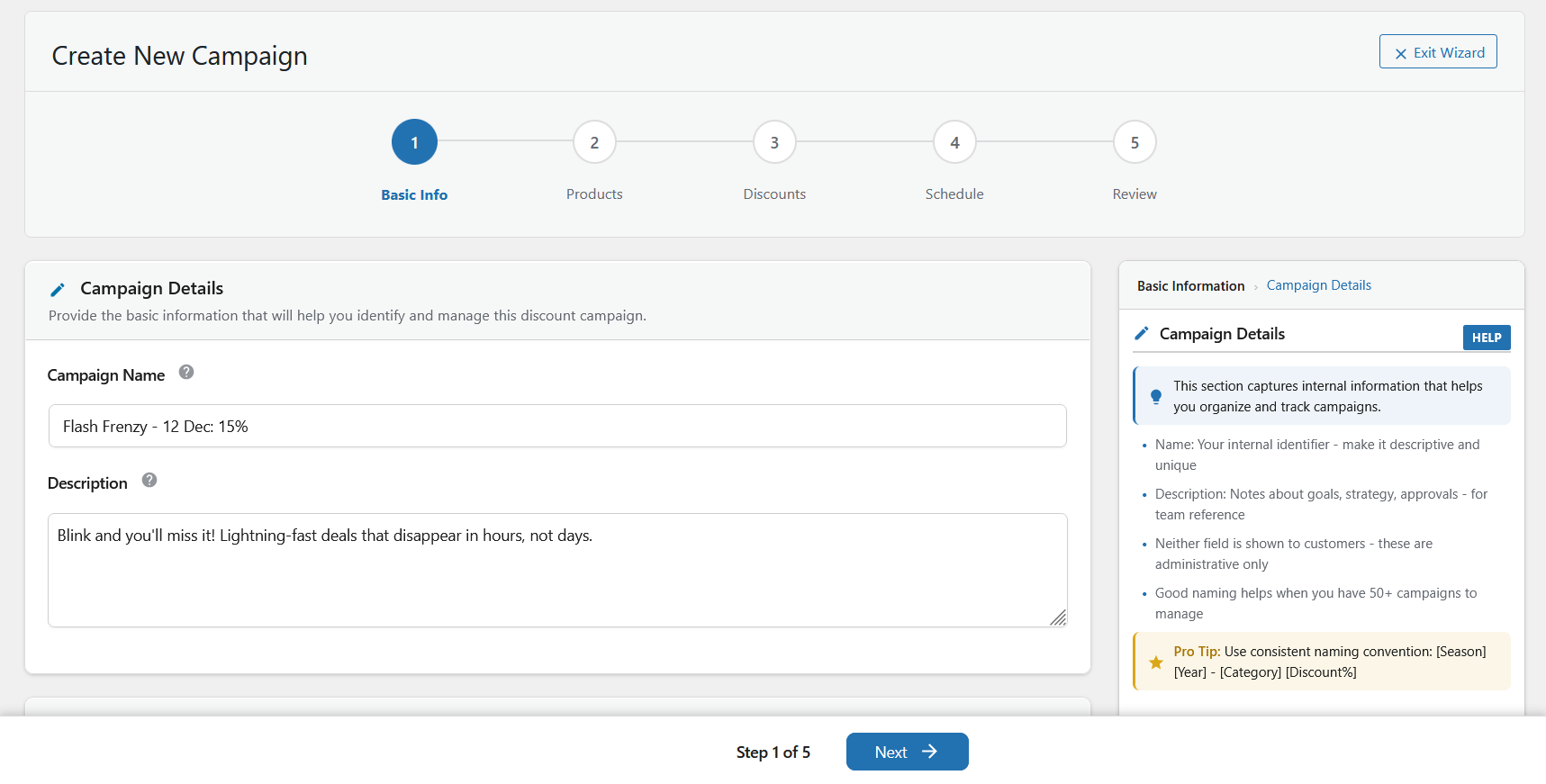
Campaign wizard Step 3 – Discount configuration with live badge preview and positioning 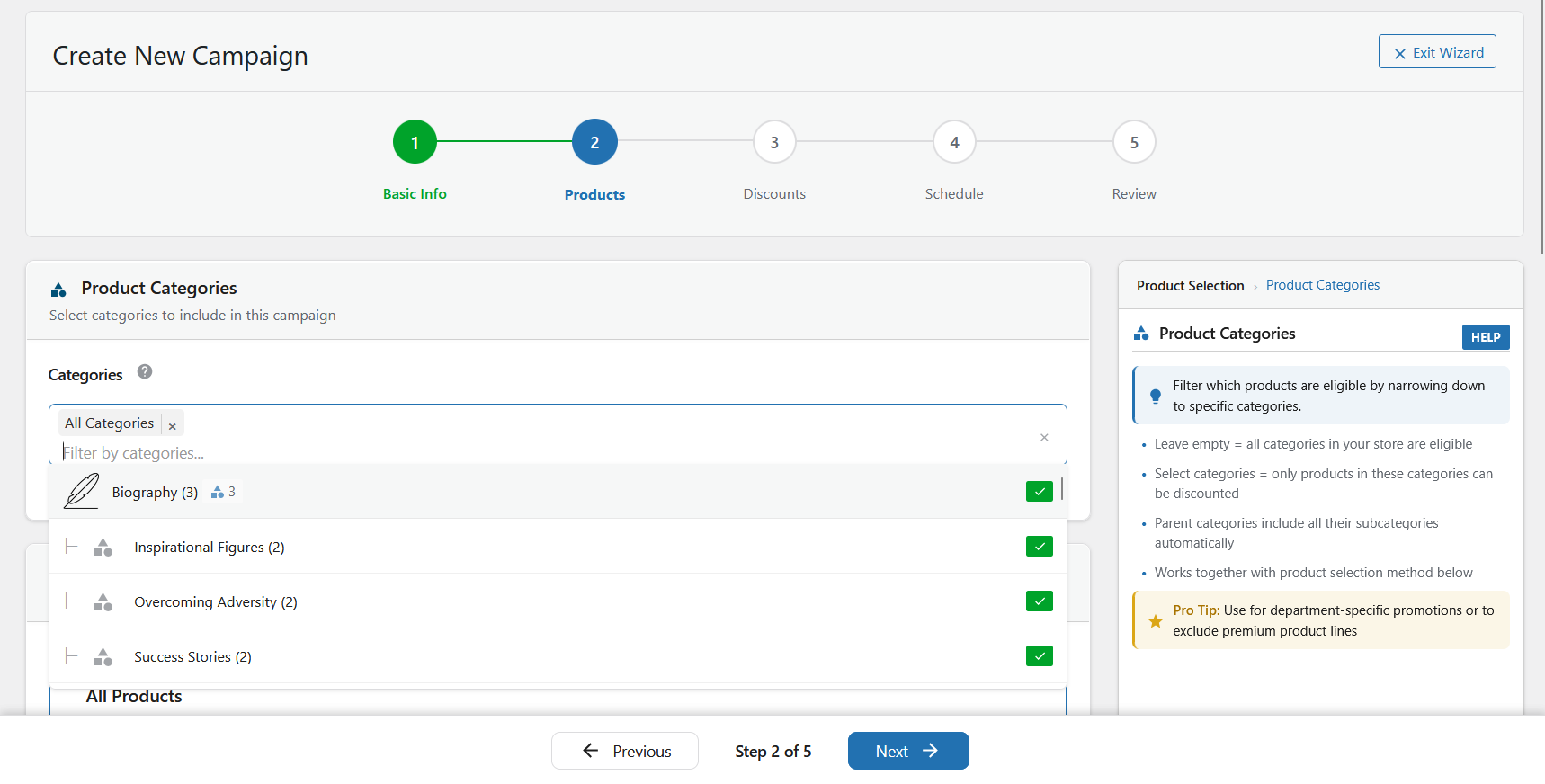
Campaign wizard Step 4 – Schedule configuration with date/time picker and duration calculator 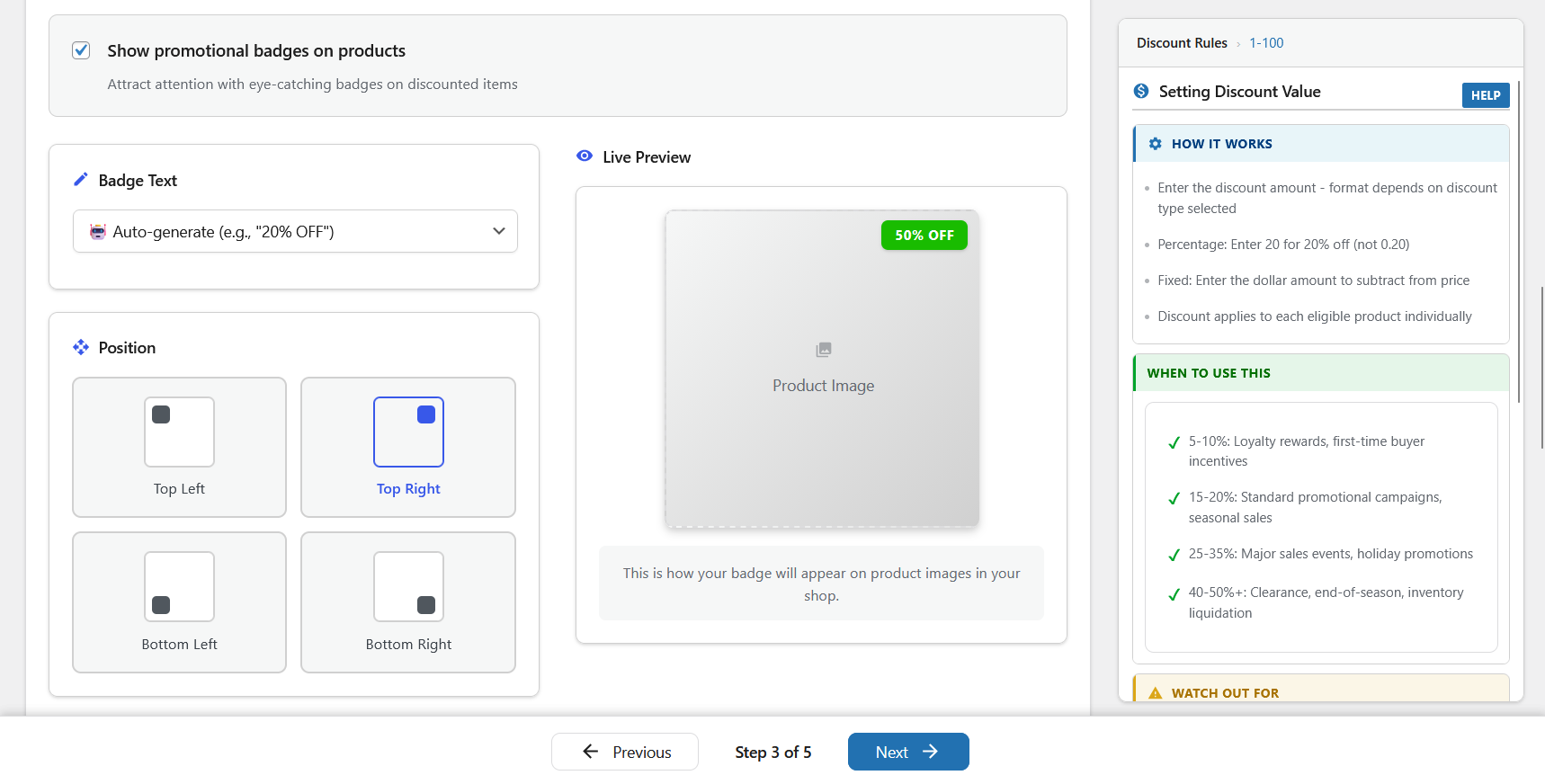
Campaign wizard Step 5 – Review with smart recommendations and campaign summary sidebar 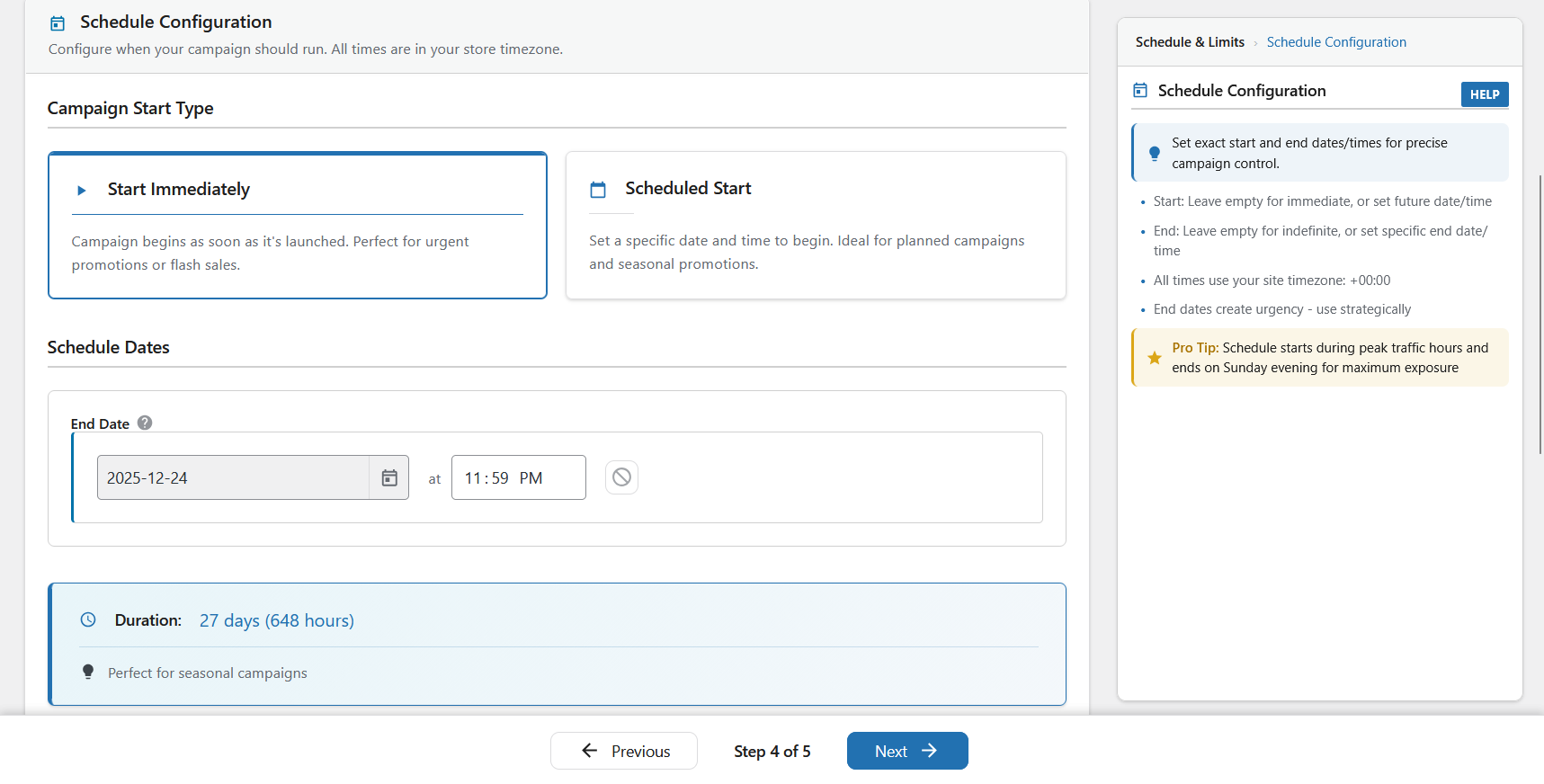
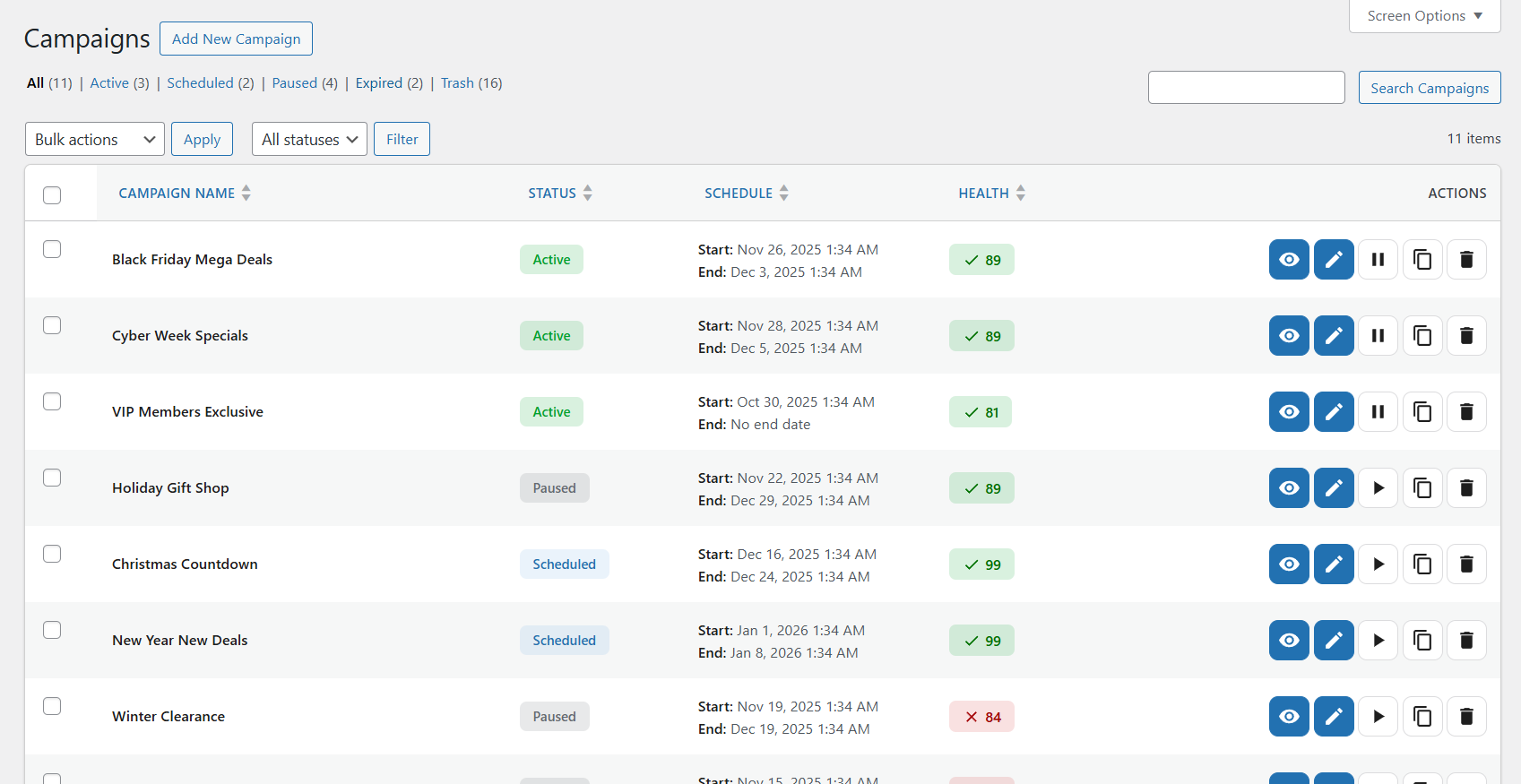
Campaigns list – Manage all campaigns with status, schedule, health scores, and quick actions 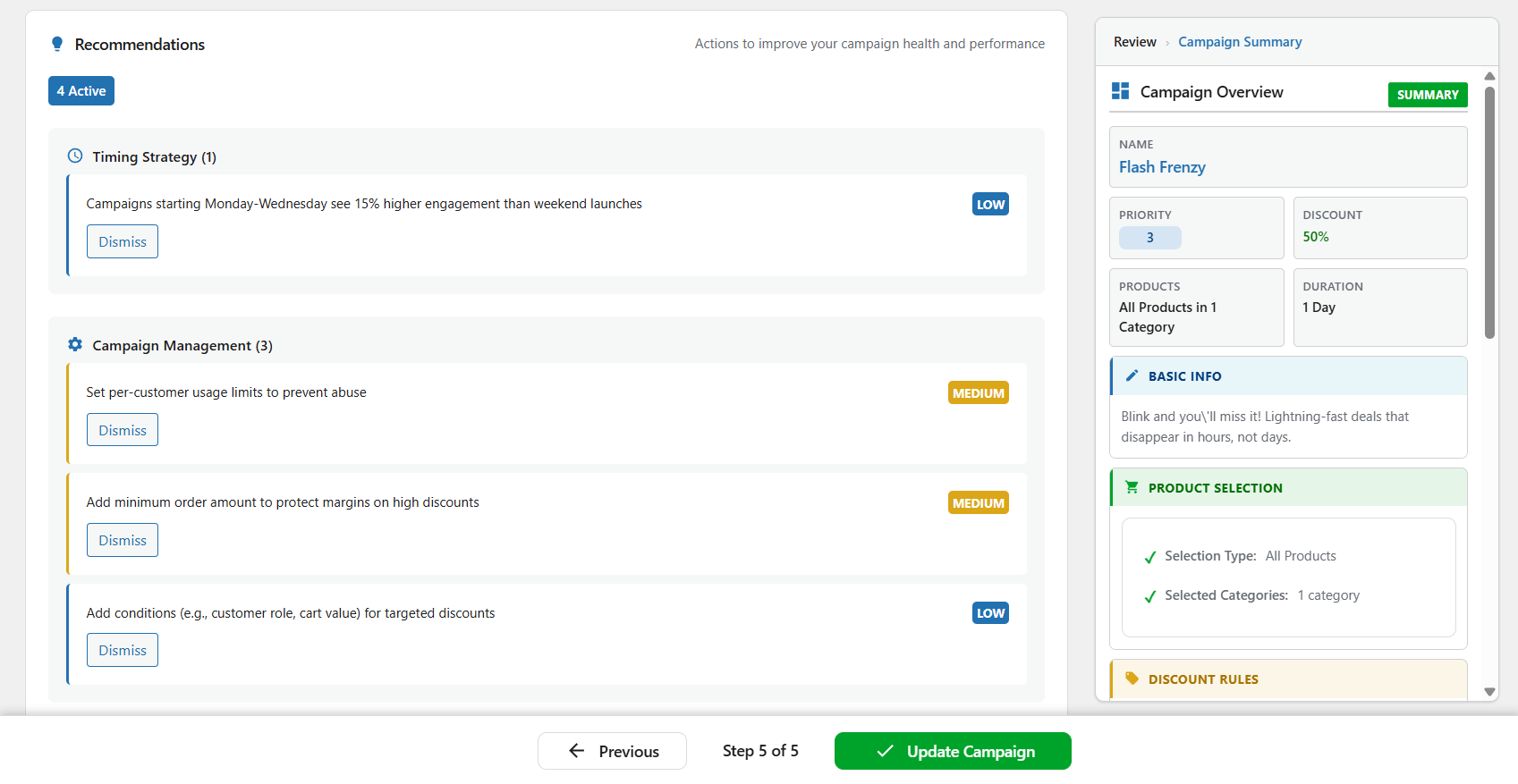
Campaign overview panel – Quick view of campaign settings and real-time performance metrics 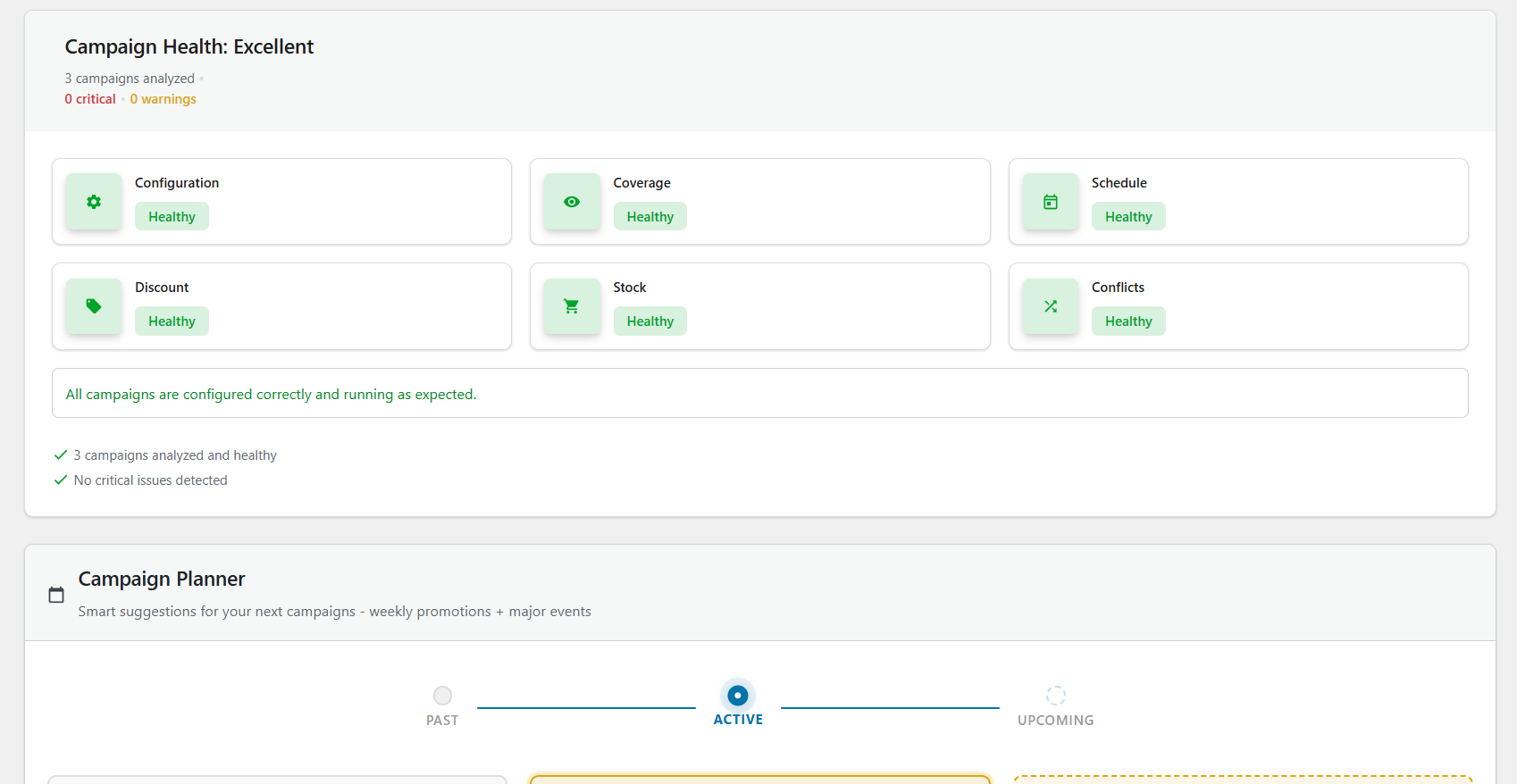
Main dashboard – Performance summary with campaign cards sorted by urgency 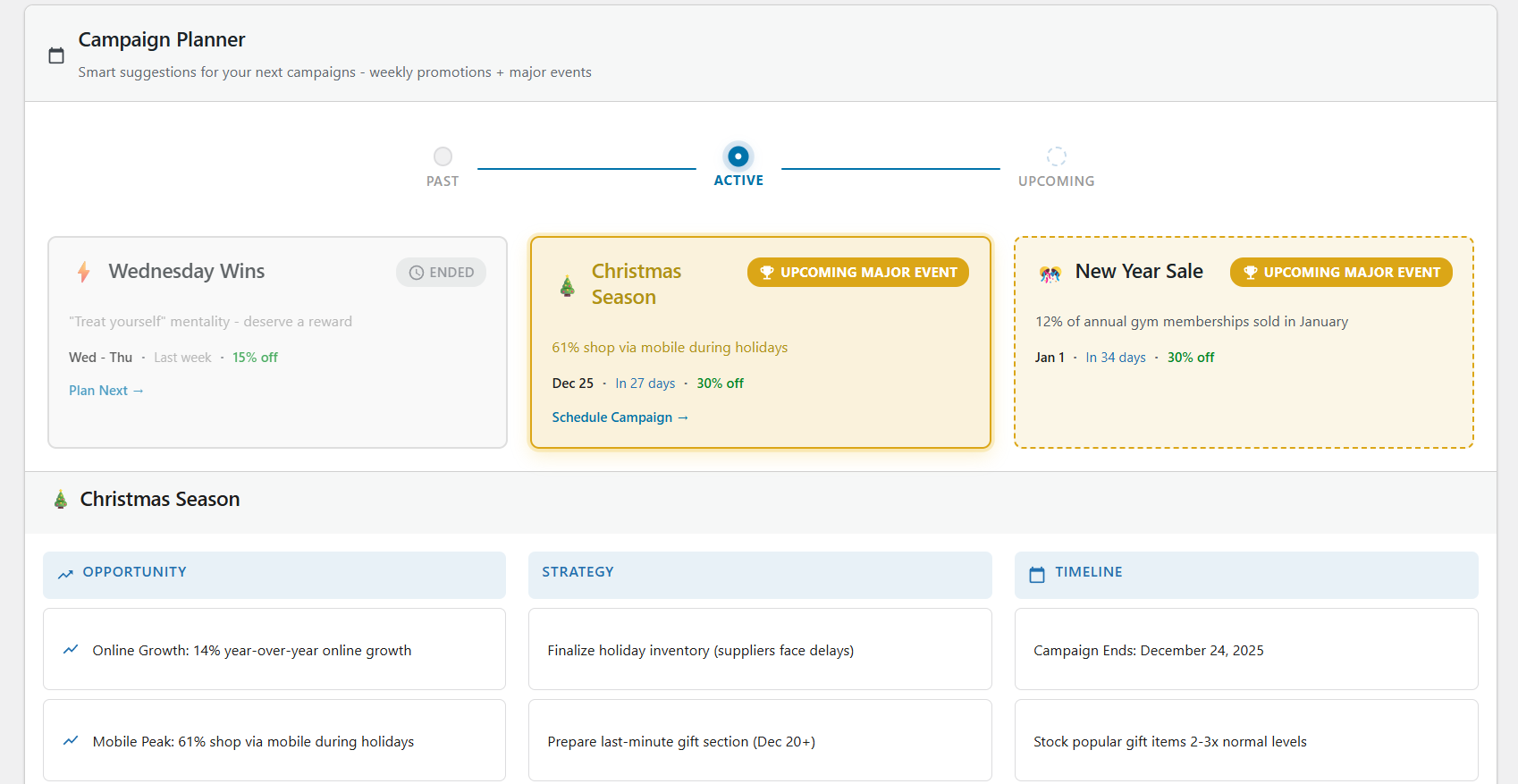
Dashboard health widget – Monitor all campaigns with 6 health indicators at a glance 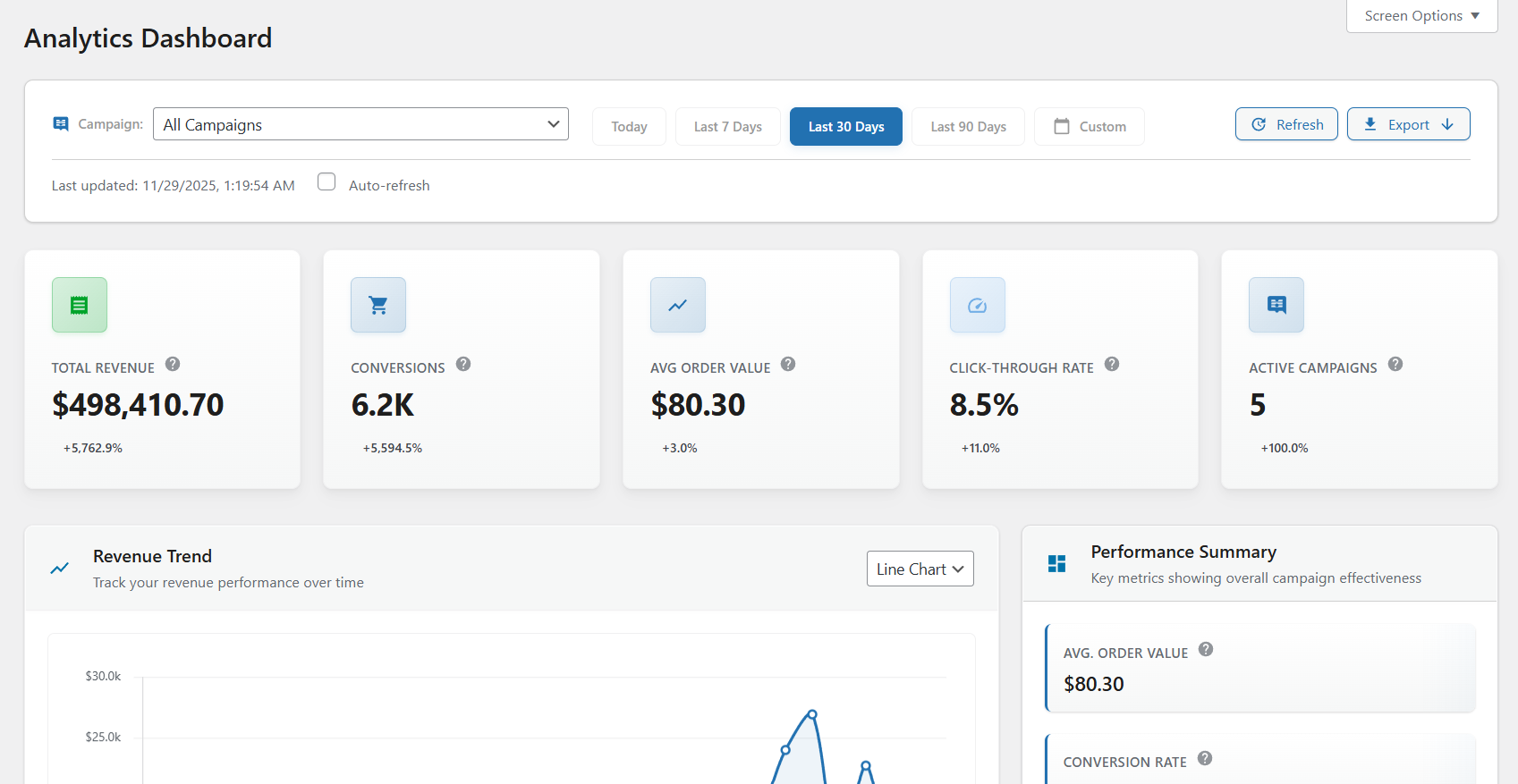
Campaign planner – Smart suggestions for upcoming events and seasonal promotions 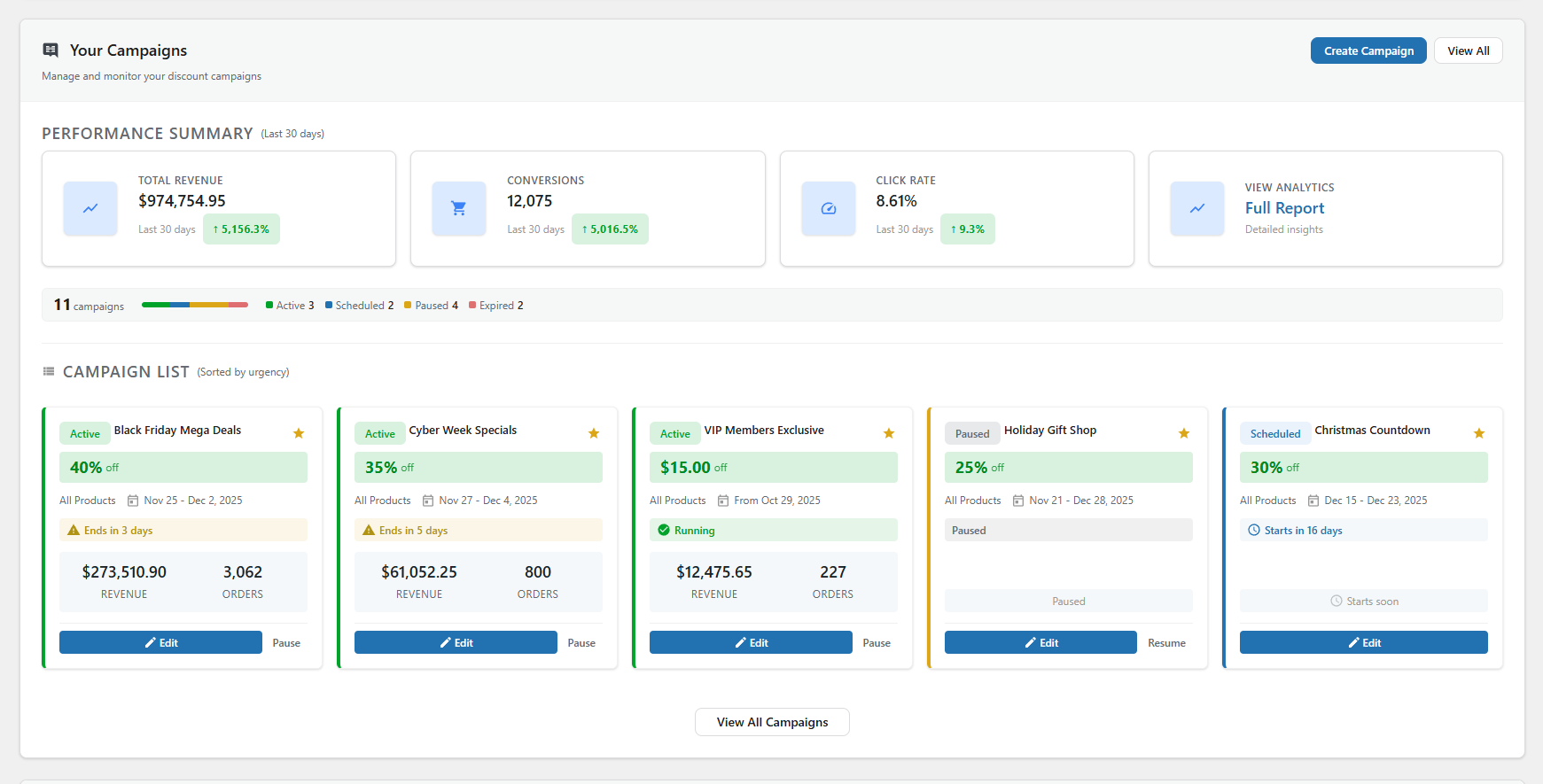
Analytics dashboard (Pro) – Track revenue, conversions, click-through rates, and performance trends
FAQ
-
How do I schedule WooCommerce sales automatically?
-
Install Smart Cycle Discounts, create a campaign using the 5-step wizard, and set your start and end dates in the Schedule step. The plugin automatically activates your sale prices at the scheduled time and removes them when the campaign ends. No manual work required – your WooCommerce sale prices update themselves on schedule.
-
What WooCommerce discount types are supported?
-
The free version supports percentage discounts, fixed amount discounts, and BOGO deals (Buy One Get One) on any WooCommerce product. The Pro version adds tiered quantity discounts (volume-based dynamic pricing), spend threshold discounts (minimum cart value offers), and bundle discounts (buy a set of products together for a deal). All discount types work with the automated scheduling system.
-
Is this a WooCommerce dynamic pricing plugin?
-
Yes. Smart Cycle Discounts supports dynamic pricing through multiple discount types. The free version includes percentage discounts, fixed amount discounts, and BOGO deals. The Pro version adds tiered quantity pricing (buy more, save more), spend threshold discounts, and bundle deals – all the dynamic pricing options you need for a WooCommerce store.
-
Can I set up BOGO deals in WooCommerce with this plugin?
-
Yes. BOGO (Buy One Get One) deals are included free. You can create Buy 1 Get 1 Free, Buy 2 Get 1 at 50% off, or any custom buy/get combination with your chosen discount percentage. BOGO campaigns run on the same automated schedule as all other discount types.
-
How do I create bulk discounts for WooCommerce?
-
Use the Tiered Quantity Discounts feature (Pro). Set quantity breaks like: Buy 5+ get 10% off, Buy 10+ get 20% off, Buy 25+ get 30% off. The discount applies automatically at checkout based on the quantity in the cart. Perfect for wholesale, B2B, and volume-based WooCommerce pricing.
-
How do I automate Black Friday and Cyber Monday sales?
-
Create a campaign with your desired discount, select your products, and schedule it for your Black Friday dates (e.g., November 29 12:00 AM to December 2 11:59 PM). You can set this up weeks in advance using Draft mode. The campaign activates and deactivates automatically – no midnight price editing required.
-
Is Smart Cycle Discounts compatible with my theme?
-
Yes. Smart Cycle Discounts is a backend plugin that works with any properly coded WordPress theme. It integrates with WooCommerce’s native sale price system, so your theme’s existing sale price styling applies automatically. No theme modifications needed.
-
Can I schedule campaigns in advance?
-
Yes. Use the Schedule step in the wizard to set specific start and end dates/times. Campaigns activate and deactivate automatically based on your schedule. You can create campaigns weeks or months in advance using Draft status, then set them to Scheduled when ready.
-
How many campaigns can I create?
-
There are no campaign limits – you can create and run unlimited campaigns in both the free and Pro versions. Run as many simultaneous promotions as your store needs.
-
What’s the difference between the discount types?
-
Free Version:
– Percentage: Reduce price by a percentage (e.g., 25% off = $100 product becomes $75)
– Fixed Amount: Reduce price by fixed amount (e.g., $10 off = $100 product becomes $90)
– BOGO: Buy One Get One offers with flexible configurations (e.g., Buy 2 Get 1 Free)Pro Version:
– Tiered: Quantity-based dynamic pricing (e.g., Buy 5 get 10% off, Buy 10 get 20% off)
– Spend Threshold: Discount based on cart total (e.g., Spend $100 get 15% off)
– Bundle: Product bundle deals (e.g., Buy shampoo + conditioner + mask for 20% off) -
Will this slow down my site?
-
Smart Cycle Discounts is designed for performance with optimized database queries, efficient caching, and admin-scoped asset loading. In most stores, frontend impact is minimal while campaign operations remain reliable at scale.
-
Can I run multiple discount campaigns at the same time?
-
Yes. You can run unlimited campaigns simultaneously. Use the Priority field (1-5, where 5 is highest priority) to control which campaign takes precedence when multiple campaigns affect the same product. This prevents discount stacking and gives you full control.
-
What’s the difference between “All Products”, “Specific Products”, and “Random Products”?
-
- All Products – Applies discount to your entire product catalog. Best for store-wide sales.
- Specific Products – You manually select which products to discount using the AJAX-powered product search. Best for targeted promotions.
- Random Products – Plugin automatically selects X random products from your catalog each day. Best for “deal of the day” promotions that drive repeat visits.
-
Does it work with WooCommerce HPOS (High-Performance Order Storage)?
-
Yes. Smart Cycle Discounts is fully compatible with WooCommerce HPOS and has been tested with custom order tables. It works with both the legacy post-based storage and the new High-Performance Order Storage system.
-
Does it work with WooCommerce Subscriptions?
-
Yes. Subscription products are fully supported. On the free tier, discount campaigns apply to the recurring subscription price automatically – no special setup needed. Your subscription product pages show strikethrough pricing just like regular products (e.g., ~~$29/month~~ $23.20/month). The Pro version adds advanced subscription controls: choose whether to discount the recurring price, the sign-up fee, or both. You can also limit discounts to the first X renewal payments – for example, “20% off for the first 3 months, then full price.” If WooCommerce Subscriptions is not installed, the subscription settings simply don’t appear in the wizard.
-
Does it work with WooCommerce block-based cart and checkout?
-
Yes. Smart Cycle Discounts fully supports WooCommerce block cart and checkout pages (WooCommerce 8.3+). Discounted prices display correctly with strikethrough formatting in both classic templates and the new block-based cart/checkout. The plugin automatically detects which template you’re using and applies the appropriate discount display logic. No configuration needed – it just works.
-
Can I duplicate an existing campaign?
-
Yes. On the Campaigns list page, hover over any campaign and click the “Duplicate” action. This creates a copy of the campaign with all settings intact, which you can then modify as needed. Great for creating seasonal promotions based on previous campaigns.
-
How does the priority system work?
-
When multiple campaigns affect the same product, the campaign with the highest priority (5 = highest, 1 = lowest) takes precedence. This lets you run multiple campaigns without conflicts – for example, a high-priority flash sale can override a lower-priority seasonal discount.
-
Can I export campaign data?
-
Campaign analytics and export features are available in the Pro version. Pro users can export campaign performance data in CSV or JSON format, and schedule automated reports.
-
What happens when a campaign ends?
-
When a campaign reaches its end date/time, it automatically deactivates and removes the sale prices from affected products. The campaign remains in your list as “Expired” and can be duplicated or reactivated with new dates. Your original product prices are restored automatically.
-
Is there a way to test campaigns before activating them?
-
Yes. Use the Draft status to create and configure campaigns without activating them. You can review the campaign settings, check the health score, and preview which products will be affected. When ready, change the status to Active or Scheduled.
-
Does it work with WooCommerce variable products?
-
Yes. Smart Cycle Discounts fully supports WooCommerce variable products. When you apply a discount to a variable product, all variations receive the discount automatically. The sale price displays correctly on both the main product page and individual variation selections.
-
Can I exclude products that are already on sale?
-
Yes. The plugin respects existing sale prices. If a product already has a manual sale price set in WooCommerce, you can configure your campaign to skip those products or override them based on your preference.
-
Can I offer free shipping with discount campaigns?
-
Yes. Enable free shipping for any campaign with a single toggle in the Discounts step. When enabled, customers receive free shipping on qualifying orders. You can apply free shipping to all shipping methods or select specific methods like flat rate or local pickup. This is included in the free version.
-
Can I create wholesale or member-only discounts?
-
Yes. Use the User Role Targeting feature to restrict discounts to specific WordPress user roles. Choose “Include” mode to give discounts only to selected roles (e.g., “Wholesale Customer” or “Premium Member”), or “Exclude” mode to give discounts to everyone except certain roles. This makes it easy to create B2B pricing, membership discounts, or role-based promotions – all from the same WooCommerce store.
-
Does it work alongside WooCommerce coupons?
-
Yes. Campaign discounts and WooCommerce coupons work independently. Campaign discounts apply to product prices (shown as sale prices), while coupons apply at checkout. Customers can use both together unless you configure specific restrictions.
-
What happens if two campaigns affect the same product?
-
The campaign with the higher priority wins. Each campaign has a priority setting from 1 (lowest) to 5 (highest). When multiple active campaigns include the same product, only the highest-priority discount applies. This prevents discount stacking and gives you full control over which promotions take precedence.
-
How is this different from WooCommerce’s built-in sale price feature?
-
WooCommerce’s built-in sale prices are set per product – you need to edit each product individually. Smart Cycle Discounts lets you manage discounts at the campaign level: select hundreds of products at once, set a schedule, and the plugin handles everything automatically. You also get features like priority management, health monitoring, random product rotation, and campaign intelligence that WooCommerce doesn’t offer natively.
-
Can I create recurring weekly or monthly promotions?
-
Yes. Recurring campaigns are available in the free version with two modes. Continuous mode toggles your campaign active/inactive based on time windows – perfect for daily happy hours or weekend specials without creating hundreds of database entries. Instances mode creates separate campaign copies for each occurrence with individual analytics. Set up a “Weekend Flash Sale” once and schedule it to repeat every weekend, or create monthly promotions that run automatically.
-
Is there a limit on how many products I can discount?
-
No. You can apply discounts to your entire product catalog or select specific products. The plugin is optimized with efficient database queries and caching to handle stores with thousands of products without performance issues.
-
Can I set minimum order requirements for discounts?
-
Yes (Pro). Application rules let you fine-tune when discounts apply. Set minimum quantity requirements (e.g., “discount only applies when buying 3+ items”), minimum order value thresholds, and choose whether to exclude products already on sale. These rules give you precise control over discount eligibility.
-
How do I control discount stacking with coupons?
-
Pro users can configure combination policies for each campaign. Choose whether your campaign discount can be combined with WooCommerce coupon codes or if it should be mutually exclusive. This prevents over-discounting and protects your margins when running multiple promotions.
Reviews


Contributors & Developers
“Scheduled Sales & Automatic Discounts for WooCommerce – Smart Cycle Discounts” is open source software. The following people have contributed to this plugin.
Contributors
“Scheduled Sales & Automatic Discounts for WooCommerce – Smart Cycle Discounts” has been translated into 1 locale. Thank you to the translators for their contributions.
Interested in development?
Browse the code, check out the SVN repository, or subscribe to the development log by RSS.
Changelog
1.8.21
- Performance: Replaced transient-based caching with WordPress object cache API — eliminates transient bloat and orphaned rows.
- Performance: Batched category queries and removed redundant preloading on admin page loads.
- Fix: Campaigns with no products, no discount, or no schedule are now correctly blocked on all surfaces — previously only caught during wizard review.
- Fix: Post-activation campaigns with zero orders no longer show “Ready” — capped to “Good” until real order data arrives.
- Fix: Store-wide analytics no longer count on-hold orders as confirmed revenue.
- Fix: Dashboard product count no longer double-counts and override intensity uses store-wide denominator.
- Fix: Health score uses campaign average instead of worst-campaign minimum.
- Improvement: Intelligence cache invalidates immediately on campaign changes instead of waiting for TTL expiry.
- Improvement: Policy profiles simplified to three deterministic presets (conservative, balanced, aggressive) — removes adaptive interpolation that caused threshold drift between page loads.
- Improvement: 105 reason codes now have explicit functional impact classifications — eliminates silent fallback behavior in the diagnostic contract.
- Improvement: ~30 reason codes completed with all 7 vocabulary dimensions — state-specific impact copy (risk vs caution) now covers blocking, conflict, stock, discount, schedule, coverage, economics, and reliability codes.
- Cleanup: Removed ~380 lines of adaptive policy code, legacy compile branches, and dead Store Provider methods.
- UI: Tools page cache card now honestly reports cache state and disables Clear Cache when no persistent object cache is available.
1.8.20
- Feature: 16 new intelligence recommendations — override intensity, dependency notice, predicted uplift (weak/negative), revenue trend (up/down), margin exposure, category saturation, and 8 wizard cross-field checks (discount depth vs duration, fixed discount vs product prices, spend threshold vs AOV, priority collision, recurring idle gap, bundle incentive, user role reach).
- Feature: Wizard CTA button now renders in the review step — clicking navigates directly to the relevant wizard step.
- Feature: All 31 diagnostic codes now have explicit action-oriented titles instead of generic family fallbacks.
- Fix: 15 intelligence logic correctness fixes — cache key mismatch, missing compile refresh guard, confidence cap bypass, guardrails wrong threshold, shared reason code, launch-ready linked check, score saturation, risk default asymmetry, double penalty, threshold ordering, health source mismatch, zero-activity default, economics code divergence, post-activation filtering, wizard health status.
- Fix: CTA button labels now match the recommended action across all surfaces (14 mismatches fixed).
- Fix: Surface adapter prefers vocabulary action titles over diagnostic messages for the “Best Next Action” display.
- Fix: Centralized margin economics code list prevents overflow cap from dropping important economics signals.
1.8.19
- Feature: Health gauge now reflects actual diagnostic health instead of a composite formula that mixed opportunity scores into health. A campaign with critical issues always scores low.
- Feature: Store-wide dashboard intelligence — the dashboard verdict now aggregates health across ALL active campaigns instead of analyzing a single focus campaign. Conflicts between any campaigns are surfaced immediately.
- Feature: Override Intensity operational signal — replaces Discount Coverage (already shown in Catalog Snapshot) with a new intelligence metric showing what percentage of overlapping products have their discount silently overridden by higher-priority campaigns.
- Feature: Bidirectional conflict detection — campaigns now detect both directions of overlap: higher-priority campaigns blocking them AND lower-priority campaigns they override. Direction-aware messaging tells merchants exactly what’s happening.
- Fix: Actions no longer trigger from synthetic metric thresholds alone — all metric-triggered actions (reduce overlap, protect stock, improve timing, protect margin, high discount load) now require diagnostic evidence from actual health analysis before firing.
- Fix: Free-tier confidence no longer penalized for missing Pro order data — evidence scoring split into diagnostic (free) and economic (Pro) sub-scores so free users see honest confidence based on their diagnostic data quality.
- Fix: Phantom metric computation gated — margin_impact and predicted_uplift no longer produce meaningless values when inputs are zeroed (free tier). Returns null instead of fake numbers driven by calendar month.
- Fix: Empty reason codes on pre-launch timing and overlap actions now properly assigned, fixing family deduplication.
- Fix: Badge and free shipping toggles use delegated events and live DOM lookups to prevent stale state.
- Fix: Clearing all conditions during campaign edit now persists to database.
- Fix: Incomplete campaigns can now be saved as draft via the wizard UI.
- Fix: Campaign ended hook fires when active campaign transitions to any non-active state.
- Fix: Stop recurrence button now cancels pending ActionScheduler events and cache entries.
- Feature: Resume Recurring button added to campaigns list for paused recurring campaigns.
- Maintenance: Removed deprecated code, zombie reason codes, legacy status string emissions, and dead code from the intelligence system.
1.8.18
- Feature: Store-Aware Opportunity Intelligence — Upcoming Opportunities generates suggestions based on your store’s actual campaign history and product data, not just calendar events.
- Feature: Campaign Drought, Best-Selling Category, Category Gap, Discount Coverage Gap, and Repeat Winner detections with Opportunity Chains and intelligence-aware suppression.
- Feature: Category-based wizard pre-fill — clicking a category-based store opportunity opens the wizard with the category pre-selected and all steps completed for quick review and launch.
- Feature: Intelligence now monitors free shipping configuration, user role targeting, location targeting, combination policies, and usage limits — previously invisible features are now covered by health checks with actionable signals.
- Feature: Usage limit proactive alerts — 75% early warning before the 90% near-exhaustion signal, plus lifetime usage cap tracking with exhaustion detection.
- Feature: “Campaign performing well” positive signal — active campaigns with 7+ days of usage and no issues now show a positive health status instead of generic “all checks passed.”
- Feature: Adaptive inactivity detection — the “no activity detected” threshold adjusts to your store’s order frequency (3 days for high-volume, 7 days for medium, 14 days for low-volume stores).
- Feature: Campaign age context in dashboard verdict — active campaigns show “Running for X days” alongside the health status.
- Feature: Conflict resolution guidance now explains which campaign wins: “Campaign X has higher priority and overrides this campaign on shared products” or “The oldest campaign wins on ties.”
- Feature: Bundle product picker now respects Products step filters — categories, tags, and advanced conditions from the Products step scope the bundle’s available products.
- Fix: BOGO campaign creation failed with “BOGO configuration is invalid” after contract cleanup —
validate_compiled_campaignnow reads complex discount structures fromdiscount_rulesinstead of stripped top-level keys. - Fix: Intelligence showed false “inventory problems” on campaigns with no stock issues —
resolve_reason_code_familysubstring fallback mapped'product'to'stock'family; now correctly maps to'coverage'. - Fix: Health score stuck at 75 regardless of actual health — hardcoded default dimension scores (75), unlinked context scores (76/80/70), and decision_readiness computed before action severity replacement all contributed; defaults changed to 100, decision ordering fixed.
- Fix: “Discounted products have inventory problems” shown when all operational signals are green — cross-validator’s
cross_bogo_all_productswarning triggered for category-filtered BOGO campaigns; now only fires for entirely unfiltered catalogs and usesinfoseverity. - Fix: Bundle strategy
variation_idused as parent ID in cart quantity tracking — now correctly readsproduct_idas the parent for WooCommerce variations. - Fix: Bundle
get_maximum_discount()returned flat_price value instead of savings — now calculates(total_regular_price - flat_price)usingget_regular_price()consistently. - Fix: Bundle sanitizer allowed negative
discount_value, uncappedproduct_dataarrays, and desynchronizedproduct_ids/product_data— now floors at 0, caps at 50 entries, and filtersproduct_datato matchproduct_ids. - Fix:
$threshold_modeundefined variable in discounts step validator — Rule 6 (fixed discount exceeding spend amount) was dead code; now reads from the first threshold’sdiscount_typefield. - Fix: Intelligence cache not invalidated on campaign create/update/delete —
invalidate_campaign()now clears thewsscd_dashboard_ciprefix alongside other cache groups. - Fix:
usage_limit_exhaustedandusage_limit_nearly_exhaustedsignals never fired —usage_countwas read from the campaign array but never joined from the database; now resolved viaWSSCD_Customer_Usage_Repository. - Improvement: Canonical backend data schema with
WSSCD_Campaign_Data_Schema— compiler emits canonical payloads, hydrator handles reverse boundary, deprecated top-level keys stripped after compilation. - Improvement: Campaign Intelligence decision service now uses numeric health scores and boolean issue flags instead of Health Service vocabulary strings — eliminates cross-layer vocabulary dependency.
- Improvement: Health service product ID resolution consolidated — single
wc_get_product()loop per analysis (was 2x per product), product IDs resolved once and threaded through all checks (was 3 separate resolutions). - Improvement: View Model passes pre-normalized data to Decision Service — eliminates duplicate normalization of scores, diagnostics, actions, and reliability per pipeline call.
- Improvement:
resolve_reason_code_family()memoized with static cache — reduces ~30 repeated lookups per pipeline call to ~8 unique lookups. - Improvement: Quality guard inspects only the primary action instead of normalizing the entire action list (result was discarded).
- Improvement: All diagnostic messages now describe problems only — action advice (“Consider…”, “Ensure…”, “Verify…”) removed from health service and cross-validator messages; IS vocabulary is the sole owner of fix text.
- Improvement: Full vocabulary coverage for all 6 discount types — 40+ reason codes added to family map, reason labels, impact text, action titles, and CTA labels.
- Improvement: Operational signal panels now scan
risk_flagsalongsidecritical_issuesandwarnings— eliminates contradictions between the verdict and the signal cards. - Improvement:
build_schedule_risk_statenow matchesrecurringcategory items alongsidescheduleitems. - Feature: Email notifications now include Campaign Intelligence verdicts — Campaign Started, Ending Soon, and Ended emails show the IS health score, verdict, reason, and recommended action.
- Feature: Health Alert email notification (free) — triggered when Campaign Intelligence detects critical health issues on an active campaign. Enabled by default.
- Feature: Usage Limit Alert email notification (free) — triggered when campaign usage reaches 75%, 90%, or 100% of the configured limit. Enabled by default.
- Feature: Conflict Alert email notification (Pro) — triggered when same-priority or higher-priority campaign conflicts are detected, including which campaign wins.
- Feature: Zero Activity Alert email notification (Pro) — triggered when an active campaign has no discount usage after the adaptive inactivity threshold.
- Improvement: Notification hooks use transient-based deduplication — each signal fires at most one email per campaign per day to prevent alert fatigue.
- Feature: Campaign Overview Panel actions (Activate/Pause, Duplicate, Delete) now work via AJAX from any page — dashboard, campaigns, analytics — without navigating away. Page reloads in place after action completes.
- Feature: Campaign list action buttons show animated loading spinner on click while the page navigates to process the action.
- Feature: Tools page cache clear, log clear, and table optimization now work without page refresh — counters and displays update inline via AJAX.
- Feature: Unsaved changes indicator on Settings and Notifications pages — “Unsaved changes” badge appears next to the Save button when form fields are modified, with browser leave warning.
- Fix: Campaign Overview Panel footer buttons (Close, Edit, Activate, etc.) crashed on every use due to stale
footerNamereference inresetPanel()after incomplete refactor. - Fix: Overview panel action URLs contained HTML-encoded
&entities (fromwp_nonce_url) which broke query parameters when used in JavaScriptwindow.location.href— replaced with raw URL builder for JSON/JS contexts. - Fix: Log Viewer “View Log” returned
[object Object]instead of log text —handle_view_logsdouble-wrapped the result fromview_logs()which already returnsarray('logs' => string). - Fix: Button loading spinner did not animate —
@keyframeswas defined in a separate CSS file; spinner now uses self-contained@keyframes wsscd-button-spinin_buttons.csswith hardcoded fallbacks and explicit SVG icon hiding. - Improvement: Notifications page merged FREE and PRO sections into single “Notification Types” section with “Advanced Notifications PRO” divider — eliminates duplicate section headers and 6 repetitive PRO badges.
- Improvement: Campaigns page localizer now includes all operational button i18n keys (activate, pause, duplicate, moveToTrash, confirmDelete) — previously missing, relied on JS fallback strings.
1.8.17
- Feature: Campaign Overview Panel now includes operational action buttons (Activate/Pause, Duplicate, Delete) in the footer, matching the campaigns list table.
- Feature: Panel reopens automatically after an action completes via return_url parameter.
- Fix: Zero-activity dashboard no longer shows false stock warnings or “Ready to Launch” — stock risk flags are stripped for paused/expired focus campaigns, and verdict caps at “On Track” with idle messaging.
- Fix: Catalog Snapshot categories stat correctly shows all categories for full-catalog campaigns.
- Fix: Catalog Snapshot header chip shows discount load level label instead of duplicating the donut percentage.
- Fix: Health-driven “Needs Attention” verdict shows health-specific reason instead of contradictory “launch ready” messaging.
- Fix: “launch_ready” reason code family changed from “schedule” to “review”, preventing false overlap impact text.
- Improvement: Page header border radius, border, and shadow now use shared card design tokens for visual consistency.
1.8.16
- Fix: Dashboard intelligence verdict now agrees with operational signals — schedule/overlap reason codes only fire when diagnostic evidence exists, eliminating contradictions between “On Track” status and warning reasons.
- Fix: Campaign Health “Fair” (70-89) now correctly triggers “Needs Attention” verdict instead of “On Track”, aligning the metric card with the decision engine.
- Fix: “Ready to Launch” verdict now requires health score >= 90 (Healthy), not >= 80.
- Fix: Dashboard “Campaigns” section now includes expired campaigns, matching the Overview total count.
- Fix: Overview status breakdown now includes an Expired row so the breakdown sums to the displayed total.
- Fix: Catalog Snapshot categories stat now matches the “Affected categories” chips, with full-catalog campaigns correctly showing all categories.
- Fix: Catalog Snapshot header chip shows discount load level instead of duplicating content from the donut or stats section.
- Fix: Health-driven “Needs Attention” verdict now shows health-specific reason and action instead of contradictory “launch ready” messaging.
- Fix: “launch_ready” reason code no longer maps to schedule family, preventing false overlap impact text on positive verdicts.
- Fix: Diagnostics “Fresh estimate” label replaces contradictory “Fresh data” when analysis mode is estimated.
- Fix: Page header “Analytics PRO Pro” double badge — tab labels now use clean translated titles.
- Fix: Missing plus icon on Create Campaign buttons — corrected non-existent “plus-alt” icon reference to “plus”.
- Fix: Stock risk signals no longer appear when focus campaign is paused or expired — health context builder now strips stock-category risk flags for non-active campaigns, matching the aggregate-level guard.
- Fix: Dashboard campaigns list always reflects current data instead of stale cache.
- Fix: Zero-activity dashboard no longer shows “Ready to Launch” — verdict caps at “On Track” with “No campaigns are currently active” messaging when no campaigns are running.
- Improvement: Action engine emits severity “warn” for schedule/timing actions backed by diagnostic evidence, ensuring proper verdict escalation.
1.8.15
- Redesign: Comprehensive admin UI/UX overhaul across all plugin pages — Dashboard, Campaigns, Analytics, Settings, Notifications, Tools, and Help.
- Redesign: Shared page header with segmented-control tab navigation, plan badge (Free/Pro), Upgrade button for free users, and contextual action buttons.
- Redesign: Dashboard — redesigned Upcoming Opportunities (hero + weekly split), 3-column workspace grid (Campaigns, Catalog Snapshot, Overview), and Campaign Intelligence deduplication.
- Redesign: Campaigns page — compact KPI strip replaces 5 large summary cards, inline status filters with Trash support, search moved into bulk actions toolbar.
- Redesign: Campaign Overview Panel — hero identity card with gradient metric strip, stacked section cards replacing tabbed workspace, pro-gated performance section.
- Redesign: Analytics page — Hero Metric + Supporting Grid for KPIs, Bento Grid layout (Products, Campaigns, Activity), compact Store Performance inline strip, sequential AJAX loading.
- Redesign: Settings and Notifications pages — card-grid layout with server-side FOUC prevention, Save button in header, consolidated Email Setup section.
- Redesign: Tools page — action cards grid with stats strip, key-value pairs, and danger zone.
- Redesign: Help page — clean 3-column card grid with documentation, support, and campaign ideas.
- Improvement: Shared stats strip component (elevated floating cards) used by Tools and Notifications health displays.
- Improvement: Standardized card headers across all pages — bare 16px icon + title + description, matching Campaign Intelligence pattern.
- Improvement: Card header descriptions added to all cards across every page for better context.
- Improvement: Upgrade to Pro link in page header for free users linking to Freemius checkout.
- Improvement: Pro feature gating on Campaign Overview Panel performance section — free users see upgrade overlay instead of empty metrics.
- Improvement: Hero card metrics show Pro badge and em-dash for Revenue/Orders on free plan.
- Fix: Color flash on page load — removed JS setProperty overrides that replaced CSS custom property var() references with flat values.
- Fix: Revenue Trend blank section — chart empty state rendered visible by default, jQuery .show() replaced with .css(‘display’, ‘flex’).
- Fix: 502 errors on Analytics — sequential AJAX loading replaces parallel requests that overwhelmed PHP-FPM.
- Fix: Settings/Notifications field flash (FOUC) — server-side hidden flag on conditional fields prevents 1-second visibility before JS hides them.
- Fix: Stray ?> rendered as visible text in Upcoming Opportunities chip badge.
- Fix: Top Products table column mismatch — JS generated 5 columns but template had 4.
- Fix: Performance-by-type meta class mismatch between JS and CSS.
- Fix: System report double-wrapping in AJAX handler.
- Maintenance: Consolidated duplicate toggle switch CSS — notifications page now uses shared _forms.css.
- Maintenance: Consolidated card header/heading CSS — removed page-specific duplicates from settings, tools, notifications, and analytics in favor of shared _components.css.
- Maintenance: Removed gradient backgrounds from all card headers — unified flat white style.
- Maintenance: Removed icon badge wrappers from all card headers — unified bare icon pattern.
- Maintenance: Removed orphaned CSS — gauge/limit cards, empty states, dashboard grid layout, business row, tab workspace styles, and 70+ lines of dead selectors.
- Maintenance: Removed dead PHP — render_basic_section method, section-basic.php template, handle_ajax_requests method.
- Maintenance: Removed dead JS — tab switching logic, sectionCards cache, test-email-footer reference.
- Maintenance: Added WordPress admin color scheme CSS to Help page for consistency.
For the complete changelog of earlier versions, visit the full changelog.