

Description
Crawl Hunt is a comprehensive WordPress plugin that helps you monitor and track website changes through automated crawling. Perfect for SEO monitoring, content tracking, and staying updated with your website’s status.
This plugin connects to the Crawl Hunt service. You must opt in by clicking “Connect Crawl Hunt” inside the plugin before any data is sent to the service.
Features:
- Automated website crawling
- Track URL status and changes
- REST API integration for external crawlers
- Simple and intuitive admin interface
- Detailed crawl logs and history
- Secure account connection to Crawl Hunt
- Lightweight and performant
External Service: Crawl Hunt
Data sent to the service:
- WordPress site URL during connection
- Account authentication token for API access
- Dashboard data requests initiated by the user
Terms of Use: https://www.crawlhunt.com/terms-and-conditions
Privacy Policy: https://www.crawlhunt.com/privacy-policy
Screenshots

Crawl Hunt Home page showing the Connect button and status banner 
Crawl Hunt Dashboard page 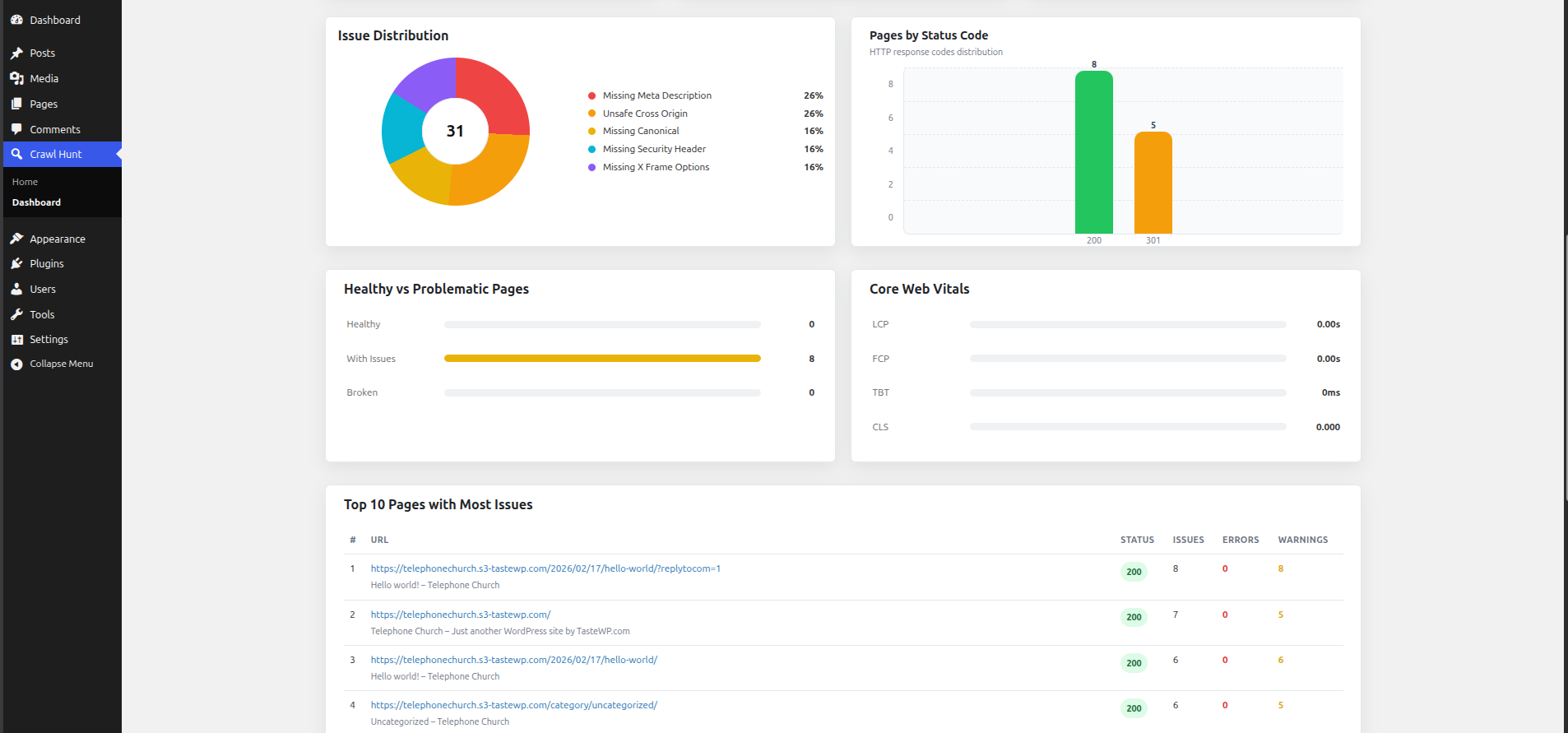
Crawl Hunt Audit Issue Tracking 
Crawl Hunt Audit Results
Installation
- Go to Plugins > Add New in your WordPress admin panel and search for “Crawl Hunt”, or upload the plugin ZIP file via Plugins > Add New > Upload Plugin.
- Click Install Now and then Activate the plugin.
- A new Crawl Hunt menu item will appear in your WordPress sidebar — click it to open the plugin home screen.
- Click the Connect button. A popup will open taking you to the Crawl Hunt website. If you do not have an account, create a free one at https://www.crawlhunt.com.
- Sign in to your Crawl Hunt account. The popup will close automatically and your WordPress site will be connected.
- Return to the Crawl Hunt plugin in WordPress — the status banner will now show Connected.
- Click Open Crawl Hunt Application to open the Crawl Hunt dashboard in a new tab.
- In the Crawl Hunt dashboard, go to Projects and click Run Audit to start your first SEO crawl of your WordPress site.
- Once the crawl completes, navigate to the Issues tab to review all detected SEO problems grouped by type and priority.
- Use the AI Fix or Edit actions on each issue to apply changes — updates are written back to your WordPress site automatically through the plugin.
FAQ
-
Do I need to connect my Crawl Hunt account?
-
Yes. Click “Connect” in the plugin interface to authorize the plugin to access your account.
-
How do I integrate with external crawlers?
-
You can use the REST API endpoint at
/wp-json/crawl-hunt/v1/logto send crawl data. Include your API key in theX-API-Keyheader if configured. -
Does this plugin load external code?
-
No. All scripts and styles are bundled with the plugin. The external Crawl Hunt service is contacted only after you connect your account.
Reviews
There are no reviews for this plugin.
Contributors & Developers
“Crawl Hunt – Advanced SEO Optimization Tool” is open source software. The following people have contributed to this plugin.
Contributors
Translate “Crawl Hunt – Advanced SEO Optimization Tool” into your language.
Interested in development?
Browse the code, check out the SVN repository, or subscribe to the development log by RSS.
Changelog
1.0.7
- Fixed: Bulk AI Fix no longer fails with “Page not found for URL” for taxonomy archive pages (WooCommerce product categories, product tags, and any other public custom taxonomy). The plugin now correctly resolves these URLs and applies SEO meta updates via Yoast SEO and Rank Math.
- Improved: Error messages for URLs that cannot be resolved now explain specifically why the fix could not be applied — covering cases such as a different domain, date archives, author archives, search results pages, and deleted or renamed pages — instead of showing the generic “Page not found for URL” error.
1.0.6
- Added: Plugin now redirects to the Crawl Hunt home screen automatically after activation.
- Added: Product tour for first-time users — guides through the Connect button, Open App button, How It Works section, and the final CTA. Accessible at any time via the “Take a tour” link.
- Improved: Connect flow redesigned to match the Shopify integration. Clicking Connect now registers the site with Crawl Hunt, creates or links the user account using the WordPress admin email, and opens a short-lived login link in a popup — no pre-existing crawlhunt.com session required.
- Improved: Popup closes automatically after a successful connection and the status banner refreshes in place without a page reload.
- Improved: “Open Crawl Hunt Application” button now reads “Start Free SEO Scan” when the site is not yet connected.
- Fixed: Tour popover font rendering — added explicit font-smoothing and font-family declarations to counteract driver.js
all: unsetreset. - Fixed: Tour popover was rendering as a small invisible dot because driver.js CSS was not being extracted by wp-scripts. Base styles are now enqueued as a standalone stylesheet.
1.0.5
- Fixed: readme.txt external service links now render as proper anchors on WordPress.org.
- Fixed: Data sent to service list now renders as proper unordered list on WordPress.org.
- Improved: Expanded installation instructions with a full 10-step guide covering connection, audit, and fix workflow.
1.0.4
- Fixed: Replaced manual canonical and schema tag output paths with WordPress built-in canonical/script APIs.
- Fixed: Updated asset loading and path handling for WordPress.org compliance.
1.0.3
- Fixed: Removed Shopify references from the plugin settings page to comply with WordPress.org guidelines.
- Fixed: Removed all locked or restricted built-in features to comply with Guideline 5 (no trialware or feature gating).
1.0.2
- Fixed: Replaced raw inline script output with wp_print_inline_script_tag() in auth.php
- Fixed: Debug log paths now use wp_upload_dir() and WP_CONTENT_DIR instead of hardcoded ABSPATH references
- Fixed: Renamed JavaScript global crawlHuntConfig to crawlHuntSEOAudit for uniqueness
1.0.1
- Fixed: Resolved WordPress database query warnings in auth.php
- Improved: Optimized meta query for OAuth state validation
1.0.0
- Initial release
- Basic crawling log functionality
- Admin dashboard and settings
- REST API integration