

Description
Improve conversion data accuracy and ad performance with unified tracking, product feeds, server-side tracking, and reporting for WooCommerce.
WooCommerce All-in-One Conversios Tracking Plugin helps store owners track accurate conversions across Google Analytics 4 (GA4), Google Ads, Microsoft Ads, Meta (Facebook), TikTok, and Snapchat, & manage multiple product feeds, and view reports in one place using a single plugin solution.
Track Add to Cart, Checkout, and Purchase events across supported advertising platforms. The plugin includes Conversion API (CAPI) support for Meta, TikTok, and Snapchat, along with pixel integrations for 12+ marketing and analytics tools.
Sync WooCommerce products in real time to Google Merchant Center, Microsoft Merchant Center, Meta Catalog, and TikTok Catalog to keep product data up to date and improve Shopping feed approval and visibility.
Universal Commerce Protocol (UCP) (Pro) enables WooCommerce products to be discovered and purchased within Google Gemini shopping experiences. Conversios syncs products through Google Merchant Center and tracks purchases using server-side tracking to ensure accurate reporting in GA4 and connected ad platforms. (Requires approved Google Merchant Center account.)
Replace multiple plugins for pixels, server-side tracking, product feeds, and reporting with one unified WooCommerce solution to reduce costs, simplify setup, and manage marketing performance more efficiently.
Trusted by 60,000+ stores to improve attribution accuracy, reduce GA4 vs WooCommerce reporting gaps, and scale campaigns with more reliable data.
In a published WooCommerce case study, a global paint brand improved conversion tracking after implementing Conversios all-in-one plugin. Within weeks, they reported a 90% increase in Meta Ads conversions and a 50% uplift in Google Ads conversions, along with reduced GA4 vs WooCommerce reporting gaps. See the case study:
Global paint brand sees 90% lift in Meta Ads with Conversios
Walkthrough Video
Watch the full Conversios setup walkthrough covering GA4 tracking, Google Ads conversions, Meta Pixel + CAPI, Microsoft Ads UET, and product feed syncing.
What Problem We Solve
WooCommerce store owners often rely on multiple plugins to manage Google Analytics 4 (GA4) tracking, Google Ads conversions, Meta CAPI events, product feeds, and reporting. This increases setup complexity, costs, and ongoing management effort.
Sales and conversion data frequently becomes inconsistent between WooCommerce and advertising platforms due to browser restrictions, ad blockers, and fragmented tracking setups. Product feeds for Google, Meta, Microsoft, and TikTok require regular updates to avoid disapprovals and performance issues.
In some cases, orders are completed successfully but never reported to analytics or ad platforms because the customer does not return to the WooCommerce order confirmation page(thank-you page) after payment.
Conversios (Pro) includes an Order Recovery Engine that automatically detects such missed orders and sends the conversions to GA4, Google Ads, and Meta using server-side APIs to maintain accurate reporting.
Marketing reports & insights are spread across multiple dashboards, making it difficult to identify gaps and optimize campaigns confidently.
This plugin unifies conversion tracking, server-side tracking, product feeds, and reporting in one no-code WooCommerce solution.
Store owners can manage everything from a single dashboard without developer support, saving time, reducing costs, and making marketing performance easier to measure and optimize.
Customer Feedback
“Outstanding support. Setup was quick and issues were resolved efficiently.”
@sajava
“Essential for e-commerce at scale; helped us move to managed first-party tracking and keep revenue reporting in sync across platforms and POS.”
@boomstudio
Features We Provide
Pixel & Conversion Tracking
- Google Analytics 4 (GA4) integration to track ecommerce and lead events
- Google Ads remarketing tag for audience building (Free)
- Google Ads purchase conversion tracking with Enhanced Conversions support (Pro)
- Meta (Facebook & Instagram) Pixel for ad tracking and conversion optimization
- TikTok Pixel and TikTok Conversions API (Pro)
- Snapchat Pixel and Snapchat Conversions API (Pro)
- Pinterest Tag to measure ad performance and user interactions
- LinkedIn Insight Tag for conversion tracking and audience insights
- Microsoft UET (Universal Event Tracking) for Microsoft Ads reporting and remarketing
- X (Twitter) Pixel for website tracking and audience creation
- Facebook Conversions API (Meta CAPI), TikTok Conversions API, and Snapchat Conversions API support (Pro)
- Order Recovery Engine (Pro): Automatically detects WooCommerce orders that were completed but not tracked and sends the missing purchase conversions to GA4, Google Ads, and Meta. This helps keep your ad reports accurate and prevents lost conversion data.
Product Feed Management
- Sync WooCommerce products to Google Merchant Center for Shopping ads
- Automatic product feed sync with Microsoft Merchant Center (Bing Shopping)
- Product catalog sync to Meta (Facebook & Instagram Shops)
- Product feed sync to TikTok Catalog for ecommerce ads
- Real-time updates for product price, availability, and variants
- Universal Commerce Protocol (UCP) (Pro): Enable WooCommerce products to be discovered and purchased within Google Gemini shopping experiences, with server-side tracking for accurate GA4 and ad platform reporting (Requires approved Google Merchant Center account)
Reporting & Insights
Most WooCommerce store owners need to check conversions in multiple places like GA4, Google Ads, Meta Ads, and WooCommerce separately, which makes reporting fragmented and time-consuming. Conversios centralizes key reports inside WordPress so you can validate tracking accuracy and monitor performance faster.
View and analyze your data using platform-specific reports, including:
- GA4 basic reporting for events and conversions
- GA4 Ecommerce Funnel reporting (Pro)
- Google Ads conversion reporting(Pro)
- Meta Ads conversion reporting(Pro)
These reports help validate tracking accuracy, compare platform data with WooCommerce orders, and identify optimization opportunities more confidently.
Have a look at the full feature list over here.
Supported Payment Methods
Purchase conversions work with common WooCommerce payment gateways, including:
– Stripe
– PayPal
– WooCommerce Payments
– Authorize.Net
– Razorpay
Important: Purchase tracking works when the payment flow redirects customers to the WooCommerce Order Received / Thank You page.
Any payment gateway that returns users to this page after successful payment will be tracked correctly.
Supported WooCommerce Events
Conversios tracks the complete WooCommerce shopping journey using standard GA4 ecommerce and engagement events.
Store and product browsing
– page_view (page visit)
– view_item_list (category or product list view)
– select_item (product click)
– view_item (product detail page)
Cart actions
– add_to_cart (add product to cart)
– remove_from_cart (remove product from cart)
– view_cart (cart page view)
Checkout steps
– begin_checkout (checkout started)
– add_shipping_info (shipping method selected)
– add_payment_info (payment method selected)
Orders/purchase
– purchase (order completed)
– refund (order refunded)
Other GA4 engagement events
– scroll (scroll depth tracking)
– form_submit (form submissions)
– signup (user sign-up)
– login (user login)
– email_click (email link clicks)
– phone_click (phone number clicks)
– address_click (address or map clicks)
– file_download (file download tracking)
– article_load (content or article load events)
Add to Cart works out of the box for standard WooCommerce themes. Stores using drawer carts, AJAX carts, or custom flows may require customization. Get help with us at info@conversios.io
Consent Mode v2 Support
Consent Mode v2 (works with your CMP): Conversios does not provide a consent banner. It sends or blocks tracking based on your existing CMP settings. To enable and configure Consent Mode, contact our support team at info@conversios.io.
Best Fit for Which Stores
- WooCommerce DTC brands and stores running paid ads that need more consistent purchase conversion reporting in GA4 and advertising platforms
- WooCommerce stores selling physical or digital products where purchase and checkout data is critical for ROAS and campaign optimization
- WooCommerce stores using multiple ad platforms and looking to track conversions and manage pixels from one place
- Stores that want to validate GA4 and ad platform conversions against WooCommerce orders
- Merchants who prefer a no-code setup for conversion tracking, product feeds, and reporting without developer dependency
Setup in Minutes & Faster Time to Value
- Get started in about 15 minutes with a simple no-code setup.
Conversios combines multi-platform conversion tracking,Feed and reporting in one plugin, so you don’t need to install or manage multiple plugins.
Support
Need help with setup, event validation, custom cart/checkout, payment gateways, or Consent Mode? Email info@conversios.io or chat with us on WhatsApp.
View step-by-step setup guides:
Setup Documentation
You can also use our free tool to quickly check if tracking is working or not on your site and overall website tracking score:
Website Tracking Checker Tool
Privacy Policy
You can view our detailed privacy policy here.
Compatibility
Conversios is compatible with the following major plugins:
- Perfect Brands for WooCommerce (for Product Feed)
- YITH WooCommerce Brands (for Product Feed)
- WooCommerce Brands (for Product Feed)
- YITH Multi-Currency Switcher for WooCommerce
- YITH Custom Thank You Page for WooCommerce
- Multi-currency plugins like WOOCS, CURCY, and WBW Currency Switcher
- Consent Management Platforms (CMPs) like CookieYes, GDPR Cookie Compliance, Real Cookie Banner, and Cookiebot (for Consent Mode v2)
- Lead generation plugins like Contact Form 7, Ninja Forms, Formidable Forms, WPForms, and Gravity Forms
Screenshots
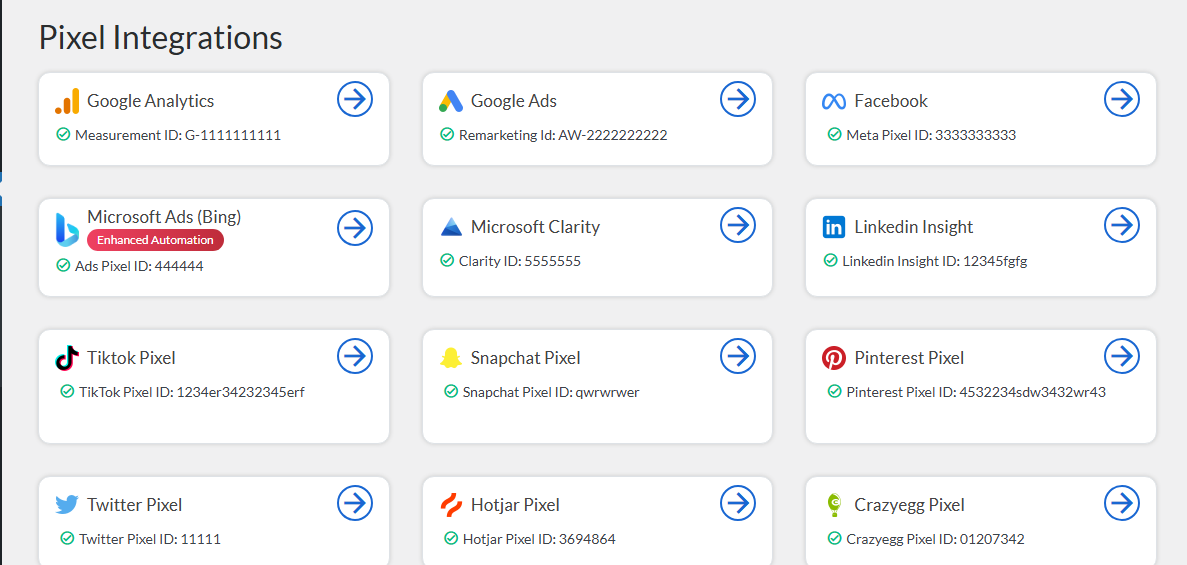
Integration screen showing connected Pixel and Analytics accounts. 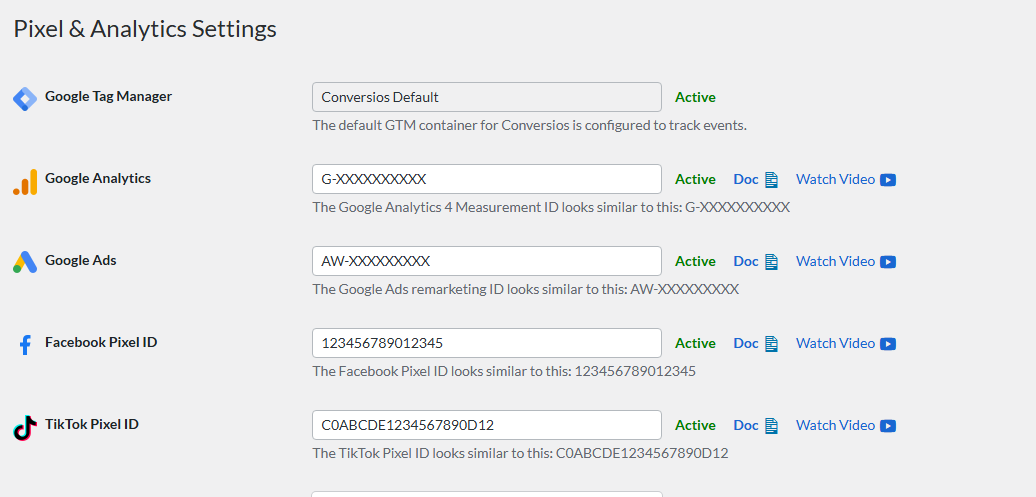
Pixel & Analytics settings where you add channel IDs for event tracking. 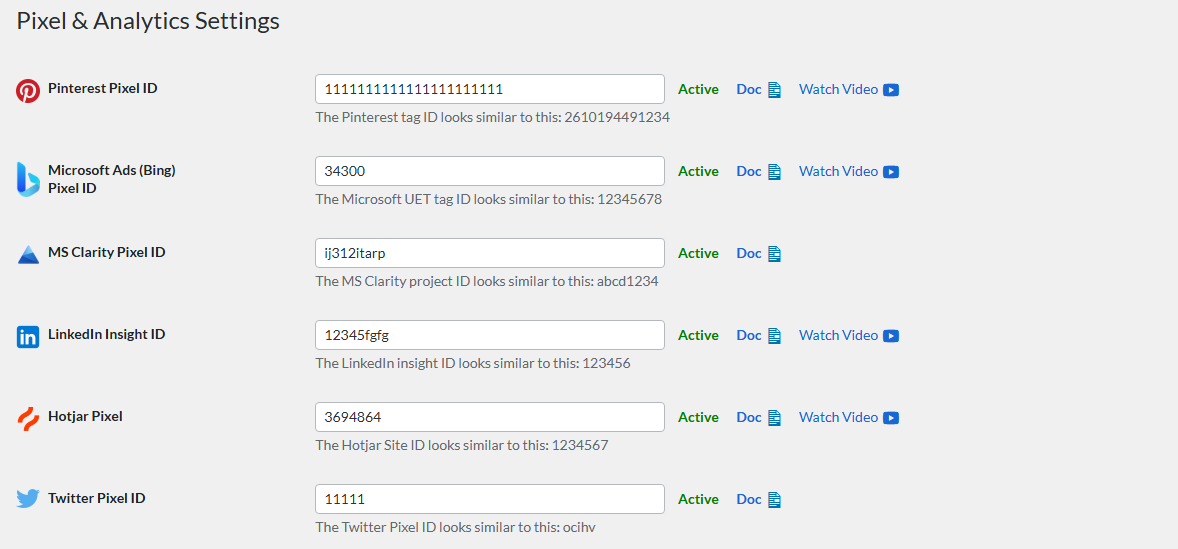
Event tracking settings showing the WooCommerce events sent to each platform. 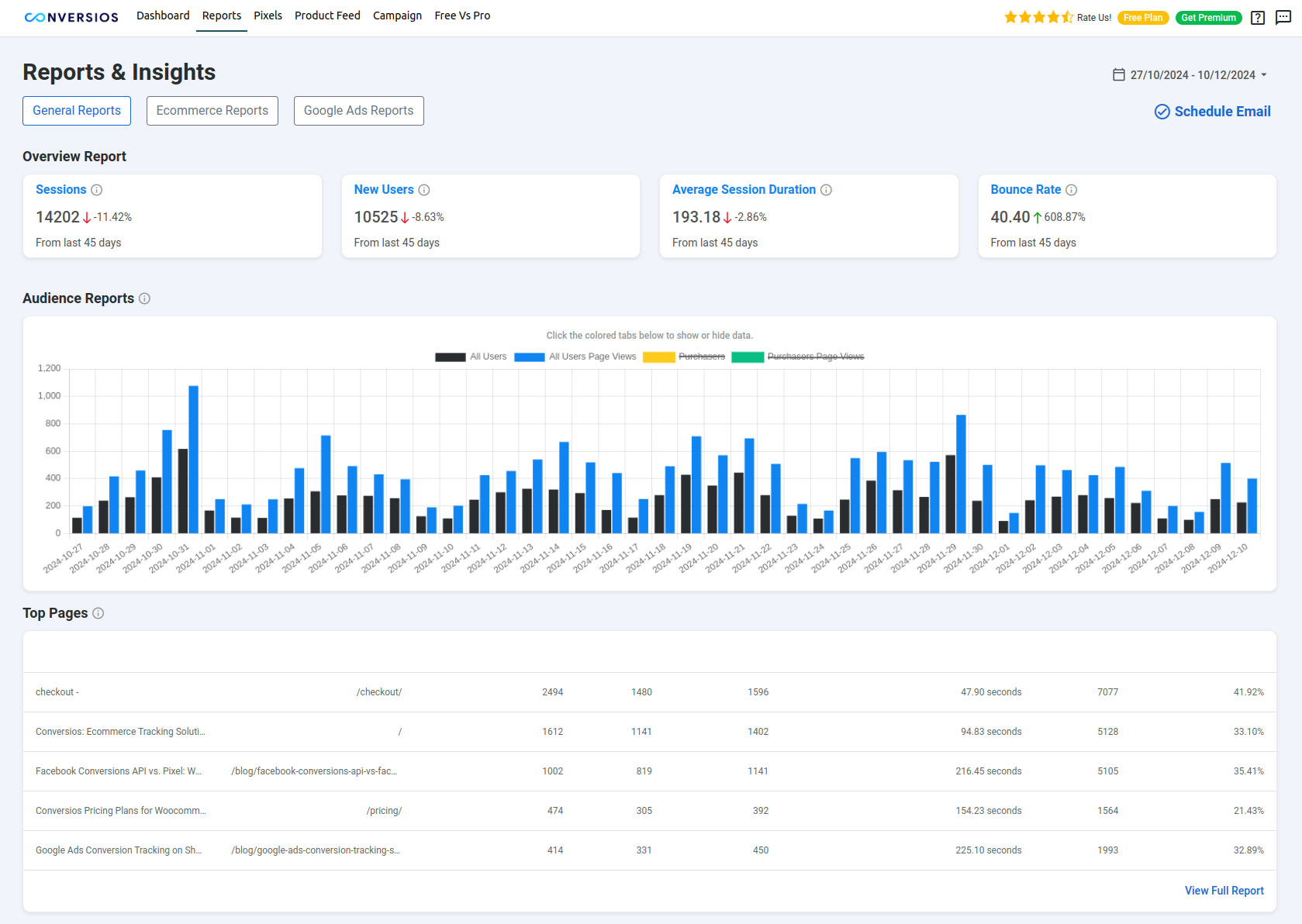
General Reports (GA4) screen showing sessions, users, engagement, and top pages. 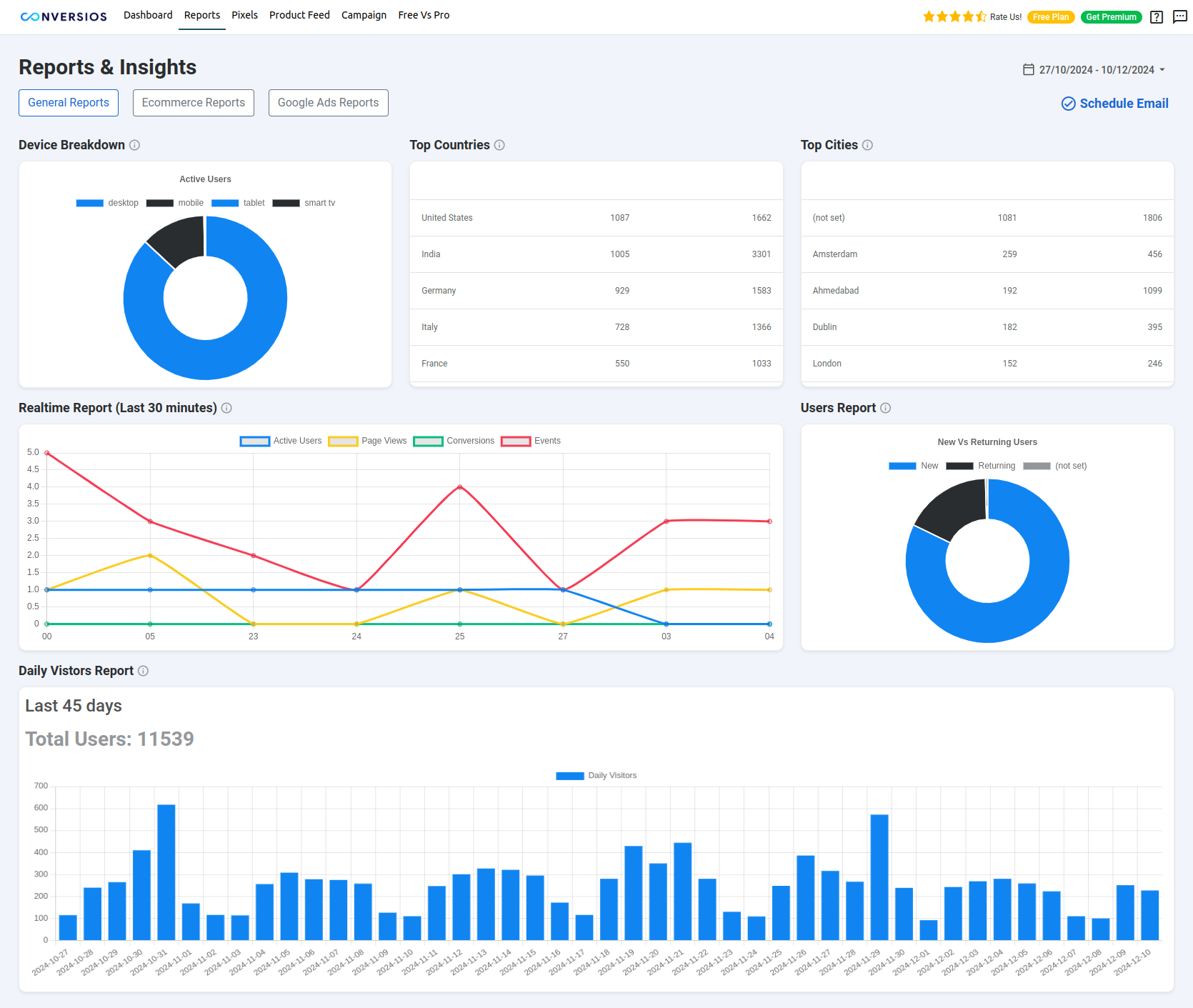
Audience insights screen showing device, country, city, and daily traffic trends. 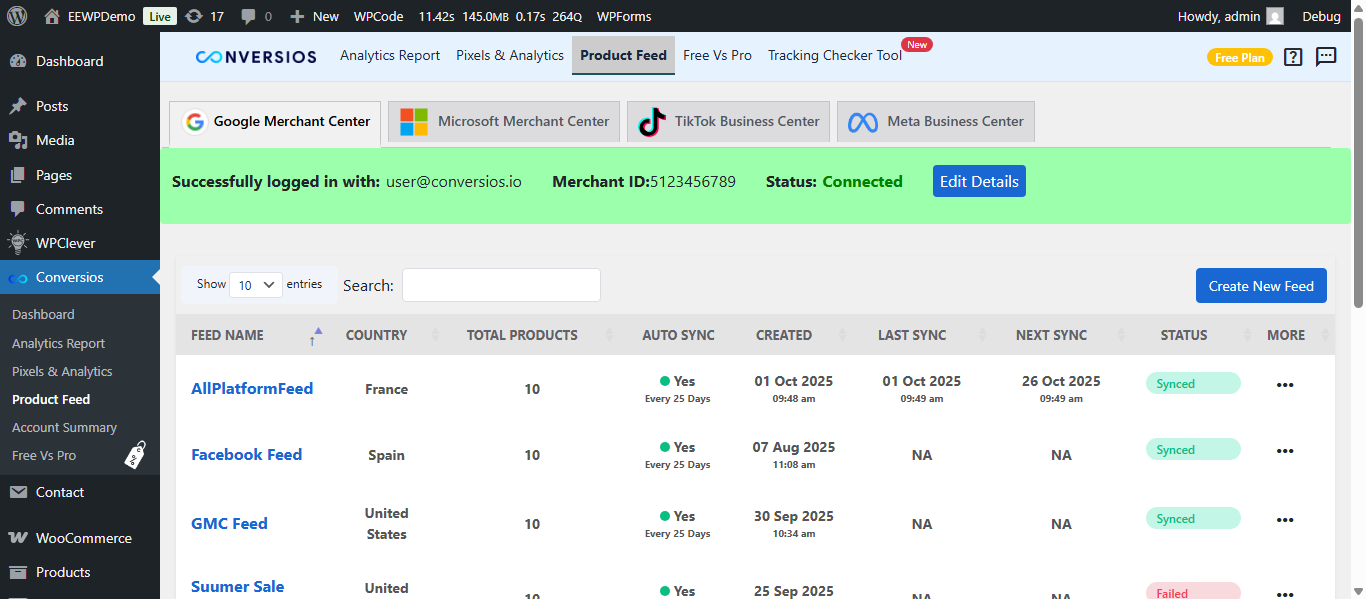
Product Feed screen showing channel connections for Google Merchant Center, Microsoft Merchant Center, Meta Catalog, and TikTok Catalog.
Installation
-
Upload the Conversios plugin folder to the
/wp-content/plugins/directory. -
Activate the plugin from the “Plugins” menu in WordPress.
-
Set up Pixel & Analytics Integrations (WordPress Admin Conversios Pixel Integrations):
- Google Analytics 4 (GA4): Add your GA4 Measurement ID to enable WooCommerce event tracking.
- Google Ads: Enable the remarketing tag (Free). For purchase conversions (Pro), add your Conversion ID and Conversion Label. You can also enable enhanced conversions (optional).
- Microsoft Ads: Add your Microsoft UET Tag and configure the Purchase conversion goal/ID.
-
Set up other integrations if needed:
- Meta (Facebook) Pixel, TikTok Pixel, Snapchat Pixel, Pinterest Tag, LinkedIn Insight Tag, X (Twitter) Pixel, Microsoft Clarity, Hotjar, Crazy Egg
-
Sync your product feeds:
- Connect Google Merchant Center, Microsoft Merchant Center, Meta Catalog, and TikTok Catalog.
-
After setup, click Finish Setup in the onboarding wizard.
-
View reports inside the plugin (Conversios Analytics Reports):
- General Reports (GA4) (Free)
- eCommerce Reports (GA4) (Pro)
- Google Ads Reports (Pro)
- Meta (Facebook) Reports (Pro)
-
Explore detailed setup guides:
-
For common troubleshooting, visit our FAQ section.
-
Need help? Email support@conversios.io.
FAQ
-
Does Conversios support Google Analytics 4 (GA4)?
-
Yes. Conversios integrates with Google Analytics 4 and automatically tracks 15+ eCommerce events like purchases, cart views, checkouts and sign-ups. Follow our step-by-step setup guide here: GA4 setup.
-
Can I use Conversios without writing code?
-
Yes. The plugin includes a no-code setup wizard to connect GA4, Google Ads, Microsoft Ads, Meta Pixel and other pixels in minutes.
-
Does Conversios support server-side tracking?
-
Yes. Server-side tracking is available in the Pro version. It helps recover conversions lost to iOS restrictions and ad blockers and improves attribution accuracy.
-
Is Google Ads remarketing included in Free?
-
Yes. The Google Ads remarketing tag is available in the free plan to build audiences. Google Ads purchase conversion tracking is available in Pro.
-
Does Conversios support Google Ads Dynamic Remarketing?
-
Yes. Dynamic remarketing is available in the Pro version. The plugin sends product identifiers and page types required to show personalized product ads on the Google Display Network. A connected Google Merchant Center feed is recommended.
-
Is Microsoft Ads purchase conversion tracking included in Free?
-
Yes. Microsoft Ads UET purchase conversions are supported in the free plan.
-
Why are events not firing in GA4 or Meta Events Manager?
-
Verify your IDs and labels first. Use GA4 DebugView or Meta Test Events to confirm events. If you use caching or security plugins, whitelist Conversios scripts. Ensure orders reach the WooCommerce thank-you page and that consent is granted when using a CMP.
-
What should I do if conversions are not showing in Google Ads or Meta?
-
Confirm the Conversion ID and Label (Google Ads) or Pixel ID (Meta). Check for caching or script blockers and whitelist Conversios. Validate events in GA4 DebugView, Meta Test Events and Microsoft UET Tag Helper.
-
Can I use my own Google Tag Manager (GTM) container?
-
Yes. You can use your own GTM container or the pre-configured options provided by Conversios.
-
Is Conversios compatible with Consent Mode v2?
-
Yes. Conversios supports Google Consent Mode v2 and works with popular CMPs to respect user choices under GDPR and CCPA.
-
Will the plugin slow down my site?
-
No. Conversios is performance-optimized and uses a lightweight implementation designed to minimize impact on load time.
-
Does Conversios work with High-Performance Order Storage (HPOS)?
-
Yes. Conversios is fully compatible with WooCommerce HPOS.
-
Can I sync product feeds to Google, Microsoft or Meta catalogs?
-
Yes. You can sync products to Google Merchant Center, Microsoft Merchant Center and Meta Catalog. TikTok Catalog is also supported.
-
Where can I view reports inside the plugin?
-
Go to Conversios → Analytics Reports. Tabs include General Reports (GA4, Free), Ecommerce Reports (GA4, Pro), Google Ads Reports (Pro) and Facebook (Meta) Reports (Pro).
-
Can I track logged-in users and guest users differently?
-
Yes. Conversios tracks both. Pro supports advanced mappings such as user ID and enhanced conversions where applicable and compliant.
-
Does Conversios track purchases from third-party payment gateways?
-
Yes, as long as the gateway returns to the WooCommerce thank-you page. Server-side tracking in Pro can help recover some offsite gateway cases.
-
What is the Order Recovery Engine?
-
Order Recovery Engine is a Server side tracking (Pro) feature that automatically detects WooCommerce orders that were completed but not tracked due to thank-you page issues, payment gateway redirects, browser interruptions, or custom checkout flows. The plugin cross-checks WooCommerce orders with reported conversions and sends any missing purchase events to GA4, Google Ads, and Meta using server-side APIs.
-
What is Universal Commerce Protocol (UCP)?
-
Universal Commerce Protocol allows WooCommerce products to be discovered and purchased within Google Gemini. Conversios enables this by syncing your product catalog with Google Merchant Center and tracking purchases originating from Google Gemini using server-side tracking, so conversions are accurately reported in GA4 and supported ad platforms.
-
Is Universal Commerce Protocol (UCP) included in the free plugin?
-
No. Universal Commerce Protocol (UCP) is available only as part of the Conversios Server-Side Tracking (SST) Pro plan.
-
Do I need Google Merchant Center for UCP?
-
Yes. An approved Google Merchant Center account is required, as product data is synced through Merchant Center for Google Gemini shopping experiences.
-
Can I customize which events are tracked?
-
Yes. You can enable or disable GA4, Ads and Meta events in settings. Pro adds advanced controls and custom mappings.
-
Will server-side tracking work on Safari and iOS browsers?
-
Yes. Server-side tracking helps maintain measurement on Safari, iOS and ad-blocked browsers by sending server events.
-
How can I ensure data privacy and comply with GDPR using Conversios?
-
Conversios integrates with popular CMPs such as CookieYes, GDPR Cookie Compliance, Real Cookie Banner and CookieBot, and supports Consent Mode v2 to manage data collection based on consent.
-
What happens if my website has a caching plugin enabled?
-
Whitelist Conversios scripts and exclude key endpoints from caching to ensure events are sent correctly.
-
Where can I report a bug or request a new feature?
-
Open a support thread on WordPress.org or email support@conversios.io.
Reviews


Contributors & Developers
“Conversios: Google Analytics (GA4), Google Ads, Conversion and Analytics Tracking for Multi-Channels” is open source software. The following people have contributed to this plugin.
Contributors

“Conversios: Google Analytics (GA4), Google Ads, Conversion and Analytics Tracking for Multi-Channels” has been translated into 12 locales. Thank you to the translators for their contributions.
Interested in development?
Browse the code, check out the SVN repository, or subscribe to the development log by RSS.
Changelog
Conversios 7.2.15
February 02, 2026
* Added Universal Commerce Protocol (UCP) support under Server-Side Tracking (Pro) for Google Gemini shopping experiences.
Conversios 7.2.14
December 01, 2025
- Improved compatibility with WordPress Multisite setups.
- Enhanced compatibility with WPML and Polylang for multilingual stores.
- Improved Google Tag Manager (GTM) DataLayer for more accurate event tracking.
Conversios 7.2.13
Nov 05, 2025
Security Fix
- Improvement: Improved nonce verification in public AJAX requests to enhance access control..
Conversios 7.2.9
Sept 03, 2025
Enhancements
- Product Feed Manager: smoother setup flow across Google Merchant Center, Microsoft Merchant Center, Meta Catalog and TikTok Catalog.
- Improved attribute and category mapping UI.
- Easier schedule management for feeds; more reliable status refresh.
Conversios 7.2.8
July 5, 2025
Changes
- Removed Google Ads Customer Match and all campaign management pages (Google Ads and Microsoft Ads) from the UI.
- Updated settings labels and documentation to clarify plan scope:
- Google Ads remarketing tag is Free.
- Google Ads purchase conversions and Dynamic Remarketing are Pro.
- Microsoft Ads purchase conversions are Free.
Conversios 7.2.7
July 1, 2025
Enhancements
- Automated Microsoft Ads Conversion Tracking: Set up Microsoft Ads conversion tracking automatically without hassle.
Free Features
- Microsoft Ads Conversion Tracking: Track conversions across Microsoft Ads in the free version.
- GA4 eCommerce Tracking: Automatically track key events like purchases, add-to-cart, and form submissions.
Pro Features
- Google Ads Conversion Tracking: Track conversions on Google Ads, including purchase tracking and remarketing features.
- Server-Side Tracking for Google Ads: Bypass ad blockers and ensure more accurate conversion tracking.
- Facebook Conversions API (CAPI): Improve attribution and conversion tracking with Facebook’s server-side API.
- Dynamic Remarketing for Google Ads: Automatically remarket to users with personalized ads based on their site actions.
Conversios 7.2.5
May 1, 2025
- Automated Microsoft Ads Conversion Tracking: Set up Microsoft Ads conversion tracking automatically without hassle.
Free Features
- Microsoft Ads conversion tracking is now available in the free version.
- Improved Google Ads conversion tracking setup for easier configuration.
- GA4 eCommerce tracking now automatically includes events like purchases, add-to-cart, and form submissions.
Pro Features
- Server-Side Tracking: Server-side tracking for Google Ads helps bypass ad blockers and track conversions more accurately.
- Facebook Conversions API (CAPI): Added Facebook CAPI for improved server-side event tracking.
- Dynamic Remarketing for Google Ads: Automatically remarket to users based on their site actions.
Conversios 7.2.4
March 18, 2025
- Google Ads Customer Match List: Upload and manage customer data for advanced segmentation and targeted Google Ads campaigns.
Conversios 7.2.3
February 26, 2025
- Microsoft Bing Marketing Integration: Connect WooCommerce to Microsoft Bing and Microsoft Merchant Center to showcase products across the Microsoft network.
Conversios 7.2.1
February 3, 2025
- WordPress Event Tracking: Added scroll depth, file downloads, blog author views, user login, and signup tracking for complete activity insights.
Conversios 7.2.0
January 17, 2025
- UI/UX Enhancements: Improved plugin navigation and setup flows for a smoother user experience.
Conversios 7.1.7
September 27, 2024
- Google Ads Reporting: Added detailed insights for campaign performance tracking.
- Enhanced Campaign Management: Simplified the Google Ads campaign setup and optimization process.
Conversios 7.1.0
June 20, 2024
- E-commerce & Lead Tracking: Enabled tracking for WooCommerce events and lead generation actions like form submissions and email clicks.
- Google Ads Enhanced Conversions: Added better attribution for purchase and form submission events.
Conversios 7.0.0
February 6, 2024
- Major UI Overhaul: Revamped dashboard and setup wizards for better onboarding.
- New Integrations: Added TikTok Events API and Snapchat Conversions API.
- Performance Max Campaigns: Launch and manage PMax campaigns from within the plugin.
Conversios 6.8.0
October 31, 2023
- New Tracking Options: Integrated Hotjar, Microsoft Clarity, Crazy Egg, and Bing Ads tracking.
- HPOS Compatibility: Seamless event tracking support for WooCommerce High-Performance Order Storage.
Conversios 6.6.0
September 18, 2023
- TikTok Integration: Added TikTok Catalog sync and event tracking to improve campaign performance.
Conversios 6.3.4
June 28, 2023
- Server-Side Tracking: Introduced GTM-based server-side tagging for GA4, Facebook CAPI, and Google Ads.
Conversios 6.2.0
May 31, 2023
- E-Commerce Reports: New dashboard with insights from GA4 and Google Ads.
- Performance Improvements: Optimized script execution for faster site speed and tracking accuracy.
Conversios 5.2.0
December 27, 2022
- Facebook CAPI Integration: Advanced server-side event tracking for Facebook.
- Product Sync Enhancements: Improved sync reliability for Google Merchant Center.
Conversios 5.0.0
October 20, 2022
- Google Tag Manager Integration: One-click setup for GA4, Google Ads, and multiple pixels using GTM.
- Dynamic Remarketing: Enhanced tag logic for better ad personalization and retargeting.
Conversios 4.9.0
September 8, 2022
- Custom GA4 Event Tracking: Add and manage custom events on WooCommerce product and checkout pages.
- Product Sync Optimization: Better scheduler for syncing with Google Merchant Center.
Conversios 4.8.0
June 20, 2022
- Performance Max Campaigns: Launch PMax campaigns directly from the plugin interface.
- Campaign Reporting: View performance metrics like clicks, cost, conversions, and revenue.
Conversios 4.7.0
April 5, 2022
- Facebook Pixel Conversion Tracking: Track events like Page View, Add to Cart, Checkout, Purchase, and Search.
- Multi-Currency Support: Added compatibility with popular WooCommerce currency switcher plugins.
Conversios 4.6.0
January 26, 2022
- GA4 Dashboard: Introduced a dedicated dashboard for Google Analytics 4 e-commerce reports.
- Product Sync Enhancements: Added support for custom attributes such as brand and GTIN.
Conversios 4.3.0
September 29, 2021
- Campaign Performance Insights: Added metrics for Google Ads campaigns, including clicks, cost, conversions, and sales.
- Improved Google Authentication: Enhanced token handling and OAuth flow stability.
Conversios 3.0
March 8, 2021
- Standalone GA4 Tracking: Added Google Analytics 4 (GA4) tracking for WooCommerce events.
- Dynamic Remarketing: Automated tags for view_item_list, view_item, add_to_cart, and purchase events.
- Google Shopping Solution:
1.Product sync with Google Merchant Center.- Smart Shopping campaign creation and reporting.
- Google Ads and Merchant Center account linking.
- Merchant Center Enhancements: Improved site verification and domain claim.
- WooCommerce Compatibility: Enhanced support for WooCommerce 5.0.0.
Conversios 1.0.10
- Introduced local currency settings.
- Tracked impressions, product clicks, and add-to-cart events for homepage featured and recent product sections.
- Enhanced tracking for related product sections on product pages.