

Description
Turn any Elementor Pro Form into a payment form.
If you sell a single product, collect donations, send invoices, or take bookings with a fee, you don’t need a full online store — you just need a form that takes payment. GatewayKit is the Elementor payment form plugin that adds a Payment Gateway action to Elementor Pro Forms: build the form with your own fields, and customers complete payment at a secure hosted checkout. No shopping cart, no WooCommerce, no bloated e-commerce stack.
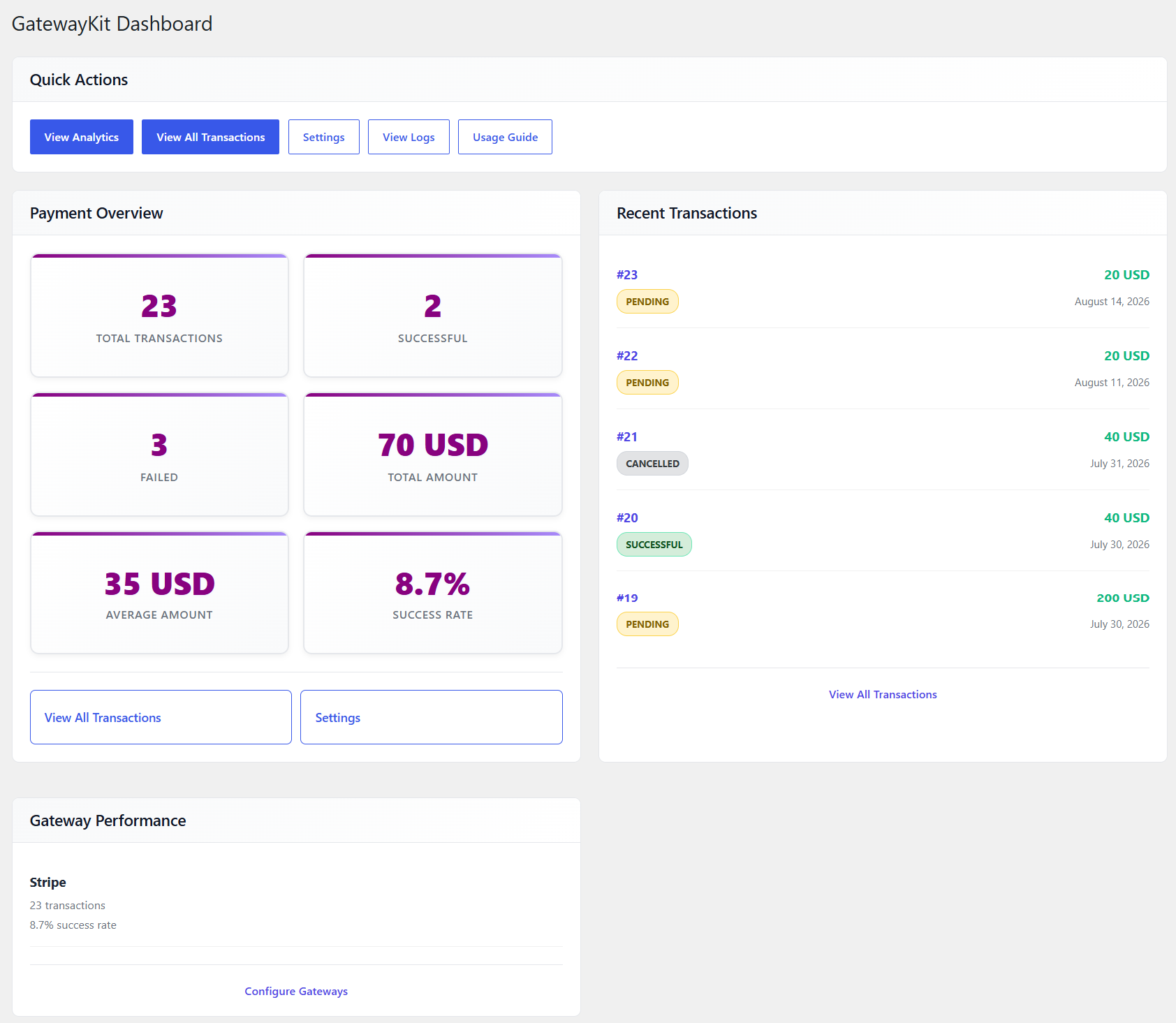
Set up in minutes, right inside the form builder you already use. Every payment is recorded in a full dashboard, and PDF receipts and invoices are emailed to your customers automatically.
Who it’s for: freelancers, web designers, small businesses, nonprofits, course creators, and agencies building client sites on Elementor Pro.
Try the live demo: See GatewayKit in action — wp-test.pourmirzai.com.
Translations: Available in English, Spanish, French, German, Brazilian Portuguese, and Arabic.
Requirements: Elementor Pro must be installed and active. The Elementor Forms widget (included with Elementor Pro) is required to create and accept payments through forms.
Why Elementor users choose GatewayKit
- All 9 gateways included free — PayPal, Stripe, Mollie, Razorpay, Paystack, Mercado Pago, CoinGate, Coinify, and NOWPayments. No per-gateway upsells and no premium tier just to unlock a processor.
- Payments your customers actually prefer — UPI, PIX, mobile money, iDEAL, Bancontact, SOFORT, and 100+ cryptocurrencies, plus Apple Pay, Google Pay, Klarna, and Afterpay through Stripe Checkout.
- A real payment dashboard in WordPress — search, filter, and review every transaction in one place instead of logging into five provider dashboards.
- PDF receipts and invoices, sent automatically — professional, printable, and included free.
- Payment Links — generate shareable Stripe checkout links without building a form at all.
- Security-first — credentials encrypted at rest (AES-256-CBC), logs auto-redact sensitive data, nonce verification and rate limiting built in, and no tracking or call-home.
Popular use cases
- Sell a single product or digital download from a landing page — no storefront required
- Collect donations and fundraising amounts (custom amounts supported; optional payment with Pro)
- Send invoices and let clients pay any amount they owe
- Take event registrations and booking fees right on the signup form
- Charge deposits or run recurring subscriptions (Pro)
- Accept crypto and local payment methods for customers worldwide
Payment Gateways Included Free
- PayPal — Modern hosted checkout with sandbox mode and webhook verification
- Stripe — Stripe Checkout with automatic 3D Secure, Apple Pay, Google Pay, Klarna, Afterpay, and embedded checkout option
- Mollie — iDEAL, credit cards, Bancontact, SOFORT, and more
- Razorpay — UPI, cards, net banking, and wallets for Indian merchants
- Paystack — Cards, bank transfers, and mobile money for African markets
- Mercado Pago — Cards, PIX, and local payment methods for Latin America
- CoinGate — Bitcoin, Ethereum, and 50+ cryptocurrencies
- Coinify — Bitcoin, Ethereum, and popular cryptocurrencies
- NOWPayments — Bitcoin, Ethereum, and 100+ altcoins
Core Features
- Fixed or dynamic payment amounts (pull the price from a form field)
- Transaction dashboard with search, filters, and date-range filtering
- Secure receipt tokens with a printable payment-result shortcode
- PDF receipts emailed automatically to customers
- PDF invoices downloadable from the receipt page
- Transaction notes for internal order tracking
- Shareable Payment Links (Stripe) — no form needed
- Per-form failure redirect pages
- Structured logging with sensitive-data redaction
- Security: input sanitization, output escaping, nonce verification, rate limiting
GatewayKit Pro (Optional)
Upgrade to GatewayKit Pro for advanced features:
- Discount (coupon) codes with usage limits, per-user caps, and expiry dates
- Partial (deposit) payments — charge a percentage now, the rest later
- One-click refunds from the dashboard (Stripe + PayPal) — no separate logins
- Analytics dashboard with revenue trends and your best-performing forms
- CSV export for your accountant or CRM (all / selected / filtered)
- Recurring subscriptions powered by Stripe
- Optional (donation-style) payment forms
- Outgoing webhooks to trigger automations in Zapier, Make, and n8n
- White-label mode for agencies and client sites
- Payment Summary field showing customers a clear breakdown before they pay
Visit the GatewayKit website for full documentation and demos.
External Services
This plugin connects to payment provider APIs to process payments.
What is sent and when
When a user submits a payment form, the plugin sends the payment amount, currency, and a transaction reference to the configured payment provider’s servers for authorization and capture. No personal user data beyond what the provider requires for payment processing is transmitted.
PayPal
- API Endpoint (Live): https://api-m.paypal.com
- API Endpoint (Sandbox): https://api-m.sandbox.paypal.com
- Terms of Service: https://www.paypal.com/us/legalhub/useragreement-full
- Privacy Policy: https://www.paypal.com/us/legalhub/privacy-full
Stripe
- API Endpoint (Live): https://api.stripe.com
- API Endpoint (Test): https://api.stripe.com
- Terms of Service: https://stripe.com/legal
- Privacy Policy: https://stripe.com/privacy
Mollie
- API Endpoint (Live): https://api.mollie.com
- API Endpoint (Test): https://api.mollie.com
- Terms of Service: https://www.mollie.com/terms
- Privacy Policy: https://www.mollie.com/privacy
CoinGate
- API Endpoint (Live): https://api.coingate.com
- API Endpoint (Test): https://api-sandbox.coingate.com
- Terms of Service: https://coingate.com/terms-of-service
- Privacy Policy: https://coingate.com/privacy-policy
Coinify
- API Endpoint (Live): https://api.coinify.com
- API Endpoint (Test): https://api.coinify.com
- Terms of Service: https://coinify.com/terms
- Privacy Policy: https://coinify.com/privacy-policy
NOWPayments
- API Endpoint (Live): https://api.nowpayments.io
- API Endpoint (Test): https://api-sandbox.nowpayments.io
- Terms of Service: https://nowpayments.io/terms
- Privacy Policy: https://nowpayments.io/privacy
Razorpay
- API Endpoint (Live): https://api.razorpay.com
- API Endpoint (Test): https://api.razorpay.com (test keys)
- Terms of Service: https://razorpay.com/terms-of-service/
- Privacy Policy: https://razorpay.com/privacy-policy/
Paystack
- API Endpoint (Live): https://api.paystack.co
- API Endpoint (Test): https://api.paystack.co (test keys)
- Terms of Service: https://paystack.com/terms
- Privacy Policy: https://paystack.com/privacy-policy
Mercado Pago
- API Endpoint (Live): https://api.mercadopago.com
- API Endpoint (Test): https://api.mercadopago.com (sandbox tokens)
- Terms of Service: https://www.mercadopago.com/terms-and-conditions
- Privacy Policy: https://www.mercadopago.com/privacy-experience
Screenshots


Installation
- Install and activate Elementor and Elementor Pro (the Forms module is required).
- Upload the
gatewaykitplugin folder to/wp-content/plugins/or install it via Plugins Add New Upload Plugin. - Activate GatewayKit through the Plugins screen.
- Go to GatewayKit Settings and enable the gateways you want, then enter your credentials.
- Create an Elementor Pro Form, then under Actions After Submit add the Payment Gateway action.
- Configure the gateway, amount, and success/failure redirect pages.
- Create a result page and add the shortcode
[gatewaykit_receipt].
FAQ
-
Does this require Elementor Pro?
-
Yes. The Elementor Pro Forms module is required because GatewayKit is an “Actions After Submit” handler for Elementor forms.
-
Does GatewayKit require WooCommerce?
-
No. GatewayKit is a standalone payment solution for Elementor Pro Forms — no WooCommerce, no shopping cart, no e-commerce plugin needed.
-
Elementor Pro already includes Stripe. Why do I need GatewayKit?
-
Elementor’s built-in form action supports Stripe only and gives you no payment dashboard, no PDF receipts, and no choice of provider. GatewayKit is a superset: all 9 gateways (PayPal, Stripe, Mollie, crypto, and more), a full transaction dashboard, PDF receipts and invoices, Payment Links, and the Pro extras — included free.
-
Which payment methods are included in Lite?
-
All nine payment gateways are included in the free plugin: PayPal, Stripe, Mollie, CoinGate, Coinify, NOWPayments, Razorpay, Paystack, and Mercado Pago. GatewayKit Pro adds advanced features like discount codes, refunds, analytics, CSV export, and more.
-
Can customers pay a custom amount?
-
Yes. Set the amount type to “From Form Field” and map it to a number field — perfect for invoices and donations.
-
Is this plugin secure? Can I trust it with payments?
-
Yes. GatewayKit was built security-first: all API keys and secrets are encrypted at rest (AES-256-CBC) and decrypted only in memory when a payment is processed. Logs automatically redact sensitive data. Every form submission is protected by nonce verification, input sanitization, output escaping, and rate limiting. GatewayKit itself does not track your visitors, and your data is never sold or shared — payment details are sent only to the payment providers you configure, and license/update checks run through Freemius’s SDK (which you can opt out of).
-
The activation link in my opt-in email returns a 403 error. What should I do?
-
This is a known issue documented by Freemius in Known License Activation Issues Security Layer Blockage. The activation URL contains random security keys with punctuation characters (
%,^,;,),*,!,>,$) that some security plugins and firewall modules (ModSecurity, Cloudflare WAF, Wordfence, Solid Security, etc.) flag as suspicious and block.Per Freemius’s official guidance, temporarily disable your security plugins/layers/modules just for the activation process:
- Temporarily disable ModSecurity (cPanel ModSecurity Off), Cloudflare WAF (WAF Off), and/or any WordPress security plugin (Wordfence, Solid Security, etc.).
- Open the activation email again and click the activation link.
- Once activation completes, re-enable all the security components you disabled.
The same guidance applies if license-key activation fails for the same reason.
Reviews

Contributors & Developers
“GatewayKit – Payment Gateway for Elementor Pro Forms” is open source software. The following people have contributed to this plugin.
Contributors
Translate “GatewayKit – Payment Gateway for Elementor Pro Forms” into your language.
Interested in development?
Browse the code, check out the SVN repository, or subscribe to the development log by RSS.
Changelog
1.3.3
Critical fixes
- White Label magic link no longer breaks after saving settings — the secret is no longer wiped by options.php
- Fixed analytics charts showing “No data” on the Analytics page
- Top Forms now shows page/form names instead of raw IDs
- Fixed analytics filter styling to match standard WordPress admin UI
- Redesigned dashboard to a cleaner two-column layout
Polish
- Applied White Label branding to all admin page titles
- Removed redundant White Label submenu from the dashboard menu
- Improved subscriptions page filter styling and spacing
1.3.2
New
- Subscriptions overview page (Pro) — track active, past-due, cancelled, and paused subscriptions in one place
- Analytics, Discounts, and Subscriptions now appear in the GatewayKit menu for everyone — Pro users get the full feature, free users get a clear upgrade path
Polish
- Minor admin styling and translation improvements
1.3.1
Critical fixes
- Bulk Export on the Transactions page now downloads the selected rows instead of failing silently
- Webhooks for Razorpay, Paystack, Mercado Pago, and NOWPayments now correctly process pending payments
- White-label magic link unlocks the settings page again
Security hardening
- Payment redirect pages are now safe to reload — duplicate receipts and redundant notifications are prevented
- PayPal and Coinify webhooks require signing secrets to be configured; unverified requests are rejected
- Removed the request scanner that was blocking legitimate form fields; SQL safety is still enforced at the database layer
- Duplicate rate-limit implementations consolidated into one consistent system
- Encrypted gateway secrets now refuse to operate when WordPress security keys are absent, with a clear admin notice
Reliability
- Outgoing webhooks are now delivered asynchronously — a slow downstream service no longer stalls the buyer’s success page
- Proxy-spoofed IP headers can no longer bypass per-IP rate limits (unless you explicitly configure trusted proxy ranges)
- Payment endpoint now validates redirect URLs and can’t be replayed across clients
1.3.0
New gateways and payment methods
- Added Razorpay — UPI, cards, net banking, and wallets for Indian merchants
- Added Paystack — cards, bank transfers, and mobile money for African markets
- Added Mercado Pago — cards, PIX, and local methods for Latin American markets
- Added Apple Pay and Google Pay support via Stripe Checkout
- Added Klarna and Afterpay / Clearpay (Buy Now Pay Later) via Stripe Checkout
- Added Stripe Embedded Checkout — keep customers on your site with no redirect
- Added Payment Links — generate shareable Stripe checkout links without a form
1.2.1
- Fixed discount codes not being applied at checkout — discounted total is now correctly sent to all payment gateways
1.2.0
- Added PDF invoice attachment to customer receipt emails
- Added refund processing from dashboard (Stripe + PayPal)
- Added advanced analytics dashboard with revenue charts (PRO)
- Added invoice PDF download from receipt page
- Added Stripe subscription lifecycle management (PRO)
- Added outgoing webhooks with HMAC-SHA256 verification (PRO)
- Added white-label mode for agencies (PRO)
- Added Payment Summary form field for Elementor (PRO)
- Added optional (donation-style) payment forms (PRO)
- Fixed Payment Summary and Discount Code field rendering in Elementor editor (PRO)
1.1.0
- Stronger PayPal webhook security with optional signature verification
- Safer payment confirmation for PayPal orders
- Faster payments — PayPal tokens are now cached
- More accurate zero-decimal currency list
- Pro features: CSV export and date-range filter on Transactions page
1.0.0
- First public release
- PayPal payments through Elementor Pro Forms
- Optional GatewayKit Pro add-on with Stripe, Mollie, and CoinGate gateways