

Description
Bang! Cart for Stripe gives every product a buy button you place exactly where you want it – any page, any post, with a shortcode. Customers fill a fast, polished basket that matches your theme, and pay on Stripe’s own checkout page.
Your pages stay yours: the plugin adds no pages, no templates and no database tables of its own. Stripe holds the card details and the order history – this plugin never sees a card number and keeps no order records of its own.
What it does
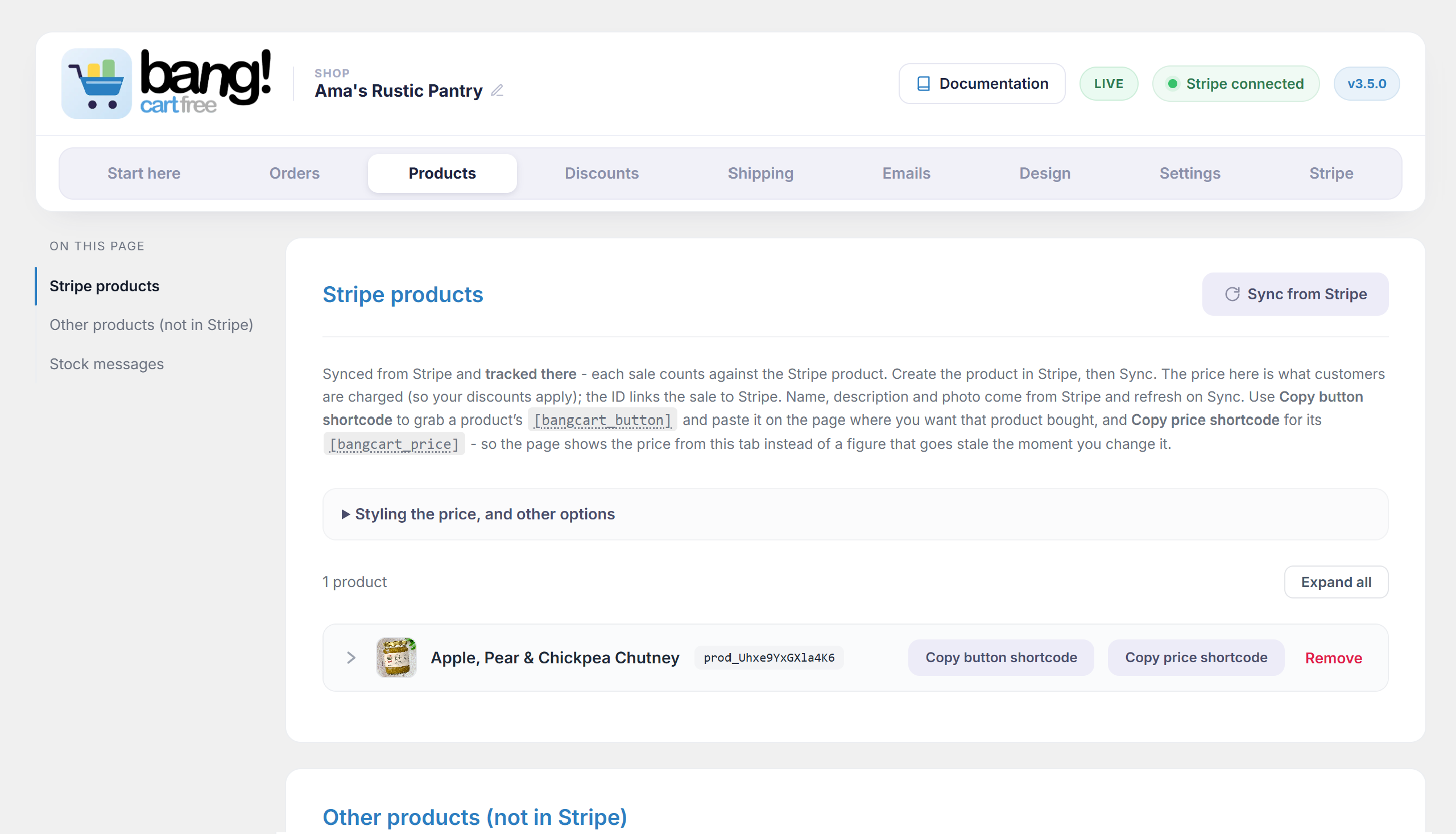
- Add-to-basket buttons for your Stripe products, or for products you add here.
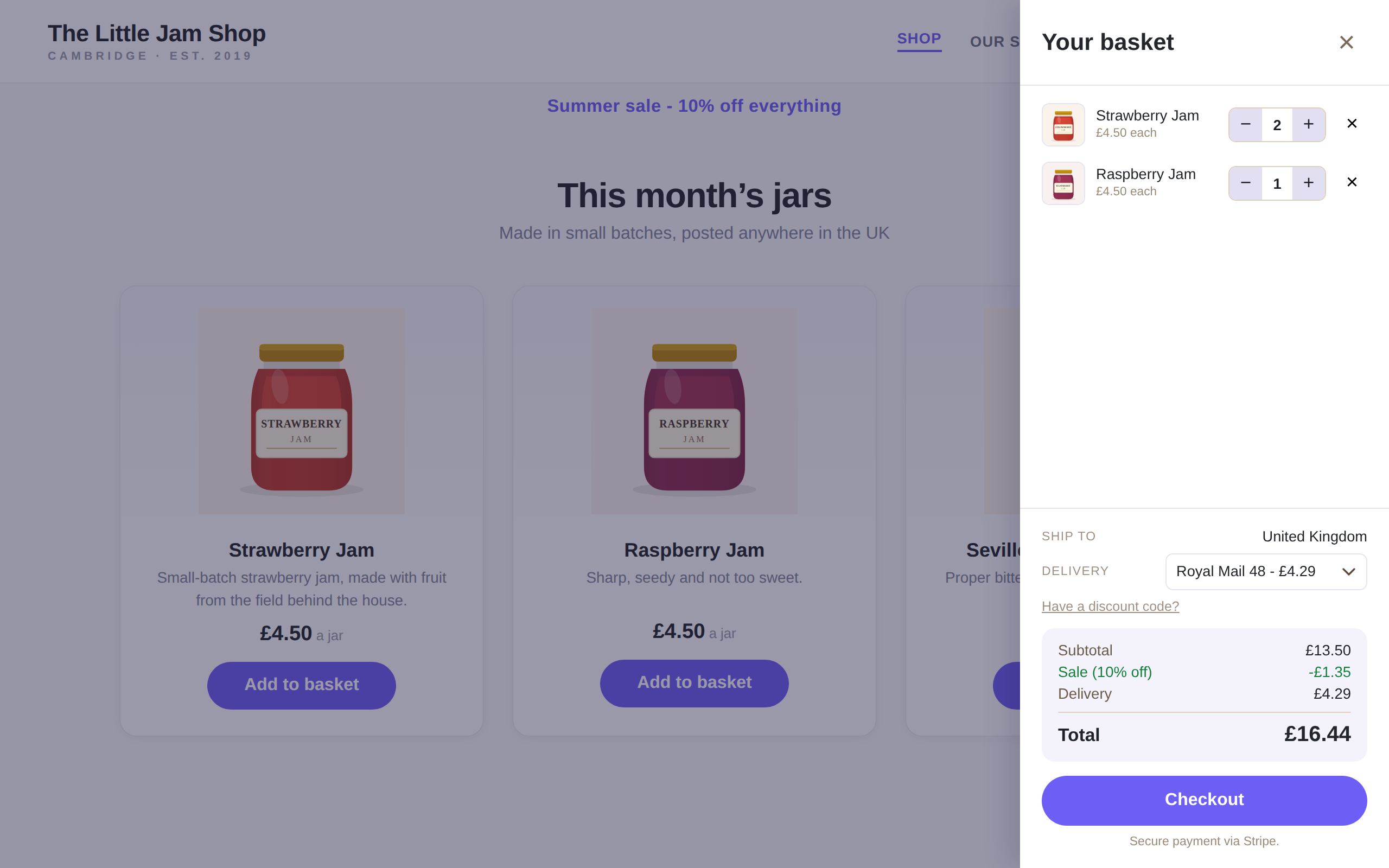
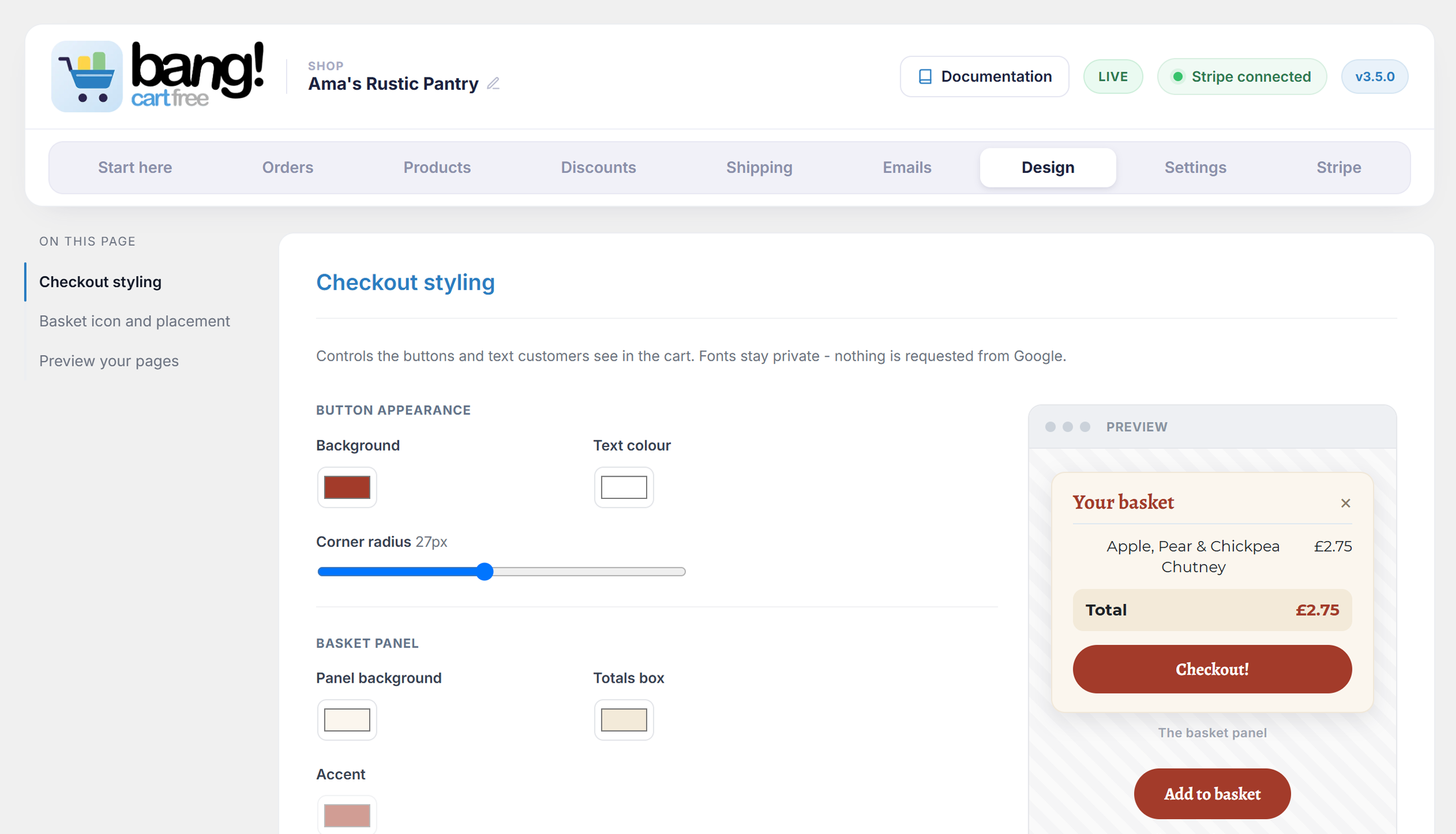
- A basket that works on a phone, in your theme, with your fonts and colours.
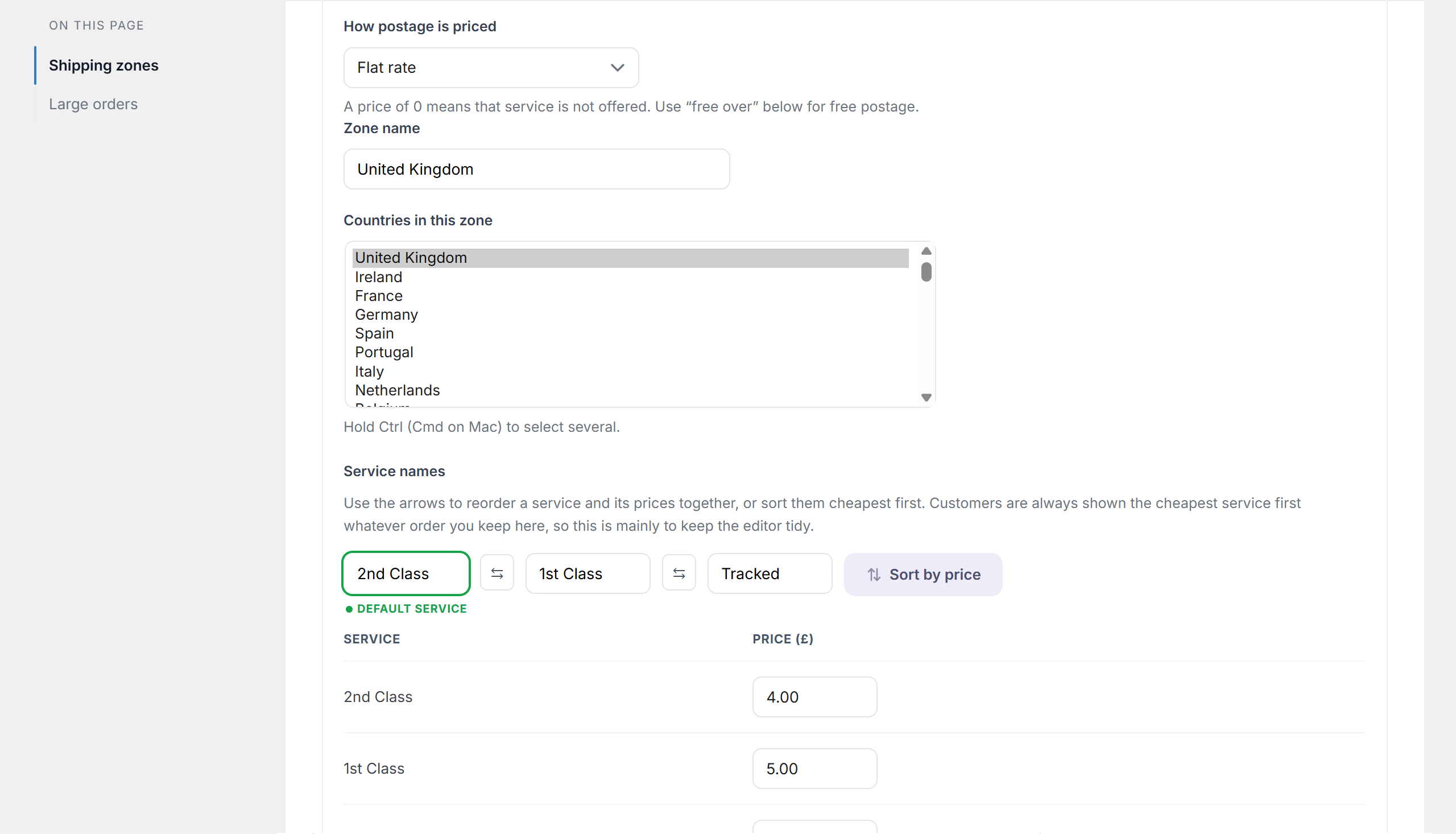
- Delivery zones of your chosen countries – as many zones as you need, each with a flat rate per service, or first item plus each additional – with collection in person.
- Free postage over a spend or a number of items.
- A shop-wide sale percentage.
- Discount codes, fixed or percentage, with a use limit and an expiry.
- Stock counts, with low-stock and sold-out messages you write yourself.
- Reservations, so two people cannot buy the same last item.
- Confirmation emails to your customer and to you, in your own words.
- A PDF receipt the plugin makes itself, attached to both order emails – switch it on under Invoice / receipt document on the Emails tab (a fresh install sends no document until you choose one).
- Delayed bank payments handled properly – stock is not released while a Bacs payment settles.
How your customers can pay
Checkout happens on Stripe’s own payment page, so your shop offers whatever payment methods your Stripe account has switched on – cards, Apple Pay, Google Pay and Link out of the box, and methods like Klarna, iDEAL, Bancontact or Bacs Direct Debit where your country and your customer’s support them. Strong Customer Authentication (3-D Secure) is handled there too, automatically. None of it is configured in this plugin: you switch methods on in Stripe, and your checkout follows. Stripe ships new payment methods, and your shop simply has them.
What it deliberately does not do
- It does not store card details. Payment happens on Stripe’s page.
- It does not keep a copy of your orders. Stripe already has them, and one truth beats two.
- It does not do subscriptions, tax tables, or a hundred payment gateways.
Who it suits
Makers, artists, food producers, small-batch and craft shops – anyone selling a focused range of products from a site that is more than just a shop. If your products live on pages you designed, and you want a buy button on each and a shopping cart that follows your customer around the site, this is built for you.
You will need
A Stripe account and a secret key. Test mode works exactly like live mode, so you can try the whole thing before taking a real payment.
Documentation, with screenshots of every step, lives at bangplugins.com/docs/cart.
External services
This plugin connects to Stripe to take payments. Stripe is the only external service it uses.
When a customer checks out, the plugin creates a Stripe Checkout session through the Stripe API (api.stripe.com) and sends the customer to Stripe’s secure page to pay. It also receives payment confirmations back from Stripe by webhook, and in the admin it reads your products and prices from your Stripe account.
Data sent to Stripe: the items and amounts in the basket, the chosen delivery option and cost, and – entered by the customer on Stripe’s own page – their email and delivery or billing address. The plugin never sees or stores card numbers; Stripe handles those entirely. This happens only when you or a customer does something that needs Stripe: loading products, taking a payment, or verifying the webhook.
Stripe is provided by Stripe, Inc. Your use of it is subject to their terms and privacy policy:
- Stripe Terms: https://stripe.com/legal
- Stripe Privacy Policy: https://stripe.com/privacy
Screenshots
Installation
- Install and activate the plugin.
- Open Bang! Cart in the admin menu and paste your Stripe secret key on the Stripe tab.
- Press Set up webhook automatically on the Stripe tab – one button creates the webhook in your Stripe account and saves the signing secret for you. (You can still add it by hand in your Stripe dashboard if you prefer.) Without a webhook, orders are paid for but no emails are sent.
- Add your products, either by syncing them from Stripe or by adding them here.
- Copy a product’s shortcode onto its page.
FAQ
-
Do I need WooCommerce or another ecommerce plugin?
-
No. This is a complete standalone shopping cart: it needs nothing but WordPress and a Stripe account. It adds no pages, templates or database tables of its own, so it sits happily on any site.
-
Do I need a Stripe account?
-
Yes. This plugin is a shopfront for Stripe; Stripe takes the money.
-
Which currencies can I charge in?
-
Any decimal currency Stripe supports – pounds, euros, dollars and dozens more, priced the way you write them (5.50 charges as 5.50). Whole-unit currencies such as the Japanese Yen are not offered yet.
-
Does it work with page builders?
-
Yes. The buy button is a shortcode, so it renders anywhere your builder renders shortcodes – including inside Elementor widgets – and the basket follows your customer on every page.
-
Can I sell digital products?
-
The cart is built around physical goods: stock counts, postage, collection in person. It does not deliver files, so digital downloads are not its focus.
-
Does it work without the webhook?
-
Payments will succeed, but nothing will tell your site that they did – so no emails go out and stock does not go down. Set the webhook up.
-
Where are my orders?
-
In Stripe. The Orders tab shows the recent ones and lets you tick them off as posted, but refunds and the full history live in Stripe, where they belong.
-
Does my customer get a receipt?
-
Two ways, use either or both: Stripe can email its own receipt, and the plugin can attach its own PDF receipt to the order emails – choose Plugin receipt under Invoice / receipt document on the Emails tab. A fresh install has this set to None, so pick one if you want a document sent.
-
Can I use my own products, not Stripe’s?
-
Yes. Products added here are sold and priced normally; they are just not tracked as Stripe products in Stripe’s reporting.
-
Can customers collect in person?
-
Yes. Switch a zone on and leave its postage prices empty.
-
Is it translation-ready?
-
The storefront and most of the admin are. A translation template is included in /languages.
Reviews
There are no reviews for this plugin.
Contributors & Developers
“Bang! Cart – Standalone Stripe Shopping Cart & Buy Buttons” is open source software. The following people have contributed to this plugin.
Contributors
Translate “Bang! Cart – Standalone Stripe Shopping Cart & Buy Buttons” into your language.
Interested in development?
Browse the code, check out the SVN repository, or subscribe to the development log by RSS.
Changelog
3.7.1
- Fix: the logo at the top of your order emails could arrive torn in half in Gmail. Gmail cannot display WebP images – it converts every one it is sent, and that conversion pulls logos apart. What the customer sees is the corner of your artwork and then a block of flat colour where the rest of it should be. It reads as a broken upload, and the file is perfectly good everywhere else you look at it, which is why this can run for months without anybody catching it. A WebP or AVIF logo is now copied to a PNG automatically and the emails use the copy. There is nothing for you to do.
- This affects far more shops than it sounds like it should, because a WebP logo is rarely a choice anyone made: the popular image-optimiser plugins convert an entire media library to WebP when they are installed, logo included. If your site has one of those, check the Emails tab – the plugin will tell you what it found and what it did about it.
- The same fault reached the order notification you get yourself, wherever “Show the logo in the seller email too” is ticked, which it is by default.
- The Emails tab now explains the format rule where the logo is chosen, and warns you in the two cases the plugin cannot fix on its own: a server whose image library was built without WebP support and so cannot make the copy, and an image-optimiser plugin that swaps the new PNG back to a WebP as it is served, quietly undoing the fix. Both warnings name Gmail, so it is clear which of your customers are seeing it.
- Worth knowing if you have already tried to fix this yourself and thought you had failed: Gmail keeps its own copy of every image it converts, filed under the web address it came from, and holds it for a long time. Replacing the picture without changing the file name can keep serving the broken version. The PNG copy is written under a new name for exactly that reason.
- Tested up to WordPress 7.1.
3.7.0
- Groundwork, and nothing else: no new features, no new settings, and every checkout behaves exactly as it did before. This release prepares the plugin for a payment form that can sit on a page of your own site rather than on Stripe’s, which arrives as part of the Bang! Cart Pro add-on. Until something supplies that form, none of it does anything at all – your customers still pay on Stripe’s page, exactly as they do today.
- The one thing worth knowing: the plugin now understands a checkout that finishes on your own site, including the case where a card is declined. A payment that did not go through says so plainly and keeps the basket, rather than thanking somebody for an order that never happened.
- More groundwork on the same terms: no new settings, nothing you have set up changes. This release also prepares the plugin for asking your customers to type something – a name to engrave, an invoice number, a message with the order – which arrives as part of the Bang! Cart Pro add-on. Until something asks, nothing appears.
- The part worth knowing: a basket can now hold the same product on more than one line, so one order can carry three of the same mug with three different names on them. All three still come off one stock count. What the customer types can be corrected in the basket, and reaches your order email, their confirmation, the packing page, the receipt and your Stripe dashboard.
- Fix: the chosen delivery zone and service now travel with the basket from page to page. They used to live only on the page they were picked on, so a customer who chose a dearer service and then navigated anywhere before checking out was quietly reset to the first service in the list. The basket already survived the journey; now the choices riding on it do too.
- Replacing a Stripe secret key now warns you, at the moment of saving, if the site’s webhook did not come along with it. A key from a different Stripe account leaves the webhook behind in the old one – and without a webhook, payments complete with no order emails, no stock changes and no order records. Where the plugin created the webhook itself it asks Stripe outright and only speaks when something is actually wrong; a webhook made by hand gets an honest “check this” instead. The verdict also sticks: the connection box on the Stripe tab stays red with the same plain sentence until the webhook is set up, rather than the warning living exactly one page load. Previously the only hint was the connection box going quietly amber.
- The plugin header now names its homepage (Plugin URI), and every link home uses the bare bangplugins.com host.
- While a connection check runs, the page says so: the checking box scrolls into view and the header chip reads “Stripe: checking…” with a pulsing dot until the answer lands.
- One press now does the whole webhook job: “Set up webhook automatically” starts the end-to-end connection check itself the moment setup succeeds, so there is no second button to remember. “Verify connection now” remains for re-proving an existing connection whenever you want.
- The Start here checklist’s webhook step now reflects the live connection: if Stripe stops being connected after setup is complete, that step re-opens and says order emails have stopped, instead of keeping a tick that contradicts the header. Completed setup itself stays completed.
- The Start here tab now shows a number when checklist rows are open – the same badge the Orders tab uses for parcels to post. That means the setup steps still to do, and the webhook row if a broken connection re-opens it later. A completed shop with a healthy connection shows no badge at all.
3.6.0
- No new features, and nothing you have set up changes – but two real fixes below, one of which is worth reading. The new work in this release is groundwork: it prepares the plugin for products that sell in options (one shirt in several colours and sizes, each with its own price, stock and photograph), which arrives as part of the Bang! Cart Pro add-on. The plugin now understands how such a basket line is counted, so stock, reservations and receipts stay exact when it appears.
- Fix: when a product is sold out, the message now names what is sold out rather than only the product. On a product with options this is the difference between “Bang! tee is sold out” and “Bang! tee – Red / Small is sold out” when the other sizes are still on the shelf.
- Fix: saving the Products tab could write a stock count against the wrong product. A product set to Unlimited had its stock box greyed out in a way that stopped the browser sending it at all, so every product listed below it took the count belonging to the one above – and the tab redrew showing the new, wrong figures as though you had typed them. Any shop with an unlimited product above a limited one was affected. The boxes are still uneditable when they should be, but they now report their value, so the counts line up with the products they belong to. Check the stock figures on your Products tab after updating; a count that has drifted needs typing in once.
- Fix: a Stripe Checkout page now expires when the stock reserved for it does. Left to Stripe’s own setting the page stayed payable for 24 hours, while the stock held for it was released after 30 minutes – so a checkout left open in a tab could still take payment the next morning for something sold that afternoon. The page now closes with the reservation, and the customer simply starts again with an up-to-date basket.
- Fix: a hand-made checkout request that listed the same product twice was charged in full but only partly subtracted from stock. Your storefront cannot produce such a request – this closes the gap for one built by hand against the public endpoint. The quantity now counts once, summed, in every place that reads it, so the count a sale leaves behind always matches what was paid for.
- Fix: with the Pro add-on active, unticking Custom price on a product did not stick – the tick quietly returned on save, with the old minimum back in the Price box as though you had typed it. An unticked box and a deactivated add-on used to look identical to the save, which kept your settings safe through Pro-less saves at the cost of making the untick impossible. The editor now says when it was on the page, so off means off – and a save made with Pro deactivated still preserves everything, exactly as before.
- Fix: on a slow first visit, the basket could briefly appear open and slide itself shut. The basket’s styles print after its markup, so a slow first load could paint it before they arrived – and their arrival then animated it closed. Its closed position now travels ahead of the markup, so there is nothing to animate and nothing to see.
- Fix: clicking anywhere inside an open product card no longer folds it shut. The card’s grey header strip is meant to open and close it, but the check ran on the whole card, so a click on empty space in the body closed the card mid-edit.
3.5.1
- Fix: three currencies have been removed from the Settings picker because the plugin cannot charge in them accurately. Chilean Peso (CLP) is one of Stripe’s zero-decimal currencies: prices here are held to two decimal places, so a shop selling at 5.50 sent Stripe an amount Stripe read as 550 Chilean Pesos, charging the customer a hundred times the price. Croatian Kuna (HRK) has not existed since Croatia joined the Eurozone on 1 January 2023 and Stripe rejects it outright, so a shop set to it could not take a single payment – Croatian shops should use the Euro. Icelandic Krona (ISK) will not accept fractions of a krona at Stripe, so it worked for a whole-krona price and failed for 5.50, which the price boxes accept. Every remaining currency was then checked one by one against Stripe’s own tables and all 44 are correct.
- Fix: checkout now refuses to create a payment at all if the shop’s saved currency is not one the plugin can charge in, and says so on every admin screen until it is put right. The picker’s own check was the only thing standing between a bad currency and a wrong charge, and a picker that offers the wrong currency defeats it. Refusing the sale is deliberate: the alternative – quietly falling back to a different currency – keeps the checkout working while charging in the wrong money, which is the same fault better hidden. No shop is switched to another currency without being asked.
- If your shop uses any currency other than those three, nothing changes and there is nothing to do.
- Fix: the customer’s order status page now shows the collection details for a collection order. The address and opening hours were already in the confirmation email and on the thank-you page, but the status page – the one screen built to be revisited from that email – printed only the words “Collection in person”.
- Changed: for collection orders, marking now records the handover, mirroring what Mark posted records for delivery. The button on the Orders tab says Mark collected on a collection row (it said Mark posted on every row), the marked status page says “Collected – Your order was collected on [date]” (it said “Ready to collect – packed and waiting for you”, which told a customer to come and fetch what they were already holding), and the unmarked page no longer promises “You will be emailed when it is ready to collect” – an email no version has ever sent. Your signal to come and collect is the collection details in the confirmation email and now on the status page. The Orders card heading now counts orders “to go out” rather than “to post”, and a collection row’s Delivery column says Collection in person instead of showing the billing address as if goods were being sent there.
- Fix: the Stripe key boxes now check both ways. The live box has always refused anything that is not a live secret key; the test box accepted any text at all – a publishable key, a truncated paste, a typo – and the mistake only surfaced later as unexplained API failures. Each box now accepts only the key that belongs in it and says so when refusing.
- Fix: the Design tab’s order status previews now show the real wording for every state. The collection preview showed delivery wording (“You will hear from us when it is posted”), and the marked states could not be previewed at all. There are now previews for all four: being prepared for posting, posted, being prepared for collection, and collected.
- Changed: a basket over a zone’s posting limit in a zone that offers collection now shows your own large-order message, if you have written one, with the collection offer after it. It previously ignored the custom message on that branch and used built-in wording, which read as broken to any shop that had written its own.
3.5.0
- The buyer’s confirmation email now includes a Cancellation and returns section, on by default, editable on the Emails tab. UK distance-selling law requires this information in the email itself – a link to a returns page does not count – and missing it is expensive: no cancellation notice and the customer’s 14-day return window stretches to as long as a year; no note that the customer pays return postage and the shop pays it instead. The default wording covers the 14-day right and how to use it, who pays return postage, when the right does not apply, faulty-goods rights, and the complaints route. Edit it to match how you actually handle returns, or switch it off if these details already reach every customer another durable way.
- New Policy pages card on the Settings tab: your Terms of service, Privacy policy and Returns policy URLs. They are linked from the buyer’s confirmation email under the cancellation wording. Each URL is checked when you save – a page that does not answer gets a warning, not a refusal, because a staging site behind a password fails the same check silently at Stripe’s end too.
- The same card explains the two Stripe Dashboard settings that put “By placing your order, you agree to our Terms of Service and Privacy Policy” under the Pay button – both are needed, Stripe’s error message does not say which one is missing, and neither can be set by a plugin.
- A delivery zone somehow saved with priced postage but no countries can no longer take a posting order. Stripe attaches the postage and the country list together, so this state used to create a payment with no postage charged and no delivery address collected – the customer paid a total the basket never showed, and the shop had an order with nowhere to send it. Checkout now refuses with a clear message instead, before any stock is reserved. Collection orders are unaffected: collecting needs no countries.
- A source comment now records why the basket’s Checkout button may be worded freely: it only opens Stripe’s payment page. The button that takes the money is Stripe’s own Pay button, which is the one the button-labelling law governs, and Stripe keeps it compliant.
- Test emails can now be sent to any address you type, with your own suggested. Mail from a site to its own domain often never leaves the server, so a test to a different domain – a Gmail or Outlook inbox – is the one that proves delivery. The address is remembered for next time, and a mistyped address refuses loudly instead of quietly testing the wrong inbox.
3.4.1
- The Page overlay control on the Design tab now stays editable in both basket placements. Previously it sat with the floating-only settings, so it went grey in self-placed mode even though the overlay still dims the page there. Behaviour and saved values are unchanged.
- The floating corner button’s live preview now sits in a framed Preview panel beside its controls, matching the checkout styling preview.
3.4.0
- Multiple shipping zones. Every zone you switch on now sells: customers pick their region in the basket, and each zone prices at its own rates. The Add zone button sits under your zones on the Shipping tab.
- New Page overlay control on the Design tab: choose the colour and strength of the tint that dims your page while the basket is open. Defaults to the indigo the plugin has always used, so nothing changes until you change it.
- A refreshed wordmark in the admin header, and the admin and fresh-install storefront colours now follow its blue. Shops that have saved their own styling keep it, exactly as always.
- The plugin’s admin styling and scripts, and the storefront basket’s styling and scripts, now load through WordPress’s enqueue system (wp_add_inline_style / wp_add_inline_script on registered handles) instead of printing style and script tags directly.
- The description no longer compares this plugin with other plugins – it just says what this one does.
- Wording: notes about settings made by an add-on that is not active now state that fact plainly, with no product names, no paused badges pointing anywhere, and nothing offered for sale from a working screen.
3.3.5
- Fix: pressing Recount now tells you the answer instead of telling you to wait for it. The confirmation still said the total would “reappear here once it is complete” – wording written for the background-only count in 3.3.3 – while 3.3.4 printed the finished figure directly beneath it. A message that tells you to wait for something already on the screen sends you away and back to check.
- The notice now reports what actually happened: the new total and order count when the count finished in the press, that it is carrying on in the background when the history is too long for one request, or that there are no paid orders to total yet.
3.3.4
- Fix: pressing Recount, or landing on Orders for the first time, now counts straight away instead of queueing the work. 3.3.3 handed the whole job to WP-Cron – including for a shop whose entire history is a single request – so the press made no Stripe call at all, and on a site with WP-Cron switched off the total never appeared. The first slice now runs on the spot; only a longer history hands off to the background.
- Fix: a count in progress now advances on Orders tab loads whenever the queued background slice is overdue, so a site with WP-Cron disabled finishes over a few page views rather than never.
- Only the Orders tab pays for that first request – the other tabs fetch the order list for the “to post” badge as they always did, and spend nothing extra on a figure they do not show.
3.3.3
- New: the Orders tab now shows what the shop has taken, all time, above the orders. Gross, in the shop’s currency, with the order count beside it – and it says plainly that it is before Stripe’s fees and any refunds, because a figure an owner acts on should not need explaining.
- It is counted, not guessed. The Orders tab only ever asks Stripe for the 25 most recent orders, so adding up what is on screen would have printed the same number for a shop with 25 orders and a shop with 2,500. The whole history is read once in the background instead, a slice at a time, and no figure is shown until that count is complete – a half-read history is not a smaller total, it is a wrong one.
- After that it stays current for nothing. The admin already fetches recent orders on every tab of this plugin; new orders are counted from that list, so the ordinary day costs no extra request at all. A shop busy enough to outrun it falls back to a background catch-up rather than holding up the page.
- Only paid orders count. An async bank payment that has not cleared is not money yet, and an order that needed no payment is not takings.
- Test and live totals are separate and always were. Clear test order data now removes the test total with the rest of the test notes, and never touches the live one.
- A shop that has taken orders in more than one currency is told so rather than shown a total that adds them together.
- Recount, beside the figure, rebuilds it from Stripe from scratch – for after a refund, or any time the number deserves checking.
3.3.2
- Setting the webhook up by hand no longer breaks delayed bank payments. The hand-setup instructions on the Stripe tab named one Stripe event to tick; the one-button setup beside them has always subscribed four. Anyone who followed the written route silently lost every Bacs or bank-debit order – paid for, never completed. All four events are now listed, built from the plugin’s own list so the two can never drift apart again.
- Those instructions now also explain customer.created, the event Verify connection now uses to prove the connection without taking a payment.
- The connection check now says plainly what a missing async_payment event costs a shop, instead of mentioning it in passing.
- The Emails tab named a “Check connection” button that does not exist – the buttons are Verify connection now and Re-check only.
- The translation template was a version behind: it still offered translators three strings 3.3.1 had already replaced, and omitted the replacements, so that work was wasted and those lines stayed English. It is rebuilt from the shipped code.
3.3.1
- The Documentation button in the admin header is live – it opens the new documentation site at bangplugins.com/docs/cart.
- Start here: the self-placed basket step now points at the Design tab, where the shortcode’s Copy button actually lives – both the wording and its Open button still said Settings after 3.3.0’s tab split.
- The Email colours hint now names the real control, Save changes – there is no “Save colours” button.
- readme: the install steps describe the one-button webhook setup (adding it by hand remains a fallback), and the plugin’s own PDF receipt is described instead of implying all receipts live in Stripe.
- Housekeeping: seven code comments still said “Settings tab” for controls that moved to the Design tab in 3.3.0.
3.3.0
- Hardening release: rate-limited public endpoints, refresh-safe admin actions, crash-safe order fulfilment, multi-page PDF receipts, cross-tab basket sync, an accessibility pass (visible focus, keyboard product cards, AA contrast), and a set of correctness fixes across discounts, stock metadata, coupon counters and currency validation. Full detail in changelog.txt.
- New default storefront palette – a clean indigo-and-blue base for your own styling (existing stores keep their current look automatically; everything stays configurable in Checkout styling).
- The admin’s Settings tab is now two tabs: Design (checkout styling, basket placement, previews) and Settings (shop identity, status, thank-you page); stock messages moved beside the stock levels on Products.
3.2.9
- The large-order enquiry button now closes the basket when it is clicked. If it points at a section on the same page, the basket no longer sits open over whatever the page scrolls to.
3.2.8
- The per-zone large-order message is now tucked behind a switch in each zone – “Give this zone its own large-order message” – instead of always showing. Off (the default), the zone quietly uses the shop-wide Large orders settings, so a zone is no longer a wall of text repeating the option that already sits below it. Turn the switch on only where you want different wording.
- The large-order enquiry button now opens the contact page in the same tab, not a new one.
3.2.7
- New choice on the Discounts tab: let a customer’s discount code apply on top of an automatic discount. Off by default. With it on, the automatic discounts (quantity, sale, order value) still only ever apply one at a time, and then the code comes off on top – so a code and a sale can combine, the way most shops work. The total can never fall below zero, and free delivery is unaffected.
- Tidied the wording throughout so the plugin no longer talks in terms of “jars” – the examples now speak of “items”, since you might be selling anything.
3.2.6
- The {limit} and {over} placeholders in the Large orders settings are now click-to-copy too, so you can drop them straight into your message.
- Widened the Enquiry link and Button wording boxes on the Large orders card (and the matching per-zone fields) – they were cramped to a fraction of their proper width.
3.2.5
- Every shortcode shown in the admin is now click-to-copy. The dedicated Copy buttons stay; on top of that, any shortcode woven into a line of help text – on Start here, Products, Settings and elsewhere – can be clicked to copy it, so you never have to select it by hand.
3.2.4
- Large orders no longer have to dead-end. On the Shipping tab you can now reword the “too many to post” message and, if you like, add a link so oversized baskets get a button through to your contact page instead of a flat “please remove some”. Set one message and link for the whole shop, or a different one per zone.
3.2.3
- Bang! Cart now sits high in the left-hand admin menu, just below Dashboard, instead of down by Comments – fewer plugins to scroll past to reach your shop.
- New quick-access item in the top admin toolbar: a Bang! Cart menu with shortcuts to Orders, Products, Settings and Stripe, on every admin and front-end page. Shown only to users who can manage the shop.
3.2.2
- A clean bill of health from WordPress’s official Plugin Check tool: 228 errors and 106 warnings, now zero. Every echoed style value is escaped, every translatable string with a placeholder carries a translators note, every form field is unslashed and sanitised at first touch, and the few deliberate exceptions (token-authenticated email links, the uninstall sweep, the migration’s one-time scan) now say in code exactly why they are what they are.
- Fixed along the way: the Start here checklist’s placement scan now also recognises the pre-rename shortcode names, so a shop built before 3.2.0 is no longer told its button is missing.
- Tested up to WordPress 7.0. The readme changelog now keeps recent versions only; the full history back to 2.0.0 ships in changelog.txt.
3.2.1
- The webhook section’s hand-setup note now links straight to the Developers – Webhooks page of your Stripe dashboard, in the mode that matches the key above it – the same courtesy the API-key boxes got in 3.1.11.
3.2.0
- The plugin is now Bang! Cart for Stripe – a new name, same shop. Everything renames itself: settings saved under the old internal prefix are carried over automatically the first time the new version loads, and nothing needs re-entering.
- Old links keep working forever: order-status and receipt links in emails already sent, shortcodes already pasted into pages, and the webhook address stored in Stripe’s dashboard all answer exactly as before.
- If you added the old override constant to wp-config.php, it is still honoured.
Earlier versions: the complete history back to 2.0.0 ships in this plugin’s changelog.txt.