

Description
Every quote on one screen. Accept or decline in one click. Status history and internal notes. All free.
Here is the problem. A quote request lands in your inbox as an email. You reply, they reply, and three days later you cannot remember who said yes and who is still waiting.
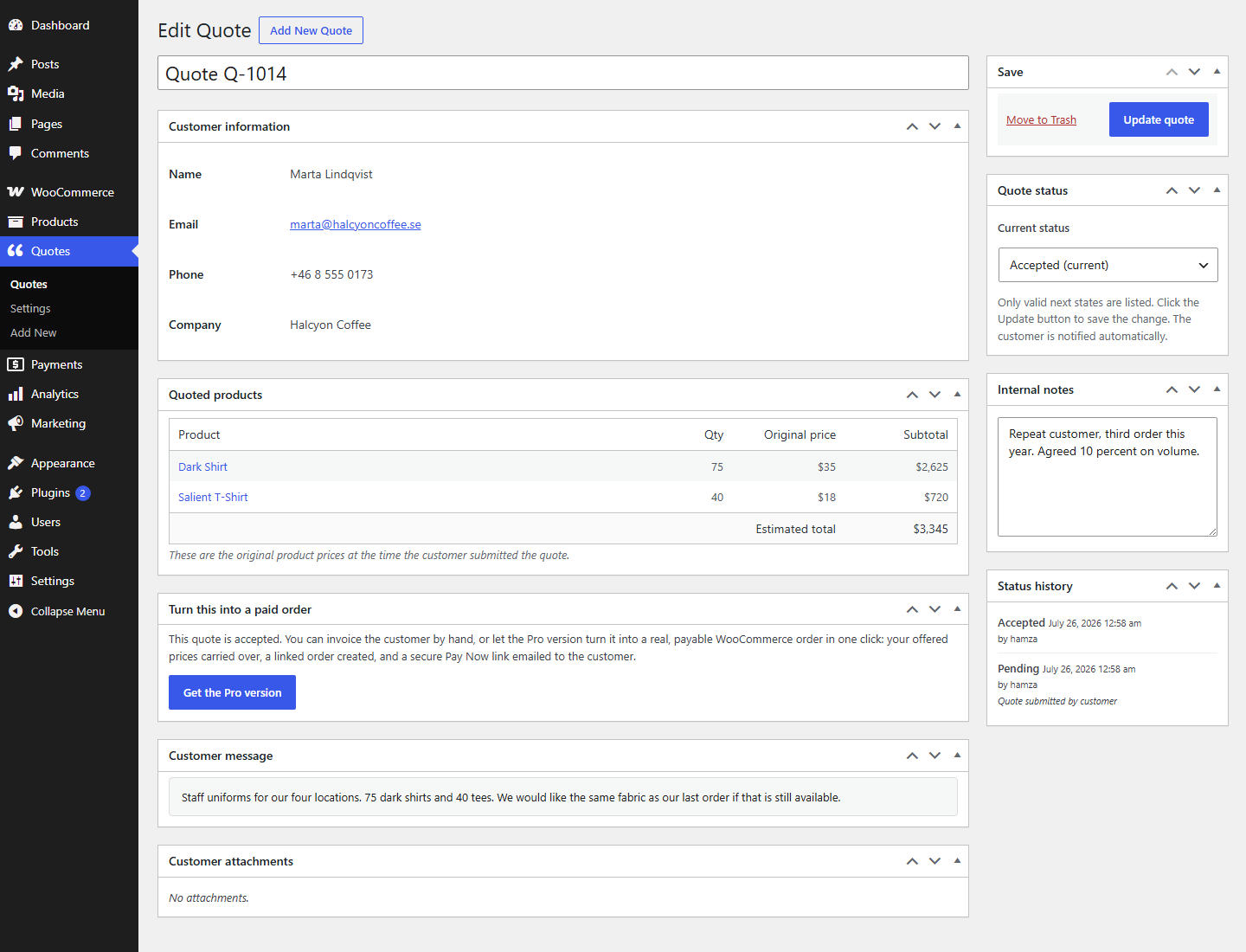
Devtonic Quote Requests puts every quote on one screen instead. You see the customer, the products they asked for, their message, and the current status. You accept or decline with one click. Every change is logged, so you always know where a quote stands.
I built Devtonic Quote Requests because I kept seeing quote plugins that stop at the email. Capturing the request is the easy half. Answering it, tracking it, and knowing where it stands is the half that actually runs your business, so that half is free here.
What the free version does
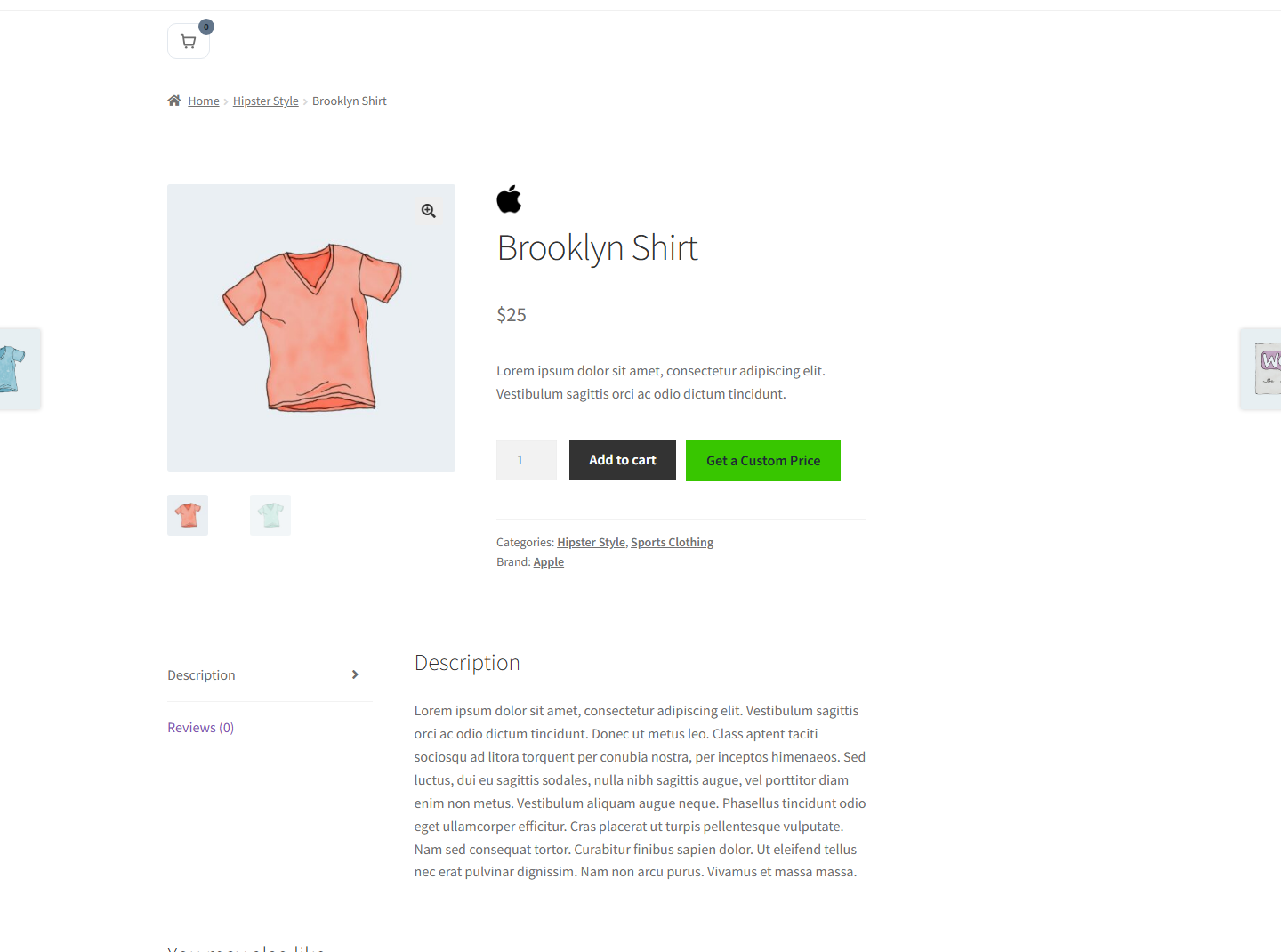
- Add to Quote button on product pages, next to Add to Cart or in place of it
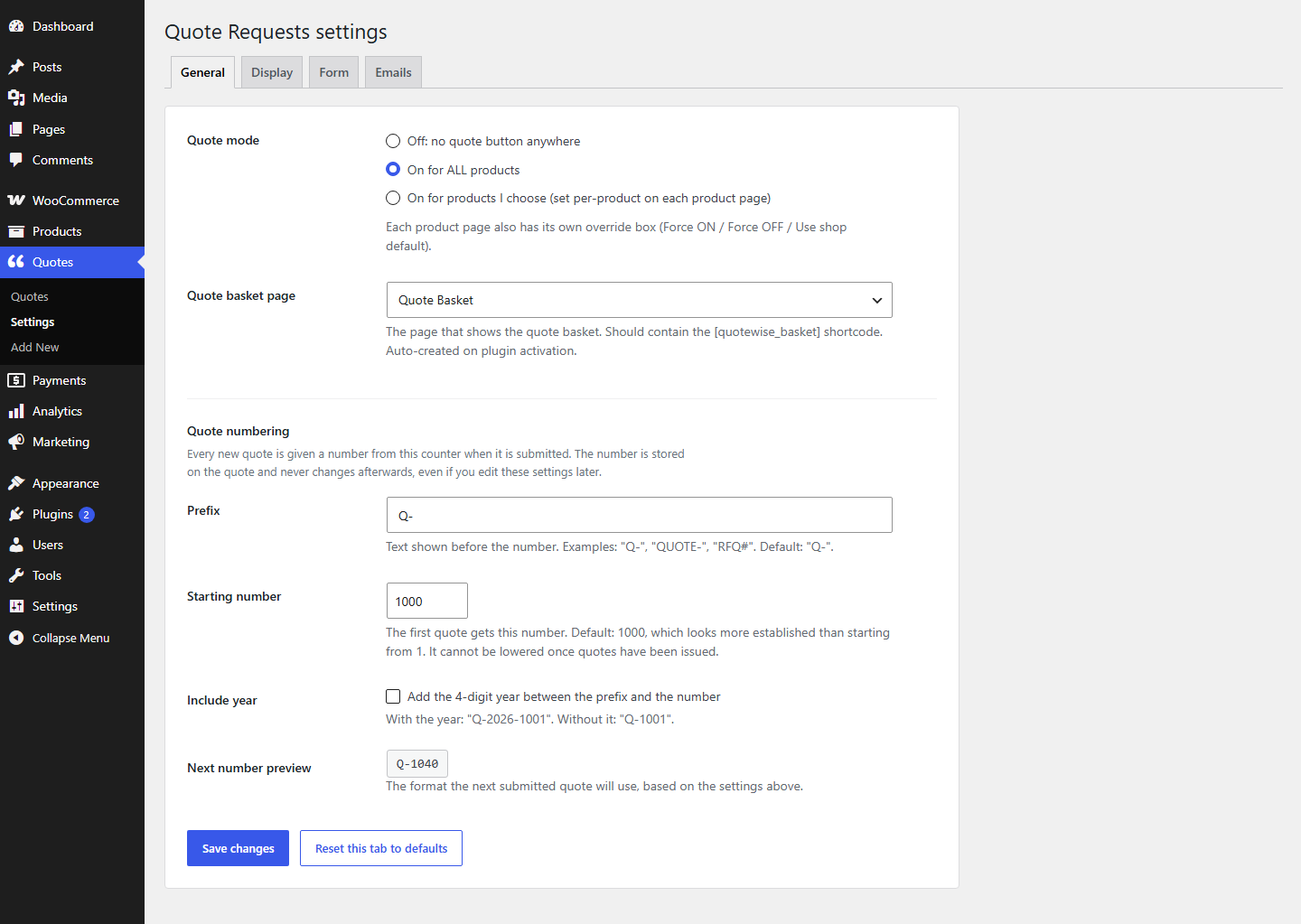
- Per-product control: force the button on, force it off, or follow the shop default
- Change the button text, color, and position
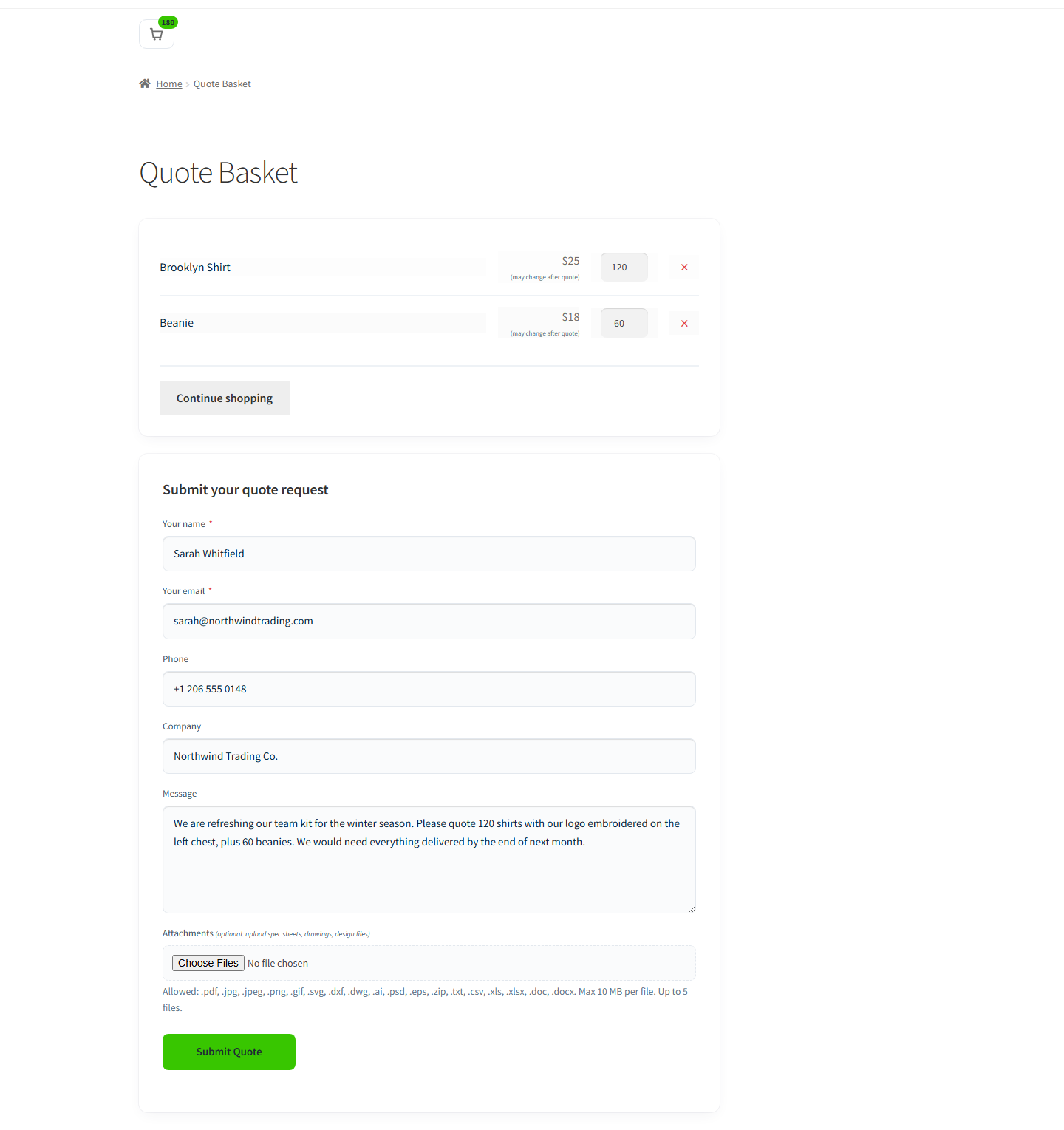
- Session-based quote basket, kept separate from the normal WooCommerce cart
- Mini quote basket and the shortcodes [quotewise_basket] and [quotewise_basket_count]
- Request form with 5 fields: Name, Email, Phone, Company, and Message
- Optional reCAPTCHA v3 to stop spam (opt-in, uses free Google keys)
- Option to hide the price and the Add to Cart button on quote-only products
- Admin email the moment a new quote comes in
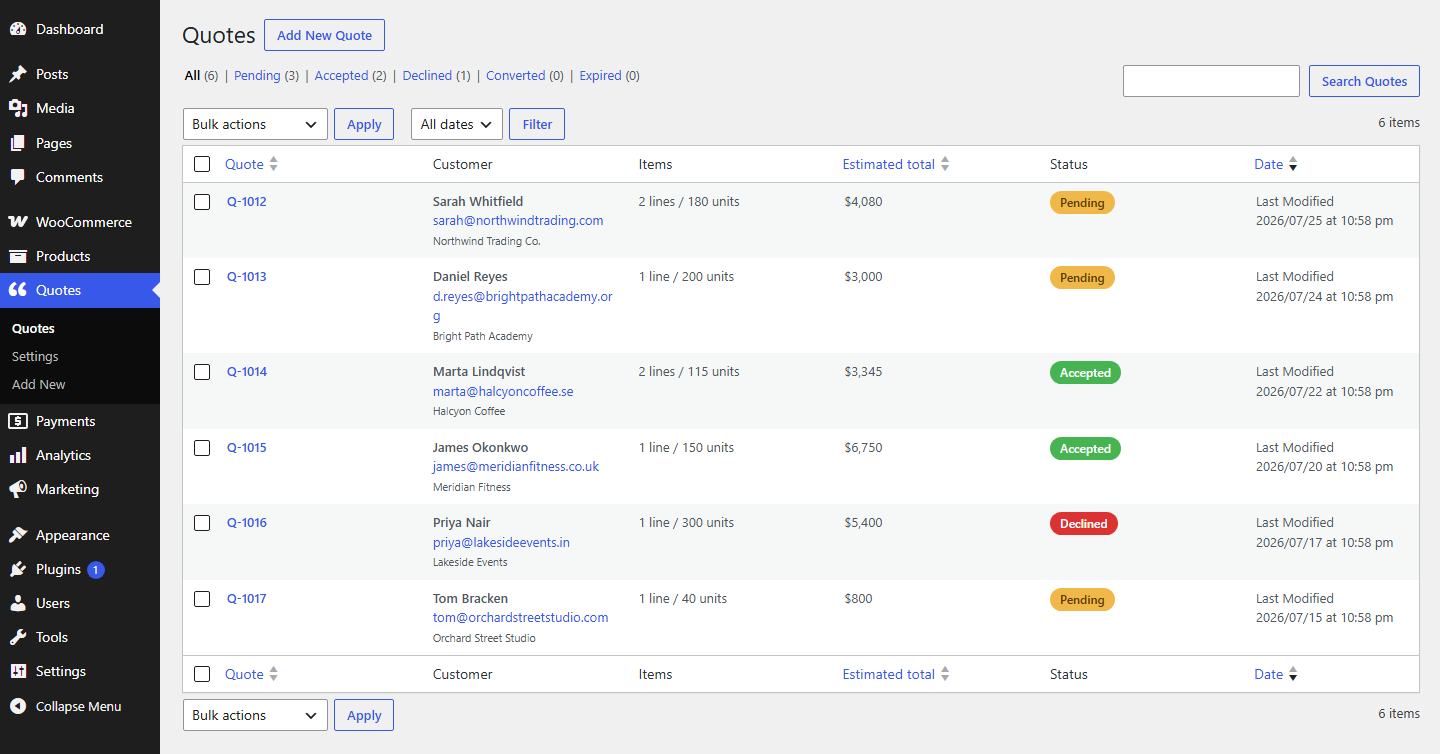
- A real admin dashboard: every quote in a sortable list, with status filters and search by customer
- Bulk actions on the quote list: mark accepted, mark declined, or export to CSV
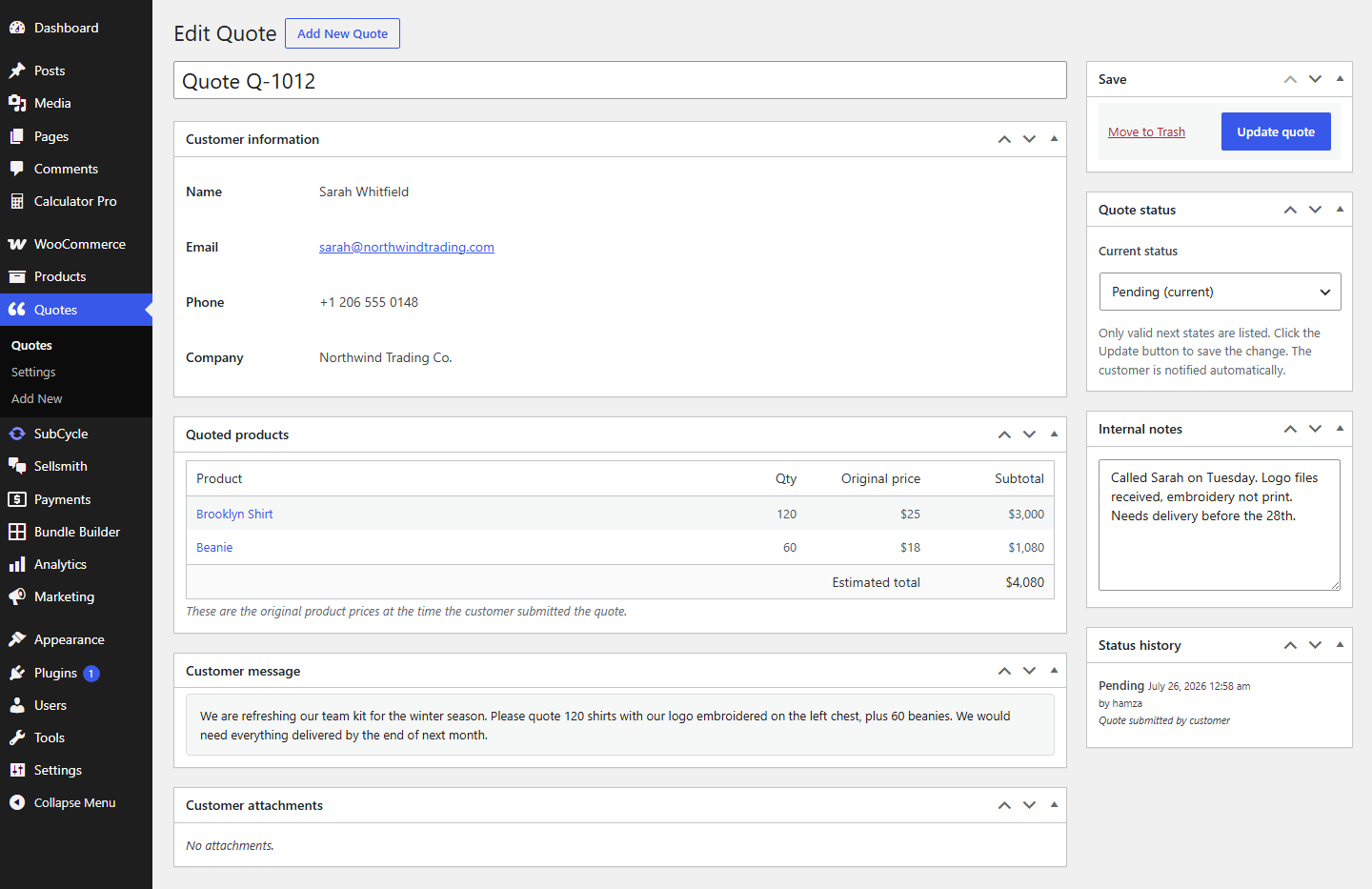
- Single quote screen with customer info, requested products, their message, internal notes, and full status history
- Accept or decline a quote, and the customer gets a clean email either way
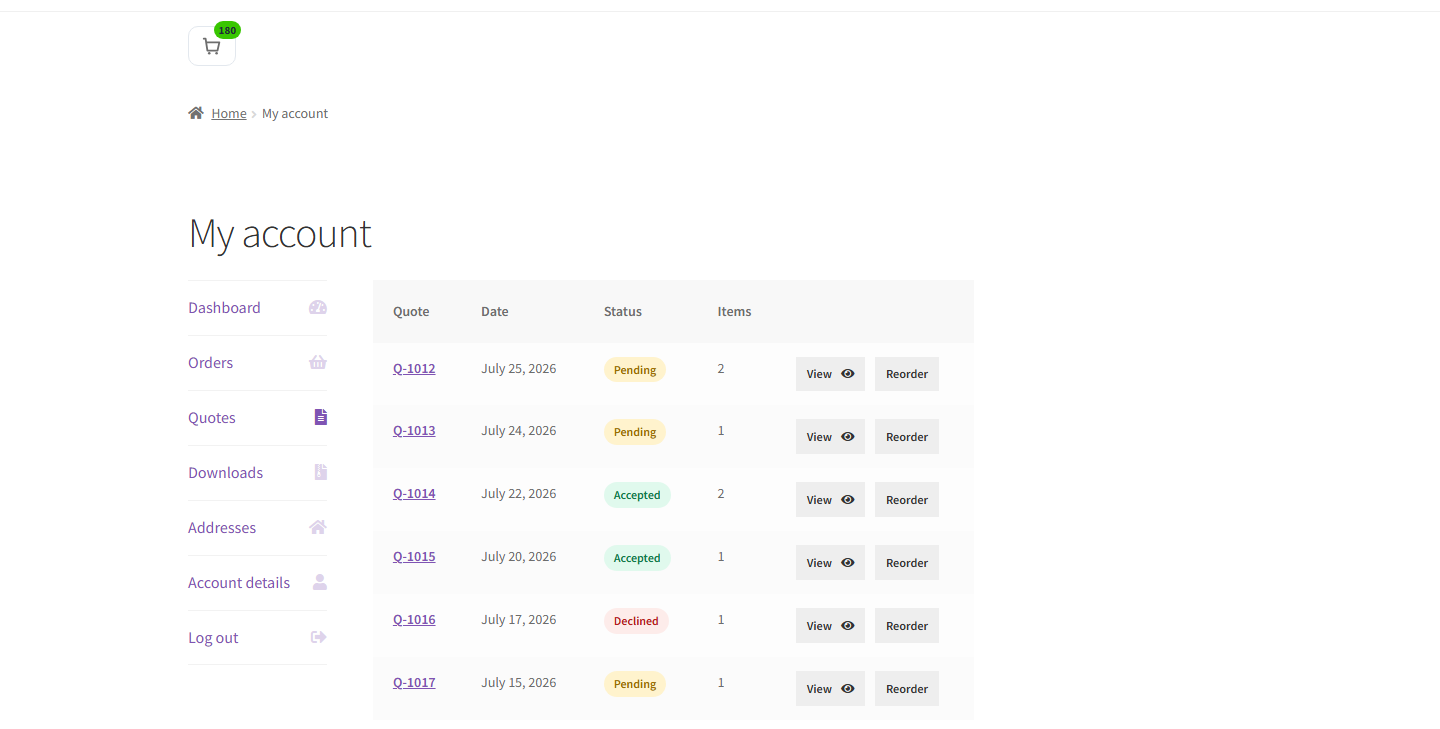
- My Account “Quotes” tab so logged-in customers can view, accept, or decline their own quotes
- Works for guests too, no account needed to request a quote
- HPOS (High-Performance Order Storage) compatible
- Translation-ready (text domain: quotewise)
The free version manages quotes end to end. It does not turn an accepted quote into a paid order. Taking the payment is the job of the Pro version, below.
The Pro version
Pro is a separate add-on for shops that want to close the sale, not just track it. It adds:
- Convert an accepted quote into a real WooCommerce order with a Pay Now link. This is the main reason to go Pro.
- Share a quote by private link, so a customer can view and pay without logging in
- PDF quotes, attached to the email and downloadable
- Quote expiry dates, automatic reminders, and automatic expiry when a quote runs out
- Price negotiation: let customers suggest a price and reply back in a message thread
- Custom form field builder with conditional logic
- Quote rules by user role, product, or priority
- REST API and webhooks
- Bulk import quotes from a CSV file
- A quote analytics dashboard
The Pro version lives at https://devtonicstudios.com/quotewise.
What you get without paying
The dashboard, accept and decline, status history, internal notes, and the customer My Account tab are all in the free version. You only pay when you want to take payment, send PDFs, or negotiate. If all you need is to collect and answer quotes, the free version is the whole tool, not a demo.
Built and supported by one developer
Devtonic Quote Requests is made by Hamza at Devtonic Studios. The same person builds it and answers the support email. No ticket queue, no bot.
External services
Devtonic Quote Requests uses one third party service, and only if you switch it on.
Google reCAPTCHA v3 (optional, off by default)
Turned on under Quotes Settings Form, using reCAPTCHA keys you create yourself. Once enabled, the quote form loads a script from Google and each submission is scored by Google to filter spam. What is sent: the reCAPTCHA token generated in the visitor’s browser, your site key, and the visitor’s IP address as part of that request. No quote contents, names, or email addresses are sent.
Leave the setting off and Devtonic Quote Requests contacts no external service at all.
Google terms of service: https://policies.google.com/terms
Google privacy policy: https://policies.google.com/privacy
Screenshots
Installation
- Upload the
quotewisefolder to/wp-content/plugins/, or install through the Plugins screen in WordPress. - Activate the plugin through the Plugins screen.
- Make sure WooCommerce is also installed and active.
- Go to Quotes Settings to set the quote mode, button look, and form fields.
- Open any product where quote mode is on to see the Add to Quote button.
FAQ
-
Does Devtonic Quote Requests require WooCommerce?
-
Yes. Devtonic Quote Requests is a WooCommerce extension and will not run without it.
-
Is Devtonic Quote Requests compatible with HPOS (High-Performance Order Storage)?
-
Yes. Devtonic Quote Requests declares HPOS compatibility from version 1.0.0.
-
Where does the quote basket live?
-
In the WooCommerce session, the same place as the normal cart. It does not mix into the regular cart, and it is not saved to the database until the customer submits the quote.
-
Can a guest customer (not logged in) submit a quote?
-
Yes. Guests can add products to the quote basket and submit. Their email is the only identifier in that case.
-
Can a customer accept or decline their own quote?
-
Yes. From My Account Quotes, a logged-in customer can view a quote and accept or decline it.
-
Can the free version take payment for a quote?
-
No. The free version manages quotes: request, accept, decline, notes, status history, and email. Turning an accepted quote into a paid order with a Pay Now link is part of the Pro version.
-
Can I customize the email subject and body?
-
Yes. Every Devtonic Quote Requests email appears under WooCommerce Settings Emails, just like WooCommerce’s own emails. Subject, heading, recipients, and type (HTML or plain text) are all editable.
-
What is the “Powered by Devtonic Quote Requests” line?
-
It is an optional small credit link in your emails and quote pages. It is off by default. You can turn it on under Quotes Settings Display if you want to support the plugin.
-
Can my theme override Devtonic Quote Requests’s templates?
-
Yes. Copy the files from the plugin’s
templates/folder intoyourtheme/quotewise/, keeping the same folder structure. This is the standard WooCommerce template pattern. -
Is reCAPTCHA required?
-
No. It is off by default. You turn it on under Quotes Settings Form and paste your own free reCAPTCHA v3 keys from https://www.google.com/recaptcha/admin.
Reviews
There are no reviews for this plugin.
Contributors & Developers
“Devtonic Quote Requests for WooCommerce” is open source software. The following people have contributed to this plugin.
Contributors

Translate “Devtonic Quote Requests for WooCommerce” into your language.
Interested in development?
Browse the code, check out the SVN repository, or subscribe to the development log by RSS.
Changelog
1.0.0
- Initial public release.
- Add to Quote button with global and per-product modes.
- Session-based quote basket with shortcodes and a mini basket.
- Request form with 5 fields and optional reCAPTCHA v3.
- Admin Quotes dashboard with sortable columns, filters, and search.
- Single quote screen with accept, decline, internal notes, and status history.
- Admin new-quote email plus customer received, accepted, and declined emails.
- My Account Quotes tab for customers.
- Optional “Powered by Devtonic Quote Requests” credit, off by default.
- HPOS compatible and translation-ready.