

Description
Every events page answers two questions: when, and where. For millions of disabled visitors the real question comes first — “will this event work for me?”
Ananyoo Accessible Events is built around that question. Every event states, right on the page, the accommodations it provides — wheelchair access, live captions, sign language, a quiet room and more — each with a clear way to ask for what is missing. Visitors can even filter your events list down to only the events they can truly attend. The listing, the single pages and the admin screens are all audited to WCAG 2.2 Level AA, because an “accessible” plugin whose own settings page cannot be used with a keyboard is only half finished.
And a community is more than its next event. The [ananevt_timeline] shortcode looks backwards as well as forwards: it weaves the blog posts and events you already have into one flowing, accessible timeline — year by year, photo by photo — the story of your organisation, telling itself. Five designs, your colours, a “Load more” that needs no JavaScript, and not a single extra post type to maintain.
Developed by Shivaji Mitra (M/S. Anblik) — an accessibility consultant who builds with the screen reader switched on.
Live demos: Accessible events » · Accessible timeline — all five designs »
Why this plugin?
Most events plugins treat accessibility as a checkbox at the end of the project: an unlabelled calendar icon here, a date picker no keyboard can reach there — and nowhere at all to tell a Deaf attendee whether the talk will have captions. This plugin is built the other way round. Accessibility is not a feature of the product; it is the product. Attendees see exactly what each event provides before they register. Organisers manage it in an admin audited to the same standard. Search engines read the same structured facts through Schema.org. Everyone gets the full picture — on the smallest phone, in high-contrast mode, by keyboard, by screen reader.
Key features
- A dedicated Event type — its own menu, list and
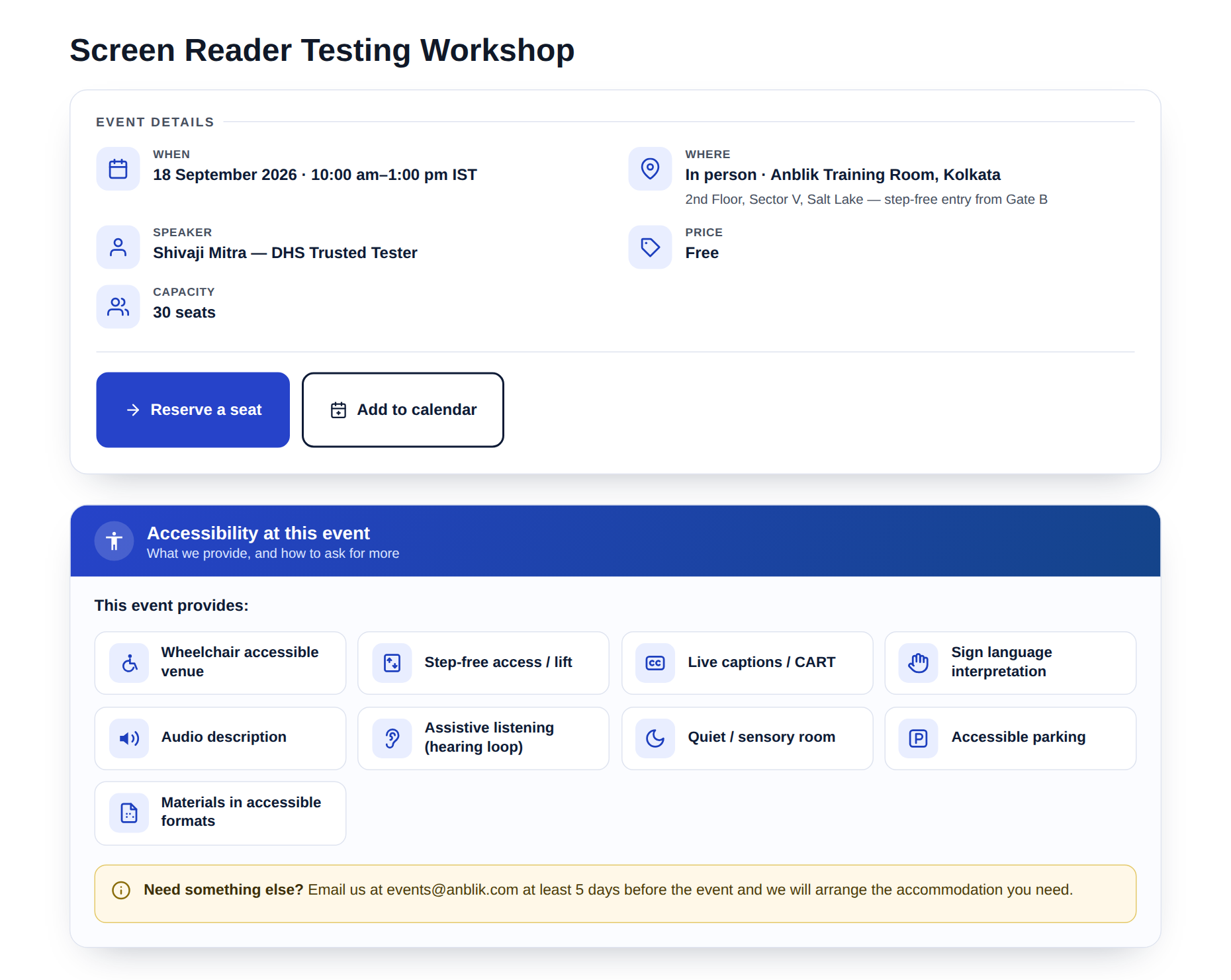
/events/links, cleanly separated from your blog. The type lives in the plugin, not a theme, so your events survive any theme change. - “Accessibility at this event” — the standout feature — tick what an event provides: wheelchair access, step-free entry, live captions / CART, sign-language interpretation, audio description, assistive listening, a quiet room, accessible parking, materials in accessible formats. Each shows with its own icon and a clear “how to request an accommodation” note. No other mainstream events plugin does this.
- Filter events by accommodation — visitors who need captions or a wheelchair-accessible venue can filter the list to only the events that provide it.
- Structured details, entered accessibly — start / end date and time, time-zone label, mode (In person / Online / Hybrid), venue, address, register link with your own button text, price, capacity and speaker — all in a labelled meta box with native date and time inputs.
- Accessible “Add to calendar” and Subscribe — a properly labelled
.icsdownload for each event, plus a Subscribe button that keeps all your events up to date in a visitor’s own calendar app via a live feed. - Visitor local time — online events can show the start time in each visitor’s own timezone automatically (progressive enhancement; the site time always remains).
- Machine-readable dates — real
<time datetime>markup and Schema.org Event structured data, so both screen readers and search engines understand your events. - A real listing — the
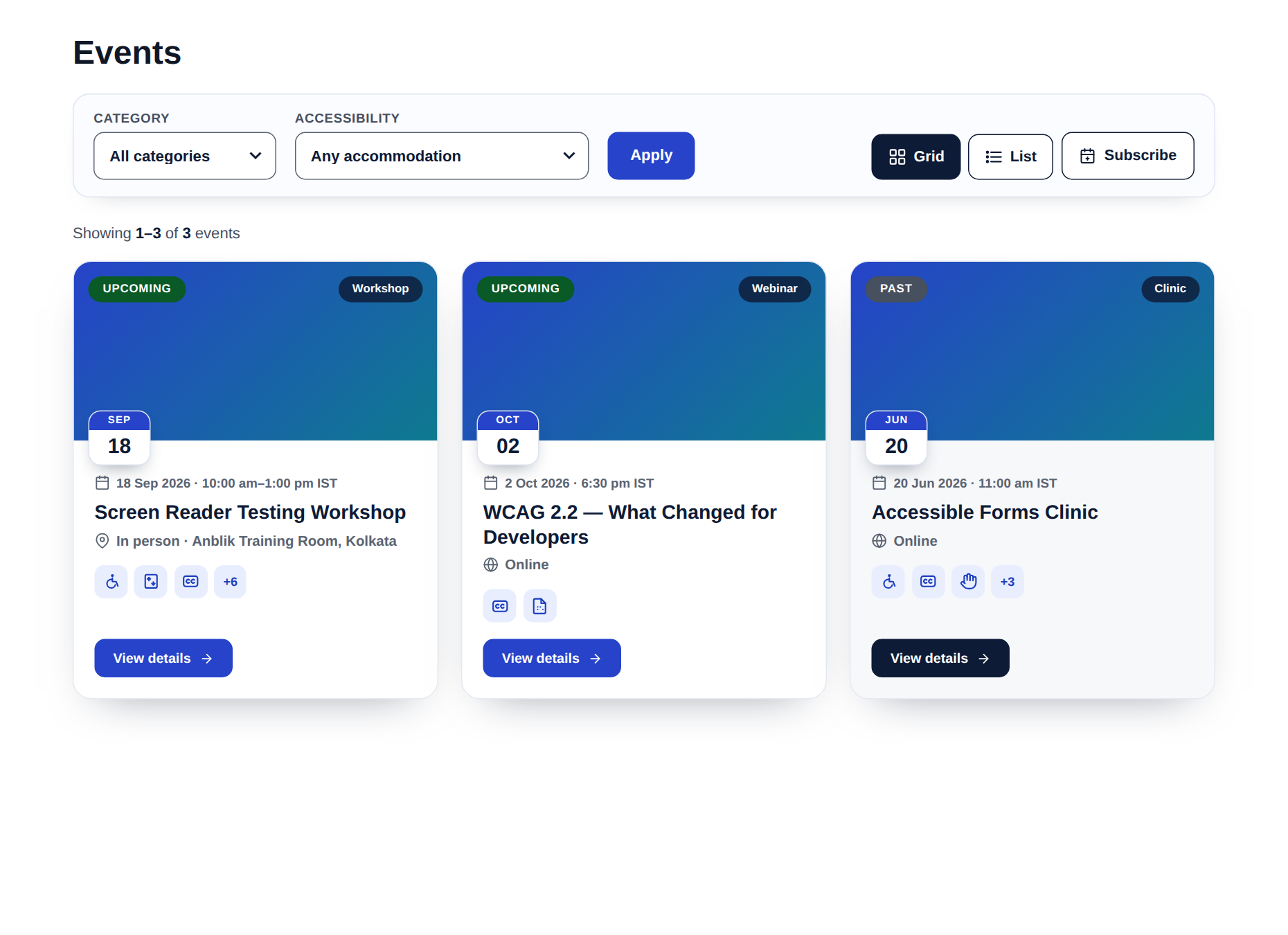
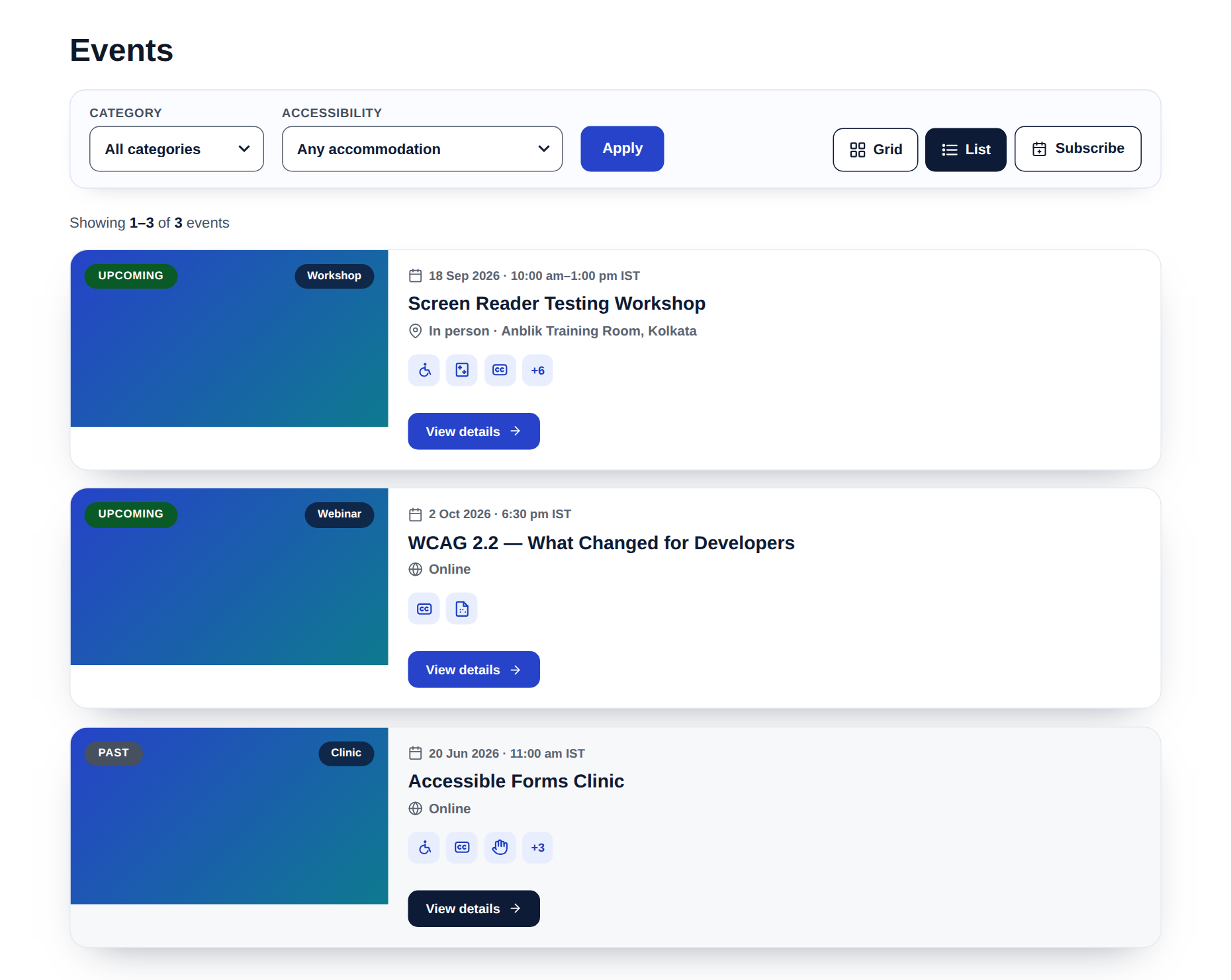
[ananevt_events]shortcode: one paginated list with Upcoming/Past status pills, a date tile and accommodation mini-icons on every card, category and accessibility filters, and an accessible Grid/List view switch. Aheadingattribute keeps your page’s heading order sequential. - An accessible timeline — tell your story — the
[ananevt_timeline]shortcode draws your existing blog posts and/or events as one elegant vertical timeline, newest first, with year pills on the line and a small Event/Blog tag on each entry. Five built-in designs (Spine, Alternate, Compact ledger, Photo journey, Feature rows), featured images on or off, hand-picked entries withids="", a category filter, and a “Load more” that works without JavaScript. Change every colour from Settings — the defaults are WCAG-AA out of the box. Perfect for an “Our Journey” page that updates itself. - Optional enquiry form — paste any form shortcode onto your events; pairs naturally with Ananyoo Accessible Forms. A single event can override the site-wide form. Off by default.
- An audited admin — the meta boxes, settings tabs and events list meet the same WCAG 2.2 AA standard, with an ARIA live-region announcement when you filter.
- You stay in control — every behaviour is a simple on/off toggle.
Links
- Plugin home & documentation
- Live demo — accessible events
- Live demo — the accessible timeline, all five designs
- More accessibility plugins from Ananyoo — further WordPress accessibility plugins are in active development.
- Support & contact
Privacy
This plugin stores only the event content you create, in your own WordPress database. It collects no visitor data, sets no cookies, makes no external requests and adds no tracking. The only front-end scripts are the optional Grid/List view switch and the optional local-time display — both run entirely in the visitor’s browser and send nothing anywhere. Nothing leaves your site.
Accessibility
Conforms to WCAG 2.2 Level AA. Verified with automated tooling (axe-core: 0 violations across WCAG 2.0 / 2.1 / 2.2 A & AA) on both the front-end output and the admin screens, plus a manual review:
- Semantic structure — a description list inside a labelled region, real sections and a logical heading order (SC 1.3.1, 2.4.6).
- Contrast — every text pair meets 4.5:1; focus rings and borders meet 3:1 (SC 1.4.3, 1.4.11). Status is stated in words, never colour alone (SC 1.4.1).
- Keyboard & focus — native, keyboard-operable controls with a visible 3px focus indicator; targets at least 44px (SC 2.1.1, 2.4.7, 2.4.11, 2.5.8).
- Clear links — the register and calendar controls name the event and say what they do (SC 2.4.4).
- Reduced motion and Windows High Contrast / forced-colors supported (SC 2.3.3).
Screenshots


Installation
- Install and activate the plugin.
- Go to Accessible Events Add New, fill in the event details and tick the accommodations it provides.
- Create a page (for example “Events”) and add the shortcode
[ananevt_events]to list them (Upcoming first, then Past). - For an “Our Journey” style page, add
[ananevt_timeline]anywhere — it weaves your blog posts and events into one accessible timeline automatically. - Visit Accessible Events Settings to choose what appears, pick your timeline design and colours, and decide how events behave.
FAQ
-
Does the accessibility apply to the admin too?
-
Yes. The meta boxes, the Settings and About tabs, and the events list are all built to the same WCAG 2.2 AA standard — labelled controls, visible focus, sufficient contrast, and an ARIA live-region announcement when you filter Upcoming / Past.
-
How do I add a contact form to my events?
-
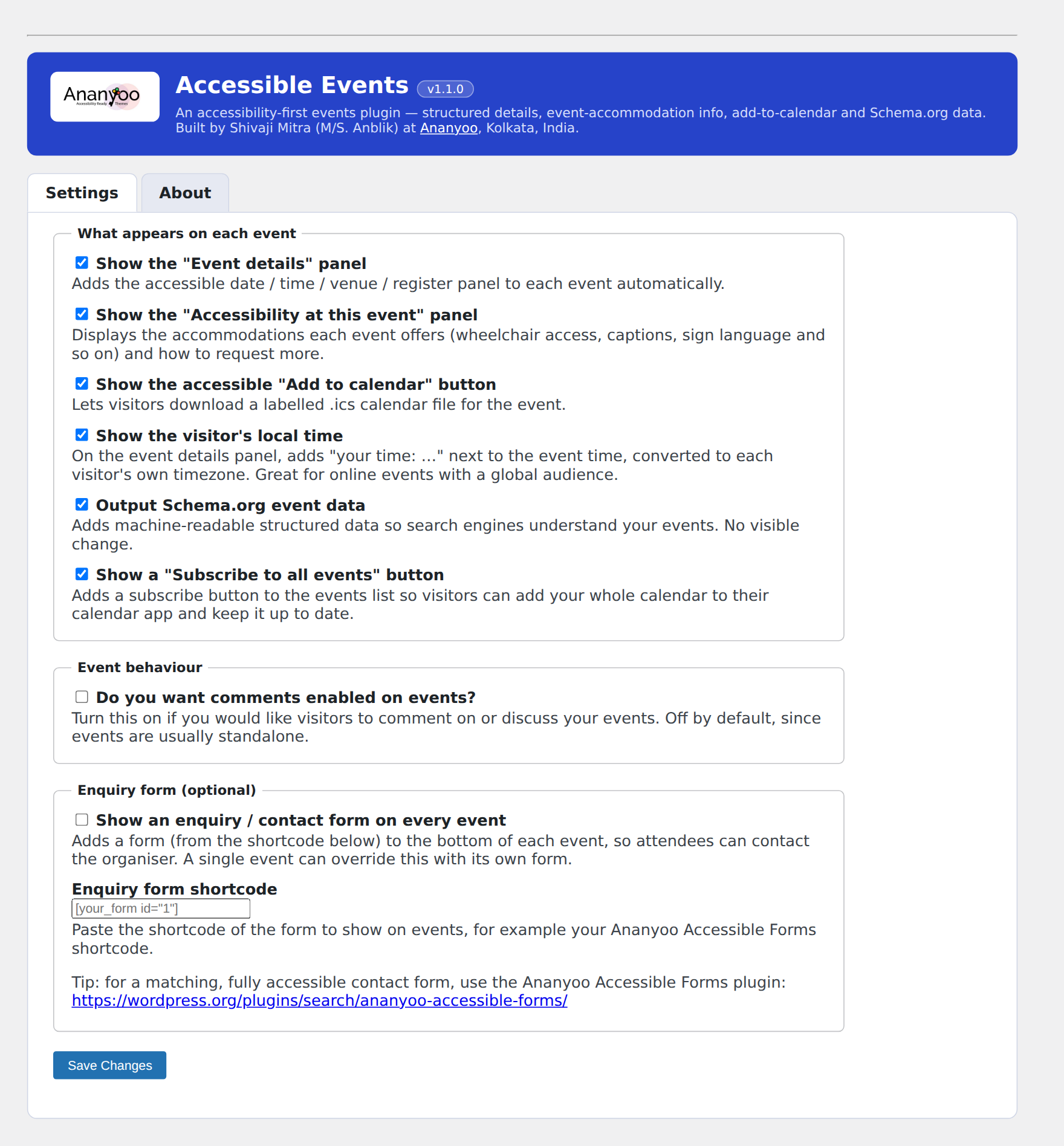
In Accessible Events Settings, switch on “Show an enquiry form on every event” and paste a form shortcode. For a matching accessible form, use Ananyoo Accessible Forms. A single event can also have its own form in the “Enquiry form” box on the event editor.
-
How do I make a timeline of my posts and events?
-
Add
[ananevt_timeline]to any page. By default it mixes your events and blog posts newest first; narrow it withsource="posts"orsource="events", acategory="slug", or hand-pickedids="12,34,56". Choose one of the five designs in Settings (or per page withdesign="journey"and friends), switch featured images off withimages="no", and set your own colours in Settings — every empty colour field keeps the accessible default. There is no separate “story” post type: the timeline always reflects your real content. -
Will my events break if I change theme?
-
No. Events and their data live in the plugin, so they are theme-independent.
-
Where do events appear?
-
Single events at
/events/your-event/, and wherever you place the[ananevt_events]shortcode. The shortcode splits Upcoming and Past automatically, sorted by date.
Reviews
There are no reviews for this plugin.
Contributors & Developers
“Ananyoo Accessible Events – WCAG 2.2 AA Events Calendar” is open source software. The following people have contributed to this plugin.
Contributors
Translate “Ananyoo Accessible Events – WCAG 2.2 AA Events Calendar” into your language.
Interested in development?
Browse the code, check out the SVN repository, or subscribe to the development log by RSS.
Changelog
1.5.5
- Timeline buttons — modern hover. “Read more” and “Load more” now invert on hover and keyboard focus (the accent fill and text colours swap) with a soft shadow lift, in place of the old plain underline. It reads the same colour variables, so contrast is preserved and each site gets its own two-colour flip;
prefers-reduced-motionis honoured. - Timeline
[ananevt_timeline]gains anexcerptattribute — the number of words in each entry summary (default 28;excerpt="0"hides the summaries entirely). Example:[ananevt_timeline excerpt="20"].
1.5.4
- Timeline date badge now exposes its parts as sub-spans —
<span class="antl__dm">(day and month) and<span class="antl__yr">(year) inside.antl__date. The default inline rendering is unchanged (“20 Jun 2026”), but a theme can now restyle the badge — for example a round year-over-date pill on the spine — with pure CSS, no JavaScript. Multi-day event ranges are preserved in the day-month span.
1.5.3
- Timeline “Alternate” design: cards now truly alternate left, right, left, right. The sides were decided by CSS nth-of-type, which also counted the year pills between entries – on a timeline spanning many years that pushed runs of cards to one side. Each entry now carries an explicit odd/even class from PHP, so the rhythm is never disturbed. The same fix applies to the photo-side alternation in “Feature rows”.
1.5.2
- Added direct links to the new live timeline demo (all five designs) – on the plugin directory page and on the About tab – alongside the existing events demo link. Text-only change.
1.5.1
- Timeline “Feature rows” design: the photo is now a tidy fixed-ratio (4:3) thumbnail beside the story instead of stretching to the full card height – the old rule could blow the image up into a tall, blurry smear when the text column was long. Rounded corners and comfortable padding; single-column with a wide ratio on phones. CSS-only fix.
1.5.0
- NEW: the [ananevt_timeline] shortcode – an accessible vertical timeline built from your EXISTING blog posts and/or events, mixed in date order. No separate “story” post type to maintain. Attributes: source=”both|events|posts”, category=”slug”, ids=”12,34,56″ (hand-picked), design=”spine|alternate|compact|journey|rows”, images=”yes|no”, order=”new|old”, per_page, paginate, limit, year_labels, source_tag, heading (2-6), readmore=”…”.
- Five design presets ship built in: Spine (one-side cards, the default), Alternate (cards left/right of a centre line), Compact ledger (dates on the left), Photo journey (big photos with the date pill on the photo) and Feature rows (magazine split cards). Year pills mark the line; each entry can show its Event/Blog source tag.
- New Timeline section in Settings: default design, Read-more text, open-in-new-tab (announced to screen readers), and nine colour overrides (line, year pill, date tag, card, title, Read-more button) applied through CSS custom properties – leave any field empty to keep the accessible default.
- “Load more” works without JavaScript: a plain link that keeps every earlier entry on the page and moves focus context to the first newly loaded entry.
- Accessibility: semantic ordered list, one heading level for every entry (configurable), visible focus rings, lazy-loaded images, no animations (nothing to disable for reduced motion), forced-colors/High Contrast support, AA-checked default colours.
- The timeline stylesheet loads only on pages that use the shortcode.
1.4.11
- Date ranges are now compact and easier to read. A range inside one month shows as “12 – 16 October 2024” instead of repeating the month and year on both sides; a range inside one year shows as “28 September – 2 October 2024”. Only a range crossing a year boundary keeps the full form on both sides. Applies everywhere the plugin prints a date range – the event details band and list rows – with month names still fully translatable. Sites that prefer the old full form can restore it with a one-line filter: add_filter( ‘ananevt_compact_date_range’, ‘__return_false’ );
1.4.10
- Fixed: deleting the plugin no longer wipes its settings. Uninstall used to remove the settings row, so the common manual-update routine (delete the plugin, then install the new zip) silently reset every toggle — including the breadcrumb trail — back to defaults on each update. Settings, events and their content are now all kept.
1.4.9
- The breadcrumb trail now sits where every other page shows it — above the title. When a theme uses the
[ananevt_event_banner]shortcode, the trail renders inside the banner above the event title; when the active theme places its own trail above the hero title for events (Ariade 1.4.67+ with the Events breadcrumb toggle on), the plugin steps aside entirely. The top-of-content placement remains only as the fallback for themes that provide neither, and the trail never appears twice.
1.4.8
- The visitor local-time note is now a neatly styled pill inside the ticket panel instead of a bare text line, and it no longer appears for visitors who are already in the event’s own timezone — it only shows when it genuinely adds information.
- Fixed the capacity pill in the Event details ticket losing its bottom border (the last-row divider rule was trimming the pill’s outline).
1.4.7
- Redesigned the “Event details” band as a gradient ticket: a tear-off date stub with the day numbers and a perforated edge, labelled rows (the When / Where / Speaker labels that were always there for screen readers are now visible for everyone), and the price and capacity chips restyled as outline pills. Same accessible markup and element throughout.
- Section headings (“About this event”, “What to expect”) now carry a small decorative gradient bar, and the register / add-to-calendar buttons are restyled as pills with a gradient primary. Focus rings, 44px targets and forced-colors support unchanged.
1.4.6
- Fixed: the “Accessibility at this event” panel now centres itself inside wide or constrained theme content areas instead of sitting against the left edge. One-line CSS change (auto side margins); no markup or behaviour changes.
1.4.5
- Fixed: automatic excerpts no longer pick up the injected breadcrumb, event header and panel text. For events without a manual excerpt, the summary shown in banners, archives and SEO descriptions is now generated from the clean event description only.
- Fixed: the About tab’s “Live demo of this plugin” link now points to the plugin’s live demo page.
1.4.4
- Breadcrumb: single events now use the active theme’s own breadcrumb when it provides one. Ariade 1.4.63+ renders a semantic, accessible
<
ol> trail from Rank Math’s data and handles the section-listing step, the current-title de-duplication and the styling — so an event’s trail is now identical to every other page on the site. The plugin’s own tidy trail remains the fallback for other themes.
1.4.3
- Breadcrumb: fixed the divider showing twice (“//”) between crumbs. Rank Math wraps the separator in its own , so passing a separator that also carried the “separator” class produced two nested .separator spans and the theme painted the divider on both. The glyph is now a neutral aria-hidden span, so exactly one divider renders. Decorative-only, still hidden from assistive technology.
1.4.2
- New option: “Show a breadcrumb trail on single events” (off by default). When on, each event gets a “Home › Section › Event” breadcrumb above its details, matching your theme. Because events use the plugin’s own banner instead of the theme’s title block, a theme breadcrumb attached to that title never appears on events — this fills that gap.
- Breadcrumbs are powered by the Rank Math SEO plugin (with its Breadcrumbs function enabled). The Settings screen now tells you, right beside the option, whether Rank Math breadcrumbs are ready and how to enable them. Without Rank Math nothing is shown — no error.
- The trail adopts the active theme’s breadcrumb styling where available (e.g. the Ariade theme’s .ariade-breadcrumb look) and ships a tidy fallback style of its own for any other theme.
1.4.1
- Review: the remaining short data identifiers now use the plugin’s unique
ananevtprefix, so they cannot collide with any other plugin — the event post typeaae_eventis nowananevt_event, the category taxonomyaae_event_catis nowananevt_event_cat, and every custom field meta key_ae_*is now_ananevt_*. - Added a safe, automatic, one-time migration that relabels your existing events, their categories and all their saved details from the old identifiers to the new ones on update. It is non-destructive (it only renames rows, never deletes or duplicates data), idempotent (safe to re-run), and preserves every event exactly as it was — including permalinks, since the
/events/slug is unchanged.
1.4.0
- Review: gave every function, class, constant, option, shortcode and script handle a unique
ananevtprefix (previously the shortaae/AAE), so the plugin cannot collide with other plugins or themes. The listing shortcode is now[ananevt_events]and the banner shortcode[ananevt_event_banner]. Existing events are unaffected — the event post type, its category taxonomy and all saved event data are kept exactly as before, so nothing is lost on update. - Review: the enquiry-form output injected into the event content is now passed through
wp_kses()with a form-aware allow-list before being returned to thethe_contentfilter, so all rendered markup is escaped while the form fields and their accessibility attributes are preserved.
1.3.4
- “What to expect” list items now inherit the surrounding text size instead of being fixed at 1rem, so they match the body copy of whatever theme they sit in.
- Each event-details meta item now carries its label (When/Where/Organiser/…) as a real element (.ae-ehead__lab, screen-reader-only by default) plus a per-type class (.ae-ehead__chip–when etc.), so themes can build a labelled-columns layout. Default appearance is unchanged.
1.3.3
- The “rows” list layout can now be paired with the Grid/List view switch (view=”rows” view_switch=”yes”). List shows the full-width rows; Grid reflows the same rows into a card grid via a CSS layout class on the wrapper — same markup, same styling, no re-fetch, works without JavaScript falling back to the List. Card grid/list views are unchanged.
1.3.2
- The single-event banner ([ananevt_event_banner]) now shows one title line — the subtitle when set, otherwise the post title — instead of both, so the banner stays compact (useful when the title is in a tall script and the subtitle is its shorter translation). The details header below is unchanged.
1.3.1
- New
[ananevt_event_banner]shortcode: outputs a single event’s source tag, title, subtitle and excerpt, for use inside a theme’s own title banner — so a site can give events the same header band as its other pages instead of the default single-post header. When this banner is used, the details header below it no longer repeats the subtitle.
1.3.0
- New “Rows” list layout:
[ananevt_events view="rows"]renders full-width rows with a month/year date badge, a two-line title (title + the new Subtitle field), a compact when/where line, a short description and a “Know more” button — great for a bilingual or editorial events list. - New source tag on the Rows layout, showing where each entry comes from (for example ” Event” or ” Blog”). On by default with a new Settings toggle, and per-listing overridable with
source_tag="no". Theananevt_source_labelfilter lets a theme rebrand or shorten it. - New event fields: Subtitle (a second title line), Organiser, Organiser email (shown as a mailto link) and a “What to expect” list.
- Redesigned single-event layout: a header band with the date badge, subtitle and a when / where / organiser / email meta row; an “About this event” heading; and a bulleted “What to expect” section after the description. Every icon still carries a visible label — meaning never rests on colour or an icon alone.
- All new screens keep the audited WCAG 2.2 AA contrast, 44px targets, visible focus and forced-colors support.
1.2.5
- New
subscribeattribute on the [ananevt_events] shortcode — hide the Subscribe button on one listing (e.g. a compact home-page section) while keeping it on your main events page.
1.2.4
- New
limitattribute on the [ananevt_events] shortcode — cap the list to the first N events, e.g.[ananevt_events show="upcoming" limit="3" paginate="no"]for a “next three events” section on a home page.
1.2.3
- The Plugin URI now points to the plugin’s own documentation page (it previously matched the Author URI, which the wordpress.org submission form does not allow). No functional change.
1.2.2
- The About tab now carries a Credit & documentation section with links to the plugin documentation, the live demo and the full Ananyoo plugin family — matching the other Ananyoo plugins.
- Readme restructured with Why this plugin?, Key features, Links and Privacy sections, and links to the plugin home page and live demo. No functional change.
1.2.1
- Fixed the heading order on listing pages (flagged by axe DevTools and Lighthouse): card titles were h3, which skipped a level under a page’s h1 title. Card titles are now h2 by default, and a new
headingattribute lets you match any page structure — for example[ananevt_events heading="3"]when the list sits under an h2.
1.2.0
- Redesigned the single-event page: the Event details panel now shows each detail beside its own icon tile (calendar, place, speaker, price, capacity), and the “Accessibility at this event” panel has a branded header and a real icon for every accommodation — wheelchair, captions, sign language, audio description, hearing loop, quiet room, parking, step-free access and accessible materials — instead of tick marks. The “how to request an accommodation” note is now a clear call-out.
- Redesigned the events listing: the filters sit in a toolbar card with labelled Category and Accessibility dropdowns, a “Showing 1–10 of 14 events” count line appears above the cards, and each card gains a date tile on the image plus a row of accommodation mini-icons (with screen-reader labels), so visitors can see captions or wheelchair access before opening an event.
- All icons are decorative SVGs with the label always in text — nothing is conveyed by the icon alone.
1.1.0
- New: filter the events list by accessibility accommodation (captions, sign language, wheelchair access and more) — a filter no other events plugin offers.
- New: show each event time in the visitor’s own timezone (great for global online events).
- New: a “Subscribe” button that adds all your events to a visitor’s calendar app via a live .ics feed, kept up to date automatically.
1.0.11
- Fixed the Upcoming/Past and category pills sitting tight against their text: the pills inherited the image wrapper’s zero line-height, which collapsed their vertical padding. They now have proper breathing room.
1.0.10
- Refined the event cards (Template A): roomier Upcoming/Past pills, a one-line date with a calendar icon, a location line with a pin icon, and a solid “View details” button. Grid cards bottom-align their buttons; List view reflows to image-left.
1.0.9
- Redesigned the [ananevt_events] listing as a single, paginated list (10 per page) instead of separate Upcoming/Past sections; each card now shows its status as an Upcoming/Past pill on the image, with a cleaner card design (Grid = image on top, List = image on the left).
1.0.8
- Documentation: readme updated for the current menu name (Accessible Events), the Settings/About tabs, and the listing category filter, Grid/List and pagination. No functional change.
1.0.7
- Past-events pagination now shows 10 per page by default, matching the blog and portfolio.
1.0.6
- Added an Event Categories taxonomy, and gave the [ananevt_events] listing a category filter, an accessible Grid/List view switch and pagination for past events — matching the Ananyoo plugin family.
1.0.5
- Reworded the comments option as a plain “Do you want comments enabled on events?” toggle, and made it control event comments directly (on = enabled, off = disabled). Events are an independent post type, so this no longer depends on blog settings.
1.0.4
- Matched the admin header to the Ananyoo plugin family: the exact brand blue (#2643c9) and the real Ananyoo logo.
- Fixed admin notices appearing inside the header — they now sit above it (added the standard wp-header-end marker).
- The header description now runs the full width of the banner.
1.0.3
- Header restyled to the Ananyoo blue to match the other plugins.
- Passed Plugin Check: removed the unused Domain Path header, corrected two input-sanitize annotations, and trimmed the short description to 150 characters.
1.0.2
- Redesigned the admin: a branded header with the plugin name and version, and Settings / About now shown as tabs on one page (About moved out of its own menu item).
1.0.1
- The admin menu now reads “Accessible Events” (with a calendar icon) so it is easy to find and does not clash with other events tools.
- Added “Settings” and “About” quick links on the Plugins list row.
1.0.0
- Initial release: Event post type with structured details; “Accessibility at this event” accommodations; accessible add-to-calendar (.ics); Schema.org Event data and
<time>markup;[ananevt_events]Upcoming / Past listing; optional per-site and per-event enquiry form; professional, WCAG-audited Dashboard, Settings and events list with an ARIA live-region filter.