

Description
Duplicate images for SEO using page-specific ALT texts.
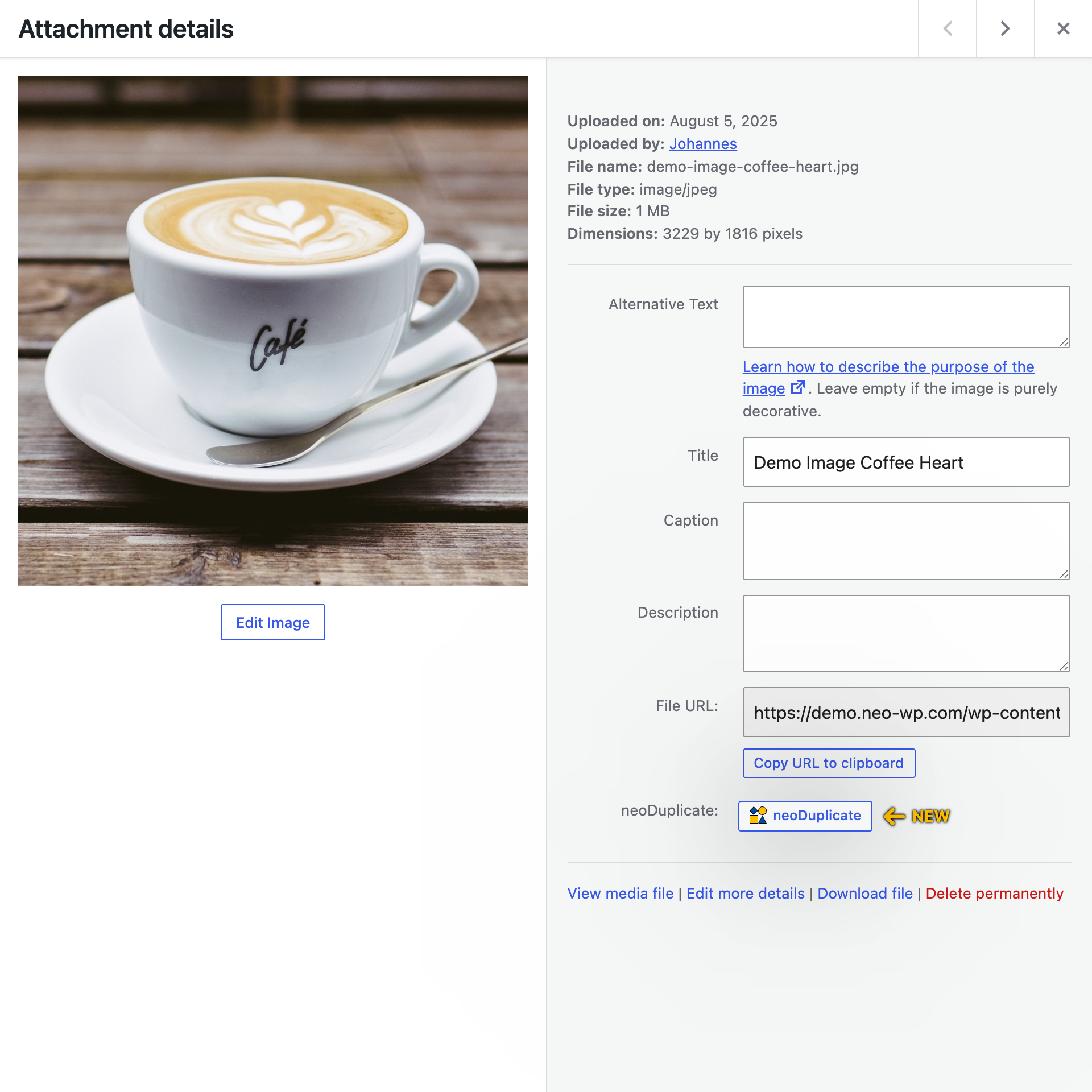
Duplicate images, videos, and documents in the WordPress media library with just one click! The plugin lets you use the same media in different posts with individual ALT tags and titles – ideal for SEO optimization and A/B testing.
🏝️ Sandbox for neo Duplicate
Try neo Duplicate directly in the browser without having to install it.
🚀️ Main Features of neo Duplicate
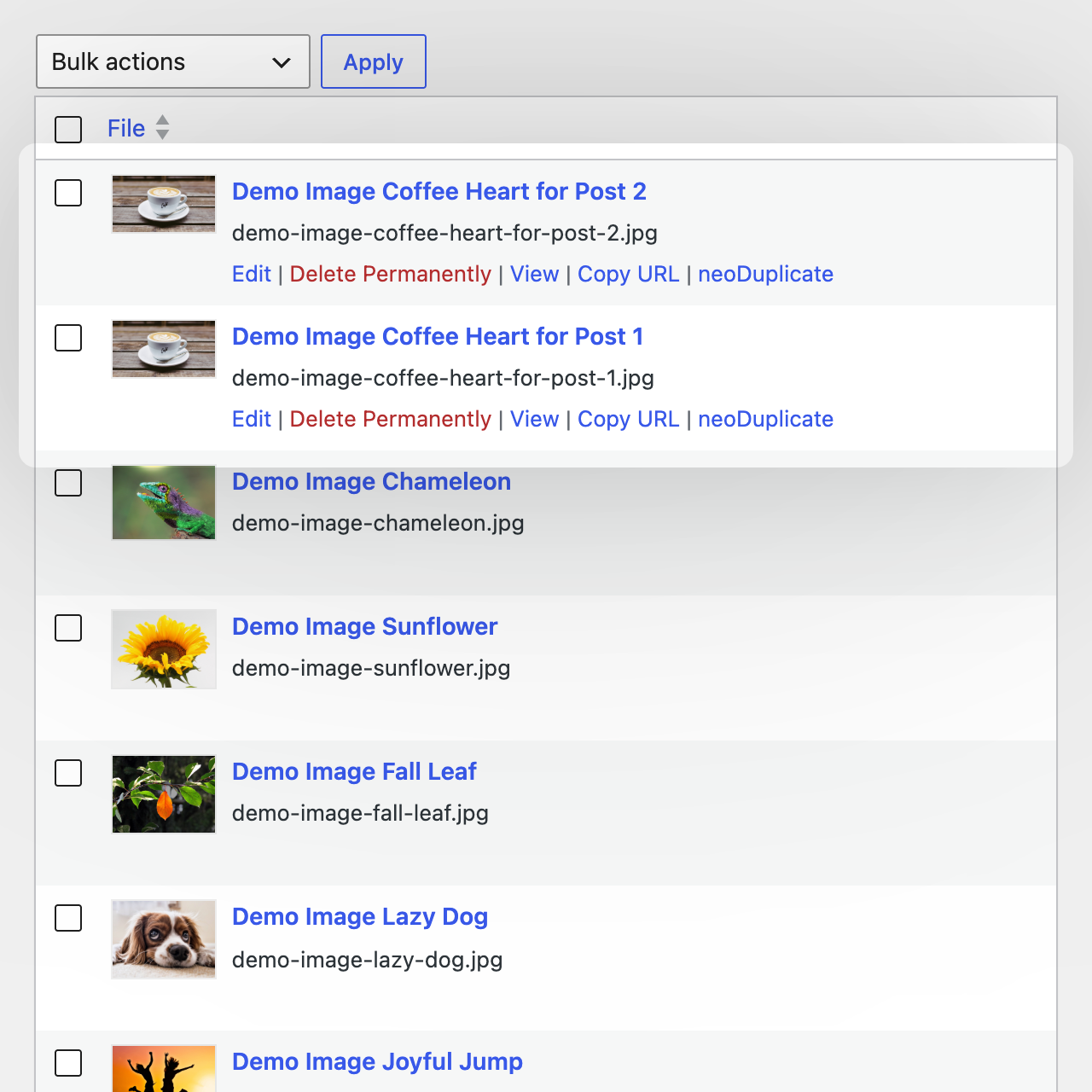
- ✅ Simple duplicator to copy images, videos and documents
- ✅ Thumbnails in all resolutions, titles and ALT texts are carried over exactly
- ✅ Support for all common file formats (JPG, WEBP, PNG, SVG, MP4, PDF, …)
- ✅ Allows identical images with different ALT tags, titles and descriptions
- ✅ Duplicate neoDraw drawings for reuse
- ✅ Save original images before editing
- ➡️ Image Duplicator for the WordPress media library
🎉 Be the king of the neoUniverse
Get the ultimate bundle!
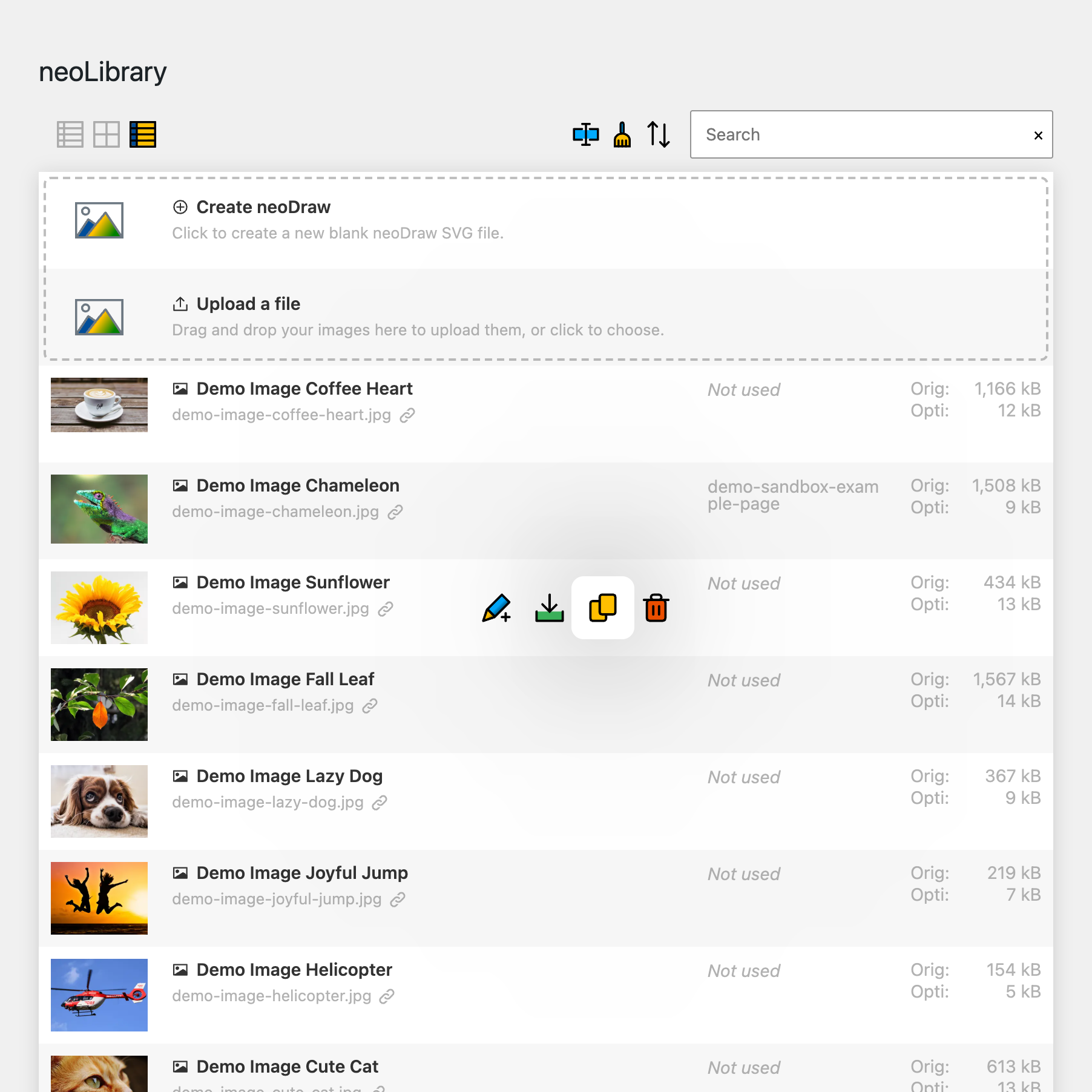
- 🗂️ neoLibrary
Bring order to your media library and see where your images are used! - ✏️ neoRename
Maximize your image SEO with AI efficiently via your own API connection without credit packages. - 💬 neoAlt
Create alt texts and image titles directly in WordPress with AI – includes 300 free image alt text generations every month! - 🔄 neoReplace
Easy replacement with drag and drop! - 🖇️ neoDuplicate
Duplicate images for SEO with page-specific ALT texts. - 🚀 neoOptimize
Optimize your image SEO by serving images in the resolution they are displayed in the browser. - 🎨 neoDraw
Implement creative ideas with drawings directly in WordPress! - 🎬 neoAnimate
Impress with animated line-path effects! - 🏃♂️ neoMotion
Impress with captivating stop-motion animations! - ✨ neoPlugins
All free neoMedia plugins for WordPress.
❤️ Our Drive
Feedback to neo Duplicate from WP pros that drives us every day:
- … Everything works smoothly! Images are duplicated completely including all resized variants and all metadata.
Jonas Gruber ⭐⭐⭐⭐⭐ - … With neoDuplicate I create copies of my images to quickly try something without overwriting the original.
Florian Krines ⭐⭐⭐⭐⭐
🎁 Help us, neo Duplicate make it even better! Your opinion matters. ➔ Send us feedback
🔮 A look into the future
We are constantly working on new features. Do you have wishes or suggestions? Then let us know!
🔍 Related Plugins
We learned from the best to develop the Duplicator plugin. If you are looking for an alternative to neo Duplicate it, take a look at the following plugins:
- Yoast Duplicate Post – Features: clone, copy, duplicate post
- Duplicate Page – Features: duplicate custom posts, duplicate page, Page Duplicate, Post duplicate
- Duplicate Post – Features: copy pages, copy posts, duplicate pages, duplicate posts
- Duplicate Page and Post – Features: clone page, clone post
🤝️ Compatibility
The Duplicator Plugin offers maximum compatibility:
- Tested from WordPress 6.2 and PHP 8.0. Optimized for WP 7.0.
- Multilingual support for e.g. English, German, …
- The Duplicator Plugin integrates seamlessly into the WordPress backend and is compatible with WooCommerce.
- Compatible media file types: SVG, JPG, JPEG, WEBP, AVIF, PNG, GIF, TIF, BMP, MP4, MOV, WEBM, AVI, MP3, WAV, PDF, TXT, ZIP, …
- The Duplicator Plugin is compatible with all common page builders and has been tested with: Bricks, Elementor, Divi, Gutenberg, Classic Editor, …
🛡️ Security & Performance
The Duplicator plugin keeps your data safe and your website fast:
- Regular updates for maximum reliability and security
- Productive testing of new plugin updates by WordPress experts
- Resource-efficient for a fast WordPress backend
- SEO-optimized for higher search engine rankings
- Clean uninstallation without leftover database entries
- German security according to EU standards GDPR and DSGVO
🌍 Our community & support
We continuously develop the Duplicator Plugin. If you have questions or problems we are here for you – in the WordPress forum or for Pro users on our website.
- WordPress Forum: https://wp.org/support/plugin/neo-duplicate
- Ideas & wishes: https://neo-wp.com/feedback/
- Free support: https://neo-wp.com/contact/#free
- Pro support: https://neo-wp.com/contact/#pro
neo Duplicate – Image. Video. Document. – by neoWP
Technology knows no borders. We are proud that our software is used worldwide. duplicate • clone • copy • Duplizieren • Klonen • kopieren • dupliquer • cloner • copier • duplicar • clonar • copiar • duplicare • clonare • copiare • dupliceren • klonen • kopiëren • kurudia • kloni • nakala • rudufu • 复制 • 克隆 • 复制 • 複製 • クローン • コピー • डुप्लिकेट • क्लोन • प्रतिलिपि • पुनरुत्पादन
Screenshots
Installation
Help and Support
- WordPress Forum: https://wp.org/support/plugin/neo-duplicate
- neo Duplicate Free Support: https://neo-wp.com/contact/#free
- neo Duplicate Pro Support: https://neo-wp.com/contact/#pro
Get pro features
Find out what the Pro version of neo Duplicate has to offer to unlock the full potential of your media. ➔ What the Pro version can do
Installation & Activation
Install via the WordPress Plugin Directory
- Open the WordPress dashboard > Plugins > Add New Plugin
- Search for „neo Duplicate“ and click “Install Now”.
- After installation click “Activate”.
Installation from neo Duplicate from the official neoWP website
- Download the Duplicator plugin from the official website neo-wp.com.
- Open the WordPress dashboard > Plugins > Add New Plugin > Upload Plugin > Activate Plugin
Manual installation of neo Duplicate via FTP
- Download the Duplicator plugin from the official website neo-wp.com.
- Extract the ZIP file and upload the neo-duplicate folder via FTP to the
/wp-content/plugins/directory of your WordPress installation. - Go to the WordPress dashboard > Plugins > In the list click “neo Duplicate” and click “Activate”.
After activating the Duplicator plugin
- In the side bar of the WordPress dashboard click “neoWP” to review and adjust the default options.
- Adjust the “neo Duplicate” settings to your individual requirements.
Compatibility and requirements
Minimum system requirements for the Duplicator Plugin
- WordPress version 6.2 to 7.0
- PHP version 8.0 or higher
- MySQL version 8.0 or higher
- Optimized for servers with Linux operating system (not Windows)
- Server memory limit: min. 128 MB
Compatible plugins and tools for neo Duplicate
The plugin neo Duplicate was tested with: Bricks, Elementor, Divi, Beaver, Oxygen, Breakdance, Gutenberg, WP Fastest Cache, LiteSpeed Cache, WP Rocket, W3 Total Cache, WP Super Cache, WP-Optimize, Autoptimize, Breeze, Cache Enabler
Legal notice about the Duplicator plugin
The plugin neo Duplicate is provided free of charge under the “GPLv2 or later” license and without any warranty. Use is at your own risk; liability for damages is excluded. Users outside Germany are responsible for complying with local regulations. This plugin may contact external services for licensing via Freemius (EULA, License Terms, Opt-In Information, Privacy Policy), updates and support. When you submit the feedback feature, the text you enter, the optionally displayed email address and website domain, as well as the plugin slug, edition, plugin, WordPress and PHP versions, language and browser user agent are transmitted to the neoWP download server. The data is sent by email to the neoWP team and fully stored in a server log protected from public access to understand the feedback and, if necessary, respond. IP address, origin and referrer are not stored in the feedback log or in the feedback email. Email address and domain can be hidden before sending.
Details about data, recipients, storage and transfers to third countries can be found in the full privacy policy.
Open-source Libraries
The plugin was made possible by the following open-source libraries (thank you!):
neo-freemius--thirdparty: Source: https://github.com/Freemius/wordpress-sdk – License: GPLv3 – https://github.com/Freemius/wordpress-sdk/blob/master/LICENSE.txt_global-sweetalert2-thirdparty: Source: https://github.com/sweetalert2/sweetalert2 (https://github.com/sweetalert2/sweetalert2/releases/download/v11.26.24/sweetalert2.esm.min.js) – License: MIT – https://github.com/sweetalert2/sweetalert2/blob/main/LICENSE
FAQ
-
Features of neo Duplicate
-
Which features are included in the plugin?
The most important features of the Duplicator plugin are:
- ✅ Clone images, videos and documents
- ✅ Creates exact copies including all image sizes and metadata
- ✅ Supports all media, including videos and PDFs
- ✅ Allows identical images with different ALT texts and titles for SEO
- ✅ Duplicate neoDraw drawings for reuse
- ✅ Backup original images before editing
-
In short
-
What is neoDuplicate?
The plugin neoDuplicate is a WordPress plugin for duplicating images, videos, PDFs and other media files directly in the Media Library. With one click you create your own copy of the file, including existing image sizes and media information.
This is especially helpful if you want to use the same image in multiple places but need different alt texts, titles, captions or descriptions per page. That way your Media Library stays flexible and you can prepare media cleanly for SEO, layouts and editorial variants.
-
Why duplicate an image?
-
Why should I duplicate an image in WordPress?
Duplicating an image makes sense when the same file is used in different posts, pages or products with their own alt text, captions, titles or descriptions. For SEO it can be better to describe an image differently depending on the context instead of using the same media entry everywhere.
Copying also helps with image editing in WordPress: you can crop, rotate or test an image for a specific post without changing the original media entry for other uses. Duplicating is also handy as a quick backup before changes or to reuse media in variants.
-
Preserve metadata
-
Are all metadata preserved when duplicating?
Yes. neoDuplicate creates a copy of the media file and preserves important media information such as title, alt text, caption and description. Existing image sizes are also duplicated so the copy can be used immediately as an independent media entry.
After duplicating you can change the copy’s metadata independently from the original. This lets you use the same image multiple times without changes to alt text or caption automatically affecting other usages.
-
Keep upload date
-
Can I keep the upload date when duplicating?
Yes. When duplicating the original upload date can be preserved so the copied file remains associated with the original time and is easier to find in the Media Library. This is useful if you sort your media by date or want to keep older projects organized.
Alternatively, a copy can be treated as a new media entry if you want it to appear as a current variant. You decide based on your workflow whether the copy stays with the original or appears higher in the Media Library.
-
Neo universe
-
What is the neoUniverse?
The neoUniverse is more than just a plugin collection. It is your complete toolbox for all media challenges in WordPress. It currently includes ten specialized plugins: neoLibrary, neoRename, neoReplace, neoDuplicate, neoOptimize, neoLazy, neoDraw, neoAnimate and neoMotion. They work seamlessly together, are perfectly coordinated and cover all areas of media management, SEO and performance. Whether renaming images, replacing files, optimizing SEO, enabling lazy-load or drawing and animating content. The neoUniverse makes your media workflow noticeably simpler and more efficient. And the best part: the neoUniverse keeps growing. New tools and features make your WordPress daily routine even better.
-
Download with Safari
-
Why do I only see a folder when downloading?
If you use Safari, your Mac may automatically unzip the ZIP file. Instead of the ZIP file you then only get the unzipped folder. You cannot upload this directly to WordPress.
Solution: Open Safari Preferences and disable the option ”Open safe files after downloading”. After that the ZIP file will remain as you need it.
The video titled ”How to disable Safari auto extract for ZIP files when downloading WordPress plugins” on YouTube shows the exact details.
-
More questions
-
I have more questions. Can you help me?
Sure! You can contact us anytime via our Support page with your questions. We will reply shortly.
Reviews
There are no reviews for this plugin.
Contributors & Developers
“neo Duplicate – Copy images with one click!” is open source software. The following people have contributed to this plugin.
Contributors
Translate “neo Duplicate – Copy images with one click!” into your language.
Interested in development?
Browse the code, check out the SVN repository, or subscribe to the development log by RSS.
Changelog
Show full changelog: https://neo-wp.com/changelog/?ref=wp-org#neo-duplicate
- 2026-08-18 Fix – neoDuplicate: Assign numeric filename suffixes sequentially when duplicating repeatedly
- 2026-08-17 Fix – neoDuplicate: Improved naming of parallel duplicates
- 2026-08-14 Improvement – neoLog: Enhanced logs for database operations
- 2026-08-14 Improvement – neoDuplicate: Consider WordPress 7.1 source files and animated GIF companion files
- 2026-08-11 Improvement – neoManagerWporg: Direct installation from the WordPress Plugin Directory
- 2026-08-05 Improvement – neoSettings: Linked neoWP settings page under “Tools” instead of under “Settings”
- 2026-08-02 Feature – neoFeedback: Send feedback directly from neoPlugins
- 2026-07-19 Fix – neoFreemius: Update re-enabled for some free users
- 2026-07-18 Improvement – neoLog: Better compatibility regarding encryption by libsodium
- 2026-07-01 Improvement – neoGlobal: Robustness regarding neoWP update server for current plugin lists
- 2026-06-30 Improvement – neoLog: Deduplicate certain log lines
- 2026-06-13 Improvement – neoSettings: neoWP settings page found under “Settings” by default
- 2026-06-05 Improvement – neoLog: Improved logs
- 2026-06-04 Fix – neoGlobal: Compatibility with caching plugins such as WP Super Cache ensured
- 2026-06-04 Improvement – neoGlobal: After installation, stay on the plugin page instead of redirecting
- 2026-06-04 Feature – neoDuplicate: setting for upload date of duplicated media
- 2026-06-04 Feature – neoDuplicate: integration into WP media library in grid view
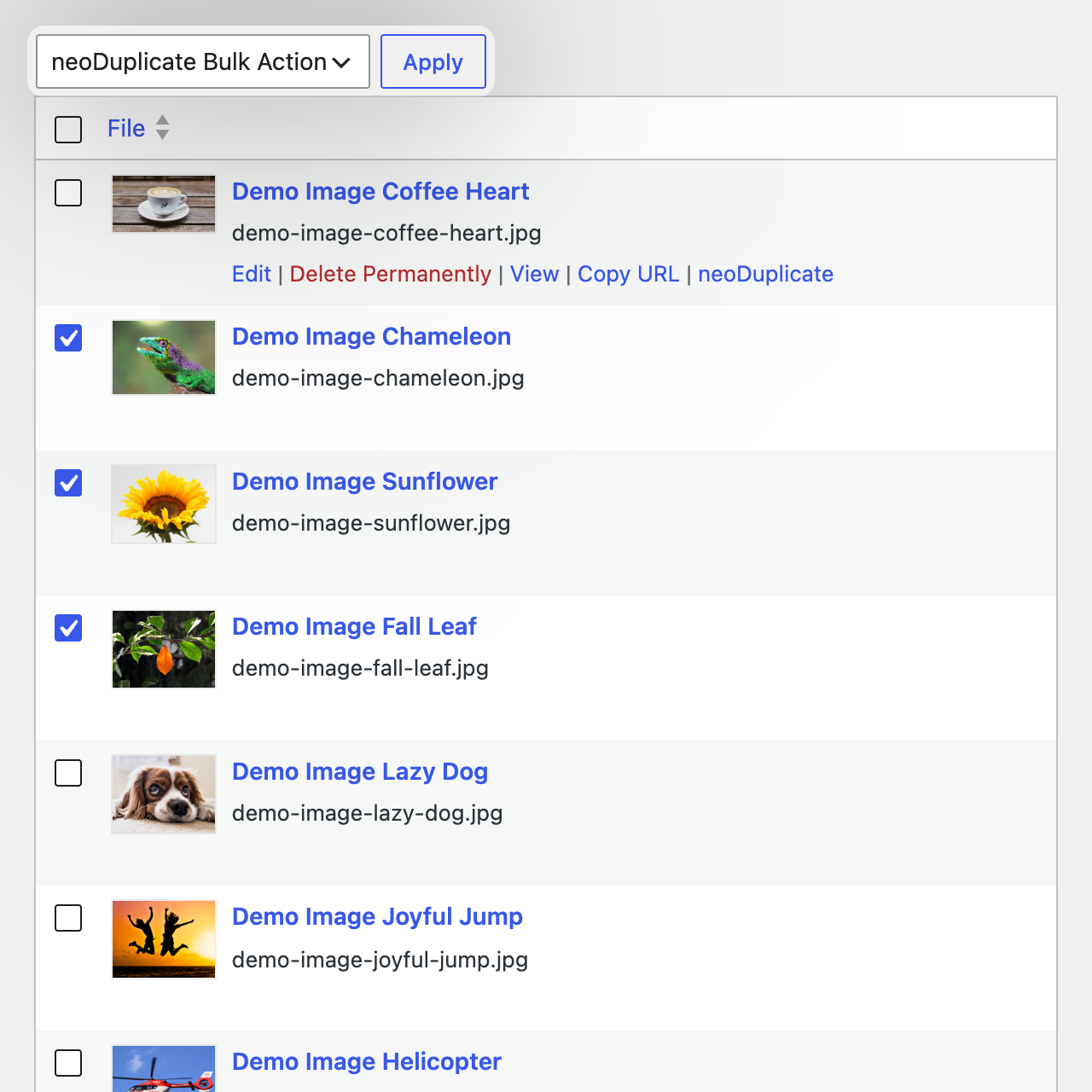
- 2026-06-04 Feature – neoDuplicate: bulk mode for duplicating images
- 2026-05-26 Improvement – neowp: WordPress 7 compatibility ensured
- 2026-05-26 Feature – neoSettings: Toggle to link neoWP under Settings and hide the main menu item
- 2026-04-10 Feature – neoReset: Button to reset tutorial notices
- 2026-04-03 Improvement – neoReset: Clear dropdown for various plugin reset options
- 2026-04-02 Improvement – neoSettings: Settings organized and grouped by plugin
- 2026-04-02 Improvement – neoSettings: Improved accessibility of the settings page
- 2026-03-21 Improvement – neoFreemius: Contact option on settings page combined into support link
- 2026-01-30 Improvement – neowp: Improved enforcement of browser-set font size
- 2026-01-30 Improvement – neoGlobal: Secure log folder name derived from WP secret key
- 2026-01-28 Improvement – neoLog: Consolidation of all logs into an additional log file
- 2026-01-16 Fix – neoGlobal: Fixed issue with sporadically hidden settings cards
- 2026-01-15 Improvement – neoGlobal: Enabled but switched-off toggles get a subtle green tint
- 2026-01-14 Fix – neoGlobal: Robustness against PHP-protected folders due to php.ini open_basedir setting
- 2026-01-01 Feature – neoSettings: Settings page for neoWP
- 2026-01-01 Feature – neoReset: Implementation of neoReset
- 2026-01-01 Feature – neoFreemius: Freemius integration
- 2026-01-01 Feature – neoManagerWporg: Implementation of neoManager
- 2023-03-12 Birthday – neowp: Founding of neoWP
- 2023-03-12 Birthday – neoDuplicate: Birth of the idea for neoDuplicate