

Description
Stars Rating transforms WordPress comments into a fully featured review system. It is simple to set up, highly configurable, and designed to keep your Media Library and admin clean no matter how many reviews come in.
Its main features are as follows:
Star Ratings
* Turns posts, pages and custom post types comments into star-rated reviews.
* Choose which post types have ratings enabled, globally and per post.
* Option to require a star selection before a comment can be submitted.
* Choose from two star styles (regular outline or solid filled) with a custom colour picker.
* Display the average rating above the comments section.
* Offers a shortcode [stars_rating_avg] to display the average rating anywhere.
* Hide the average rating text: [stars_rating_avg show_text=”no”].
* Hide an empty average rating: [stars_rating_avg show_empty_rating=”no”].
* See each review’s star rating on the WordPress comments screen (backend).
Review Photos
* Allow reviewers to attach photos to their comments.
* Photos are stored in a dedicated folder (wp-content/uploads/sr-reviews/) — completely separate from the WordPress Media Library to keep it clean.
* Photos open in a per-review lightbox gallery on the front end.
* Manage and delete individual review photos from the comment edit screen in the admin.
* Configure max number of photos, max file size, and max image dimension per upload.
* Restrict photo uploads to logged-in users or allow everyone.
Likes & Dislikes
* Add thumbs-up / thumbs-down buttons to posts on any post type.
* Show or hide vote counts next to each button.
* Restrict voting to logged-in users or allow everyone.
* SVG icons ensure consistent rendering across all browsers and devices.
Negative Rating Alert
* Show a popup when a reviewer selects a low star rating, giving them a chance to reach out before posting.
* Set the rating threshold that triggers the alert.
* Configure a direct link to your contact page inside the alert.
Google Rich Snippets
* Output JSON-LD structured data so star ratings can appear directly in Google search results.
* Set the review type (Product, Recipe, Book, Course, etc.) to match your content.
Labels & Messages
* Customise every user-facing string — prompts, button labels, alert text, error messages — directly from the settings page without editing any code.
Settings
* Organised settings page with tabbed navigation (Stars & Reviews, Likes & Dislikes, Labels & Messages) for quick access to each feature area.
Screenshots

Plugin settings — Stars & Reviews tab covering General, Display, Google Rich Snippets, Negative Rating Alert, and Review Photos configuration in one organised view. 
Likes & Dislikes settings tab — enable/disable the feature, select target post types, restrict voting to logged-in users, and toggle vote count visibility. 
Labels & Messages settings tab — customise every user-facing string for star ratings, the negative rating alert popup, and likes & dislikes buttons without touching any code. 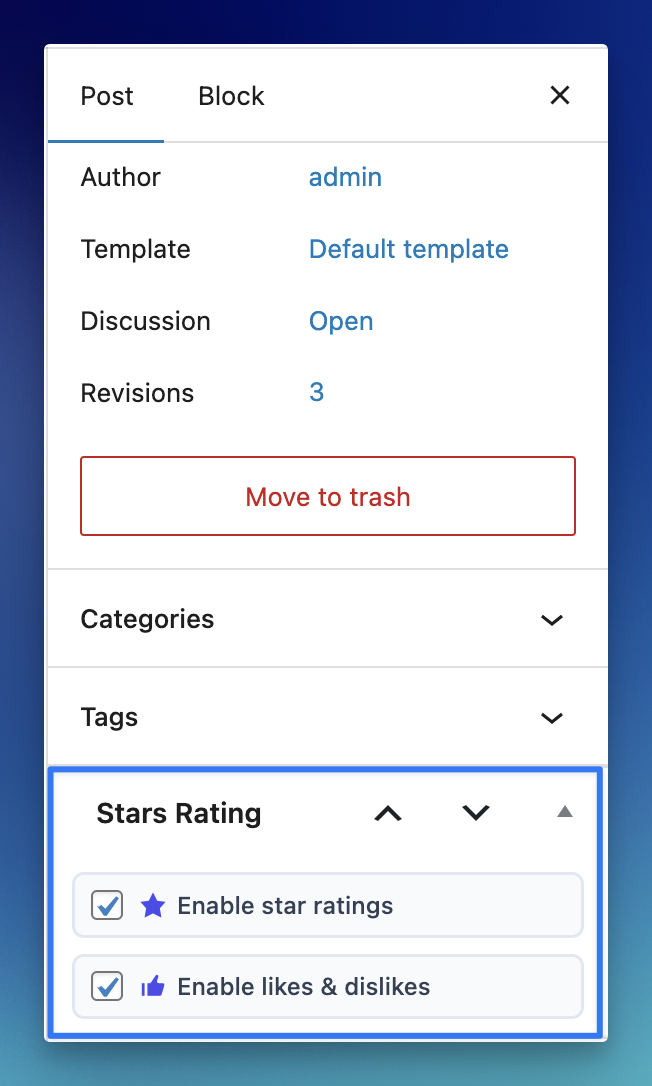
Per-post Stars Rating panel in the block editor sidebar — independently enable or disable star ratings and likes & dislikes for each post or page. 
Adding the [stars_rating_avg] shortcode via the WordPress block editor to embed the average rating anywhere in a post or page. 
Average rating shortcode rendered on the front end — displays star icons alongside the rating score and total review count. 
Review submission form with a five-star rating selector, photo upload button with live thumbnail preview, and the standard comment field. 
Published review on the front end showing the star rating and reviewer-attached photos displayed in a clean thumbnail grid. 
Likes & Dislikes buttons rendered on a post — shows the prompt label, thumbs-up/thumbs-down SVG icons, and live vote counts. 
WordPress Posts admin list with the custom “Avg. Rating” column showing average star rating and total review count per post. 
WordPress Comments admin screen with the custom “Stars Rating” column displaying the individual star rating for each comment. 
Edit Comment screen in the WordPress admin — Stars Rating metabox shows the numeric rating, and the Review Photos metabox displays all attached images with individual delete buttons.
Installation
Method 1: WordPress Admin Interface
- Navigate to your WordPress dashboard and go to Plugins > Add New.
- In the search bar, enter Stars Rating and press Enter.
- Look for the plugin in the search results and click on the Install Now button.
- Once installed, click on the Activate button to activate the plugin.
Method 2: FTP Upload
- Download the plugin ZIP file and extract it.
- Connect to your server using an FTP client (e.g., FileZilla, Cyberduck or cPanel).
- Upload the extracted plugin folder to the
/wp-content/plugins/directory on your server. - Activate the plugin through the WordPress dashboard from Plugins > Installed Plugins page.
Note: After installing & activating the plugin go to the Dashboard > Stars Rating page to enable/disable features and configure related settings.
Reviews


Contributors & Developers
“Stars Rating” is open source software. The following people have contributed to this plugin.
Contributors
Translate “Stars Rating” into your language.
Interested in development?
Browse the code, check out the SVN repository, or subscribe to the development log by RSS.
Changelog
= 4.1.0
* New: Likes & Dislikes — let visitors like or dislike posts with configurable voter permissions, post type targeting, and visible vote counts
* New: Review Photos — reviewers can now attach images to their comments; photos are stored in a dedicated directory (wp-content/uploads/sr-reviews/) completely separate from the WordPress Media Library to keep it uncluttered
* New: Per-photo lightbox — clicking a review photo opens a full-size lightbox gallery navigatable per review; photo paths are not exposed in the browser status bar
* New: Admin photo management — uploaded review photos are visible in the comment edit screen with individual delete buttons
* New: Labels & Messages — all user-facing strings (rating prompts, alert text, button labels, likes/dislikes copy) are now fully customisable from the settings page without touching code
* New: Settings tab navigation — settings are now organised into three focused tabs (Stars & Reviews, Likes & Dislikes, Labels & Messages) for easier navigation; active tab is remembered across page visits
* Improved: General code structure improvements and refactoring
* Updated: Translation files updated for multilingual support
* WordPress 6.9.4 compatibility confirmed
= 4.0.7
* WordPress 6.9 compatibility confirmed
* Updated minimum WP requirement to 6.0
* Updated minimum PHP requirement to 8.3 (recommended by WordPress.org)
* Updated translation files for multilingual support
* General code improvements
= 4.0.6
* Fixed average rating display logic based on enabled/disabled custom post types (CPTs)
* Resolved issue with rating display on individual comments
* Improved performance and optimized query handling
* Refactored large portions of the codebase for better readability and maintainability
* Updated translation (.pot) file for improved localization support
* Tested compatibility with WordPress 6.8.1
= 4.0.5
* Updated language file
* Tested plugin with WordPress 6.7.1
= 4.0.4
* Added average rating text show/hide support to shortcode
* Added empty average rating show/hide support to shortcode
* Added independent settings page of the plugin
* Removed settings from “Dashboard > Settings > Discussions” page
* Updated language file
* Tested plugin with WordPress 6.6.1
= 4.0.3
* Fixed a PHP warning on comments template
* Displayed average rating only if comments are open
* Displayed empty stars for average rating if no rating found
* Improved code for average rating to work with posts/pages/CPTs list
* Updated language file
* Tested plugin with WordPress 6.5.3
= 4.0.2
* Fixed a PHP version specific fatal error on (backend) comments page
* Tested plugin with WordPress 6.4.3
= 4.0.1
* Added “Negative Rating Alert” system to foster positive feedback
* Improved “Google Review Schema” display upon reviews availability
* Updated language POT file
* Tested plugin with WordPress 6.4.2
= 4.0.0
* Improved plugin resources management
* Improved comments enable/disable compatability
* Improved plugin settings area styles
* Improved whole plugin code WRT the advance practices
* Added comments stars rating column to the comments page (dashboard)
* Updated language file
* Tested plugin with WordPress 6.4.1
= 3.5.5
* Updated language file.
* Tested plugin with WordPress 6.2
= 3.5.4
* Added average rating fallback when there is no review
* Improved average rating display markup for better control
* Updated language file.
* Tested plugin with WordPress 6.0.3
= 3.5.3
* Tested plugin with WordPress 5.9.1
= 3.5.2
* Minor sanitization functions update.
= 3.5.1
* Improved plugin from security point of view.
* Tested plugin with WordPress 5.8.2
= 3.5.0
* Tested plugin with WordPress 5.7.1
= 3.4.0
* Added translation missing strings to the translation.
= 3.3.0
* Tested with WordPress 5.4.1
= 3.2.0
* Added custom reviews type support for Google search results.
= 3.1.0
* Added latest Gutenberg editor support.
* Allowed reviews reply without rating.
3.0.0
- Added an option to choose from two different rating stars style.
- Added an option to display stars rating in Google search results.
2.0.0
- Tested plugin with WordPress 5.1.1 and PHP 7.3.3
- Added an option to require rating selection
1.3.1
- Fixed styling issue
1.3.0
- Tested with WordPress 5.0
- Fixed the default rating value
1.2.0
- Added show/hide support for average rating above comments section
- Added “[stars_rating_avg]” shortcode support to display average rating in the post/page content area or loop
- Set the rating option in the comment form to 5 stars by default
1.1.0
- Tested plugin up to WP V4.9.8
1.0.0
- Initial Release