
Description
WP Full Picture is a tracking manager for WordPress and WooCommerce.
It lets you install tracking tools, display a GDPR-compliant consent banner and block tracking until visitors give their consent.
WP Full Picture replaces:
- Tracking plugins, like PixelYourSite, Pixel Manager for WooCommerce or Google Site Kit,
- GTM plugins, like GTM4WP,
- Consent Management Platforms, like CookieBot, CookieYes, Complianz and others.
🎁 WHAT’S INCLUDED
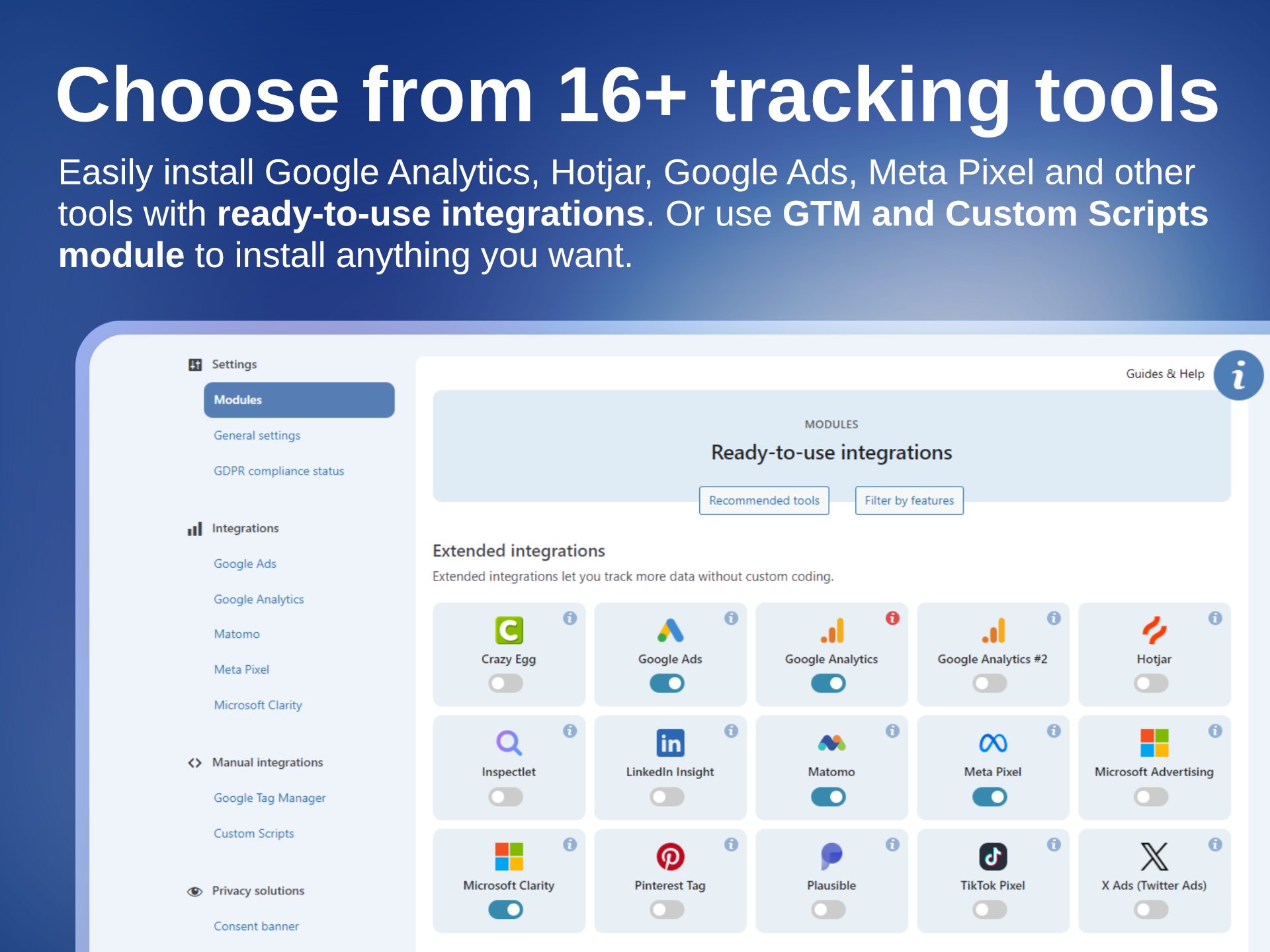
- 16 ready-to-use integrations with tools like Google Analytics, Google Ads, Meta Pixel, and more
- Built-in, pre-configured consent banner
- Google Consent Mode v2 and Microsoft UET Consent Mode support
- Google Tag Manager integration
- Comprehensive WooCommerce tracking
…and much more
🧩 INTEGRATIONS
Connect all your favorite tracking and analytics tools in minutes — no coding, no chaos.
WP Full Picture comes with ready-to-use integrations that help you understand your visitors, optimize your campaigns, and grow your business — all while staying compliant.
- Google Analytics learn more
- Google Ads learn more
- Meta Pixel learn more
- Pinterest Ads tag learn more
- Hotjar learn more
- Twitter / X learn more
- Microsoft Advertising learn more
- Microsoft Clarity learn more
- LinkedIn Insights Tag learn more
- TikTok Pixel learn more
- Plausible Analytics learn more
- Matomo learn more
- Inspectlet learn more
- Crazy Egg learn more
- PostHog (installation only)
- Simple Analytics (installation only)
Need something else?
Install more tools with the built-in Google Tag Manager integration (advanced) or a Custom Integrations module (quick and simple).
All tools installed with outhese modules work seamlessly with the built-in consent banner and consent management system — so every tool runs in full compliance.
🍪 CONSENT BANNER
WP FP comes with a GDPR-compliant consent banner that just works — no setup headaches, no cookie scans, no limits.
It comes with Google Consent Mode v2 and Microsoft UET Consent Mode built-in, so you can safely collect traffic insights, run ad campaigns and track conversions.
The banner automatically manages all your tracking tools that you installed with WP Full Picture, ensuring your site stays compliant with privacy laws while you keep gathering valuable data.
No complicated setup. No third-party cookie scanners.
👁️ ADVANCED TRACKING
With WP Full Picture you can track:
- WooCommerce events (see below)
- Clicks in affiliate links, contact links, buttons and other page elements
- Form submissions
- Views of popups, ads and pricing tables
- Page types, categories, tags
- User roles and statuses
- and more
You can track it with the tools installed with WP FP or push this data to Google Tag Manager’s dataLayer. Whatever you prefer.
[PRO] With WP Full Picture Pro, you go one step further and unlock business-oriented features like:
- Server-side tracking with Meta CAPI and Measurement Protocol
- Google Tag Gateway via Cloudflare
- Advanced Matching / Enhanced conversions tracking
- Custom events builder
- Visitor scoring (for measuring the quality of traffic sources)
- Metadata tracking
- JavaScript error tracking
- and more
🛒 WOOCOMMERCE TRACKING
WP Full Picture tracks all major WooCommerce events in 14 tracking tools, including Google Analytics, Google Ads, Meta Pixel, and Google Tag Manager.
It tracks key actions like:
- Product views and list views
- Additions to cart
- Starting checkout
- Completed purchases
- Coupon usage and more
Every event includes detailed product information for accurate conversion tracking and smarter ad targeting.
[PRO] The Pro version adds:
- Status-based order tracking (for higher accuracy)
- Server-side tracking with Meta Capi and Measurement Protocol (to better avoid ad blockers)
- Enhanced conversions and advanced matching (for better conversion attribution and ad optimisation)
📈 STATISTICS IN WP ADMIN
With WP Full Picture, you can embed reports with statistics from Google Looker Studio, Databox, and other BI platforms – directly in your WP admin.
💎 WP FULL PICTURE FREE vs PRO
Screenshots
Install tracking and marketing tools 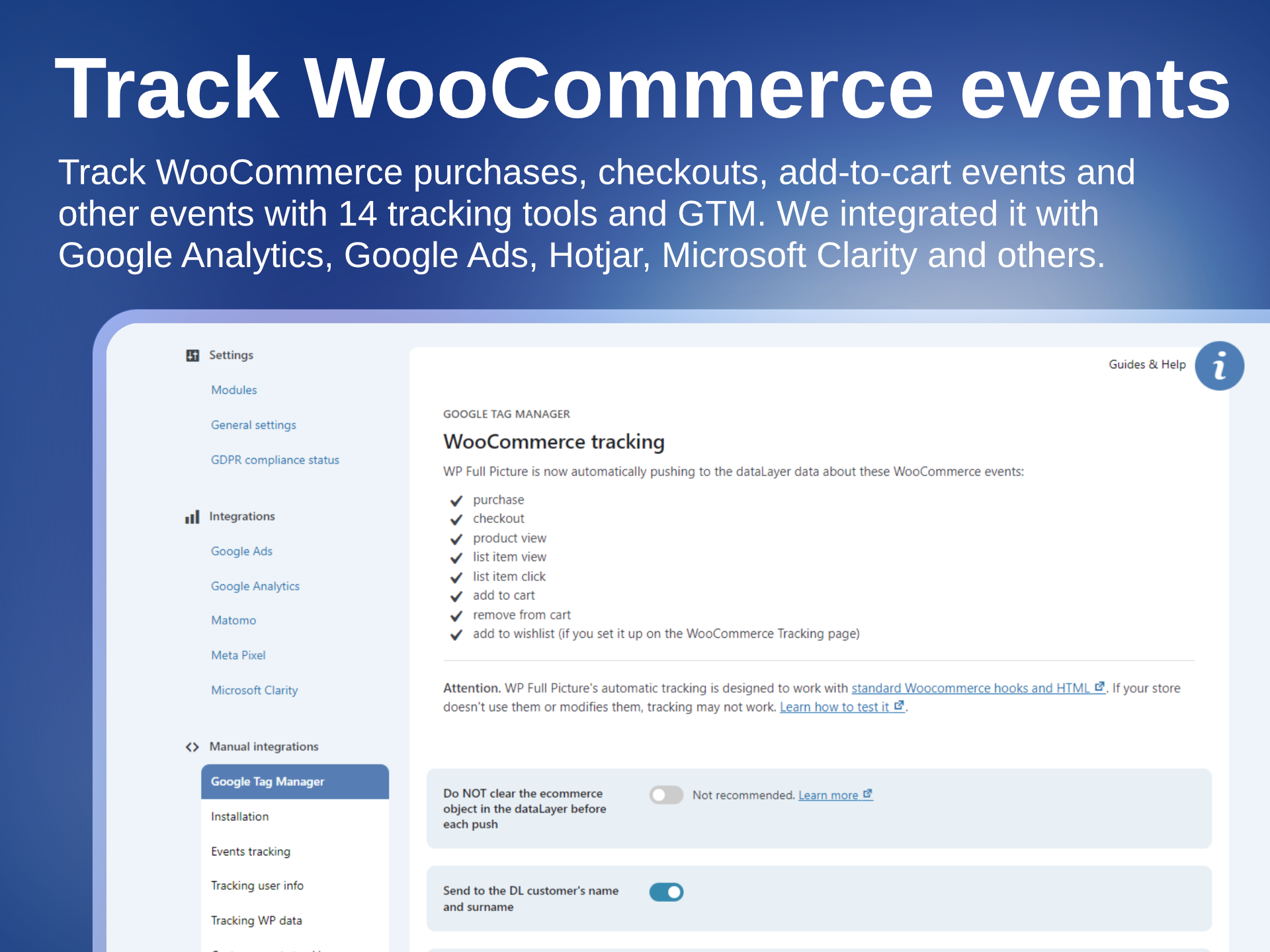
Track WooCommerce events 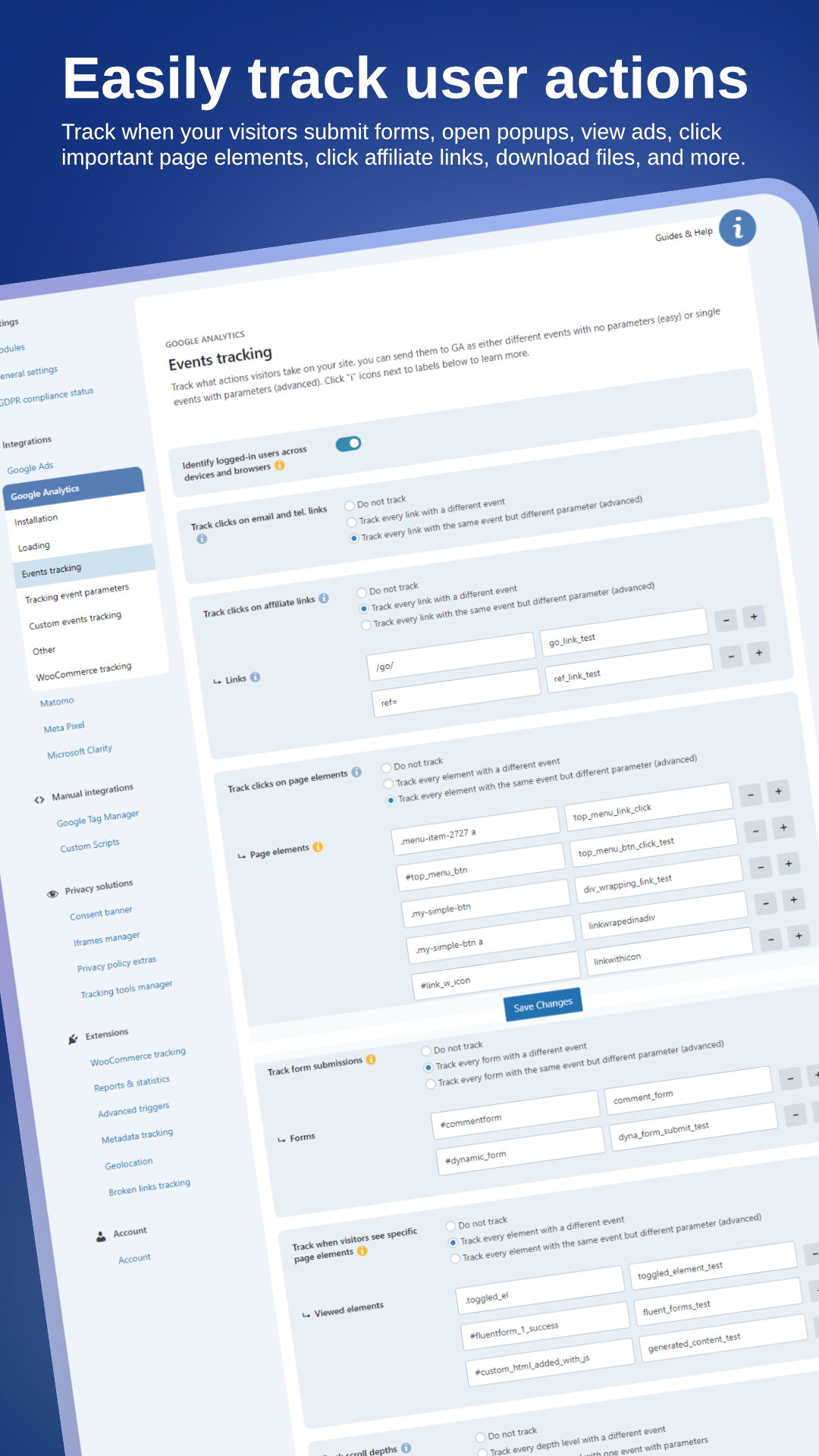
Track user actions 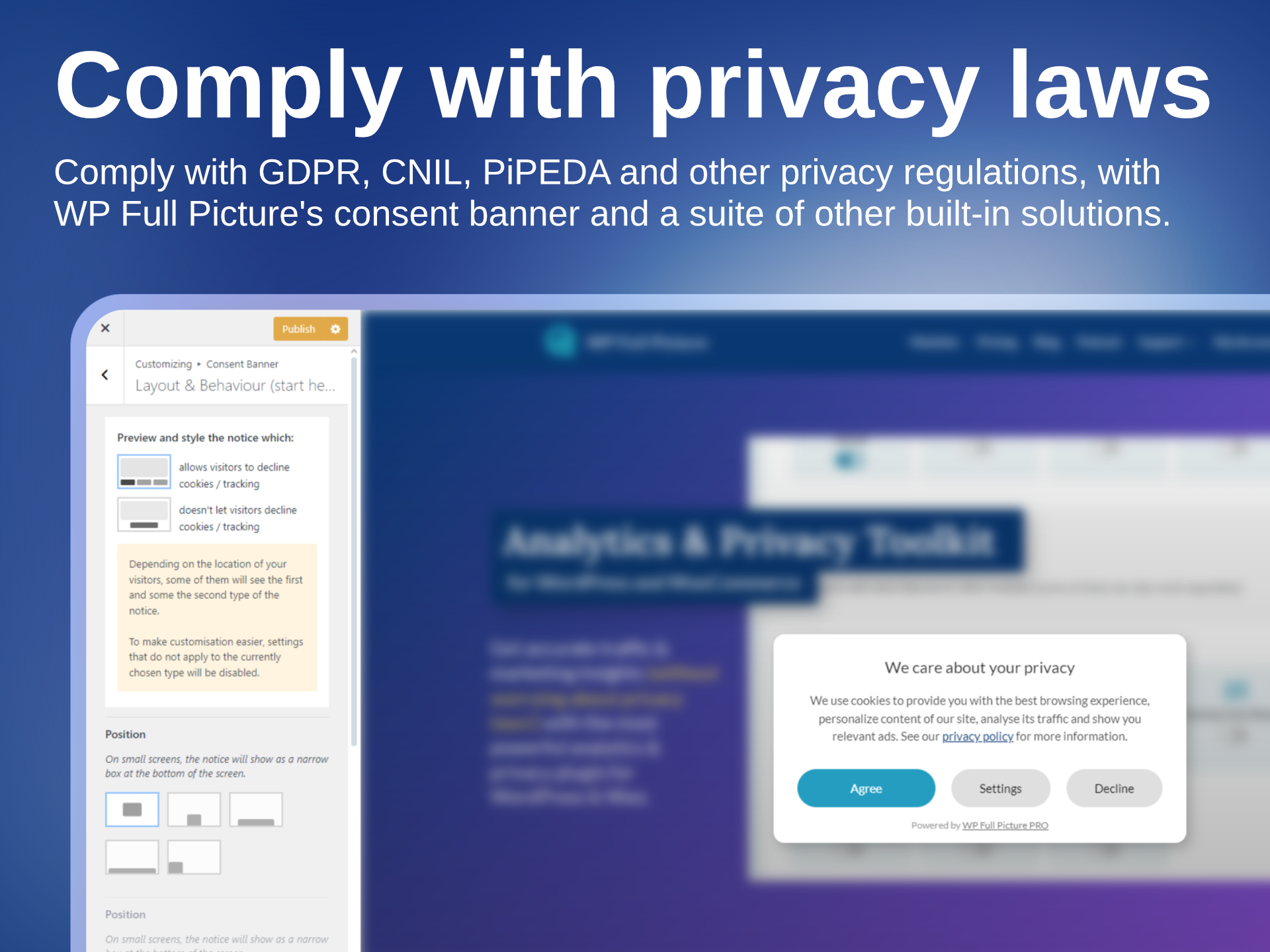
Comply with privacy laws 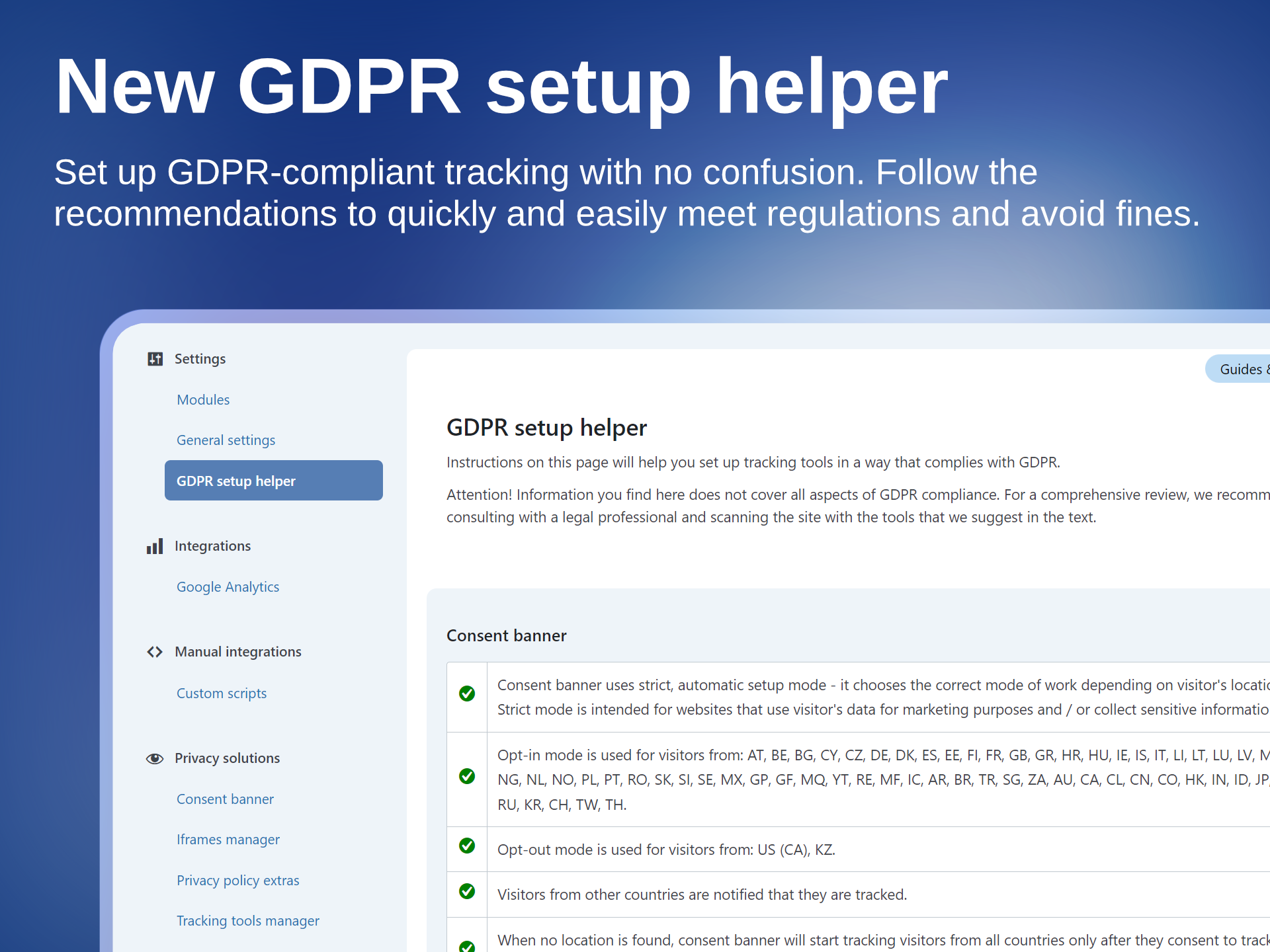
Check GDPR complaince status 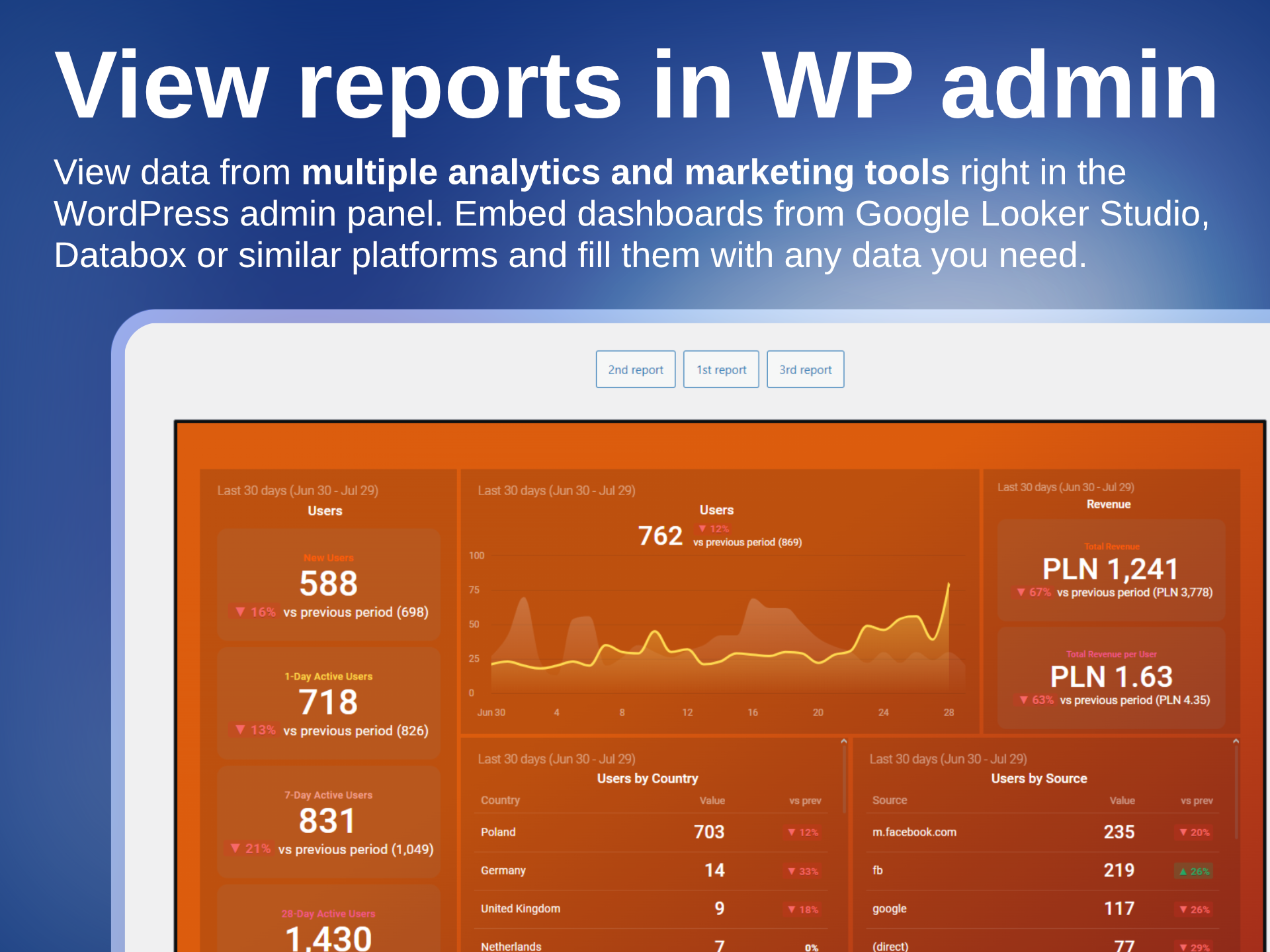
View traffic and marketing reports in the admin panel
FAQ
-
Does the plugin slow down page loading?
-
Yes, just like any other plugin, but by a very, veeery small amount.
WP Full Picture is modular, which means it only loads what is necessary. Aditionally, all files are loaded asynchronously, which does not block loading of other page elements and works well with caching tools.
-
Is WP Full Picture compatible with page builders?
-
Yes. We tested it with Gutenberg, Elementor, Bricks, Breakdance.
Only Bricks requires one small tweak to track interactions with WooCommerce product lists.
-
Yes. You can use it to control tracking scripts installed by other plugins and load them according to privacy laws.
WP Full Picture automatically handles all plugins that load Google Analytics, Ads and Microsoft Advertising. It can also control the loading og PixelYourSite, Jetpack stats and tools loaded with Pixel Manager for WooCommerce.
-
No. WP Full Picture’s modules for installing analytics tools are only optimized to work with WP Full Picture’s consent banner.
-
Can I use WP Full Picture on a website that displays ads?
-
At the moment there is not a single free consent management tool that lets you show ads from Google Adsense and other advertising platforms. To do it, the tool needs to use a IAB TCF framework which WP Full Picture does not use even in the paid version.
-
Does WP Full Picture support Google’s consent mode v2?
-
Yes. Consent mode v2 is fully supported. It works with Google Analytics, Google Ads and GTM. It works out-of-the-box. Simply, enable the consent banner module and it will work.
-
Is WP Full Picture certified by Google?
-
Google certifies only tools that support Google Adsense (for displaying ads on your own site) and use IAB TCF framework. WP Full Picture doesn’t do it. At the moment only paid Consent Management Platforms use this framework. No free tool has it.
-
No. This is a popular myth. Listing cookies is not required by law, plus it is technically doable only on simple sites. You can learn more about it here.
-
Does WP Full Picture generate privacy policies?
-
No. We recommend you use a specialized service for this.
-
Depending on the tracking tool, WP Full Picture either instructs the tool not to load cookies or blocks scripts that create these cookies.
-
No. It can be displayed unlimited number of times, on unlimited pages by unlimited number of visitors.
-
I live in the EU, but I want to start tracking visitors right after they visit the page. Can I do this?
-
Technically, you can. Legally you can’t.
-
Will my site comply with ALL privacy regulations just by using WP Full Picture?
-
No. Privacy regulations cover many areas of business. WP Full Picture helps you handle only a part of it, so you still need to be aware and act accordingly to be fully compliant with the rest of them.
-
Yes. WP Full Picture has been tested and works with multilingual plugins WPML and Polylang. It is possible that it also works with other plugins but we haven’t tested them.
-
Does WP Full Picture generate product feeds for Google Shopping or Facebook?
-
No. WP Full Picture is focused on tracking and privacy. To generate a product catalogue you can use one of many plugins from WordPress repository or cloud platforms.
-
Does WP Full Picture display statistics in the dashboard?
-
Yes. WP Full Picture lets you display in your WP admin panel reports and dashboards created in Google Looker Studio, Databox and other similar platforms.
These platforms allow you to create advanced reports with aggregated data from various analytics and marketing tools, Google spreadsheets and even WooCommerce data.
Reviews


Contributors & Developers
“Tracking and Consent Manager – WP Full Picture” is open source software. The following people have contributed to this plugin.
Contributors
“Tracking and Consent Manager – WP Full Picture” has been translated into 1 locale. Thank you to the translators for their contributions.
Translate “Tracking and Consent Manager – WP Full Picture” into your language.
Interested in development?
Browse the code, check out the SVN repository, or subscribe to the development log by RSS.
Changelog
10.1.1 (11-03-2026)
- [Update] [Woo] Added a few extra rules to better track ATC buttons on single product pages that use Ajax
- [Fix] [Woo] Fixed a bug that showed on sam configs, and prevented tracking “add to cart” events on cart pages
10.1.0 (11-03-2026)
- [New] [Pro] Added support for Stape’s sGTM plugin
- [New] [Pro] [MS clarity] You can now send custom events/tags
- [New] [Woo] You can now track add to cart events on single products which originated after clicks in “add to cart + options (beta)” block (variable and grouped products are not supported yet)
- [Other] [Woo] removed unused code and made function names clearly describe their purpose
- [Update] Moved Consent Mode 2 related settings to the inline JS, to have it fire before any other script
- [Other] Changes to in-admin texts
10.0.2 (25-02-2026)
- [Update] Visual fixes in the admin pages for WP 7.0
- [Fix] Fixed typos in some field descriptions
- [Other] README.txt update
10.0.1 (18-02-2026)
- [Fix] [Woo] Fixed compatibility with WooCommerce HPOS
- [Fix] [GTM] Default name of GTM’s dataLayer is now set to fupi_dataLayer to avoid issues with Google tools loaded outside GTM
- [Fix] [Woo] Matomo sometimes did not correctly track products added and removed from cart
- [Other] Text updates
10.0.0 (09-02-2026)
This was released only to PRO users
- [New] All files of WP FP are now loaded asynchronously
- [New] Dashboard page with guides and useful links
- [New] Conflict checker (accessible through the new dashboard page)
- [New] Consent Manager module can now control the loading of PixelYourSite and Pixel Manager for WooCommerce
- [New] Added time information to fpdata object
- [New] [Pro] Reactions module
- [New] [Woo] Option to send “add to cart” events on cart page rather then when users click “add to cart” buttons
- [New] [Woo] You can now disable sending stadard Add To Cart events and replace them with your own code
- [New] [Woo] You can now choose specific WooCommerce pages where instead of sending “Product view” events you will send “Product list view” events (for main products)
- [New] [Pro] Custom triggers can now use “Coursor left browser window” action
- [Update] WooCommerce tracking – important code modifications so that tracking can work with asynchronous file loading
- [Update] Simplified navigation
- [Update] Design and texts
- [Update] You can now block several files of the same 3rd party tool
- [Update] [Pro] Meta Pixel no longer sends Conversion API event for pageviews by default. Now it needs to be enabled by the user
- [Update] [Pro] Visitor scoring levels (10,20,30, etc.) are now enabled by default
- [Removed] Animation for the consent banner
- [Removed] Removed an option to disregard cookie choices (due to abuse and/or improper use)
- [Removed] Function to force load Google Analytics and Ads scripts
- [Removed] Function to load Google Analytics and Ads in specific countries
- [Removed] Custom Brand for WooCommerce (deprecated for a long time)
- [Removed] Options for saving WP FP scripts in files
- [Fix] Small JS bug on the settings page of the Google Analytics module
- [Fix] JS errors on “blur” events (DOM events)
- [Fix] Removed debug_mode parameter from GA events
- [Fix] Consent banner’s scroll lock is now set in a different way and is no longer removed by WooCommerce
- [Fix] [Pro] Value comparison type “lower than” in the builder of custom triggers did not work
- [Fix] [Pro] A bug prevented session cookie to be updated when a user updated from WP FP Free to Pro
- [Fix] [Pro] A bug in Status Based Order Tracking in GA4, which did not track orders for installs with different GTAGs for GA and GAds
- [Fix] Iframe placeholders will no longer get incorrect dimensions on some setups
- [Other] Renamed “Custom scripts” module to “Custom integrations” to avoid confusion with the purpose of the module
- [Other] Optimized JS functions in the customizer
- [Other] Tweaked some texts in the GDPR setup helper and the saved proofs of consent
- [Other] Increased tiemouts for sending data server-server
- [Other] Small tweaks, optimizations and removal of unnecessary code
9.4.2 (01-12-2025)
- [Fix] [GA] Fixed SBOT when gtag ID is different then measurement ID
- [Other] Freemius SDK update
9.4.1 (20-11-2025, PRO-only)
- [New] [GA] [Pro] You can now add custom parameters to “purchase” event payloads sent via SBOT
- [New] [GA] [Pro] Added an option to view SBOT payloads in order details pages
- [Update] [GA] [Pro] Added to SBOT a fallback to WC session saving – saving order data in transients
- [Fix] [Pro] SBOT fixes and improvements
- [Other] Freemius SDK update
9.4.0 (04-10-2025)
- [New] [Pro] Custom events can now have custom properties
- [New] [Pro] Custom events in Hotjar
- [Fix] [Meta] When variable products are viewed, they are now correctly sent with content_type equal to product_group (works only when the user did not choose to track variable products as single products)
- [Fix] [Pro] [GA] Triggering GA #2 pageview after user consent
- [Update] [Pro] Small improvements to status based order tracking
- [Other] Updated texts and in-app documentation
- [Other] Advanced Triggers are renamed to Custom Triggers
- [Other] Added Black Friday notifications
- [Other] Added more reasonable timeouts to sending to remote servers
9.3.2 (27-10-2025)
- [Fix] [Pro] Status-based order tracking fixes and improvements in GA and Meta
9.3.1 (23-10-2025)
- [New] [Meta Pixel] Advanced External ID
- [Change] [Woo] [Meta] When a variable product is viewed, the “content_type” is now sent to “product_group” instead of “product”
- [Fix] [Pro] [Google Ads] Fixes of bugs that showed up after the last update – connected to using GA and GAds with connected tags (the bug was introduced in the 9.3.0)
- [Fix] [Pro] [Google Analytics] When orders are sent via Measurement Protocol, item_category2 was skipped
- [Fix] Information in the GDPR setup helper about missing privacy policy did not change even if the user published it
- [Fix] [Pro] [Google Analytics] When orders are sent via Measurement Protocol, coupon text is now properly added to the payload
- [Update] GDPR-related texts and GDPR setup info page
9.3.0 (14-10-2025)
- [Update] [Google Ads] [Google Analytics] Major improvement for tracking with combined Google Tags
- [Update] Improvement for tracking products added to cart via a link with “add-to-cart” parameter
- [Update] Geolocation module’s settings are moved to the General Settings
- [Update] [Consent Banner] Added a field for the ID of the privacy policy page – important for multilingual websites
- [Update] [Meta Pixel] Status based order tracking no longer sends and empty value for FBC, when it is not available
- [Fix] [Setup Helper] SH no longer shows in the Bricks builder editor
- [Fix] [Consent Banner] Default settings for the rounded corners and button text size on mobile did not get applied properly
- [Other] Updated internal function for getting URL parameter values
9.2.0 (24-09-2025)
- [New] [UI] Basic onboarding sequence
- [New] [UI] Advanced fields are now hidden for new installations (can be shown with a switch in the top menu)
- [New] [Woo] Added support to new WooCommerce blocks
- [New] [Woo] [Pro] Added fpdata.user values to order confirmation page with info on the number and value of previous orders from the client
- [Update] [Caching] Added caching exclusions for LiteSpeed Cache
- [Update] [Caching] Added caching exclusions for WP Rocket (enabled with a switch in the “General Settings” > “Performance”)
- [Update] [Custom Scripts] Slight improvement of the code that prints inline scripts
- [Update] [Consent Banner] New default styling
- [Update] [Consent Banner] New settings for mobile views
- [Update] [UI] Simplified top menu
- [Update] Conditional field toggling now works in the repeater field
- [Update] Improved field clearing in the repeater field
- [Update] [GTM] [Pro] Updated and moved the custom events tracking script to the head file
- [Update] Improved error handling for generating the head.js file
- [Update] [Privacy] The “GDPR setup info” page is slightly expanded
- [Fix] Version number is now correctly saved in fupi_versions for new installations
- [Other] You can now enable setup mode right from the top menu
- [Other] Text updates
- [Other] Freemius SDK update
9.1.2 (02-09-2025)
- [Removed] Information about promotional consents in ConsentsDB
- [Removed] Small code cleaning
9.1.1 (13-08-2025)
- [Fix] GDPR setup info did not show some headings if the Privacy Policy page was not published
- [Fix] Rest API issues with Zapier
- [Other] Added social links to the menu
9.1.0 (06-08-2025)
- [New] [Woo] [Pro] Added a meta box with tracking information to order pages
- [New] [Woo] [Pro] Re-written status-based order tracking
- [New] [Consent banner] You can now disable asking for consents after privacy policy changes or new modules activation. Handy while setting up tracking and testing.
- [Update] More information is now output to the browser console when the Setup Mode is enabled
- [Update] Setup mode is now automatically turned off after 6 hours
- [Fix] Added a check to make sure that modules which require some settings are no longer loaded if the user did not save any
- [Fix] fupi_tools options are now saved if they are empty
- [Fix] Iframes managed with HTML or shortcode did not load if no other iframe management options were enabled
- [Fix] Actions triggered when the page loses focus are now correctly triggered
- [Fix] Translating iframe block in WPML and Polylang did not work correctly after 9.0 update. Now it’s fixed
- [Fix] Google Analytics debug view could not be enabled via the link parameter
- [Fix] Meta tag was not saved in the General Settings when the settings were saved for the first time
- [Other] Small UI tweaks
9.0.0 (02-07-2025)
- [New] User interface overhaul, including major code refactoring, new modules, changed settings and improved texts
- [New] Setup mode
- [New] Records of consent can be now stored in email account (PRO only)
- [New] Backup restoration functions are built from scratch
- [New] You can now add meta tags in the head section of HTML
- [New] MS UET Consent Mode
- [New] Added Custom events tracking to the second module of Google Analytics
- [Update] Google Advanced Consent Mode is now enabled by default
- [Update] Google Tag now loads for all visits (tracking managed by advanced consent mode)
- [Update] [Custom Scripts] HTML comments are now automatically removed from the pasted code
- [Update] Backups are now sorted by date
- [Update] fp_info shortcode now includes information on iframes and automatically managed, 3rd-party tracking tools
- [Update] fp_info shortcode now checks for duplicates
- [Update] [Rest/ AJAX calls] Changed function for getting visitor’s IP address
- [Fix] [Blocking scripts] Rewritten method of blocking scripts with specific content
- [Fix] Added a fallback widget list name for WooCommerce
- [Removed] Removed Pixel Caffeine from supported plugins in the Tracking Tools Manager
- [Removed] Privacy mode in Hotjar has been removed and replaced with data supression option
- [Removed] [GA, GAds, MS Ads] Removed setting to track without waiting for consent as they did not work with consent modes
- [Removed] Enabling debug mode no longer displays WP options below the “Save settings” button
- [Other] Visitors are now always asked for consent after new tracking tools are enabled or priv. policy text changes
- [Other] [Woo] Move “blocking sourcebuster.js” to WooCommerce settings
- [Other] Added a “feedback” button under all popup texts
8.5.3.4 (21-05-2025) [Pro-only update]
- [Fix] [Woo] Added a check for the “billing_address_2” field in checkout
- [Info] Version numbers from 8.5.3.1 to 8.5.3.3 were made available only for Free users in WP repository. They are identical to 8.5.3. They were published because of an error in WP org’s plugin repository.
8.5.3.4 (21-05-2025) [Pro-only update]
- [Fix] [Woo] Added a check for the “billing_address_2” field in checkout
- [Info] Version numbers from 8.5.3.1 to 8.5.3.3 were made available only for Free users in WP repository. They are identical to 8.5.3. They were published because of an error in WP org’s plugin repository.
8.5.3 (19-05-2025)
- [New] [Privacy] Setting default consents can be turned off by setting “fp.vars.use_other_cmp” to true
- [Update] [Google Ads] Added “currency” to “purchase” events (for dynamic remarketing)
- [Update] [MS Ads] Added revenue values to some ecommerce events
- [Update] Freemius SDK
- [Update] [Woo] Set a default “woo custom widget” for “list_name”
- [Fix] [GTM] The event “fp_privacyPreferencesChanged” is now pushed to the DL after the consents are updated
8.5.2 (31-03-2025)
- [Fix] [Meta Pixel] By mistake, the field for adding test event code was available only for Pro users
- [Fix] [Woo] There is no longer a PHP notice when there is no “billing address 2”
- [Update] Updated texts in the GDPR setup helper
8.5.1 (24-03-2025)
- [Update] [Meta Pixel] If the _fbp cookie is missing, it is now generated by WP FP to improve match quality
- [Update] [GDPR] Updated texts for the GDPR setup helper and Records of Consents
- [Fix] [Meta Pixel] The settings field for the test event code did not show up until CAPI key was entered
- [Fix] For some reason Select2 fields stopped showing placeholders
8.5.0 (18-03-2025)
- [New] [Woo] Added an option to send “product view” events when visitors change product variants
- [New] [Woo] Added an option to send an extra “product view” event for “default variants” on product pages
- [New] [Records of consent] Visitors can now see the consent data collected in CDB (must be enabled by admin)
- [Update] [Woo] Added an extra check in JS to make sure no order is tracked twice
- [Fix] [Consent Banner] When “Settings” panel was disabled, hiding the panel with toggling icon did not work correctly
- [Fix] [CDB] Fixed a bug which sometimes prevented the latest WP FP configuration from being sent to CDB
- [Fix] Content of files with settings backups sometimes opened directly in a new tab
- [Fix] [Consent banner] Visitor were asked for consent every time priv. policy or tools changed – no matter whether the settings “ask visitors for consent” was enabled or not
- [Other] [Woo] [GA4 / Meta Pixel] Added a check to disable Status-Based Order Tracking (a.k.a Advanced Order Tracking) when the plugin switches from Pro to Free
- [Other] [GA4 / Meta Pixel] Added an extra debug information about server side tracking
- [Other] Cookie for saving consents is now always set to expire after 182 days unless it’s for development
- [Other] New format of saving consents IDs in cdb_id cookie
- [Other] [Woo] [Pro] Added extra checks for getting customer data
- [Other] [Woo] [Pro] Renamed “Advanced Order Tracking” to “Status-Based Order Tracking”
- [Removed] IPs are no longer sent to CDB
8.4.0 (26-02-2025)
- [New] Google Ads can now be installed using GTAG ID
- [New] [Woo] Added an option to provide a custom selector for product teasers
- [Update] Major rewrite of the internal file structure of the admin section of the plugin
- [Update] [Pro] Function for assigning non-HTTP referrers to proper sources no longer changes document.referrer if it contains a UTM
- [Update] WooCommerce default brand taxonomy is now tracked by default. All other ones are now optional.
- [Fix] Custom scripts were not saved in files right after the option was enabled in the general settings
- [Fix] [Woo] [Pro] In some situations user data was not being sent on the purchase confirmation page
- [Fix] [Google Consent Mode] Changed the default state of “functionality” to “denied” (set to “granted” after visitors agree to personalisation cookies)
- [Other] Added a default style “display:none” to consent banner and toggler to hide them when custom content customizers are enabled (e.g. CartFlows setup manager or Kandence Email Customizer)
- [Other] Added an early “return” to the updater function
- [Other] Added a check to make sure that no premium modules are loaded when the user cancels Pro and gets a refund
- [Other] Change links to YT videos to links to the documentation
8.3.2 (27-01-2025)
- [Update] Freemius SDK
8.3.1 (22-01-2025)
- [Fix] Quick fix after last update. JS files did not get loaded if the site admin never save3d “general settings”.
8.3.0 (21-01-2025)
- [New] [Consent banner] Added an option to hide the banner on selected pages
- [New] [Performance] You can now save WP FP’s main JS and Custom Scripts in files
- [New] Free users can now send data to the website’s server via AJAX
- [Update] Added “nowprocket” parameter to inline JS so that WP Rocket does not break the plugin
- [Update] Custom Script now only output important data to fp.cscr object
- [Update] Added a browser console notification when a custom script is loaded and triggered
- [Update] Updated Freemius SDK
- [Fix] [GTM] Re-added mistakenly removed noscript fallback
- [Fix] [Free] WP FP settings didn’t get sent to CDB after they were changed
- [Fix] Consent banner did not hide on the privacy page
- [Fix] [i18n] Updated loading of translation files
- [Removed] Default jQuery file dependency (it is now only added when Woo is enabled)
- [Removed] [Custom Scripts] Removed a condition which prevented scripts from loading in the customizer if the “force load” was active
- [Removed] [Custom Scripts] ID field in a script section (it is not necessary)
- [Other] [GDPR Compliance Helper] Add information that Google reCaptcha is not GDPR compliant and must be replaced
- [Other] Added licence is_pro checks to all JS files
- [Other] [Woo] Moved loading of inline script with the checkout data lower the head element (100 value) to make sure that it loads after the helpers FILE
- [Other] [Consent banner] Added “noopener” attribute to “Powered by” link to remove the warning in ahrefs
8.2.1 (18-12-2024)
- [Fix] [Pro] When changing status of an order which contained a coupon code, Advanced Order Tracking for GA 4 gave error
- [Fix] GDPR Setup Helper no longer shows empty categories when modules are enabled without saved configuration settings
8.2.0 (16-12-2024)
- [New] Free users can now use the ConsentsDB service
- [New] [GA] [Pro] Enhanced conversions is now also available for GA
- [New] [Woo] [Pro] Advanced order tracking for Meta Pixel and GA
- [New] [Free] Checking for bots is now available in the free version
- [Update] Server requests are now by default stopped for known bots
- [Update] Greatly improved system of backing up WP FP’s settings
- [Update] [GA4] Added tracking shipping costs and taxes in separate order parameters
- [Update] Optimized server-side functions for Meta CAPI.
- [Update] Deferring scripts is now done via the WP’s own method introduced in WP 6.3
- [Fix] [Consent banner] Quotes were escaped which prevented shortcodes from working
- [Fix] [Woo] fpdata.woo.cart was empty if there were no mini cart in the HTML of the checkout start page
- [Fix] Moved FP.getInner() to head-js.php to prevent errors on first page load when autoptimize joins JS files
- [Fix] Meta _fbc generation from fbclid URL parameter
- [Fix] [Reports] Fixed a bug that prevented users from creating multiple sections for adding iframes
- [Fix] Fixed the “translations loading too early” notice in WP 6.7
- [Fix] In some cituations Helpers JS file was loaded in the DOM head instead of the footer
- [Fix] [Facebook Pixel] External ID is now sent sha256 encoded
- [Fix] [Hotjar] Woo events were not sent if the user chose not to track event parameters
- [Removed] [GA4] Enabling debugView in the settings – useless if the site is live. Now enabling can be done only via ?ga4debug=on URL parameter
- [Removed] [Woo] Removed an icon indicating whether the order “thank you” page was viewed
- [Removed] Noscript fallbacks are no longer used since they are not GDPR compliant
- [Other] Included latest JS and CSS files for select2 dropdowns
- [Other] Function FP.doActions() can now pass arguments between actions
- [Other] Consent banner – default with increased to 700px