Description
Stop Important News from Getting Buried – Grab Attention Instantly!
Your visitors miss 90% of static announcements. FYP News Ticker creates eye-catching scrolling banners that capture attention and ensure your important messages get seen – perfect for promotions, breaking news, and urgent updates.
What You’ll Get (Real Benefits, Not Technical Features)
✓ Impossible to Miss – Scrolling movement naturally draws eyes better than static banners
✓ Increase Conversions – Perfect for displaying limited-time offers and promotions that drive action
✓ Keep Visitors Informed – Announce events, updates, and important information without interrupting their experience
✓ Professional Appearance – Beautiful animated banners make your site look dynamic and modern
✓ Save Time – Schedule announcements in advance and they appear/disappear automatically
✓ No Page Slowdown – Lightweight animation with zero performance impact
✓ Works Everywhere – Display at top, bottom, or anywhere in your content
Why Choose FYP News Ticker Over Others?
VS Free Alternatives:
– 3 Beautiful Templates – Others give you 1 basic scrolling text
– Drag-and-Drop Builder – Free plugins require manual coding
– Scheduled Publishing – Others show everything all the time
– 9 Custom Icons – Most plugins are text-only
VS Premium Plugins ($39-$79):
– Same Features – Multiple templates, icons, scheduling, drag-and-drop
– Just as Beautiful – Professional animations and modern designs
– Easier to Use – Simple interface vs complex configuration
– Regular Updates – Actively maintained and WordPress compatible
VS Custom Coding:
– Save 10+ Hours – Ready in 5 minutes vs days of development
– No Animation Hassles – We handle smooth scrolling, pause on hover, responsive design
– Maintenance Free – We keep it compatible with WordPress updates
– Tested & Reliable – Works across all browsers and devices
Real-World Use Cases
🛍️ E-Commerce Sites – “🔥 Flash Sale: 50% Off Everything – 24 Hours Only!”
📢 Business Websites – “New Office Hours | Holiday Schedule | Important Update”
🎓 Educational Sites – “Registration Opens Monday | Exam Schedule Posted”
📰 News & Media – “Breaking News | Latest Updates | Live Coverage”
🎉 Event Websites – “Early Bird Tickets Available | Only 50 Spots Left!”
🏢 SaaS & Tech – “System Maintenance Tonight 10PM-2AM | New Feature Released”
3 Professional Templates
No design skills needed – each template is professionally crafted:
- Default – Classic scrolling banner perfect for any announcement
- Modern – Stylish card design with icon highlighting
- Minimal – Clean text-only layout for professional sites
Key Features
✓ Unlimited news tickers (create as many as you need)
✓ Drag-and-drop to reorder announcements
✓ 9 attention-grabbing icons (megaphone, bell, star, fire, gift, warning, info, check, arrow)
✓ Schedule start and end dates for auto-display
✓ Control scroll speed and direction
✓ Pause on hover for readability
✓ Make items clickable (link to product pages, posts, etc.)
✓ Custom colors to match your brand
✓ Fully responsive on mobile
✓ Show/hide specific items temporarily
✓ Limit how many items display
✓ SEO-friendly with proper HTML
✓ Translation ready
Simple to Use
- Create new ticker from News Tickers menu
- Add announcements with drag-and-drop builder
- Choose template and customize colors
- Copy shortcode and paste anywhere
- Done! Scrolling banner appears automatically
No configuration required – smart defaults work perfectly, customize only when you want specific behavior.
Part of the FYPlugins ecosystem – professional WordPress solutions trusted by thousands of websites.
Usage
Getting Started (3 Minutes)
- Create Ticker – Go to News Tickers Add New
- Add Items – Click “Add News Item” and enter your announcements
- Customize – Choose template, icons, colors (optional)
- Display – Copy shortcode and paste in any page, post, or widget
- Done! – Scrolling banner appears on your site
Common Use Cases
Simple announcement banner:
[fyplugins_news_ticker id=”123″]
Fast-scrolling promotions:
[fyplugins_news_ticker id=”123″ speed=”100″]
Modern template with right scroll:
[fyplugins_news_ticker id=”123″ template=”modern” direction=”right”]
Show only 3 most recent items:
[fyplugins_news_ticker id=”123″ limit=”3″]
Custom styled banner:
[fyplugins_news_ticker id=”123″ template=”minimal” class=”top-banner”]
No pause on hover (continuous scroll):
[fyplugins_news_ticker id=”123″ pause_on_hover=”false”]
Shortcode Parameters
Main Shortcode: [fyplugins_news_ticker id="123"]
The id parameter is required – get it from the ticker edit screen in admin.
Display Options
- template – Visual style:
default(classic banner),modern(card style),minimal(text only) - show_icons – Show icons:
trueorfalse(default: from ticker settings) - class – Add custom CSS classes for styling
Animation Control
- speed – Scroll speed in pixels per second (default: 50, try 100 for faster or 25 for slower)
- direction – Scroll direction:
leftorright(default: left) - pause_on_hover – Pause when hovering:
trueorfalse(default: true)
Content Selection
- limit – Maximum items to display (default: -1 for all active items)
Real-World Examples
Flash sale banner (fast, attention-grabbing):
[fyplugins_news_ticker id=”123″ speed=”100″ template=”modern”]
Event countdown (right to left):
[fyplugins_news_ticker id=”456″ direction=”right” template=”modern”]
Breaking news (continuous scroll):
[fyplugins_news_ticker id=”789″ pause_on_hover=”false” speed=”75″]
Subtle updates (minimal, slow):
[fyplugins_news_ticker id=”321″ template=”minimal” speed=”30″]
Top banner (show 5 items only):
[fyplugins_news_ticker id=”654″ limit=”5″ class=”header-banner”]
Multiple tickers on same page:
[fyplugins_news_ticker id=”111″ template=”modern” class=”promo-ticker”]
[fyplugins_news_ticker id=”222″ template=”minimal” class=”info-ticker”]
Building Your News Ticker
Creating Announcements
- Add Item – Click “Add News Item” button
- Enter Title – Your announcement text (e.g., “50% Off Everything Today!”)
- Choose Icon – Select from 9 icons or leave empty (megaphone, bell, star, fire, gift, warning, info, check, arrow)
- Add Link – Optional URL to make announcement clickable
- Schedule – Set start/end dates for automatic display (leave empty for always visible)
- Status – Check “Active” to show immediately
Managing Items
Reorder: Drag and drop items to change display order
Edit: Click item to modify text, icon, link, or dates
Hide: Uncheck “Active” to temporarily hide without deleting
Delete: Remove permanently using delete button
Scheduling Tips
Limited-time offer: Set start date (today) and end date (Friday)
Upcoming event: Set start date (next week) with no end date
Holiday hours: Set start (Dec 24) and end (Jan 2) dates
Flash sale: Set precise times with start and end dates
Screenshots
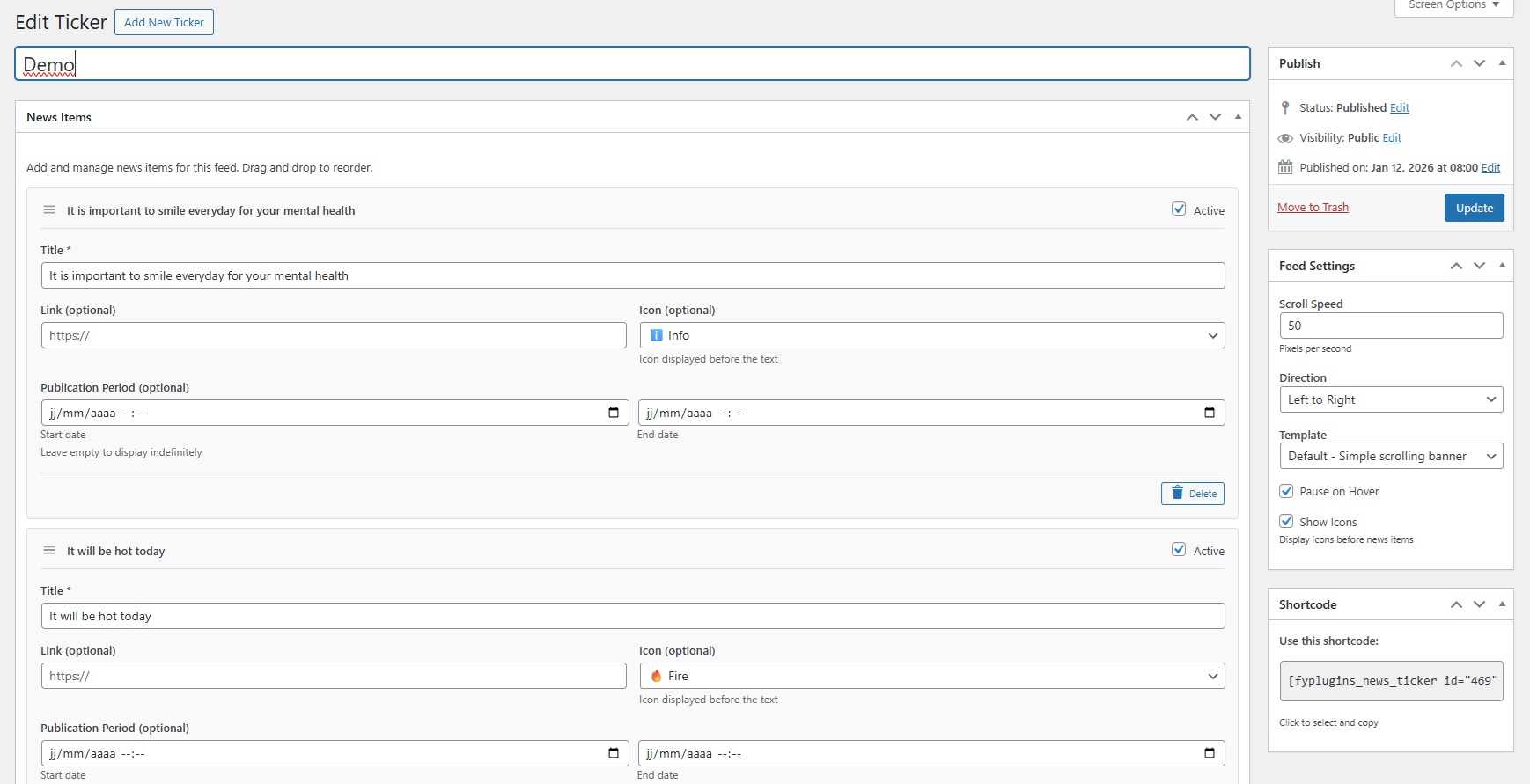
Drag-and-drop builder – Easy management interface with visual item ordering 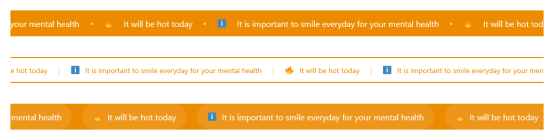
3 professional templates – Default, Modern, and Minimal styles for any use case 
Schedule announcements – Set start and end dates for automatic display 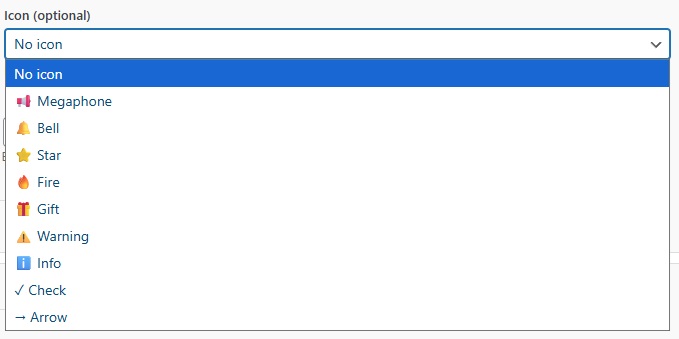
9 custom icons – Add visual interest with megaphone, bell, star, fire, and more
Installation
Automatic Installation (Recommended)
- Go to WordPress admin Plugins Add New
- Search for “FYP News Ticker”
- Click “Install Now” then “Activate”
- Go to News Tickers Add New
- Create your first ticker and add announcements
- Copy shortcode and paste anywhere on your site
Manual Installation
- Download the plugin ZIP file
- Go to Plugins Add New Upload Plugin
- Upload ZIP and click “Install Now”
- Activate the plugin
- Follow steps 4-6 above
Quick Test
- Create a ticker with 2-3 test announcements
- Add this to any page:
[fyplugins_news_ticker id="YOUR_ID"] - View the page to see your scrolling banner!
FAQ
-
Will this work with my theme?
-
Yes! FYP News Ticker works with all WordPress themes. The templates use clean HTML and CSS that adapts to your theme’s styling.
-
How do I create my first news ticker?
-
Go to News Tickers Add New, give it a name, click “Add News Item” to add announcements, publish, and copy the shortcode. Paste the shortcode anywhere you want the banner to appear.
-
Can I reorder the announcements?
-
Yes! Simply drag and drop items using the handle on the left. The order you set in the admin is the order they’ll scroll in.
-
How do I schedule announcements?
-
When adding or editing a news item, use the “Start date” and “End date” fields. The item will only display between those dates. Leave empty for permanent display.
-
Can I make announcements clickable?
-
Yes! Add a URL in the “Link” field. When visitors click the announcement, they’ll go to that URL. Perfect for promotions or event pages.
-
How do I change scroll speed?
-
Use the
speedparameter in the shortcode. Default is 50. Higher numbers (100) scroll faster, lower numbers (25) scroll slower. Experiment to find what works best. -
Can I pause scrolling when someone hovers over it?
-
Yes! This is the default behavior. Set
pause_on_hover="false"if you want continuous scrolling without pausing. -
How do I customize colors?
-
Go to News Tickers Settings Design tab and customize colors to match your brand. Changes apply to all tickers using that template.
-
Can I temporarily hide an announcement without deleting it?
-
Yes! When editing a ticker, uncheck the “Active” checkbox for any item you want to hide temporarily. Re-check it later to show it again.
-
Can I create multiple different tickers?
-
Absolutely! Create unlimited tickers, each with different announcements, templates, and settings. Use different shortcodes to display them on different pages.
-
Will this slow down my website?
-
No! The plugin uses CSS animations and lightweight JavaScript for smooth performance with minimal resource usage. Most sites see no measurable impact.
-
Does it work on mobile devices?
-
100% responsive! All templates work beautifully on smartphones and tablets with touch-friendly interactions.
-
Can I use it with page builders?
-
Yes! Works with Elementor, Beaver Builder, Divi, Gutenberg, and all major page builders. Just add the shortcode in a text/shortcode element.
Reviews
There are no reviews for this plugin.
Contributors & Developers
“FYP News Ticker – Scrolling News Banner & Announcement Bar for WordPress” is open source software. The following people have contributed to this plugin.
Contributors
Interested in development?
Browse the code, check out the SVN repository, or subscribe to the development log by RSS.
Changelog
1.0.0 (January 2026) – Initial Release
- Custom post type for managing multiple news tickers
- 3 professional templates (Default, Modern, Minimal)
- Drag-and-drop ordering of news items
- 9 attention-grabbing icons (megaphone, bell, star, fire, gift, warning, info, check, arrow)
- Scheduled publishing with start and end dates
- Customizable scroll speed and direction
- Pause on hover functionality
- Custom colors for brand matching
- Clickable announcements with link support
- Active/inactive status for temporary hiding
- Limit parameter to control displayed items
- Responsive design for all devices
- SEO-friendly with semantic HTML and ARIA labels
- Translation-ready with .pot file
- Multiple instances support