

Description
The Best 360° Panorama & Virtual Tour Plugin for WordPress
Photo Sphere Viewer lets you embed stunning 360° panoramic images, interactive virtual tours, and immersive 360° videos directly into any WordPress page. Works seamlessly with Elementor, Gutenberg, and shortcodes — no coding required.
Whether you’re a real estate agent showcasing properties, a hotel owner offering room previews, a photographer displaying panoramic portfolios, or a travel blogger sharing immersive experiences — Photo Sphere Viewer is built for you.
360° Panorama Viewer
Upload any equirectangular panorama image (JPEG, PNG) and display it as a fully interactive 360° viewer. Visitors can drag, zoom, and explore the scene on any device.
- Drag-to-explore with mouse or touch gestures
- Pinch-to-zoom on mobile devices
- Configurable field of view, zoom limits, and movement speed
- Auto-rotation with adjustable delay and speed
- Set a custom starting position (yaw & pitch angles)
- Fullscreen mode
Virtual Tour Builder
Create multi-scene virtual tours with linked navigation between panoramas. Add 3D arrow hotspots so visitors can walk through spaces scene by scene — perfect for real estate walkthroughs, museum tours, hotel lobbies, and campus maps.
- Unlimited scenes per tour
- 3D navigation arrows between scenes
- Per-scene starting position (yaw/pitch)
- Scene gallery thumbnail bar (Pro)
- Compass widget overlay (Pro)
- Works in both the Elementor widget and the
[psv_tour]shortcode
360° Video Player
Embed 360-degree videos and let viewers look around while the video plays. Ideal for immersive travel videos, event recordings, and cinematic VR content.
- Supports MP4 and common web video formats
- Play/pause, seek, and volume controls in the navbar
- Muted autoplay option (Pro)
- Loop playback (Pro)
- Works in both the Elementor widget and the
[psv_video]shortcode
Gallery Plugin
Display a thumbnail gallery bar below the viewer so visitors can switch between multiple panoramas or tour scenes instantly.
- Gallery bar with scene thumbnails
- Click-to-navigate between panoramas
- Configurable thumbnail size
- Auto-hide on click option
All Features at a Glance
- Elementor Widgets — Dedicated widgets for panorama, virtual tour, and 360° video
- Gutenberg Block — Native block editor support
- Shortcode Builder — Visual admin panel to create and manage
[psv],[psv_tour], and[psv_video]shortcodes - Fully Responsive — Works on desktops, tablets, and mobile phones
- Touch Optimized — Smooth drag and pinch-to-zoom on all touch devices
- Customizable Navbar — Toggle zoom, caption, fullscreen, autorotate, and download buttons
- Style Controls — Customize navbar background, caption color, and typography
- Starting Position — Set the default yaw (horizontal) and pitch (vertical) viewing angle
- Canvas Background — Set a custom background color behind the panorama
- Mouse & Touch Options — Enable/disable mouse wheel zoom, drag movement, two-finger touch, Ctrl+scroll, and cursor capture
- Lightweight — Optimized build with minimal footprint for fast page loads
- Developer Friendly — Clean shortcode API with full attribute control
Pro Features
Unlock advanced capabilities with Photo Sphere Viewer Pro:
- Zoom, fullscreen, download, and autorotate navbar controls
- Gallery plugin for panorama and tour viewers
- Compass overlay widget
- Gyroscope support for mobile VR-like experiences
- Visible range restriction (limit horizontal and vertical viewing angles)
- 360° video autoplay and loop
- Priority support
Perfect For
- Real Estate — Virtual property tours, open house walkthroughs
- Hotels & Hospitality — Room previews, lobby tours, resort showcases
- Photography — 360° panoramic photo portfolios
- Travel & Tourism — Destination previews, city tours, landmark explorations
- Education — Campus tours, museum exhibits, lab walkthroughs
- E-Commerce — 360° product views on WooCommerce pages
- Events — Venue tours, wedding location showcases, conference halls
How It Works
Using Elementor
- Open the Elementor editor.
- Search for Photo Sphere Viewer, PSV Virtual Tour, or PSV 360° Video in the widget panel.
- Drag the widget into your layout.
- Upload your panorama image or video and configure display settings, navbar controls, and styling.
Using Gutenberg
Insert the Photo Sphere Viewer block, upload your panorama, and configure options from the sidebar panel.
Using Shortcodes
Use the built-in Shortcode Builder from the admin menu to visually create shortcodes, or write them manually:
Basic panorama:
[psv image=”https://example.com/panorama.jpg” width=”100″ height=”80″]
Virtual tour:
[psv_tour scenes='[{“name”:”Lobby”,”panorama”:”lobby.jpg”,”links”:”2″},{“name”:”Room”,”panorama”:”room.jpg”,”links”:”1″}]’]
360° video:
[psv_video src=”https://example.com/360-video.mp4″ muted=”yes”]
Screenshots
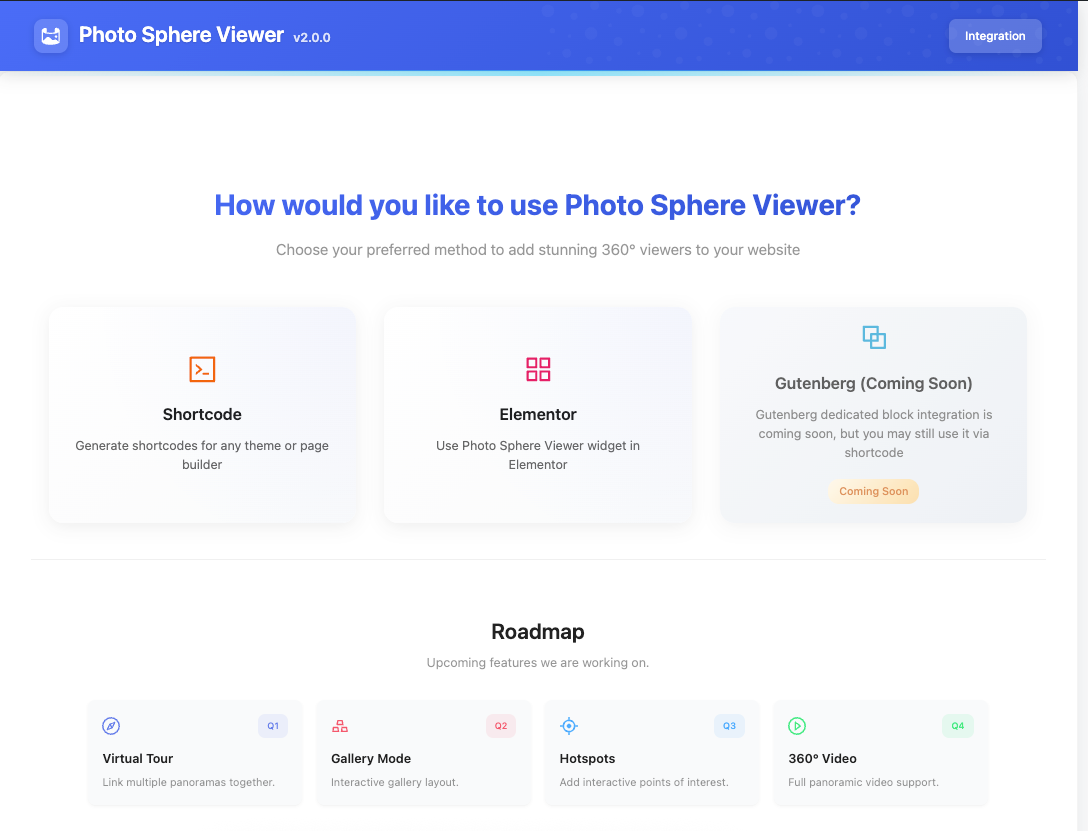
360° panorama embedded using the Elementor widget 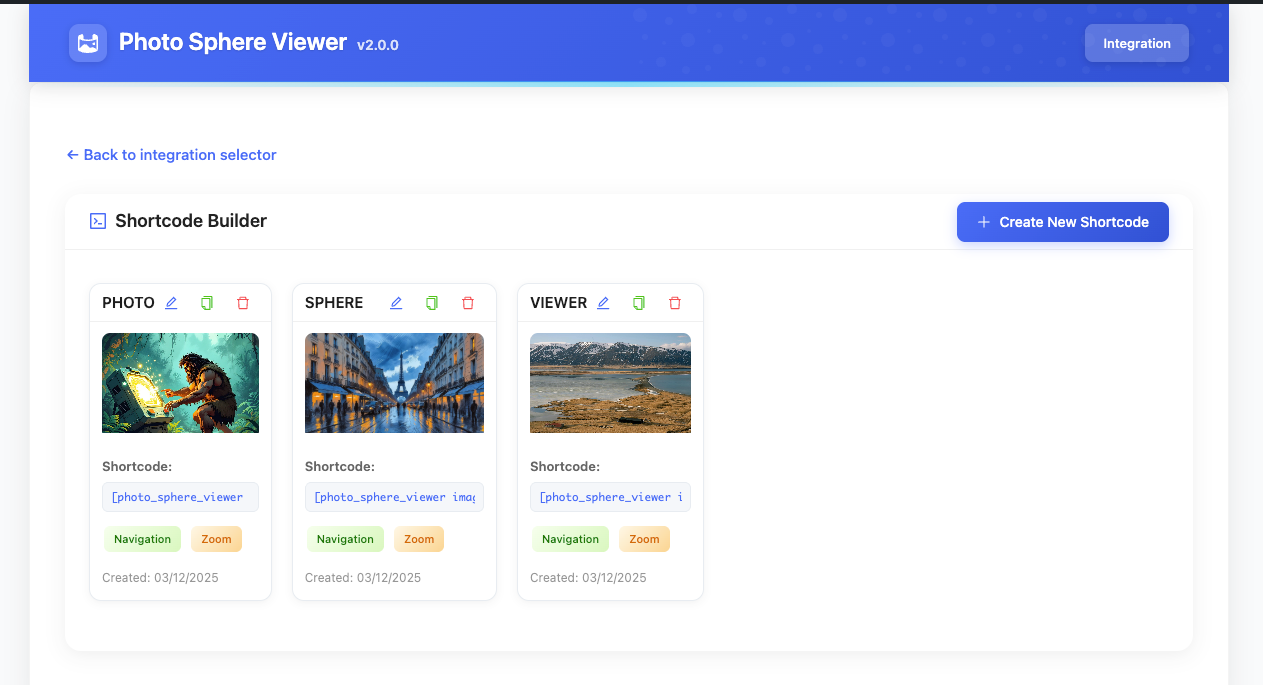
Elementor widget settings panel with full customization options 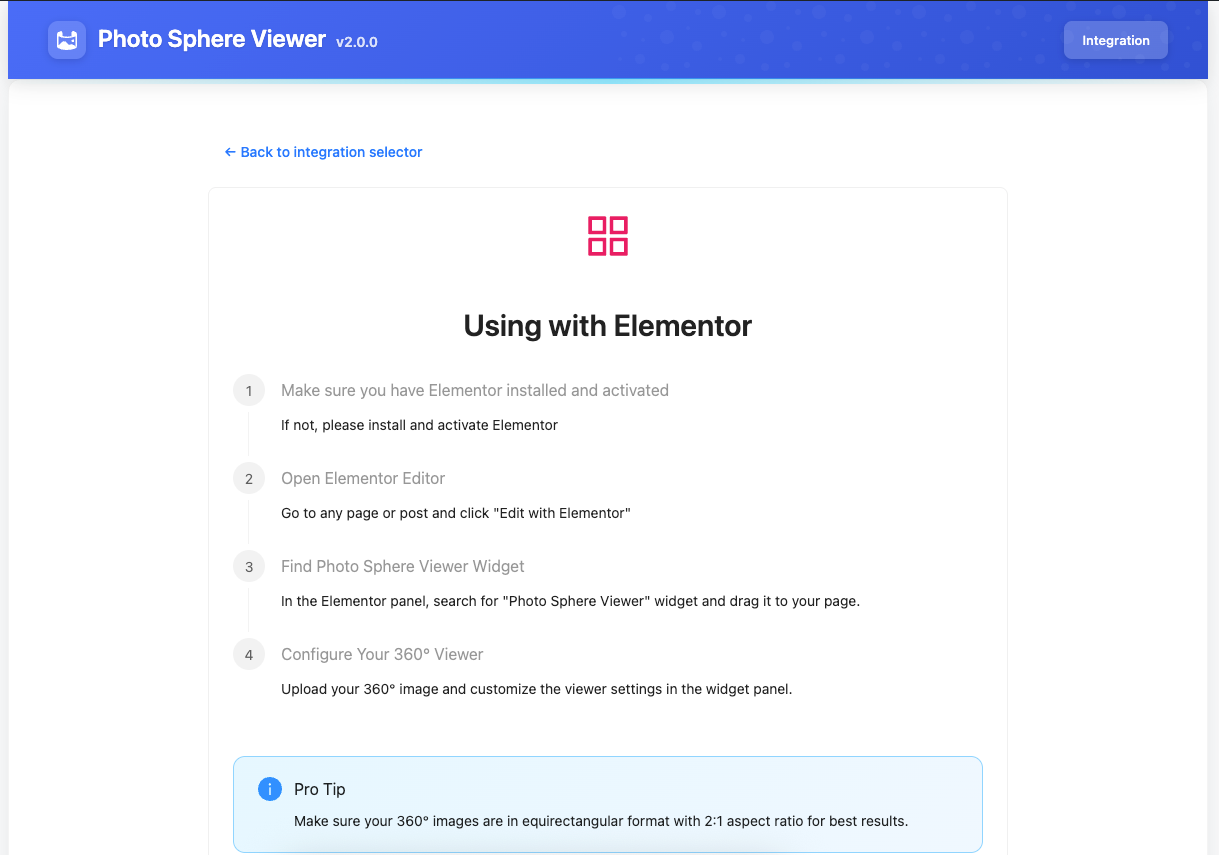
Virtual tour with 3D navigation arrows between scenes 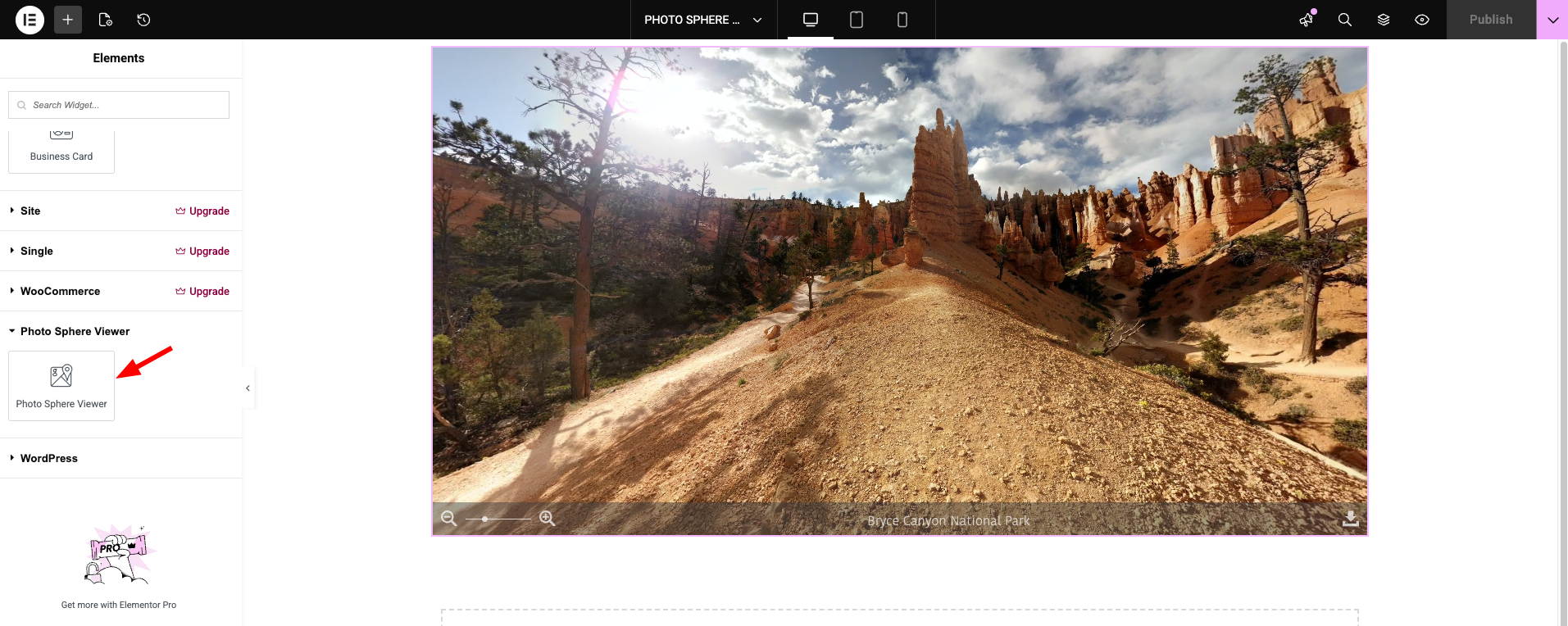
360° video player with playback controls 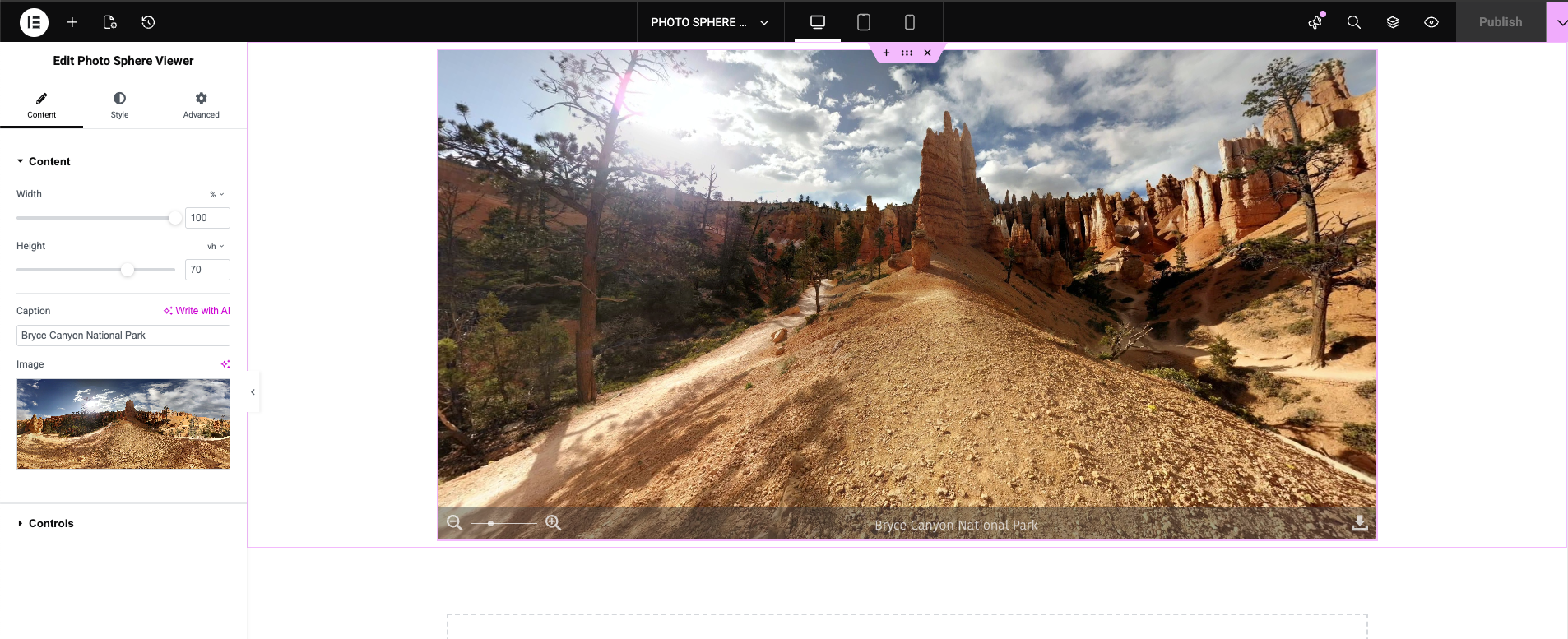
Shortcode builder admin interface
Installation
- Upload the
photo-sphere-viewerfolder to/wp-content/plugins/, or install directly from the WordPress plugin directory. - Activate the plugin through the Plugins menu.
- Use the Elementor widget, Gutenberg block, or shortcode builder (under the Photo Sphere Viewer admin menu) to add 360° content to your site.
FAQ
-
What image formats does the 360° panorama viewer support?
-
Photo Sphere Viewer supports equirectangular panorama images in JPEG and PNG formats. For 360° video, MP4 and other common web video formats are supported.
-
Do I need Elementor to use this plugin?
-
No. The plugin works with Elementor, Gutenberg, and shortcodes. You can embed 360° panoramas anywhere shortcodes are supported — posts, pages, widget areas, and WooCommerce product descriptions.
-
Is the 360° viewer mobile-friendly?
-
Yes. The viewer is fully responsive with touch-optimized controls including drag-to-explore and pinch-to-zoom. It works on all modern smartphones and tablets.
-
Can I create a virtual tour with multiple scenes?
-
Yes. Version 2.1.0 introduced full virtual tour support. You can add unlimited scenes, link them with 3D navigation arrows, and set per-scene starting positions. Available as both an Elementor widget and the
[psv_tour]shortcode. -
Can I embed 360° videos?
-
Yes. Use the 360° Video widget in Elementor or the
[psv_video]shortcode to embed interactive 360-degree videos with play/pause, seek, and volume controls. -
How do I set the starting viewing angle?
-
Each panorama and tour scene supports a starting yaw (horizontal angle, -180° to 180°) and starting pitch (vertical angle, -90° to 90°). Set these in the Elementor widget controls or via shortcode attributes (
default_yawanddefault_pitch). -
Does it work with WooCommerce?
-
Yes. You can add 360° panoramas or virtual tours to WooCommerce product pages using shortcodes or Elementor templates.
-
What is the difference between Free and Pro?
-
The free version includes the full 360° panorama viewer, virtual tour with 3D arrows, 360° video playback, caption navbar, and shortcode builder. Pro unlocks zoom/fullscreen/download navbar controls, gallery bar, compass overlay, gyroscope support, visible range restriction, video autoplay/loop, and priority support.
-
Does it support Google Street View or Photo Sphere XMP metadata?
-
Yes. Any equirectangular image — including those captured with Google Street View, Ricoh Theta, Insta360, or similar 360° cameras — works out of the box.
Reviews


Contributors & Developers
“Photo Sphere Viewer – 360° Panorama, Virtual Tour & 360 Video for WordPress” is open source software. The following people have contributed to this plugin.
Contributors
Interested in development?
Browse the code, check out the SVN repository, or subscribe to the development log by RSS.
Changelog
2.1.0 [March 07, 2026]
- Added: Virtual tour support for both widget and shortcode implementations
- Added: 360° video playback support for widget and shortcode
- Added: Gallery view support for widget and shortcode
- Added: Starting position (yaw/pitch) controls for panorama and tour scenes
- Improved: Compatibility with WordPress 6.9 and Elementor 3.35.5
- Improved: Performance optimizations for faster panorama rendering
- Fixed: Image display issue in Elementor 3.35.5 when placing widget inside columns
- Fixed: Multiple Photo Sphere Viewer widgets rendering incorrectly within the same section in editor mode
- Fixed: Duplicate frontend initialization on Elementor pages
- Fixed: Various minor bug fixes and stability improvements
2.0.3 [February 13, 2026]
- Fixed: Assets enqueue issue
2.0.2 [February 09, 2026]
- Improved: Compatibility updates for WordPress 6.9 and Elementor 3.35.3
- Improved: Performance improvements and bug fixes
2.0.1 [December 03, 2025]
- Fixed: Upgrade notice issue
- Added: Pro version pricing link
- Improved: Compatibility with latest WordPress & Elementor versions
2.0.0 [November 29, 2025]
- Added: Shortcode builder
- Improved: Refactored codebase for improved performance
- Added: Pro version
1.3.3 [October 01, 2025]
- Improved: Compatibility updates
- Improved: Documentation improvements
1.3.2 [May 01, 2025]
- Improved: Compatibility updates
1.3.1 [December 21, 2024]
- Improved: System improvements
- Improved: Compatibility updates
1.3.0 [October 09, 2024]
- Improved: Compatibility updates
1.2.0 [October 09, 2023]
- Improved: Compatibility updates
1.1.0 [March 15, 2023]
- Improved: Elementor compatibility update
1.0.1 [May 15, 2022]
- Added: Shortcode feature
1.0.0 [February 06, 2022]
- Initial release