

Description
Power Coupons is a WordPress coupon plugin built for WooCommerce stores that want discount rules, dynamic discounts, and auto-apply coupons—without turning the checkout into a “find the coupon field” scavenger hunt.
If you’ve ever run a promotion and still watched shoppers drop off at cart or checkout, it’s often not because the deal wasn’t good. It’s because the coupon experience was clunky:
- The offer was buried in a banner.
- The code was forgotten, mistyped, or never entered.
- The cart didn’t clearly explain what qualifies.
- Another discount tool conflicted, and nobody could tell why.
Power Coupons is designed to reduce that friction. Instead of relying on shoppers to enter codes, you can show eligible offers in-cart and apply discounts automatically when conditions are met. The result is a cleaner buying experience and promotions that are easier to manage (and easier to troubleshoot) over time.
Who is this for?
- Store owners who want a WordPress coupon plugin that’s easy to set up and easy to audit later.
- DTC and growing brands focused on increasing AOV with dynamic discounts and cart incentives.
- Retail teams running frequent promotions who need rule-based discounts that don’t require codes.
- Agencies managing multiple WooCommerce sites that want consistent discount logic and a clean admin experience.
What you can build with Power Coupons
Use simple conditions (cart subtotal, products, categories, quantity, combinations) to trigger offers at the right time. For example:
- Auto-apply a discount when the cart subtotal crosses a threshold (great for “spend more” campaigns).
- Apply a category-based coupon rule (e.g., discount only for a seasonal collection).
- Run quantity-based deals (bulk discounts / quantity breaks) to increase basket size.
- Show relevant offers in the cart so shoppers see what they can unlock before checkout.
How it works (quick overview)
- Create a discount rule and choose what triggers it (subtotal, products, categories, quantities, combinations).
- Set what happens when the rule matches (auto-apply coupon / discount behavior).
- Optional: exclude products or categories to protect margins.
- Test with a real cart to confirm the discount applies and updates as the cart changes.
- Launch your offer and let the cart do the work—no coupon codes required.
How to auto-apply your first discount (quick start)
- Install and activate Power Coupons.
- Go to WooCommerce > Coupons and create a new rule.
- Choose a simple condition (e.g., cart subtotal above a set amount).
- Save, then test by adding products to the cart until the condition is met.
- If the discount doesn’t update immediately, exclude Cart and Checkout pages from caching and retest in an incognito window.
Key features
- Auto-apply coupons (no codes needed): discounts apply automatically when conditions are met.
- Discount rules for WooCommerce: build rule logic around cart total, products, categories, quantities, and combinations.
- Dynamic discounts: offers update in real time as the cart changes, so shoppers always see what they qualify for.
- Clean admin workflow: create and manage rules without an overwhelming “settings maze”.
- Clean shopper UI: show only relevant offers in the cart to reduce friction and confusion.
- Designed to stay lightweight: helps reduce plugin overlap by keeping coupon rules and cart incentives in one place.
Planned features (Roadmap)
These features are on the roadmap and will appear in future updates:
- WooCommerce BOGO offers: Buy X Get Y, free gifts, and advanced BOGO rules.
- Spend-more incentives: “Spend more to unlock a reward” nudges and cart progress messaging.
- Rewards & loyalty points: earn points on purchases and redeem them for discounts.
- Coupon analytics: track coupon usage and promotion performance.
Works well in typical WooCommerce setups
Power Coupons is made for WooCommerce cart and checkout flows. Most stores combine discounts with themes, page builders, and common WooCommerce add-ons. As with any pricing/coupon system, if you run multiple “discount engines” at the same time, test carefully to avoid stacking surprises.
External services
This plugin uses external third-party services in specific situations. Below is a detailed disclosure of these services, when they are used, and what data is transmitted.
Google Fonts
When it’s used:
Power Coupons loads the Figtree font family from Google Fonts CDN to enhance the visual appearance of the plugin’s admin interface in the WordPress dashboard. This resource is loaded ONLY on the plugin’s admin pages (Power Coupons settings and coupon edit screens) and is NOT loaded on the frontend of your website or visible to your customers.
What data is transmitted:
When an administrator accesses Power Coupons admin pages, a standard HTTP request is made to Google Fonts servers. This request may include:
– The URL of the admin page being accessed
– The administrator’s IP address (standard for any HTTP request)
– Browser information (user agent)
– Timestamp of the request
Service provider:
- Service: Google Fonts
- Service URL: https://fonts.googleapis.com
- Privacy Policy: https://developers.google.com/fonts/faq/privacy
- Terms of Service: https://policies.google.com/terms
Legal basis:
The use of Google Fonts in the admin area is necessary for the proper presentation of the plugin interface to administrators. No personal data from your website visitors or customers is transmitted to Google Fonts, as this service is only used in the WordPress admin area.
How to disable:
If you prefer not to use Google Fonts for privacy or compliance reasons, you can disable it by adding this code to your theme’s functions.php file:
add_action( 'admin_enqueue_scripts', function() {
    wp_dequeue_style( 'power-coupons-font' );
}, 99 );
Note: Disabling Google Fonts may slightly affect the visual appearance of the plugin’s admin interface but will not affect functionality.
Contributors & Developers
Power Coupons is built and maintained by the team behind CartFlows and Brainstorm Force, creators of some of the most trusted WooCommerce and WordPress products.
We welcome feedback, ideas, and contributions to help make Power Coupons even better 🚀
Development & Source Code
This plugin includes compiled JavaScript assets for production use.
The original, human-readable source code for these files is included in this plugin.
React / JavaScript source code:
– Located in: admin/assets/src/
– Built files output to: admin/assets/build/
The files in admin/assets/build/ are generated from the corresponding source files in admin/assets/src/ using standard JavaScript build tools such as wp-scripts.
Screenshots
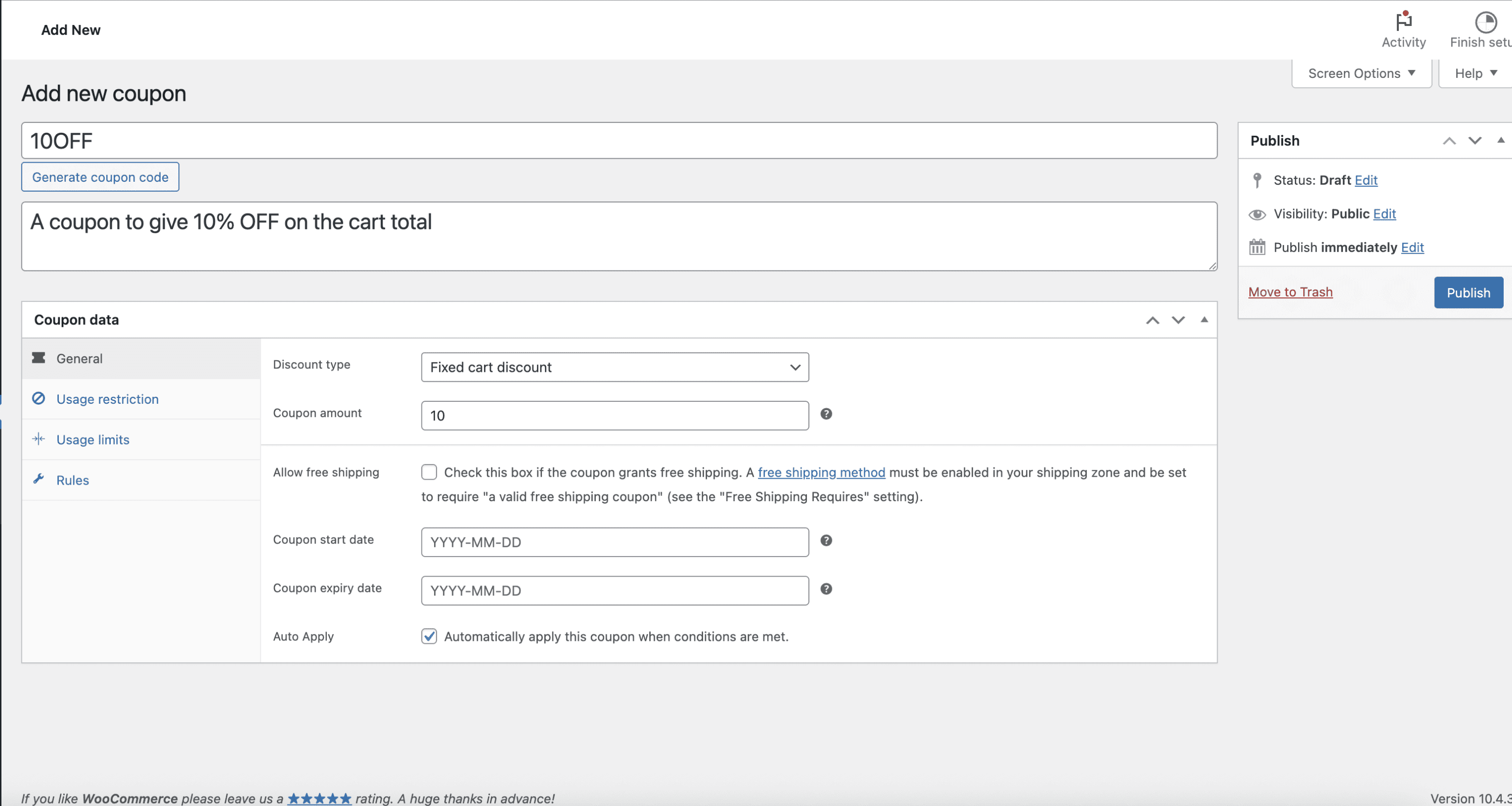
Create an auto-apply WooCommerce coupon rule with cart conditions. 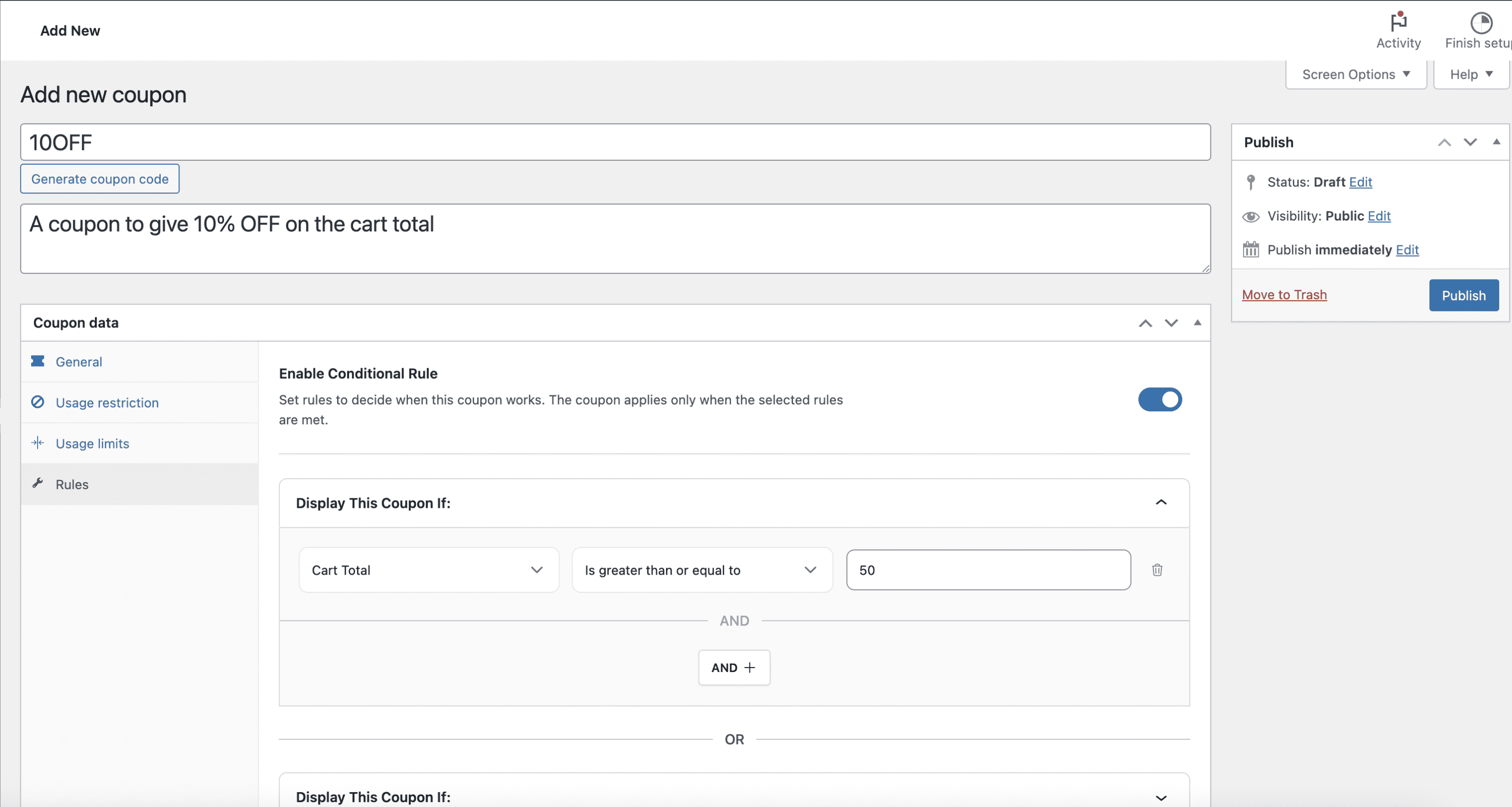
Discount rules by subtotal threshold (spend more to unlock a discount). 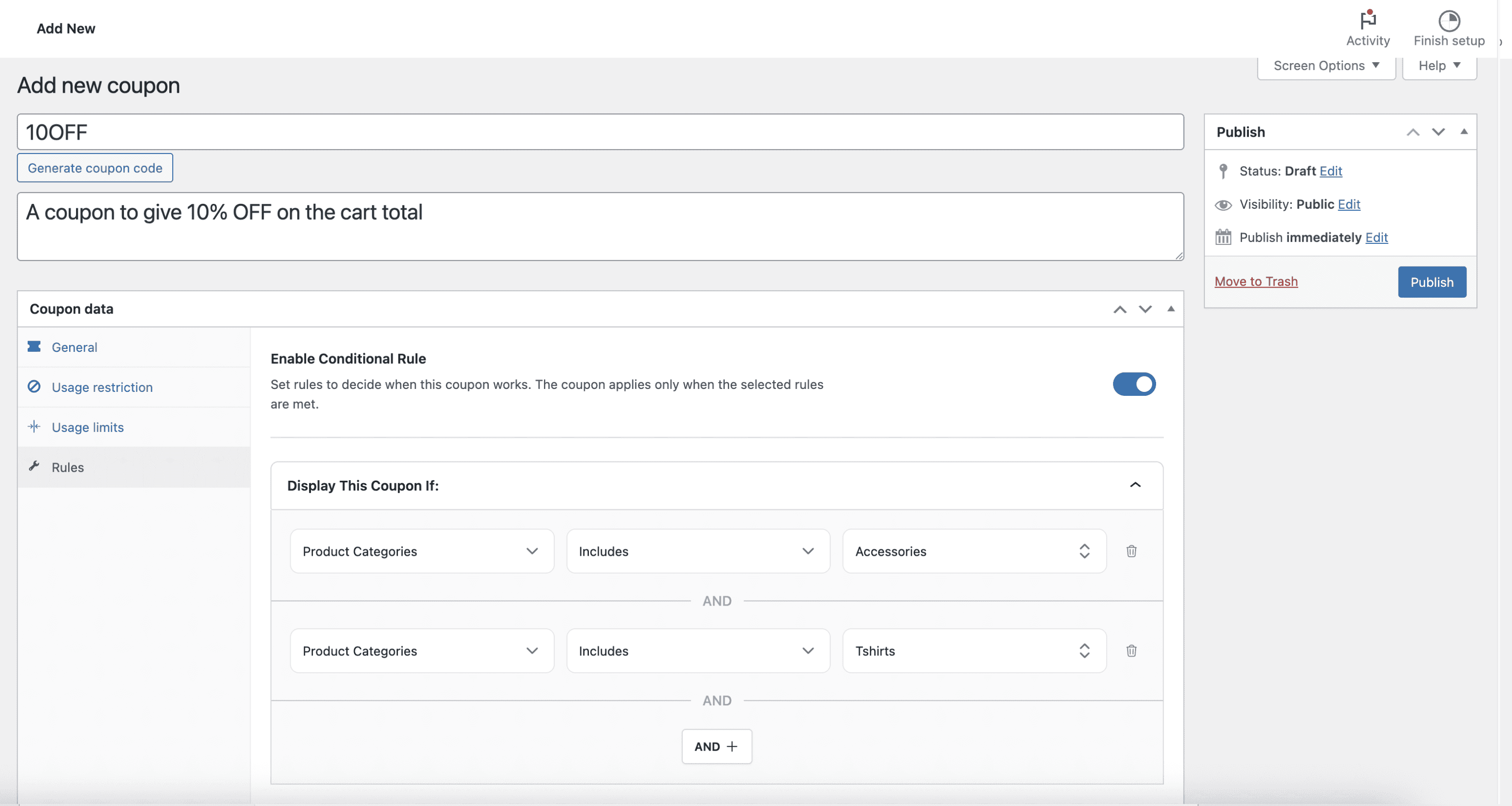
Category and product targeting (include/exclude logic). 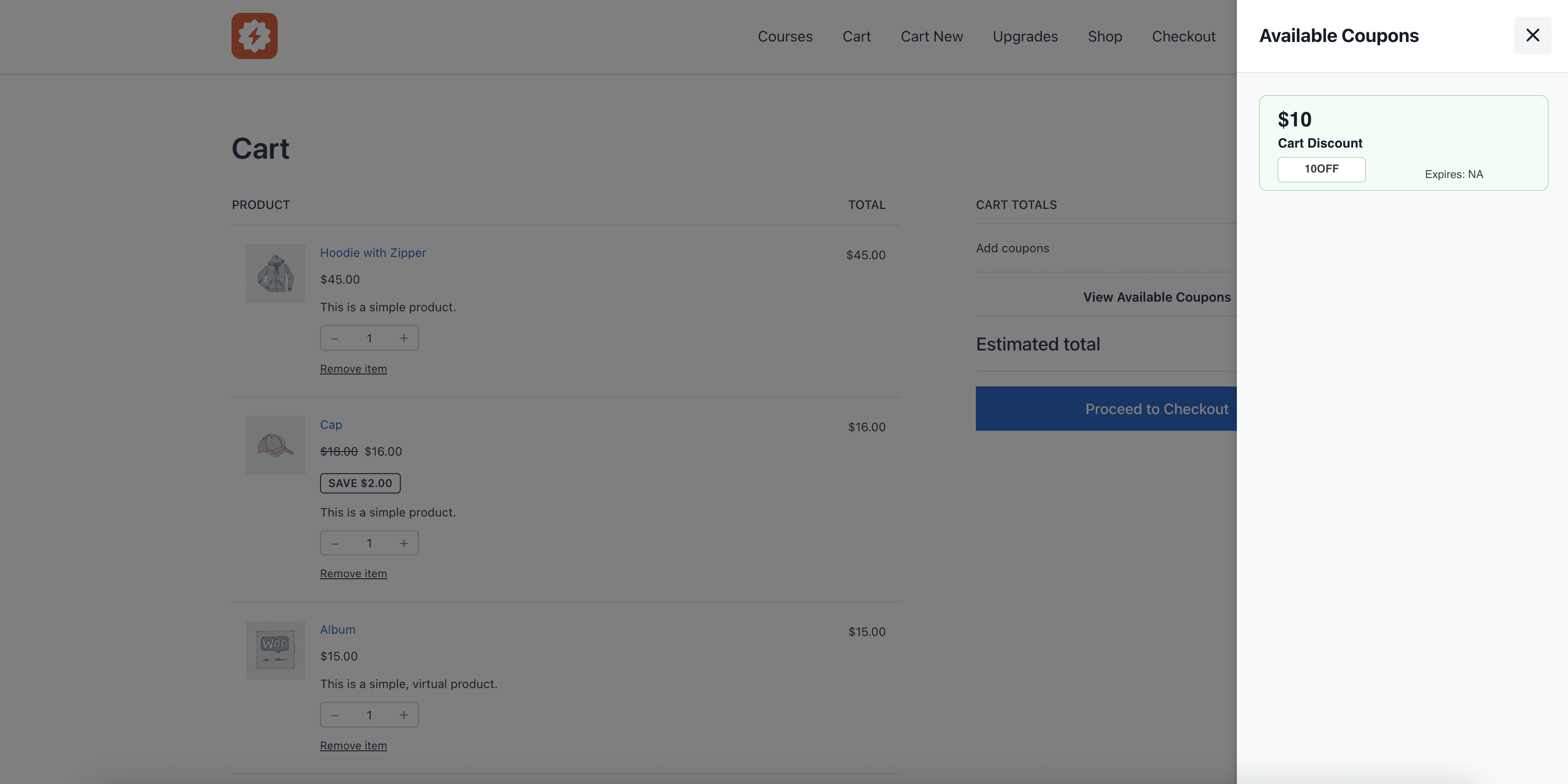
In-cart offers shown clearly (no coupon code hunting). 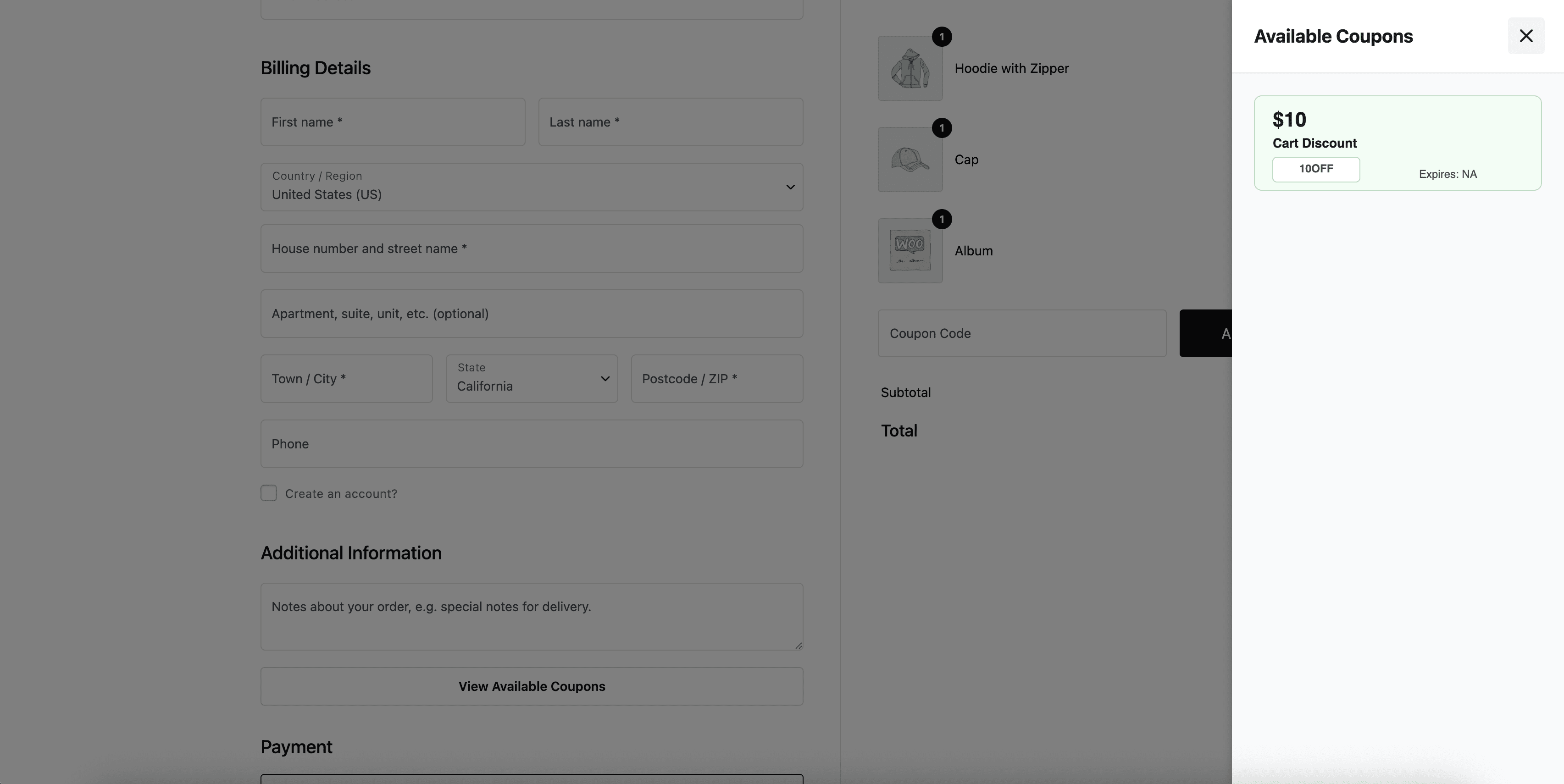
Cart and Checkout Blocks view (modern WooCommerce checkout flow). 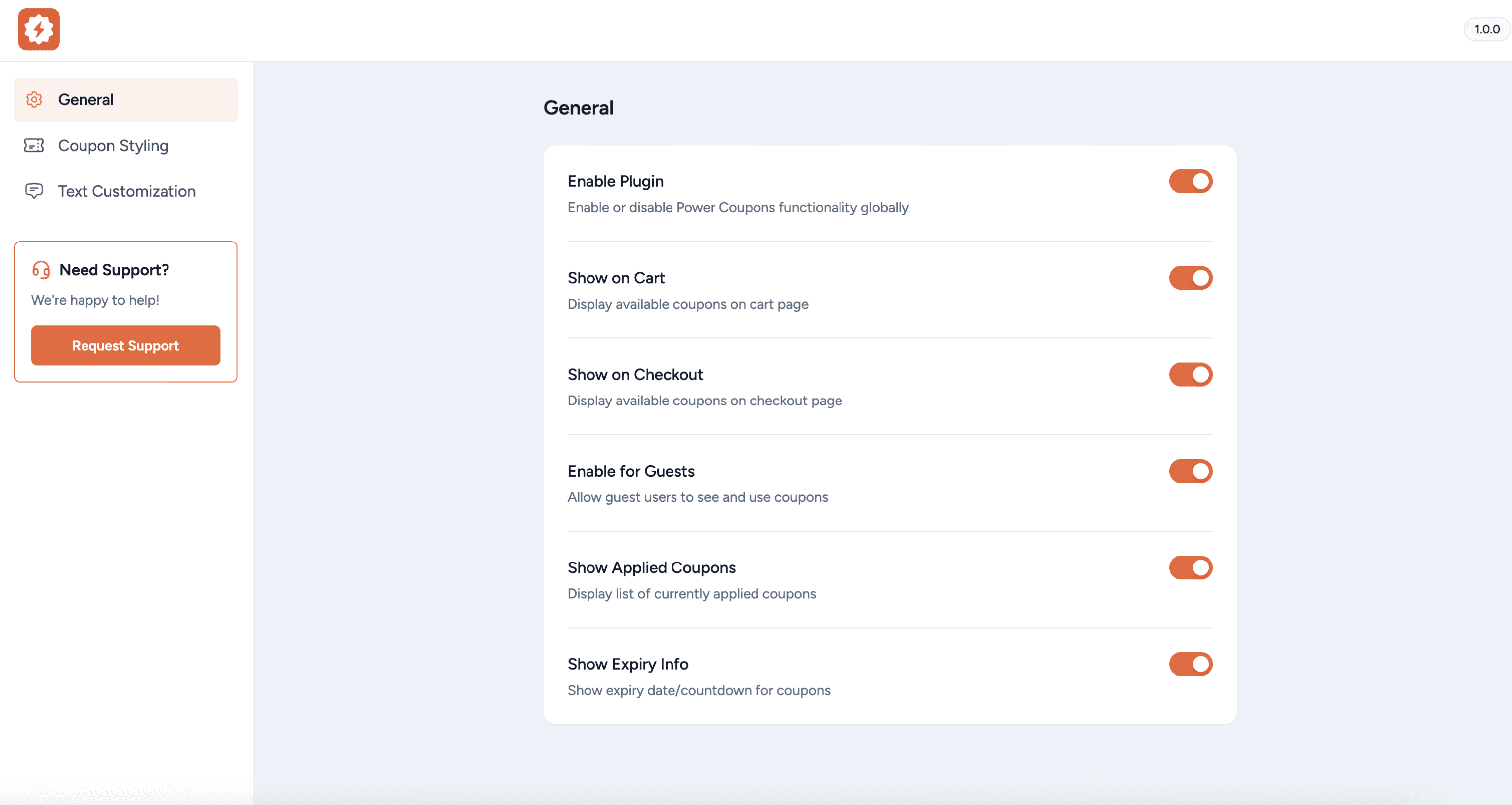
Settings screen for store-wide discount behavior and testing.
Installation
- Install the
Power Couponseither via the WordPress plugin directory or by uploadingpower-coupons.zipto the/wp-content/plugins/directory - Activate the plugin through the ‘Plugins’ menu in WordPress
- Navigate to
WordPress Dashboard > Power Coupons > Settingsto configure the settings - Make sure to disable caching on your cart and checkout pages
FAQ
-
Can I create discount rules for WooCommerce coupon codes?
-
Yes. Power Coupons lets you create rule-based discounts that apply automatically when conditions are met.
-
How do I set up dynamic discounts for WooCommerce?
-
Create a rule using cart conditions like cart total, products, categories, quantities, or combinations. When the cart conditions match, the discount applies automatically.
-
Why is my WooCommerce discount not applying?
-
Common causes include: the cart does not meet the rule conditions, excluded products/categories, usage restrictions, or another coupon/discount already applied. Check the rule conditions and test with only one active rule to isolate the issue. If you have any questions or need assistance, please contact our support team.
-
Can I create bulk discounts or quantity breaks?
-
Yes. Use quantity-based rules to offer tiered discounts based on the number of items.
-
Does Power Coupons work with WooCommerce Cart and Checkout Blocks?
-
Power Coupons is built for WooCommerce cart and checkout flows. If your store uses Blocks and you notice coupon UI differences, update WooCommerce and Power Coupons to the latest versions and contact support with details.
-
Will caching affect auto-apply discounts?
-
Some caching setups can interfere with cart sessions. If discounts do not update correctly, exclude cart and checkout pages from caching and re-test.
Reviews
There are no reviews for this plugin.
Contributors & Developers
“Power Coupons for WooCommerce” is open source software. The following people have contributed to this plugin.
Contributors
Translate “Power Coupons for WooCommerce” into your language.
Interested in development?
Browse the code, check out the SVN repository, or subscribe to the development log by RSS.
Changelog
1.0.2 – Wednesday, 26th March 2026
- New: Added compatibility for Loyalty Rewards (Pro).
- New: Added compatibility for Cart Progress Bar (Pro).
- New: Added coupon display mode setting with modal layout support.
- New: Sub-tabbed settings for Loyalty Rewards and Text Customization.
- Improvement: Settings UI improvements with cascading disable toggles.
- Fix: Dropdown focus ring color consistency.
- Fix: HTML entity rendering in admin history notes.
1.0.1 – Monday, 16th March 2026
- New: Added integration with the WordPress Abilities API.
- New: Added a “Hide from Slideout” option for individual coupons.
- New: Added
power_coupons_available_couponsfilter to control which coupons are displayed. - Fix: Fixed untranslated strings.
- Fix: Addressed accessibility issues identified in the WCAG 2.2 audit.
- Fix: Fixed alignment issues with the drawer trigger button.
1.0.0 – Monday, 2nd February 2026
- Initial release of Power Coupons.