
Description
Security Ninja helps you identify vulnerabilities and harden the security of your WordPress websites. Paired with MainWP, you can now manage and monitor all your connected sites from one central location.
This MainWP extension brings Security Ninja into your MainWP dashboard so you can manage and monitor all connected sites from one place.
Free version: Run Security Ninja’s Security Tests and Core Scanner remotely on one or more child sites. View results for all connected sites: vulnerabilities (plugins and themes), Security Tests table, Core Scanner summary, and Malware Scanner summary (last run and count when scans are available on the child site). The Security Ninja column in the MainWP Sites table shows test score and vulnerability count. The extension main page includes an All Events tab (with a Pro upsell message for free users) and a Settings tab.
Pro version: Everything in Free, plus: remote Malware Scanner (included when you use “Run all security scans” or dedicated malware scan actions, on Pro child sites); unified events log with filters and search; full malware scan file list on the per-site tab; White Label bulk action to manage child site settings; Update database tables (bulk and per-site); Pro Reports tokens for Security Ninja data. Event logs and full malware details require Security Ninja Pro on child sites.
Note:
To view event logs and scan data, your child sites must have Security Ninja Pro installed. You can still monitor free sites from the MainWP dashboard, but features like event logging only work if those sites also have premium features enabled. The “Update database tables” action requires Security Ninja 5.271 or newer on the child site.
This extension helps you save time, stay in control, and manage security across all your sites—whether you’re handling a handful or hundreds.
MainWP is an invaluable tool for those who manage multiple WordPress websites.
To combine the two, you need to install this extension on your master MainWP website.
Links and Documentation
Install the Security Ninja MainWP extension from within the MainWP dashboard
- Login to your MainWP dashboard
- Navigate to WP > Plugins
- Search for ‘Security Ninja MainWP’
- Install and activate the plugin
Install the Security Ninja MainWP extension manually
- Download the plugin
- Login to your MainWP dashboard
- Navigate to WP > Plugins
- Click Add New and then Upload Plugin
- Browse to the file, select it and click Install Now
- Click Activate Plugin once prompted.
Screenshots

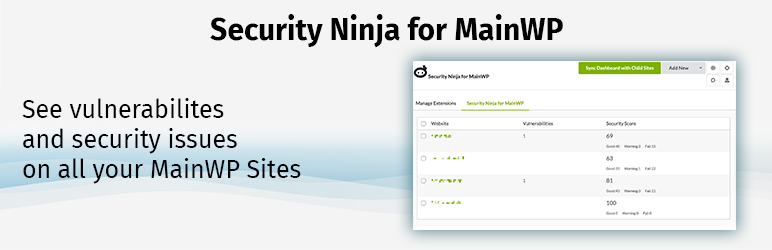
The overview in the MainWP dashboard where you can see any vulnerabilities or low scores for the security tests. 
Remote start “Run security tests” on one or more sites.
FAQ
-
What does “Run all security scans” do?
-
It triggers a full security run on the selected child site(s). In the free version, this runs Security Ninja Security Tests and Core Scanner. In the Pro version (with Security Ninja Pro on the child sites), it also runs the Malware Scanner. The scan runs regardless of the Scheduler setting on the child site. After it finishes, sync the site(s) again in MainWP to see updated results (scores, vulnerabilities, scan data) in the dashboard.
-
Support and Documentation
-
Please refer to our documentation pages for help and technical information on Security Ninja and the integration with MainWP.
Reviews

Contributors & Developers
“Security Ninja For MainWP” is open source software. The following people have contributed to this plugin.
Contributors


“Security Ninja For MainWP” has been translated into 5 locales. Thank you to the translators for their contributions.
Translate “Security Ninja For MainWP” into your language.
Interested in development?
Browse the code, check out the SVN repository, or subscribe to the development log by RSS.
Changelog
2.0.18
- IMPROVED: “Run all security scans” now triggers the full scan (Security Tests + Core Scanner + Malware Scanner) on the child site regardless of the Scheduler setting. Sync the site again after running to see updated results in the dashboard.
- IMPROVED: Per-site Security Ninja tab redesigned with clear section cards (Vulnerabilities, Security Tests, Core Scanner, Malware Scanner), short summaries, last-run times, and optional “View details” collapse for a cleaner, responsive layout.
- IMPROVED: Malware Scanner details (file list) on the per-site tab are now shown only for Pro users; free users see last run and summary with an upgrade notice.
- IMPROVED: Output escaping and sanitization throughout (human_time_diff, version strings, and dynamic content) for consistency with WordPress coding standards.
2.0.17
- 2026-02-25
- NEW: “Update database tables” (force create tables) available from the individual site Security Ninja tab and from Manage Sites bulk actions (Pro). Requires Security Ninja 5.271 or newer on the child site (this function was introduced in Security Ninja 5.271).
- FIX: Resolved fatal error when logging in with 2FA (e.g. SiteGround Security): “Call to a member function is_migration() on bool” in Freemius SDK on admin_init.
2.0.16
- 2026-02-12
- FIX: MainWP Time Tracker Extension conflict resolved — scripts and styles now load only on Security Ninja–related pages (Extensions, Manage Sites, site tab)
- FIX: DataTable initialization wrapped in existence check to prevent JavaScript errors on pages where the events table is not present
- FIX: Renamed white-label modal IDs from mainwp-popup to secnin-mainwp-whitelabel-popup to avoid ID conflicts with other MainWP extensions
- IMPROVED: Reduced script footprint on the MainWP dashboard for better compatibility with other extensions
- Code quality and hardening improvements throughout the extension
- Improved input validation and output handling for greater stability
- Events log prune task stability improved
- Minor fix: corrected “Matched pattern” label in malware scan results
- Updated 3rd party libraries
- Updated translation file
2.0.15
- 2025-09-03
- NEW: Enhanced White Label interface with dropdown selection for enable/disable.
- FIX: Pro Reports token issue fixed with two of the tokens, thank you Dominik!
2.0.14
- 2025-08-13
- NEW: MainWP Pro Reports integration – added Security Ninja tokens:
- [securityninja.score] (overall score)
- [securityninja.vulnerabilities] (count)
- [securityninja.vulnerabilities.table] (table of detected vulns)
- [securityninja.events.table] (table of last 10 events)
- IMPROVED: Tokens appear in both the grouped token list and the “Insert tokens” modal
- IMPROVED: Fallback fetching for token values when cached data is missing
2.0.13
- 2025-08-12
- NEW: Advanced event filtering system with dropdown controls for site and action type filtering
- NEW: Real-time filter summary showing active filters including search terms
- NEW: Clear filters functionality with visual dropdown reset
- IMPROVED: Database query optimization with prepared statements and table validation
- IMPROVED: Internationalization support with i18n
- UPDATED: Translation files for enhanced multilingual support
2.0.12
- 2025-07-25
- Fixed hard-coded plugin directory path to use dynamic path detection
- Replaced hard-coded version numbers with automatic version reading from plugin header
- Improved plugin compatibility when installed in different directory names
- Resolved WordPress auto-update conflicts caused by directory name changes
- Fixed SQL queries to follow WordPress coding standards (table names use direct interpolation)
2.0.11
- 2025-05-05
- Fixes to the main menu now links properly to the global events overview.
- Fixes problem with wrong timestamp time difference.
- Fixes problem with remote controlling white label status.
- Updated to be compatible with latest MainWP extension system
- Fixed integration and errors.
- Updated Freemius SDK
- Tested up to WP 6.8.1
2.0.10
- Added more strings for translation making the plugin translatable. From 8 strings to 96.
- Updated Freemius SDK.
- Added translations for Danish, Spanish, French, Italian, Japanese, Norwegian, Dutch, German, Portugese, Russian, Swedish and Chinese.
- Checked Addon works with WP 6.6.2.
2.0.9
- Simplified the global events log by removing the “Module” column.
- New feature: Logs are now automatically trimmed to maintain only the last 30 days of history or up to 10,000 of the most recent log entries.
- Bugfix: Not loading the white label popup and “Run Security Tests”
- Streamlined the interface by moving the User Agent information to a tooltip on hover over the IP address, making room for more relevant data.
- Added a helpful reminder on the global events page to synchronize websites with Security Ninja Premium for events to appear. Message: ‘It looks boring here, right? Please synchronize some websites with Security Ninja Premium installed.’
- Updated to the latest Freemius SDK.
2.0.8
- Added more strings for translation making the plugin translatable.
- Fixing bug with license and “cannot detect main plugin” error. Thank you for all the feedback and help fixing the bug.
2.0.7
- Bugfixes to pages not loading correctly.
- Improved communication with MainWP Client sites with Security Ninja.
- Bugfixes to the White label feature.
- Updated language files.
2.0.6
- Fixed broken menu link that happened on some sites.
- Improve language to show what type and version of the plugin the child site is running.
- Fix deprecated code.
- NEW: Added remote control of white label setting on child sites. Enable / disable and change settings on all child sites quickly.
2.0.5
- Fix for undefined variables linking to help sections on the website.
- Add big warning to keep the main Security Ninja running as it is now a requirement for this Addon.
- Minor bugfixes.
2.0.4
- Fix for the premium link.
2.0.3
- Fixed the addon implementation and the bugs reported.
- Dependency – Necessary to have Security Ninja plugin installed and activated. Free or pro, either works.
2.0.2
- Refactored the navigation system
2.0.1
- Fix – Install routines were not working and breaking sites.
2.0
- New version for MainWP v5
1.8
- Updated interface
- WP 6.4.2 compatibility.
1.6
- WP 6.2 compatibility.
1.5
- Improved security with MainWP changes to admin links.
- Improved speed loading data from websites.
1.4
- Tested up to WP 6.0
- Added Secret Access URL to the site list. Perfect if you have become logged out of a site. Suggestion by Alauddin. Note – Requires Security Ninja 5.145.
1.3
- Fix: Some sites data not loading when paginating the site list.
- Fix: PHP notice for custom reports function.
1.2
- Fix: Direct link in sidemenu still not working. Thank you Mustaasam.
1.1
- Fix: Direct link in sidemenu not working.
- Fix: Adding search and sorting to the site overview.
- Fix: Improved styling to follow MainWP styling.
- Fix: Logo in top left corner.
- New: Direct link to site Security Ninja Dashboard page.
- Cleaning up JS and CSS.
BIG thanks to Bogdan from MainWP for the help in tuning this 🙂
1.0
- First public release