

Description
AI Crawler Tracker by Citlyze shows you which AI crawlers visit your WordPress site and which AI answer engines send you human visitors. It is built for AI SEO: generative engine optimization (GEO), answer engine optimization (AEO), and LLM visibility measurement.
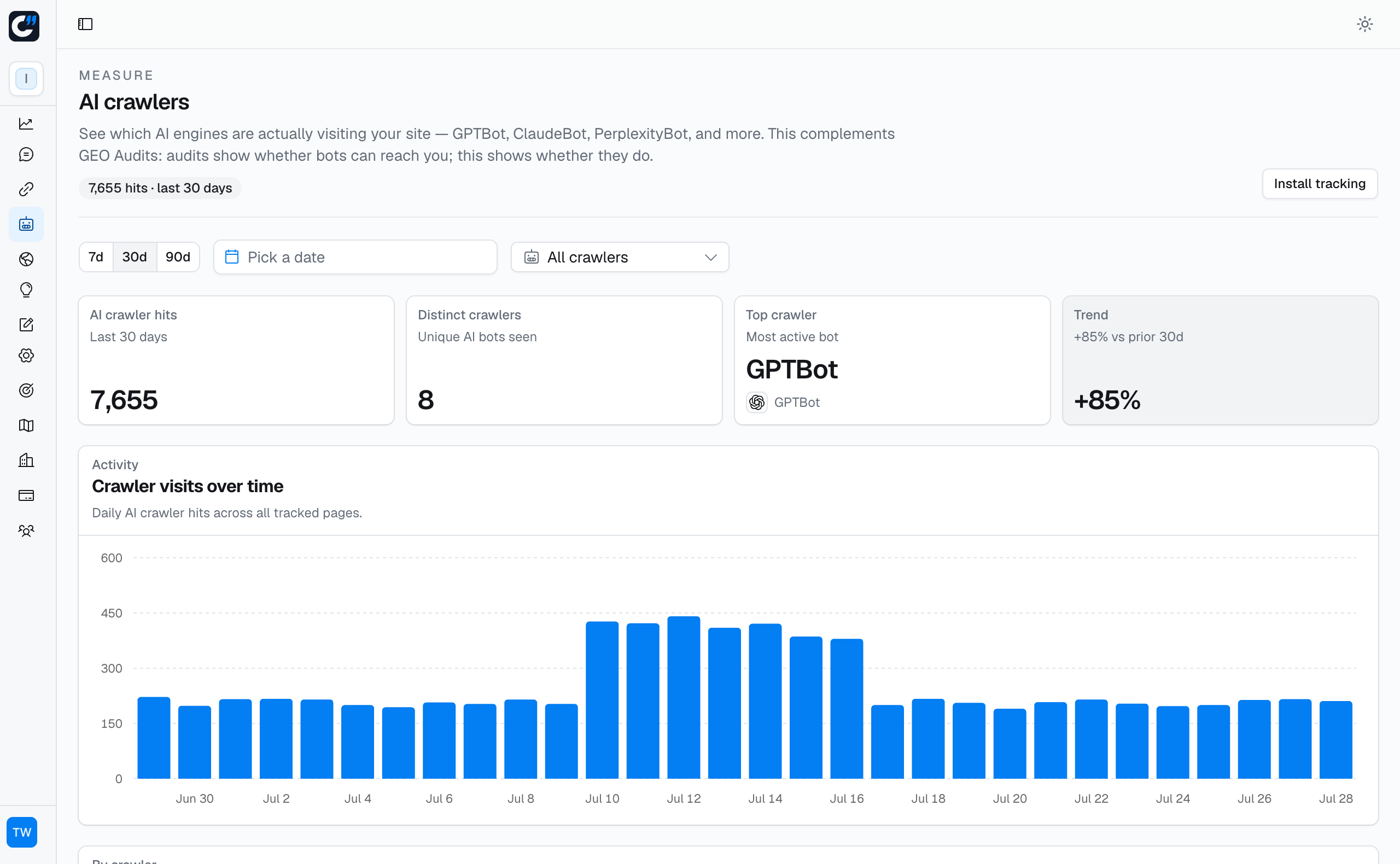
AI search engines and LLM chatbots such as ChatGPT, Claude, Perplexity, Gemini, and Copilot discover your content by crawling it, and most AI bots never execute JavaScript, so JavaScript analytics tools cannot see them. This plugin runs server-side inside WordPress, so it observes the AI bot traffic that reaches PHP and reports it to your Citlyze workspace.
Features
- Server-side AI bot detection that JavaScript analytics misses: GPTBot, ChatGPT-User, OAI-SearchBot, ClaudeBot, PerplexityBot, Bingbot, Amazonbot, Applebot, Google and Meta AI crawlers, and many more.
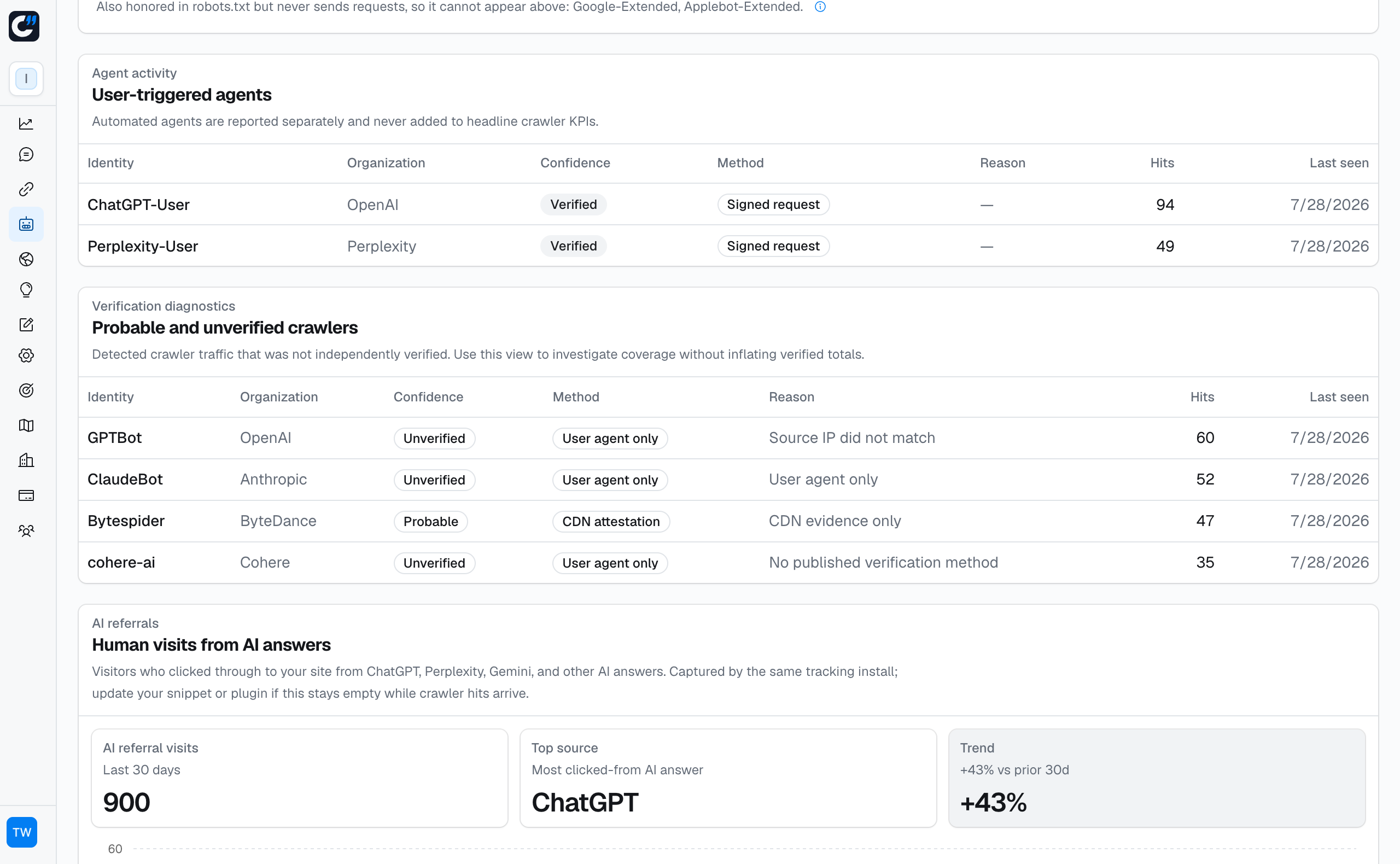
- Verified AI crawler analytics: Citlyze independently confirms that a request genuinely came from the bot it claims to be, so spoofed user agents never inflate your numbers.
- AI referral tracking: see when ChatGPT, Perplexity, Gemini, Copilot, Claude, Meta AI, Grok, DeepSeek, or Mistral send real visitors to your pages.
- Web Bot Auth support: cryptographically signed AI agents are recognised and passed to Citlyze for verification.
- No impact on page speed: events are sent as a non-blocking background request, nothing loads in visitors’ browsers, and the plugin sets no cookies.
- Security-first settings: the signing secret is write-only and stored encrypted, with optional wp-config.php constants so it never touches the database.
- Clean uninstall: the plugin removes its settings when you delete it.
A Citlyze account and a site key generated in Citlyze are required. Tracking stays inactive until an administrator enters valid settings. The plugin sends signed events only for matching crawler, signed-agent, or AI-referral requests. Citlyze independently verifies supported crawler sources before adding them to verified totals; other claims remain separate diagnostics.
Why track AI crawlers?
AI search is becoming a real discovery channel. Whether ChatGPT, Perplexity, or Gemini can cite your site starts with whether their crawlers can reach it. Tracking AI crawler visits tells you which bots read your content, how often they come back, and which pages they fetch, and tracking AI referrals tells you when that visibility turns into visitors. That measurement is the foundation of any GEO or AEO strategy.
External services
This plugin connects to the Citlyze endpoint entered by the site administrator. It requires a Citlyze account and cannot provide tracking without that service.
For a request from a known AI crawler or signed agent, the plugin sends the visitor IP address, user agent, requested path without its query string, HTTP status input, and HTTP method. When Web Bot Auth is present, it also sends bounded Signature, Signature-Input, Signature-Agent, and safe original-request metadata so Citlyze can independently verify the signature. When a human visitor arrives from a supported AI answer engine, the plugin sends the referrer URL without its query string. The site key ID, a timestamp, a request signature, and a one-time nonce authenticate the event.
Data is sent only when the request carries a recognised crawler user agent, contains bounded Web Bot Auth headers, comes from a supported AI-referrer host, or when an administrator explicitly sends a connection test. Requests are never sent for ordinary human page views. Citlyze uses the IP address and signature metadata transiently for verification and does not store them. Referrer URLs are not stored. Paths and referrers are query-stripped and capped, and Citlyze persists aggregate counters. Sanitized user-agent samples may be retained in bounded diagnostics for unrecognized bots.
Service terms: https://citlyze.com/terms-of-service
Privacy policy: https://citlyze.com/privacy-policy
Screenshots
Installation
- Upload the plugin ZIP in WordPress under Plugins > Add New > Upload Plugin.
- Activate “AI Crawler Tracker by Citlyze”.
- In Citlyze, open AI Crawlers > Install tracking and generate a site key.
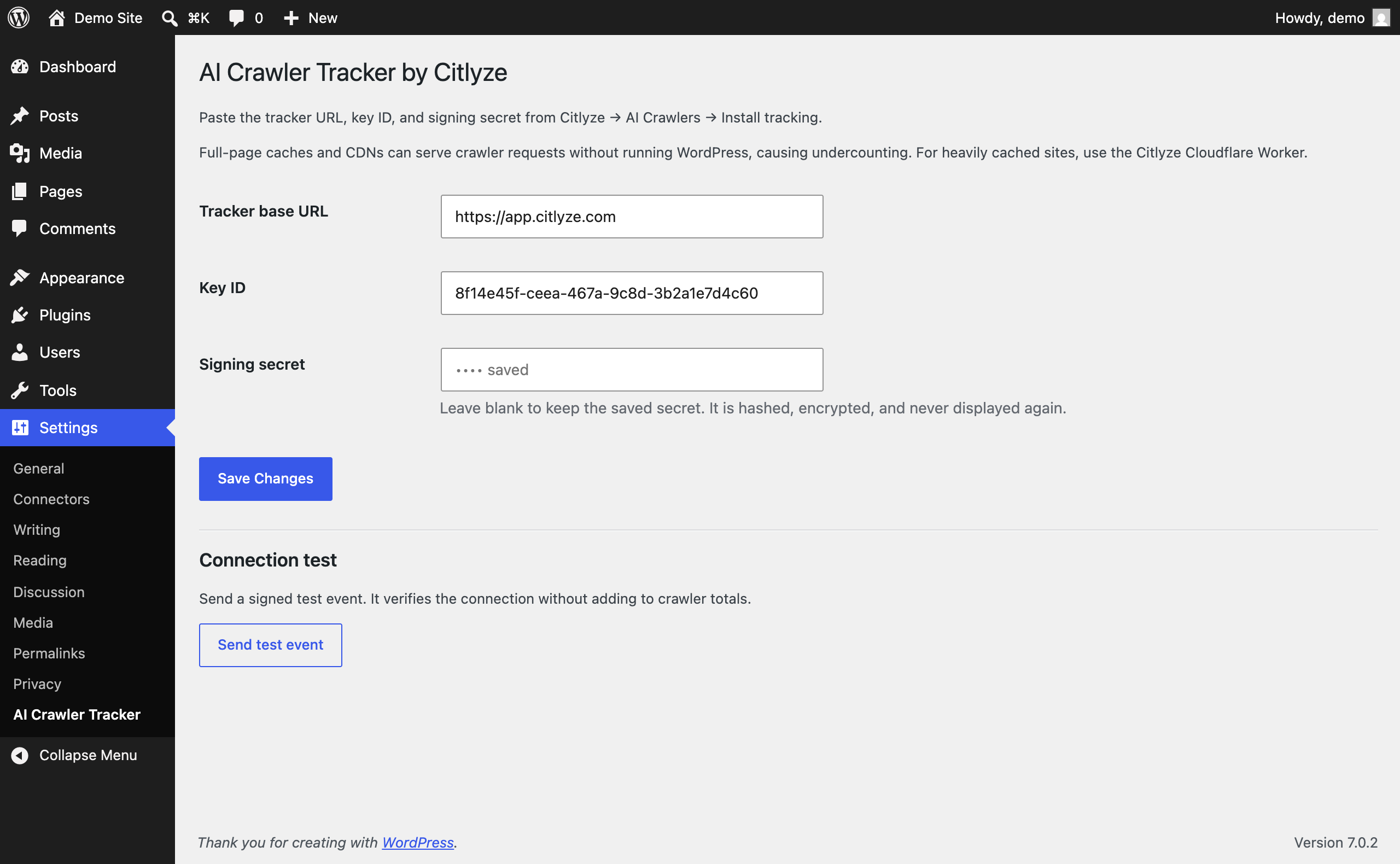
- In WordPress, open Settings > AI Crawler Tracker and enter the tracker URL, key ID, and signing secret.
- Save the settings, then use “Send test event” to verify the connection.
For security-conscious hosts, define CITLYZE_CRAWLER_SIGNING_KEY in wp-config.php. The plugin hashes it in memory and does not store it in the WordPress database. CITLYZE_CRAWLER_ENDPOINT and CITLYZE_CRAWLER_KEY_ID may be defined there as well.
FAQ
-
Does this work with full-page caching or a CDN?
-
Only when the request reaches WordPress. A full-page cache or CDN can respond without running PHP, so those crawler visits are not visible to this plugin. Use the Citlyze Cloudflare Worker for sites where most traffic is served at the edge.
-
Which crawlers are counted?
-
The plugin recognises crawlers that issue live page requests, including GPTBot, ChatGPT-User, OAI-SearchBot, ClaudeBot, PerplexityBot, Googlebot, Google Gemini Notebook, Google-Agent, Atlassian Rovo, Amazonbot, Applebot, Bingbot, Meta crawlers, and others. The list is updated with each release.
Citlyze independently confirms that a request genuinely came from the crawler it claims to be before counting it as verified. A user-agent string on its own is only a claim, so unconfirmed requests are reported separately as diagnostics and never inflate verified crawler totals.
-
Does this help with AI SEO, GEO, or AEO?
-
Tracking is the measurement side of generative engine optimization. The plugin shows whether AI crawlers actually reach your pages and whether AI answer engines send you visitors, so you can tell if your optimization work is having an effect. It does not modify your content or your robots.txt.
-
Where does the data go?
-
Events go to the Citlyze endpoint configured in Settings. See the External services section for the exact fields, timing, retention summary, and policy links.
-
How is the signing secret stored?
-
The secret you paste is never stored. It is reduced to a derived signing key immediately, and that key is encrypted using your site’s own WordPress salts before it is written to the database. The field is write-only: once saved, the value cannot be read back through the admin screen.
You can avoid database storage entirely by defining CITLYZE_CRAWLER_SIGNING_KEY in wp-config.php instead.
If a database backup leaks, rotate the site key in Citlyze under AI Crawlers > Install tracking. Rotation invalidates the old key immediately.
Reviews
There are no reviews for this plugin.
Contributors & Developers
“AI Crawler Tracker by Citlyze – AEO & GEO Analytics” is open source software. The following people have contributed to this plugin.
Contributors
Translate “AI Crawler Tracker by Citlyze – AEO & GEO Analytics” into your language.
Interested in development?
Browse the code, check out the SVN repository, or subscribe to the development log by RSS.
Changelog
2.1.0
- Expanded the AI answer-engine referrer list (Copilot, Duck.ai, Poe, Phind, HuggingChat and more).
- AI referrals are now also detected from utm_source values that AI engines append when no referrer is sent (for example ChatGPT’s utm_source=chatgpt.com).
- Reports the matched utm_source with referral events for stripped-referrer attribution.
2.0.0
- Renamed the plugin to AI Crawler Tracker by Citlyze.
- Added encrypted, write-only signing-secret storage and wp-config overrides.
- Enforced HTTPS endpoints and improved request-input sanitization.
- Added a signed, no-count connection test.
- Added privacy disclosures, translatable admin text, and cleanup on uninstall.
- Moved delivery to a stricter, signed request format.
- Added bounded Web Bot Auth signature metadata forwarding.
- Expanded crawler coverage while separating unconfirmed claims from verified totals.