Description
The Login as a User WordPress plugin lets you see the site exactly as another user sees it.
A customer says “my order is missing”. A member cannot open a course. A subscriber sees the wrong menu. Instead of asking for their password, you click Login as… next to their name. You are now that user. When you are done, click Go back to admin. That is the whole plugin.
Full setup, settings, and integrations are in the official documentation.
👉 Try the live demo. Credentials are shown on the login screen.
How it works
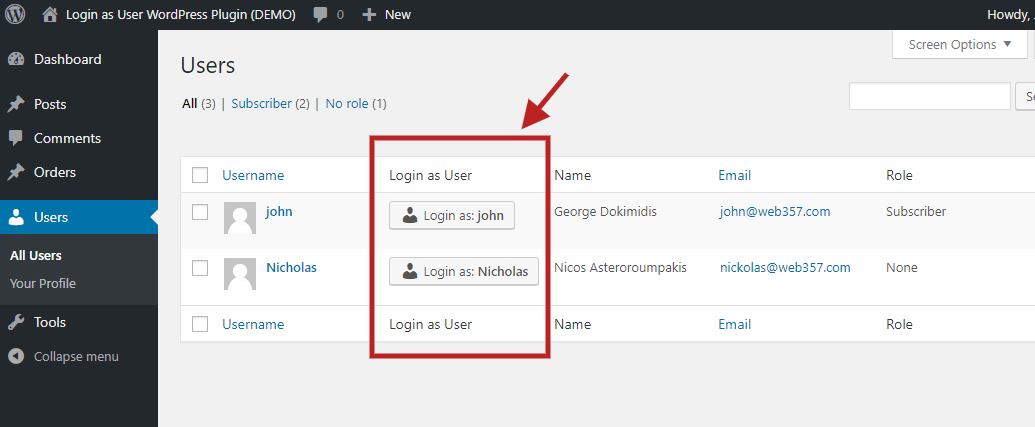
- Go to Users All Users.
- Click Login as: username next to the person you want to help.
- You land on the frontend as that user. Use Go back to admin in the message bar (or the WordPress admin bar) to return to your own account.
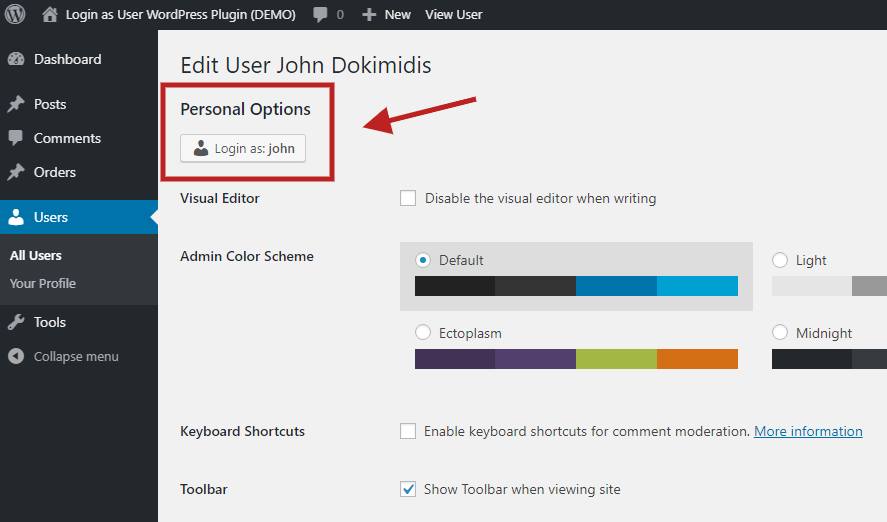
No password is requested, stored, or exposed. You can also start from the user’s profile page. See Accessing the Settings.
Free features
- Login from the Users list: a “Login as…” button next to every user. How to use it »
- Login from the user profile: same button at the top of the Edit User screen.
- One-click switch back: frontend message bar plus an optional link in the WordPress admin bar. Frontend message settings »
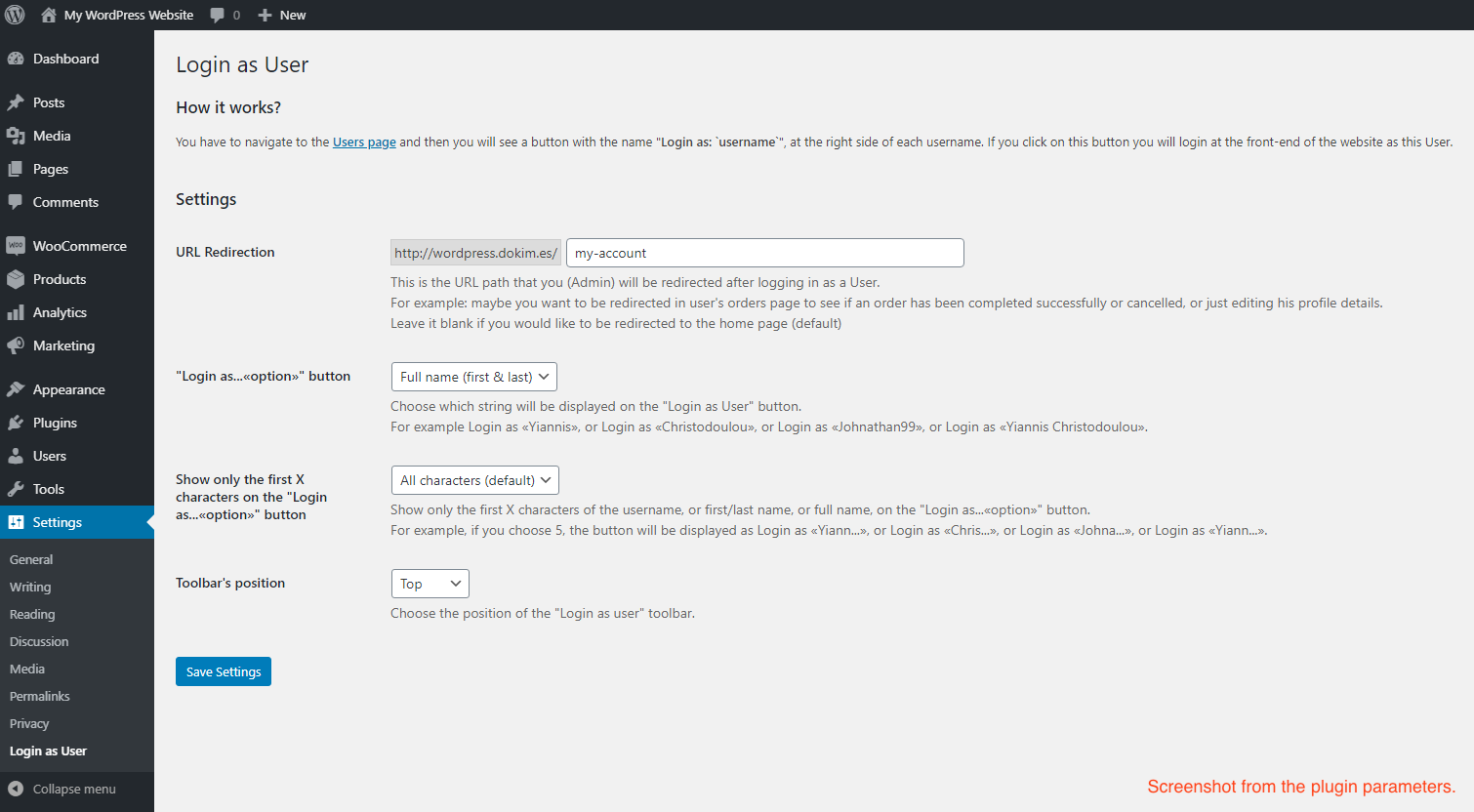
- Redirect after login / logout: send yourself to
/my-account, an order page, or back to Users when the session ends. Configuration » - WooCommerce cart preservation: keep the customer’s cart intact while you troubleshoot checkout. Cart preservation »
- Custom login button label: show nickname, first name, last name, full name, or icon only, and optionally limit the number of characters. Login button »
- Message bar position: top, bottom, or hidden. Optional attention animation on the “Go back to admin” button.
- WordPress Multisite: log in as users across the network without Super Admin privileges.
- User Insights compatible: add a custom field named
loginasuserto show the button in User Insights. - Developer hooks: filter login/logout redirects and WooCommerce cart behaviour. Developer hooks »
PRO features
Upgrade to Login as User PRO for store, membership, and team-permission tools.
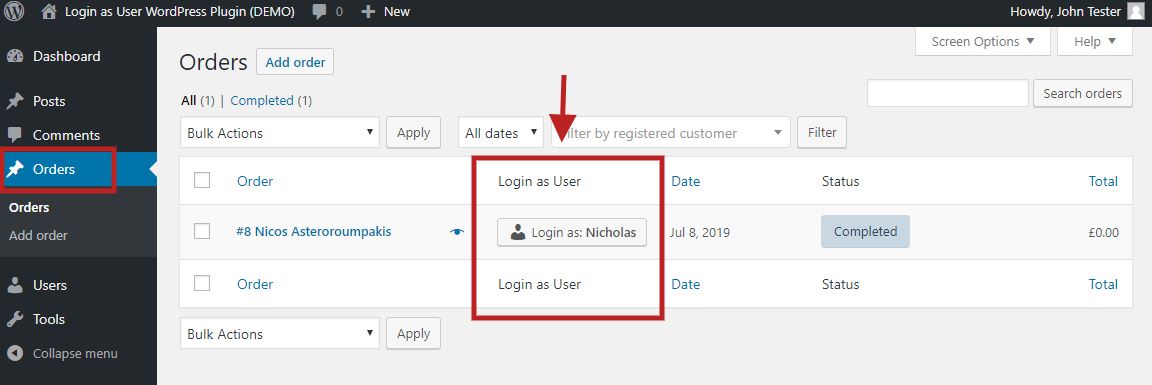
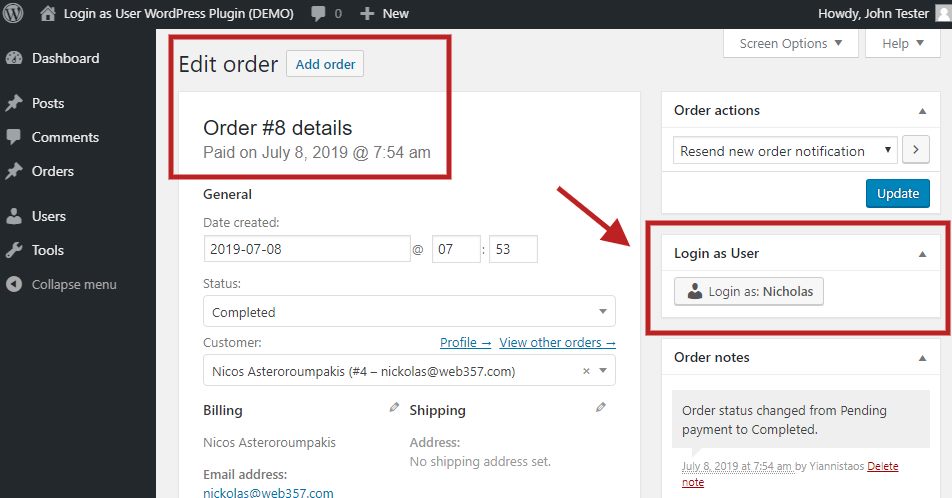
- WooCommerce: “Login as User” on the Orders list and inside the order details metabox. Help with refunds, checkout, and missing orders from the customer’s view.
- WooCommerce Subscriptions: same button on the subscriptions list and subscription details screen.
- MemberPress: log in as a member from Members, Subscriptions, and Transactions to verify access and protected content.
- SureCart: “Login as User” on Customers and Orders lists.
- Role management permissions: let Shop Managers log in as Customers only. Block them from impersonating Administrators or Editors.
- Shortcode: place a button anywhere:
[login_as_user user_id="357" redirect_to="/my-account" button_name="Login as $USER"]. - List appearance: show or hide the column, set its position, and choose Small / Medium / Large on Users, WooCommerce, and SureCart tables.
- Custom CSS: style the frontend bar and admin buttons without editing plugin files.
Documentation
Screenshots
Installation
The plugin is simple to install.
From the WordPress dashboard
- Go to Plugins Add New.
- Search for Login as a User by Web357.
- Click Install Now, then Activate.
- Open Settings Login as User.
Manual upload
- Download the
login-as-user.zipfile. - Unzip it.
- Upload the
login-as-userdirectory to/wp-content/plugins. - Activate the plugin.
- Configure options from Settings Login as User.
Step-by-step screenshots: Installation guide.
FAQ
-
What does this plugin do, in one sentence?
-
It lets an administrator click a button and temporarily become another user, so they can see and fix problems from that user’s point of view, then switch straight back.
-
Why would I want to use the Login as User plugin?
-
This plugin is for site administrators, customer support agents, and store managers who need to troubleshoot issues from a specific user’s perspective, without ever asking the user for their password. With one click, you sign in as any registered user, see exactly what they see, fix the problem, and go back to your admin account. Getting started »
-
Is it safe to use this plugin on my website?
-
Yes. Only administrators (or the specific roles you allow in the PRO version) can use the “Login as…” button. No user passwords are ever exposed, requested, or stored. Admins switch sessions through WordPress’s native authentication system.
-
Will the user be notified when I log in as them?
-
By default, users are not notified. If your privacy policy requires it, tell the customer when you need to access their account, and log the action internally. More in the FAQ.
-
Can I log in as users with any WordPress role?
-
Yes. Subscriber, Customer, Editor, Author, Contributor, Shop Manager, and custom roles. PRO lets you restrict which roles can impersonate which other roles, for example Shop Manager Customer only. Role management »
-
Does Login as User work with WooCommerce?
-
Yes. The free version already lets you log in from Users All Users and can preserve the customer’s cart. PRO adds the button on WooCommerce Orders, Subscriptions, and the order/subscription detail screens.
-
Does it integrate with WooCommerce Subscriptions, MemberPress, and SureCart?
-
Yes, in PRO. The button appears on the relevant admin lists so you can log in as members and customers from each plugin’s own screens. Integrations »
-
Does Login as User support WordPress Multisite?
-
Yes. Administrators can log in as any user across the network, without needing Super Admin privileges.
-
Yes, with PRO. Use
[login_as_user user_id="123" redirect_to="/my-account" button_name="Login as $USER"]on a dashboard, CRM page, or widget. Shortcode docs » -
How do I switch back to my admin account after impersonating a user?
-
A notification bar appears at the top or bottom of the screen with Go back to admin as…. You can also use the WordPress admin bar. No manual logout required. Frontend message »
-
- Your account needs the
edit_userscapability (Administrators have this by default). - In PRO, confirm the Users list column is not hidden under Appearance Login Button List Appearance.
- Another plugin that customizes user-table columns may be overriding the column.
See the troubleshooting FAQ.
- Your account needs the
-
Does it work with custom user roles and third-party plugins?
-
Yes. It uses WordPress’s native user system and works with most third-party plugins (WooCommerce, LearnDash, MemberPress, Tutor LMS, LiteSpeed Cache, and more), as well as custom roles created by other plugins.
-
Is this plugin GDPR-compliant?
-
The plugin does not collect or transmit personal data outside your site. Because logging in as a user lets you view their account, document the practice in your privacy policy and use it only when necessary for legitimate support.
-
Where is the full documentation?
-
Start here: Login as a User docs. For help, contact support.
Reviews


Contributors & Developers
“Login as User: See the Site as Any User” is open source software. The following people have contributed to this plugin.
Contributors


“Login as User: See the Site as Any User” has been translated into 3 locales. Thank you to the translators for their contributions.
Translate “Login as User: See the Site as Any User” into your language.
Interested in development?
Browse the code, check out the SVN repository, or subscribe to the development log by RSS.
Changelog
20-Aug-2026 : v1.7.3
- Improved compatibility with WordPress 7.1.
25-May-2026 : v1.7.2
- Full compatibility with WordPress 7.x.
- Minor fixes and improvements.
12-May-2026 : v1.7.1
- Added new admin settings to show or hide “Login as User” columns in Orders, Subscriptions, and Users views for a cleaner dashboard experience.
- Fixed an issue on WordPress Bedrock installs where “switch back” login links could fail due to incorrect WordPress URL routing (Replace home_url() with site_url() in back_url() method).
02-May-2026 : v1.7.0
- Fix: “Go back to admin” from the frontend was not restoring the original admin session (regression introduced in v1.6.9). Rolling back or logging out manually is no longer needed. The switch-back link now works correctly again.
14-Apr-2026 : v1.6.9
- fix: LiteSpeed Cache Plugin: Logged-in User Sees login as user bottomBar From Another Session.
- fix: “Go back to admin” button redirects to login screen (Memberium + LearnDash compatibility).
27-Jan-2026 : v1.6.8
- Changed the URL in the ‘Only in PRO version’ link to point directly to the pricing page and updated the link text to ‘Unlock with PRO’ for clarity.
04-Dec-2025 : v1.6.7
- Fix: Resolved issue causing thousands of audit log entries per second by checking role capabilities directly instead of creating temporary WP_User objects with set_role() calls
- Fix: Deprecated PHP warnings. Updated method signatures to use nullable type hints (e.g., ?WP_User, ?Update) in login and update checker classes. This improves code clarity and compatibility with modern PHP standards.
- Fix: preserve role capability settings across tab saves. Fix roleCapabilityCheckboxField to use saved database values instead of actual WordPress capabilities for checkbox state, and prevent roles_with_edit_users_capability from being reset when saving from Appearance tab. Resolves issue where SureCart roles would appear unchecked despite being saved in database.
25-Oct-2025 : v1.6.6
- New: Simple setting to control which roles can edit users. We also made role handling consistent so the plugin always uses the correct list of roles.
- Improved: More reliable multi-select on the settings page when choosing roles. We cleaned up how these selections are saved to avoid issues.
- Updated: New Web357 logo on the settings page.
03-Oct-2025 : v1.6.5
- Bug Fixed: The “Go back to admin…” is not displayed after logging in as a user.
- Manually clear WordPress authentication cookies without triggering clear_auth_cookie action. This prevents conflicts with other plugins (e.g. WP Activity Log) that hook into the action.
17-Sep-2025 : v1.6.4
- By default, set the Message Display Position to the bottom instead of top, but you can always change it from the Settings > Login as User > Appearance > Message > Message Display Position > Top or Bottom.
12-Sep-2025 : v1.6.3
- Remove debug logging for WooCommerce cart preservation.
08-Sep-2025 : v1.6.2
- Added WooCommerce Cart Preservation, ensuring customer carts remain intact when admins log in as users, preventing lost items and improving checkout support. More: https://docs.web357.com/login-as-a-user-wordpress-plugin/guides/integrations/#cart-preservation
- Fixed invalid HTML output by moving the filter_login_message hook from wp_head to wp_footer, preventing layout issues caused by injected markup inside the head element.
- Minor fixes and improvements
27-May-2025 : v1.6.1
- Feature: Add Column Position Settings for “Login as User” buttons in WooCommerce Orders, Subscriptions, and Users lists. Allows display in default or last column.
- Feature: Add CSS Editor Settings for Frontend and Backend. Allows custom CSS overrides for the login button and toolbar without editing plugin files.
- Feature: Integrate “Login as User” with Surecart. Adds login button support in Surecart Orders and Customers views.
- Feature: Replace verbose login status messages with icons and tooltips in WooCommerce Orders Table. Enhances layout and improves readability.
- Feature: Add custom redirect URL after logging out from “Login as User” session. Allows admins to define where to be redirected post-impersonation.
- Refactor: Improve Role-Based Login Permissions Logic. Enforces stricter permission checks and prevents unauthorized role impersonation.
- Fix: Improve Compatibility with Tutor LMS Login Flow. Prevents forced logout and broken redirects when logging in as users with limited roles under Tutor LMS.
- Fix: Prevent conflict when both free and pro versions are active. Displays admin notice and avoids critical functionality issues.
- Fix: Resolve conflict with LoginWP plugin in Login as User (WordPress). Ensures session does not revert to admin after impersonation.
- Fix: Conflict with ASE plugin on redirect after using “Login as User”. Resolves broken login redirection when ASE is active.
- Bug: Fix column width behavior for “Login as User” in WooCommerce Orders Table. Ensures layout is responsive and doesn’t break with more columns or smaller screens.
03-Apr-2025 : v1.6.0
- Added: New setting “Enable Attention Animation” to allow turning off the pulsing (ping) effect on the admin button after logging in as a user. Disabled by default for a cleaner interface. Docs »
29-Jan-2025 : v1.5.9
- Fix callback method login_as_user_metabox in WooCommerce Subscriptions integration
28-Jan-2025 : v1.5.8
- Added: Improved integrations architecture by moving integrations to separate files.
- Added: Full integration with MemberPress plugin. Now you can login as any MemberPress user. The buttons are displayed in the Members, Subscriptions and Transactions pages in WordPress Admin panel.
- Minify Existing *.min.css and *.min.js Files for Free and Pro Versions.
- Minor fixes and improvements.
04-Jan-2025 : v1.5.7
- Fully compatible with WordPress v6.7.x
- Fully compatible with WooCommerce v9.5.x
- Introduce the new demo site: https://login-as-user-wordpress-demo.web357.com/wp-admin
17-Oct-2024 : v1.5.6
- Fixed: PHP notices due to accessing properties of a non-object in certain cases when there is no logged-in user. Improved validation of the current user object before accessing display_name and user_login properties.
- Minor stability and performance improvements.
03-Oct-2024 : v1.5.5
- PHP message: PHP Warning: Undefined variable in /wp-content/plugins/login-as-user/includes/class-w357-login-as-user.php on line 667
- Other Minor fixes and improvements.
02-Oct-2024 : v1.5.4
- Optimized Asset Loading: Prevent CSS and JavaScript files from being enqueued when no user is logged into the site, improving performance. (Thanks to “ss88_uk” for the suggestion!)
- Update: Removed the includes/plugin-update-checker folder from the free version.
- Fully compatible with WooCommerce v9.3.x.
- Role-Based Login Management: Added functionality to define which user roles have the ability to log in as users of other roles. For example, Administrators can be configured to log in as any user with the roles of Customer or Shop Manager, while Office Managers can log in as users with the Author role. [Pro version]
- Minor stability and performance improvements.
19-Aug-2024 : v1.5.3
- Fully compatible with WordPress v6.6.x
- Fully compatible with WooCommerce v9.1.x
01-Jul-2024 : v1.5.2
- [Bug Fixed] PHP Fatal error: Uncaught Error: Call to undefined method WP_Post::get_customer_id() in /wp-content/plugins/login-as-user-pro/includes/class-w357-login-as-user.php:796
28-Jun-2024 : v1.5.1
- Fully compatible with WooCommerce v9.0.x and WooCommerce Subscriptions v6.4.x
- [New Feature]: Role Management Permissions in Login as User Plugin. Define which roles can log in as users of other roles, enhancing security and control by limiting this capability to specific roles. Learn more https://docs.web357.com/login-as-a-user-wordpress-plugin/configuration/#role-management-and-permissions
- [New Feature]: Added option to display the admin link in the topbar.
- Fixed ‘Login as User’ column compatibility with WooCommerce Subscriptions 6.4.
- [Bug Fix] Enhanced order column compatibility using WooCommerce’s get_customer_id method.
- [UI] Implemented minor fixes and improvements for a smoother user experience, including a go-back link in the WordPress top navbar.
- Added button_name parameter to [login_as_user] shortcode for customizable button text, including support for dynamic user type placeholder (e.g., [ login_as_user user_id=”357″ redirect_to=”/my-account” button_name=”Login as “]). [Thank you, Giorgos Iordanidis] Documentation updated: https://docs.web357.com/login-as-a-user-wordpress-plugin/guides/shortcode/
- [Improvement] The default value for the message_display_position should be “bottom”, not “top”.
- Minor fixes and Improvements.
26-Apr-2024 : v1.5.0
- Improved handling of user_id and redirect_to parameters in the [login_as_user] shortcode for enhanced functionality. Documentation updated: https://docs.web357.com/login-as-a-user-wordpress-plugin/guides/shortcode/
18-Apr-2024 : v1.4.9
- Fully compatible with WordPress v6.5.x and WooCommerce v8.8.x
- CSS Bug fixed: The “Login as User” button is currently overflowing its column within the table. [Thank you, Anthony Grullon]
- Bug fixed: After clicking the button “go back to admin as..” a 404 error occurred. It does not give the correct URL. It mostly happens when the WordPress is in a subdirectory [Many thanks to )]
- Introduced a new attribute for the [login_as_user] shortcode, enabling administrators to redirect users to a specific page after logging in. Example usage: [login_as_user user_id=”1″ redirect_to=”/my-account”].
- Now supports WooCommerce High-Performance Order Storage (HPOS) [Thank you, Rein Ridder]
- Ensured functionality remains intact when WordPress is given its own directory, following the guidelines provided https://wordpress.org/documentation/article/giving-wordpress-its-own-directory/ [Thanks, James]
- Implemented minor fixes and improvements for a smoother user experience.
23-Oct-2023 : v1.4.8
- Fully compatible with WordPress v6.3.x and WooCommerce v8.2.x
- Minor fixes and improvements
27-Jul-2023 : v1.4.7
- Added PHP 8.2 Compatibility to the Plugin Update Checker and fix deprecation notices regarding PHP 8.2.x.
- Fix CSS issues regarding z-index on Divi themes.
26-Jul-2023 : v1.4.6
- [PHP 8.2 Deprecated Warning]: Creation of dynamic property LoginAsUser_AdminPro:: is deprecated in /wp-content/plugins/login-as-user-pro/admin/class-admin.php on line 51 on PHP 8.2, and WordPress 6.2.2.
07-Jun-2023 : v1.4.5
- [Compatibility] Fully compatible with WordPress v6.2.x and WooCommerce v7.7.x
- Compatible with the WooCommerce Mobile App
- After login as a user, in the notification bar show the email instead of username. Example: “go back to admin as Yiannis Christodoulou (yiannis [@] web357 [.] com)”
- Bug fixed after going back to admin dashboard. Bug message: “The link you followed has expired.”
- PHP Warning fixed: Undefined array key “SERVER_NAME” in …/wp-content/plugins/login-as-user-pro/login-as-user-pro.php on line 67
- Minor fixes and improvements
14-Jun-2022 : v1.4.4
- Minor bugfix: The “Login as User” button is missing for specific user roles.
14-Jun-2022 : v1.4.3
- [Compatibility] Fully compatible with WordPress v6.0 and WooCommerce v6.5+
- Minor fixes and improvements
11-Feb-2022 : v1.4.2
- [New Feature] You can use the shortcode [login_as_user user_id=”357″] to display the login as user button everywhere, even on the frontend. You just have to specify the user_id. Do not forget to replace the 357 with the user ID you want. (This feature included only in the Premium version)
- [Compatibility] Fully compatible with WordPress v5.9 and WooCommerce v6.2
- Minor fixes and improvements
28-Jul-2021 : v1.4.1
- [Styling improvement] To fix the display of the login as user button when you have a lot of columns in Users/Orders area, we’ve created a new option to decrease the width of “Login as User” column. Navigate to: Settings > Login as User > “Login as…«option»” button > None (display only the user icon). [Thank you, Robert]
- [Compatibility] Fully compatible with WordPress v5.8 and WooCommerce v5.5
- Minor fixes and improvements
08-Apr-2021 : v1.4.0
- [Compatibility] Fully compatible with the User Insights WordPress plugin.
- [Compatibility] Fully compatible with WordPress v5.7 and WooCommerce v5.1.x
- Minor fixes and improvements…
09-Jan-2021 : v1.3.0
- [Compatibility] Fully compatible with Loco Translate plugin.
- [New feature] Validate website license key in the plugin settings (only for the premium version).
- [Compatibility] Fully compatible with WordPress v5.6 and WooCommerce v4.8.
19-Oct-2020 : v1.2.2
- [New option] You can now choose the position of the “Login as user” toolbar. There are two available positions, the TOP and the BOTTOM.
- [Compatibility] Fully compatible with WordPress 5.5 and WooCommerce 4.6.
15-Apr-2020 : v1.2.1
- [Bug Fixed] Error with the redirection URL after a successful login attempt. Admin is redirected to a URL that contains twice the value of the function “home_url()”, and gives a 404 error.
30-Mar-2020 : v1.2.0
- [Style Improvement] Remove any margin of the button that displayed on the toolbar at frontend.
- [Bug Fixed] The “login as user” button is not displayed. There was a filter conflict because a 3rd plugin calls the “manage_users_custom_column” filter too. We have change the priority and the issue has been resolved. [Many thanks to Michael Kuhlman for his help]
- [Bug Fixed] Error with the redirection URL. Admin is not redirected to the correct page from settings, after logged in as a user.
14-Feb-2020 : v1.1.0
- [New feature] You can now choose from the settings, which string will be displayed on the “Login as User” button. You can choose one from the following, nickname, or first name, or last name, or full name. For example Login as «Yiannis», or log in as «Christodoulou», or log in as «Johnathan99», or log in as «Yiannis Christodoulou».
- [New Feature] Show only the first X characters of the username, or first/last name, or full name, on the “Login as…«option»” button. For example, if you choose 5, the button will be displayed like this: Login as «Yiann…», or Login as «Chris…», or Login as «Johna…», or Login as «Yiann…».
- [Bug Fixed] Do not load the files “public.min.css” and “public.min.js” if the Login as User functionality is not enabled.
- Minor bug fixes and improvements.
29-Jul-2019 : v1.0.1
- If an admin is already logged in, a short message replaces the button. Example: “Already logged in” instead of “—“.
- The language files have been updated with new strings.
11-Jul-2019 : v1.0.0
- First beta release