

Description
Your tours. Your bookings. Your customers.
Run your tour business from your own WordPress website — without paying UltimaTour commission on your direct bookings.
UltimaTour Operator is a booking and operations platform built specifically for businesses that sell and operate tours, activities, excursions, charters and experiences.
Not restaurant reservations.
Not appointments.
Not generic events.
Real tours. Real departures. Real guests. Real operations.
Create experiences. Publish real availability. Take direct bookings. Accept payments. Prepare guests before arrival. Issue QR tickets. Check customers in from a phone. Manage attendance and departures. Keep customer history together. Follow up after the experience.
All directly inside WordPress.
Your website. Your operation. Your customers.
Stop stitching your tour business together
A booking is only the beginning.
After somebody clicks Book, your team still has to know:
- What did they book?
- When are they coming?
- How many guests are coming?
- Has the customer paid?
- Has everyone completed the required information?
- Who is ready?
- Who has checked in?
- Who actually attended?
- What happened during the departure?
- Has the customer been contacted afterward?
Operator keeps those workflows connected.
Instead of treating a booking as an isolated transaction, Operator follows the operational journey from availability through post-tour follow-up.
Take bookings on the website you already own
Give customers a direct booking path from your WordPress website.
Create Tours. Create real departures. Publish availability. Control capacity. Take bookings. Accept payments. Manage the customer afterward.
Operator includes:
- Public booking calendar
- Online bookings
- Tour management
- Departure management
- Capacity management
- Customer records
- Booking pipeline
- Availability requests
- Temporary holds
- Coupons
- Stripe Checkout
- PayPal Checkout
- Manual / Offline payments
And UltimaTour charges zero commission on your direct tour bookings.
No UltimaTour commission
Your customers remain your customers.
Your bookings remain your bookings.
Your business remains your business.
UltimaTour Operator does not take a percentage of your direct tour sales.
Whether you sell one seat or an entire charter, Operator does not become a commission partner in the booking.
Built specifically for tour operators
Tours are operational.
Guests have meeting times. Departures have capacity. Bookings contain participants. People need instructions. Some guests need to provide information before arrival. Staff need to know who is coming. Customers need to be checked in. Attendance needs to be resolved. Things change.
And the customer relationship continues after the tour ends.
That is why Operator is built around the departure, not merely the transaction.
Know what is happening today — and what is coming next
The Operator Dashboard brings daily operations and forward planning together.
See bookings, departures, customers, operational activity, and projected booking revenue without jumping between disconnected plugins and systems.
Planning tools include:
- Daily operational overview
- Departure management
- Booking pipeline
- Calendar planning
- Projected booking revenue
- Year, month, week, and day views
- ISO week summaries
- Google Calendar export
Operator distinguishes projected revenue from money already received so planning information does not pretend to be settlement information.
Turn bookings into ready guests
Getting the booking should not mean doing all the work at the meeting point.
Digital Pre-Check-In lets customers provide required participant information before departure.
Operator supports participant and document workflows so the booking, the people on the booking, and their readiness remain connected.
Less paperwork at departure. Less reconstruction of customer information. More time running the experience.
Put the departure in your staff’s hands
Your staff should not need to stand behind a desktop computer to run a tour.
Operator includes mobile-focused workflows for phones and tablets.
Staff can:
- Review departures
- Review guest information
- Validate QR tickets
- Check customers in
- Manage attendance
- Record operational notes
- Work through departure activity
The operational system goes where the operation goes.
Give customers QR tickets
Operator can issue digital customer tickets with QR access connected to the booking and participant workflow.
Staff can validate tickets and move customers through arrival and check-in without disconnecting them from the original booking record.
Know who actually went
Scheduled departure time is not always the same thing as operational reality.
Internet connections fail. Check-in gets interrupted. Guests arrive at the last moment.
Operator includes staff-confirmed departure closeout so unresolved attendance does not have to become an automatic customer-facing no-show merely because the clock passed the scheduled departure time.
Staff resolve final attendance. Then the departure can close.
Keep the whole customer journey together
The Customer Experience Timeline gives your team one continuous history of the relationship.
Bookings.
Payments.
Communications.
Pre-check-in.
Check-ins.
Reviews.
Instead of treating each interaction as a separate record in a separate tool, Operator keeps the customer journey connected.
Accept payments your way
Operator supports:
- Stripe Checkout
- PayPal Checkout
- Manual / Offline payments
Stripe and PayPal use provider-hosted checkout flows. Operator does not store customer credit card data.
Use online payments, offline payments, or the combination that fits your operation.
Manage real operations after the booking
Operator is not finished when the customer pays.
Operational tools include:
- Departures
- Participants
- Capacity
- Digital pre-check-in
- Document workflows
- QR tickets
- Mobile check-in
- Attendance
- Operational notes
- Incident reporting
- Departure closeout
- Customer communications
- Review workflows
Because selling the tour and actually operating the tour are two different jobs.
Operator helps with both.
Built for businesses like yours
Operator is designed for businesses including:
- Dive Centers
- SNUBA Operators
- Snorkeling Operators
- Boat Tours
- Sailing Charters
- Fishing Charters
- ATV Tours
- Buggy Tours
- Zipline Parks
- Kayak Tours
- Paddleboard Rentals
- Walking Tours
- Food Tours
- Eco Tours
- Wildlife Tours
- Museums
- Helicopter Tours
- Adventure Parks
- Sightseeing Businesses
- Excursion Operators
- Experience Providers
If you sell scheduled experiences and then have to actually deliver them, Operator is designed for that workflow.
Start with a real guided setup
Installing operational software should not begin with hunting through dozens of settings screens.
A fresh Operator installation starts with a guided five-step setup:
- Basic Business Information
- Opening Hours
- Physical Location and Timezone
- Your First Tour and real availability
- Review and Finish
Your progress is saved as you go.
Complete the guided setup and Operator unlocks the normal operational workspace.
Existing operational installations are protected from being forced through fresh-install onboarding.
Your first Tour is only the beginning
The onboarding wizard gets the first real experience into Operator.
Afterward, use the full Tour and departure tools to build out the rest of your operation, configure advanced settings, connect payment providers, manage communications and add additional experiences.
The wizard gets you started. The full Operator platform takes over from there.
Reviews belong to the customer journey too
Operator includes review workflows designed to continue the relationship after the experience.
After local Operator setup is complete, administrators can also choose whether to connect to the free UltimaTour Ecosystem and its optional trust and reputation services.
Local Operator functionality does not depend on participating in those optional exchanges.
Optional free UltimaTour Ecosystem
Operator works locally without requiring you to join the UltimaTour Ecosystem.
After setup, you may choose to create or verify free Ecosystem records.
Available connected services include UltimaTour Reviews and TrustEmporium.
Participation is administrator-authorized.
Local tours, bookings, customers, calendars, closures, check-in and administration remain available independently.
See the External Services section for exactly what each service does, when information is sent, and what information is involved.
Built to grow
Operator is a complete operational platform by itself.
Separately installed plugins may extend specific workflows through documented integration boundaries.
Operator remains fully functional without optional extensions.
Developer friendly
Operator provides documented hooks and interfaces allowing other plugins to integrate without modifying Operator core.
Developer extension hooks are documented in docs/EXTENSION-HOOKS.md.
Operator uses the standard WordPress Plugin API and remains fully functional when no extensions are installed.
What would you rather own?
A booking sitting in somebody else’s platform?
Or a customer relationship connected to your own website and your own operation?
With UltimaTour Operator you can:
Publish your tours.
Take direct bookings.
Accept payments.
Prepare your guests.
Run your departures.
Check customers in.
Keep the customer relationship.
And pay UltimaTour:
Zero commission on your direct tour bookings.
Install UltimaTour Operator and create your first Tour.
External Services
Operator remains fully usable for local tours, bookings, customers, calendars, closures, check-in, and administration without joining the UltimaTour Ecosystem. After local onboarding is complete, an administrator may choose to create or verify free UltimaTour Ecosystem records. Reviews and TrustEmporium exchanges remain disabled until an administrator enables the applicable integration. Other optional services connect only after configuration or when a visitor chooses the configured payment or anti-spam flow.
UltimaTour Reviews
Purpose: Create or verify the operator’s free UltimaTour Reviews listing for public discovery and review collection.
Data sent: Operator/business profile data such as business name, site URL/domain, public website URL, public contact email/phone when configured, logo URL, location/geography fields, public description/story, public tour profile summaries, opening hours, social links, and review/discovery settings. Booking, customer, participant, payment, and operational records are not sent by this setup step.
When data is sent: During free ecosystem record creation/verification, a manual re-check, and later profile or review sync while UltimaTour Reviews remains enabled. Before each outgoing exchange, Operator verifies its signed core-integrity manifest and protected file hashes; exchange is paused if integrity is not clean. The administrator can turn Reviews off independently in Integrations.
Service URL: https://ultimatour.com/wp-json/ultimatour-review/v1/.
UltimaTour Ecosystem / Partner Registry
Purpose: Administrator-authorized, free integrity registration of this Operator installation; signed Operator-core integrity protection; connection-health monitoring; and authentication context for administrator-enabled Reviews and TrustEmporium exchanges. This is an integrity and trust-service connection, not a commercial licensing or payment service.
Data sent during initial registration or a manual registration refresh: Operator/site name, WordPress administrator email, site URL and canonical domain, Operator REST API base URL, generated installation identifier, plugin slug/type/version, WordPress version, PHP version, registry URL, registration mode, and connection-health status. The registry returns a signed registration credential. Some internal compatibility fields retain “license” names, but that credential authenticates integrity and trust-service requests only; it does not represent a purchase or commercial entitlement.
Data sent in the twice-daily integrity heartbeat: plugin slug/type/version, installation identifier, site URL and canonical domain, registry URL, report time, WordPress version, PHP version, connection health, and Operator-core integrity results. Core integrity results contain the signed-manifest payload hash and signature status, scan time, clean/tampered state, counts of official/scanned/mismatched/missing/unexpected protected files, and the relative paths of affected files. The heartbeat does not send WordPress administrator URLs, server fingerprints, file contents, booking or tour records, customer or participant data, payment data, or unrelated plugin inventory.
When data is sent: Only after an administrator selects the disclosed Create / Verify Ecosystem Records action. Registration may then be retried manually and the integrity heartbeat runs twice daily. An administrator can also select “Run Integrity Heartbeat Now” to send the same disclosed payload on demand. Operator stores the last heartbeat attempt, last successful heartbeat, result, HTTP code, error, next scheduled run, and current local integrity summary so they remain visible on the Ecosystem Participation screen. Operator also performs the same local core-integrity scan before outgoing UltimaTour Reviews or TrustEmporium exchange, but those exchanges remain off unless an administrator enables them in Integrations. A failed scan pauses only those optional trust-service exchanges and reports the failure on the next heartbeat; it does not disable local Operator pages, administration, bookings, tours, customers, calendars, check-in, closures, or stored records. A registry outage likewise never blocks local functionality. Registration and heartbeat never check payment, a subscription, a purchase, or a commercial entitlement and never unlock a paid Operator-core feature.
Service URL: https://partner.ultimatour.com/.
Privacy policy and terms: https://trustemporium.com/privacy-terms/
Google Calendar API
Purpose: Optional one-way export of future departures to an administrator-selected Google Calendar.
Data sent: OAuth client credentials supplied by the administrator, OAuth authorization data, departure title, date/time, capacity, booked count, status, location, public booking link when configured, and Operator admin deep links.
When data is sent: During OAuth authorization, when the administrator lists calendars, when the administrator manually syncs future departures, and when enabled departure changes are mirrored.
Service URLs: https://accounts.google.com/, https://oauth2.googleapis.com/, and https://www.googleapis.com/calendar/v3/.
Privacy policy: https://policies.google.com/privacy
Terms: https://policies.google.com/terms
Stripe
Purpose: Optional Stripe Checkout payment processing.
Data sent: Booking reference, amount, currency, selected tour/departure description, customer contact details needed for checkout, and booking metadata.
When data is sent: Only when Stripe is enabled and a guest selects Stripe Checkout, or when Stripe webhooks notify this site about payment status changes.
Service URLs: https://api.stripe.com/ and https://checkout.stripe.com/.
Privacy policy: https://stripe.com/privacy
Terms: https://stripe.com/legal
PayPal
Purpose: Optional PayPal Checkout payment processing.
Data sent: Booking reference, amount, currency, selected tour/departure description, customer contact details needed for checkout, and booking metadata.
When data is sent: Only when PayPal is enabled and a guest selects PayPal Checkout, or when PayPal return/webhook flows notify this site about payment status changes.
Service URLs: https://api-m.paypal.com/, https://api-m.sandbox.paypal.com/, and https://www.paypal.com/.
Privacy policy: https://www.paypal.com/privacy
Terms: https://www.paypal.com/legalhub/useragreement-full
OpenStreetMap Nominatim
Purpose: Optional reverse geocoding for derived geography from operator coordinates.
Data sent: Coordinates entered or saved by the administrator.
When data is sent: Only when the administrator uses geography derivation features.
Service URL: https://nominatim.openstreetmap.org/.
Privacy policy: https://osmfoundation.org/wiki/Privacy_Policy
Usage policy: https://operations.osmfoundation.org/policies/nominatim/
OpenStreetMap Map Tiles
Purpose: Optional administrator-facing location picker map display for Operator Profile coordinates.
Data sent: Browser requests for map tiles around the viewed coordinates or map viewport, plus ordinary request metadata handled by the tile provider such as IP address and browser headers.
When data is sent: Only when an administrator opens the location picker map in Operator Profile/settings and the browser loads the map tiles.
Service URL: https://tile.openstreetmap.org/.
Privacy policy: https://osmfoundation.org/wiki/Privacy_Policy
Tile usage policy: https://operations.osmfoundation.org/policies/tiles/
Cloudflare Turnstile
Purpose: Optional anti-spam protection for public booking, availability request, notify-me, request-departure, and local customer submission forms.
Data sent: Visitor browser verification data handled by Cloudflare and the site key configured by the administrator.
When data is sent: Only when Turnstile is enabled, configured, and displayed on a protected public form before that form is submitted.
Service URL: https://challenges.cloudflare.com/.
Privacy policy: https://www.cloudflare.com/privacypolicy/
Terms: https://www.cloudflare.com/website-terms/
Google reCAPTCHA
Purpose: Optional anti-spam protection for public booking, availability request, notify-me, request-departure, and local customer submission forms. Operator supports Google reCAPTCHA v3 score checks and Google reCAPTCHA v2 checkbox challenges.
Data sent: Visitor browser verification data handled by Google and the site key configured by the administrator.
When data is sent: Only when reCAPTCHA is enabled and configured for a protected public form. reCAPTCHA v3 executes before submission to obtain a verification score; reCAPTCHA v2 sends data when the visitor completes the checkbox challenge.
Service URL: https://www.google.com/recaptcha/.
Privacy policy: https://policies.google.com/privacy
Terms: https://policies.google.com/terms
…
Screenshots
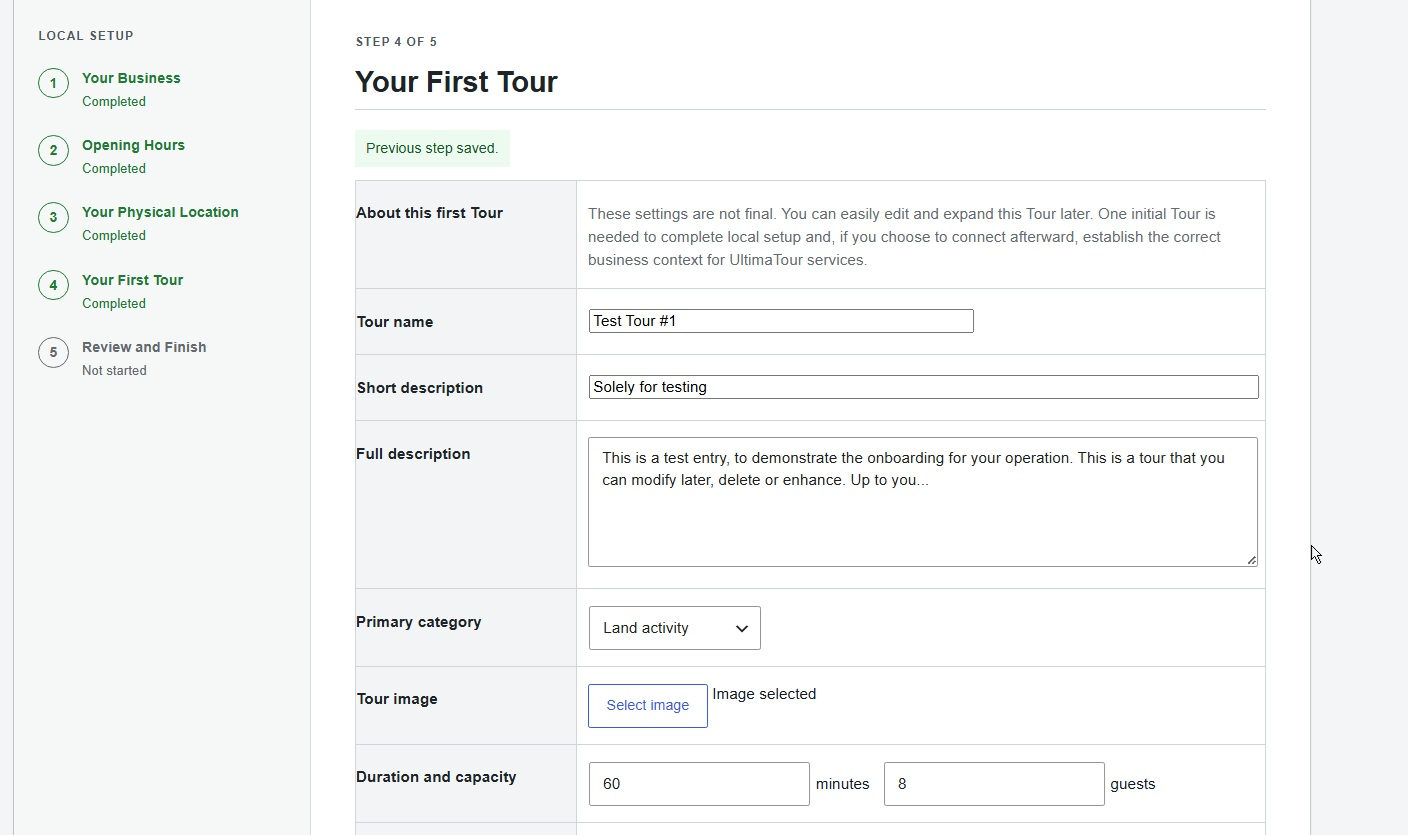


Installation
- Install UltimaTour Operator from the WordPress Plugin Directory or upload the plugin ZIP through the WordPress Plugins screen.
- Activate “UltimaTour Operator”.
- On a fresh installation, Operator opens the guided Setup Wizard.
- Complete the five guided steps:
* Basic Business Information * Opening Hours * Physical Location and Timezone * Your First Tour and real availability * Review and Finish 5. Complete setup to unlock the full Operator administration area. 6. Configure additional Tours, payment gateways, communications, integrations and advanced operational settings whenever you are ready. 7. After local setup, optionally choose whether to connect to the free UltimaTour Ecosystem.
FAQ
-
How much commission does UltimaTour Operator charge?
-
None.
UltimaTour Operator does not charge commission on your direct tour bookings.
-
Is Operator really built specifically for tours?
-
Yes.
Operator is designed around Tours, real departures, participants, capacity, payments, pre-check-in, QR tickets, mobile staff check-in, attendance, departure closeout, customer history, communications and post-tour workflows.
It is not a generic appointment scheduler relabeled for tourism.
-
Can I run Operator without joining the UltimaTour Ecosystem?
-
Yes.
Local Operator functionality remains available independently of optional UltimaTour Reviews and TrustEmporium exchanges.
After local setup, an administrator may choose whether to create or verify free UltimaTour Ecosystem records. See the External Services section for details.
-
Can customers book directly on my WordPress website?
-
Yes.
Operator includes public booking and availability workflows connected to your Tours and Departures.
-
Can staff use Operator from a phone?
-
Yes.
Operator includes mobile-focused workflows for reviewing departures and customers, validating QR tickets, checking in guests, managing attendance and recording operational information.
-
Can guests complete information before arrival?
-
Yes.
Digital Pre-Check-In allows customers to provide required participant information before departure.
-
Does Operator support QR tickets?
-
Yes.
Operator supports customer tickets with QR access for operational validation and check-in workflows.
-
Can I use Operator without Stripe or PayPal?
-
Yes.
Manual / Offline payments are supported.
-
Does Operator store credit card data?
-
No.
Stripe and PayPal use provider-hosted checkout flows. Operator stores the payment status, amount, gateway and provider reference information required to manage the booking.
-
Does Operator support real Tour availability?
-
Yes.
Tours use actual Departure and availability records rather than treating general business opening hours as Tour availability.
-
What happens if check-in is not finished by departure time?
-
Operator includes staff-confirmed departure closeout.
Scheduled departure time can identify unresolved attendance, while final attendance and customer-facing no-show consequences can wait for staff to resolve and close the departure.
-
Does Google Calendar update Operator?
-
No.
Operator provides one-way export to Google Calendar. Operator remains the editable source of operational records.
-
Does Operator install or download other plugins?
-
No.
Operator does not download, purchase, install, update, repair or activate other plugins.
Separately installed modules can integrate through Operator’s documented interfaces.
-
Can Operator be extended?
-
Yes.
Operator provides documented WordPress hooks and integration interfaces for separately installed extensions.
Operator remains functional without optional extensions.
Reviews

Contributors & Developers
“UltimaTour Operator” is open source software. The following people have contributed to this plugin.
Contributors
Translate “UltimaTour Operator” into your language.
Interested in development?
Browse the code, check out the SVN repository, or subscribe to the development log by RSS.
Changelog
1.3.8
- Adds guided first-run setup for business details, opening hours, location, timezone, and the first Tour.
- Adds improved participant document review, staff-confirmed departure closeout, and customer readiness workflows.
- Adds calendar and dashboard revenue planning with year, month, and ISO week views.
- Improves booking, payment, customer, mobile check-in, and connected-service reliability.
1.1.4
- Public WordPress.org release with booking, payments, tickets, pre-check-in, staff check-in, customer records, communications, reviews, and daily tour operations.